

AI trials often end like this: a few colleagues test a tool, most of them like it, and three months later nobody can say whether it saved time, improved quality or just added work. The tool stays because nobody decides. A pilot project prevents this. It is a short, planned test of one use case in real work, with numbers before and after and a clear decision at the end.
This is part 1 of Level 3 in our AI Work learning path. Level 2 covered workflows and quality control. Level 3 is about automation, integration and measurement, and it starts with the method that turns an idea into evidence. You will learn how to choose a use case, measure a baseline, define KPIs and success criteria, plan six to eight weeks and make a go/no-go decision with a plan for scaling.
Pick a use case that is worth a pilot
A pilot answers one question: does this use case create value in our daily work, and under which conditions? That is a different question from the tool test in Level 2, where you tested the finalists with pilot users. A tool test asks which tool. A pilot project asks whether the whole change works: the tool, the new workflow, the checks and the people.
Start with a list of candidates. Ask each team which tasks take a lot of time, repeat often and follow a pattern. Our tool comparison for AI Work lists 46 tools for sales, customer service, marketing, e-commerce and operations, which shows what is possible today. Then rate each candidate on two scales: the value it could bring, and the effort it needs for data, integration, training and checking.
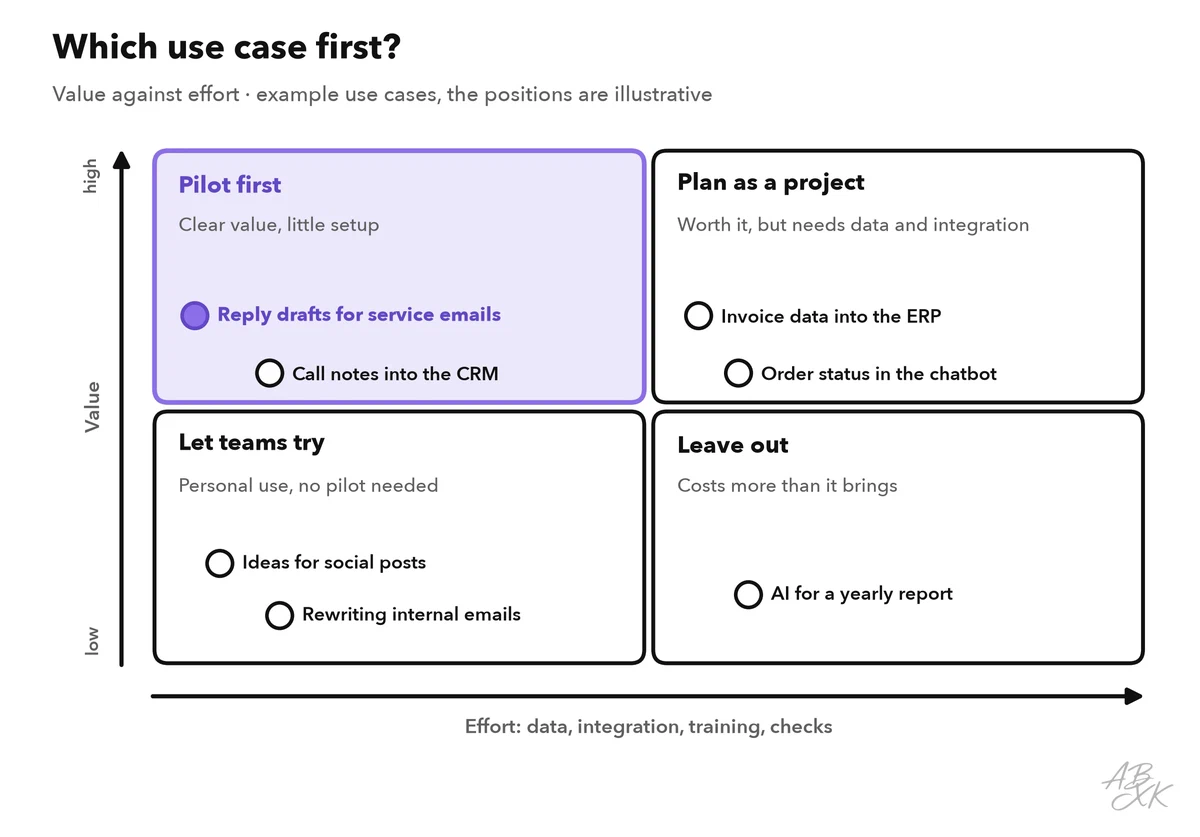
A good first pilot sits in the upper left field: clear value, little effort. It also passes four more tests:
- Frequent: The task happens every day or every week, so you collect enough cases in a few weeks.
- Measurable: You can count time, volume or errors, ideally in systems you already use.
- Contained: If the AI makes a mistake, a person catches it before a customer or the books see it.
- Wanted: The team that does the work wants to try it.
This part uses one example throughout. The service team of an online shop answers customer emails in a help desk, the software that collects customer requests as tickets. In the pilot, an AI-powered feature drafts a reply to each routine email, for example about delivery times, returns or invoices. An agent checks the draft, edits it and sends it. Every answer still passes a person, which makes this a safe first pilot.
Tools for this kind of use case range from customer service platforms with a built-in AI agent to AI agents for large service teams. According to the vendors, Tidio combines an AI agent with live chat and ticketing, and Typewise offers AI agents that handle requests across channels and run workflows in CRM and ERP systems. For the measurement side, Databox connects data sources to dashboards with goals and automated reports:



Short descriptions from our tool comparison, based on the vendors' information — not tested by ABXK.
Before anything starts, write a one-page pilot charter: the problem, the use case, what is in and out of scope, the pilot users, the data involved, the KPIs, the timeline, the owner and the decision rule. One page forces you to be specific, and the decision-maker will later check the results against it.
Measure the baseline before anything changes
The baseline is how the task performs today, measured the same way you will measure it during the pilot. Without it, every result is a guess. “It feels faster” is not a result.
Measure the baseline for at least two normal weeks before the pilot starts. Many numbers already exist: a help desk records when an email arrives, when an agent opens it and when the reply goes out. For quality, take a random sample of sent replies, for example 50 per week, and let the team lead check them with a short checklist: correct facts, complete answer, right tone.
Three traps distort the comparison:
- Seasons and campaigns. Weeks before a holiday look different from quiet weeks. Compare similar periods, or at least note the differences.
- A changed measure. If the baseline counts handling time from opening an email to sending the reply, the pilot must count it the same way.
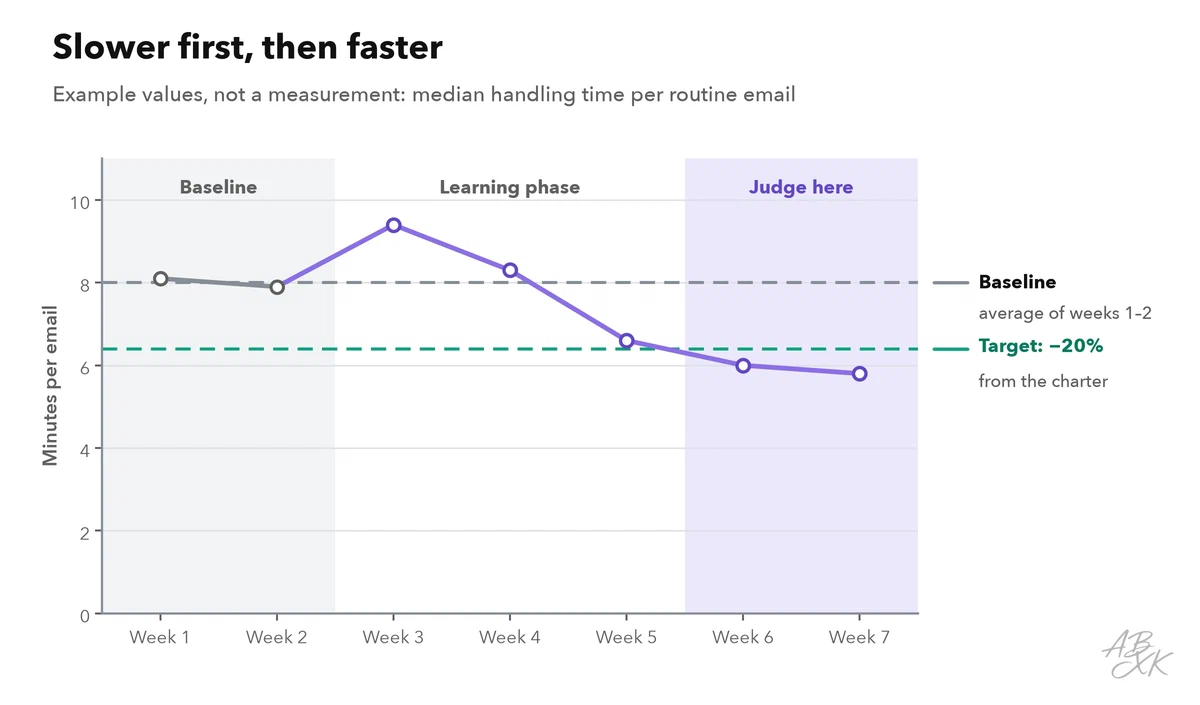
- The novelty effect. People work differently when they know a test is running, and a new tool gets extra attention in the first days. Judge the last weeks of the pilot, not the first.
If you can, keep a comparison group: a similar team or shift that works without AI during the same weeks. A busy week then affects both groups, and the difference between them shows the effect of the AI more clearly.
Measure at team level, not per person. A pilot is not a performance review, and people who feel watched stop reporting problems. In Germany, the works council has a right of co-determination when a company introduces technical systems that can monitor the behavior or performance of employees (Section 87(1) No. 6 of the Works Constitution Act, BetrVG). Involve it before the pilot starts. If the pilot processes personal data in a new way, ask your data protection officer whether a data protection impact assessment is required (Article 35 GDPR).
Define KPIs and success criteria
A KPI (key performance indicator) is a number that shows whether you are reaching a goal. A pilot needs KPIs of four kinds, because a single number can hide a problem: replies can get faster and worse at the same time.
| Kind | Example KPI | How to measure | Example target |
|---|---|---|---|
| Value | Handling time per routine email | Help desk timestamps, median per week | At least 20% below the baseline |
| Quality | Errors per 50 sent replies | Weekly random sample, checked with the checklist | Not above the baseline |
| Adoption | Share of routine emails where agents use the draft | Help desk report or a tag on each ticket | At least 70% in the last two weeks |
| Guardrail | Customer satisfaction (CSAT) and complaints | Survey after the ticket is closed, complaint log | No decline compared with the baseline |
The median is the middle value: half of the emails took less time, half took more. Unlike the average, a few very long cases cannot distort it. The targets in the table are examples. Set your own before the pilot starts and write them into the pilot charter.
A guardrail metric is a number that must not get worse, even if everything else improves. Customer satisfaction, complaints and data protection incidents are typical guardrails. If a guardrail breaks, the pilot does not pass, however much time it saves.
Then turn the targets into a decision rule, for example: “Go if the handling time falls by at least 20 percent, errors and customer satisfaction stay at least at the baseline, and at least two thirds of the pilot users want to keep working this way.” A rule written before the start protects the decision from wishful thinking at the end.
Also record what the pilot costs in time: setup, training, the weekly review and the checking of drafts. These hours belong in the result. Level 4 shows how to turn them into a full calculation when you measure the ROI of AI at work.
Plan six to eight weeks with a small team
Six to eight weeks is a good length for a first pilot. That is long enough for people to get past the learning phase and for normal weeks to show, and short enough to keep everyone’s attention. A small team is enough:
- Owner: someone from the business team who runs the pilot and reports the result, here the service team lead.
- Four to eight pilot users: a mix of enthusiasts, skeptics and new colleagues.
- Technical contact: sets up access, connections and data exports.
- Data protection officer and, where one exists, the works council: involved before the start, not after.
- Sponsor: the manager who makes the final decision and has agreed to the decision rule in advance.
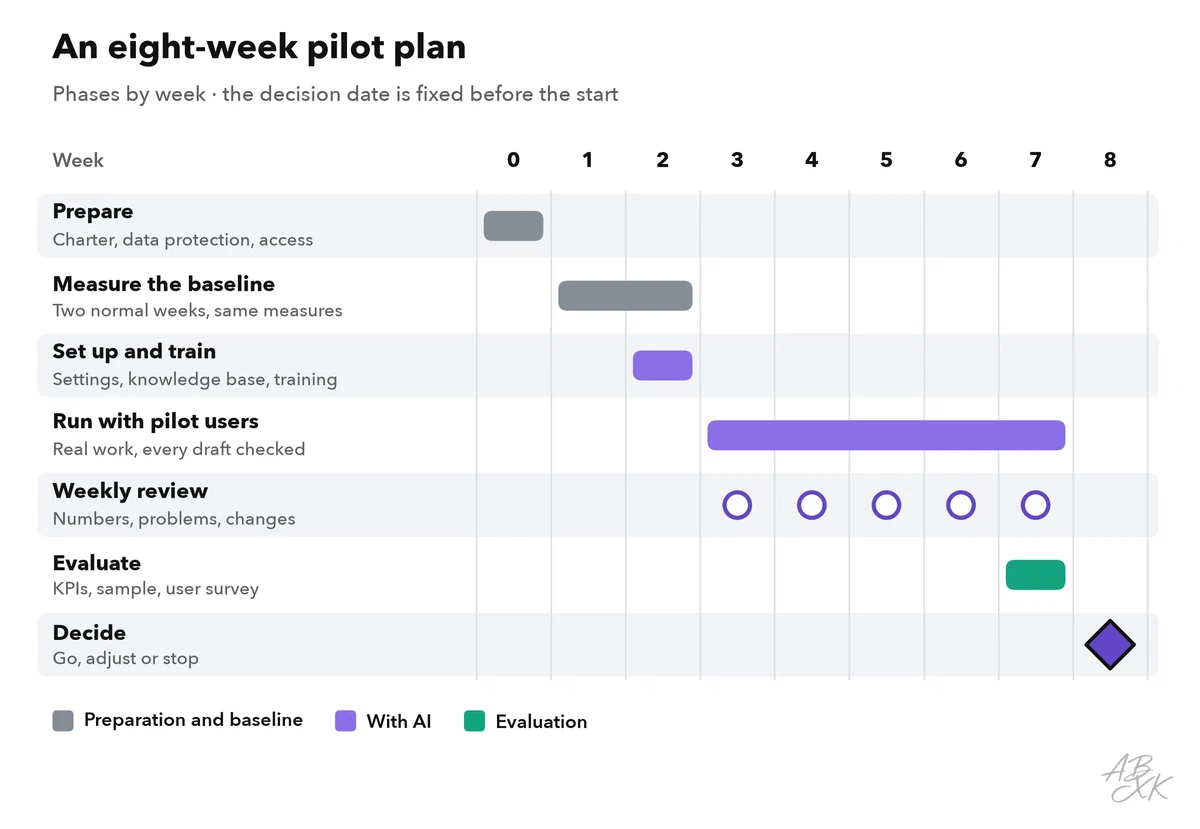
The weekly review is the heart of the pilot. In 30 minutes, the owner and the pilot users look at the numbers, go through the list of problems and agree on small changes, such as a clearer instruction for the AI or a missing answer in the knowledge base. Write every change into a change log with the date. Otherwise you cannot tell later which change caused which effect.
Do not judge the pilot after the first week. Teams often get slower before they get faster: they learn the new workflow, find gaps in the knowledge base and check every draft very carefully. The example below shows this typical curve.
Manage the risks while the pilot runs
Many pilot risks show early warning signs. Watch for them in every weekly review:
| Risk | Early warning sign | What to do |
|---|---|---|
| Wrong facts in drafts | Errors in the weekly sample | Agents check every draft; fix the knowledge base, not only the single reply |
| Personal data in the wrong place | Customer data pasted into unapproved tools | Approved accounts only, minimal data, a data processing agreement in place |
| Low adoption | Use drops after the first days | Ask the pilot users why, remove obstacles, offer a short refresher |
| Scope creep | “Can it also do this?” requests | Park new ideas on a list for after the decision |
| Knowledge in one head | Only the owner knows the settings and instructions | Document settings, instructions and the change log |
| An endless pilot | No decision date in the calendar | Book the decision meeting in week 0 |
Decide: go, adjust or stop
At the end, the owner presents the results to the sponsor on one page: the KPIs compared with the baseline and the targets, the guardrails, what the pilot users say, the time the pilot cost and a recommendation. There are three possible outcomes.
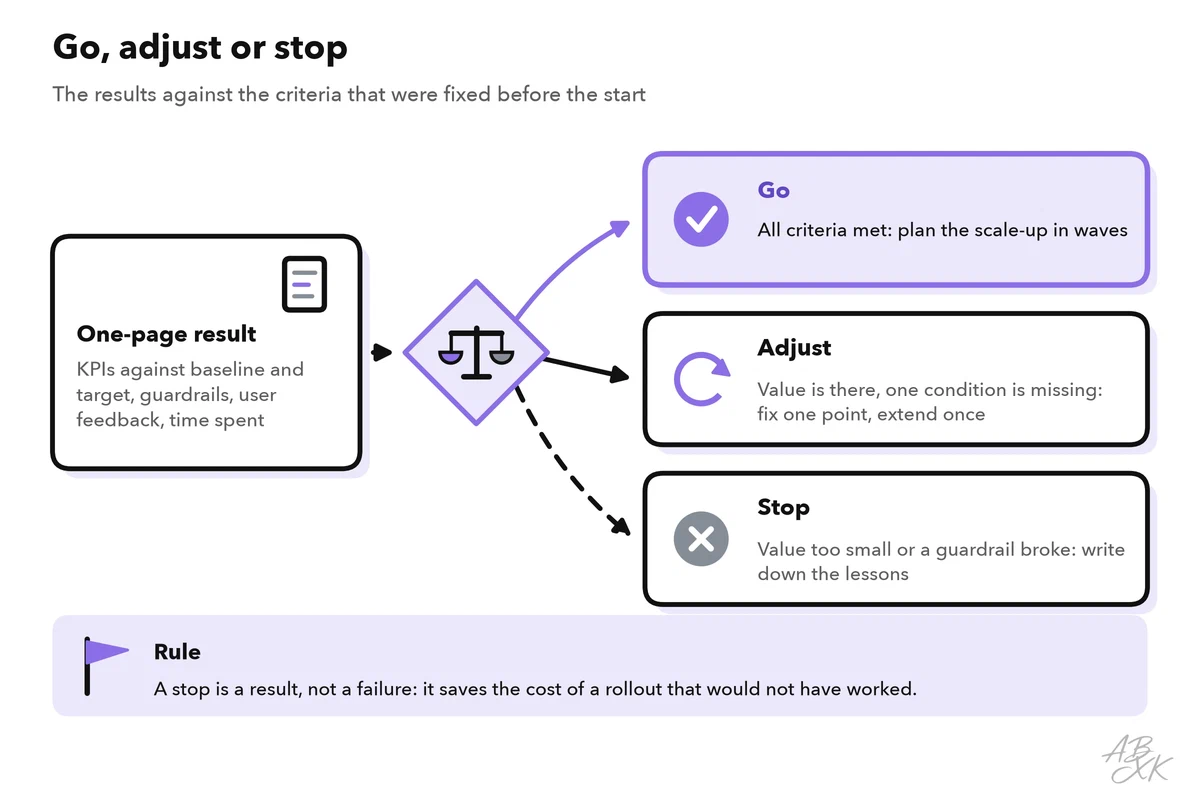
- Go: All criteria are met. Plan the scale-up.
- Adjust: The value is there, but one condition is missing, for example too many errors in one type of email. Fix that one point and extend the pilot by a few weeks, but only once.
- Stop: The value does not justify the effort, or a guardrail broke. Write down what you learned and close the pilot.
A stop is a result, not a failure: it saves the cost of a rollout that would not have worked. Keep the charter, the numbers and the lessons for the next candidate on your list.
Stops are common. A much-cited 2025 report from MIT found that 95% of organizations using generative AI were not seeing a clear return on their investment, and it blamed a learning gap in how people use the tools rather than the technology itself (Source: MIT report, as reported by Fortune, September 2025). A pilot with a baseline and fixed criteria tells you early which side of that gap your use case is on.
Prepare the scale-up before the rollout
A pilot runs with motivated users, extra attention and an owner who checks the numbers every week. Daily operations must work without all that. Scale up in waves, one more team at a time, and check these points before each wave:
| Topic | In the pilot | Before the scale-up |
|---|---|---|
| Users | Four to eight volunteers | Training for every user and a contact person for questions |
| Connections | Manual steps are acceptable | A stable connection to the help desk and the CRM, see part 2: integrate AI with your CRM and help desk |
| Quality checks | Every draft checked, weekly sample | Clear rules for which outputs need a human check, see part 5: human in the loop |
| Measurement | Weekly review by the owner | The same KPIs in a regular report, with unchanged definitions |
| Ownership | The pilot owner | A named owner for the tool, its settings and its knowledge content |
| Contracts and data protection | Test accounts, pilot terms | Production contract, data processing agreement, deletion rules |