

An AI feature is only as useful as the data it can see. A reply draft that does not know the customer’s subscription, or a call summary that never reaches the customer record, saves little time. The value appears when AI works inside the systems your teams already use: the CRM (customer relationship management system) for customers, contacts and deals, and the help desk for tickets and conversations. That is also where the risks are: wrong values written into records, too much access, duplicates and changes that nobody can trace.
This is part 2 of Level 3 in our AI Work learning path. Part 1 showed how to run an AI pilot project, and a successful pilot usually ends with the question of how to connect the tool properly. In this part, you will learn how to map data flows, choose a way to connect the systems, set permissions, use AI summaries and ticket triage, write data back with approval, keep an audit trail and avoid duplicate records.
Map the data before you connect anything
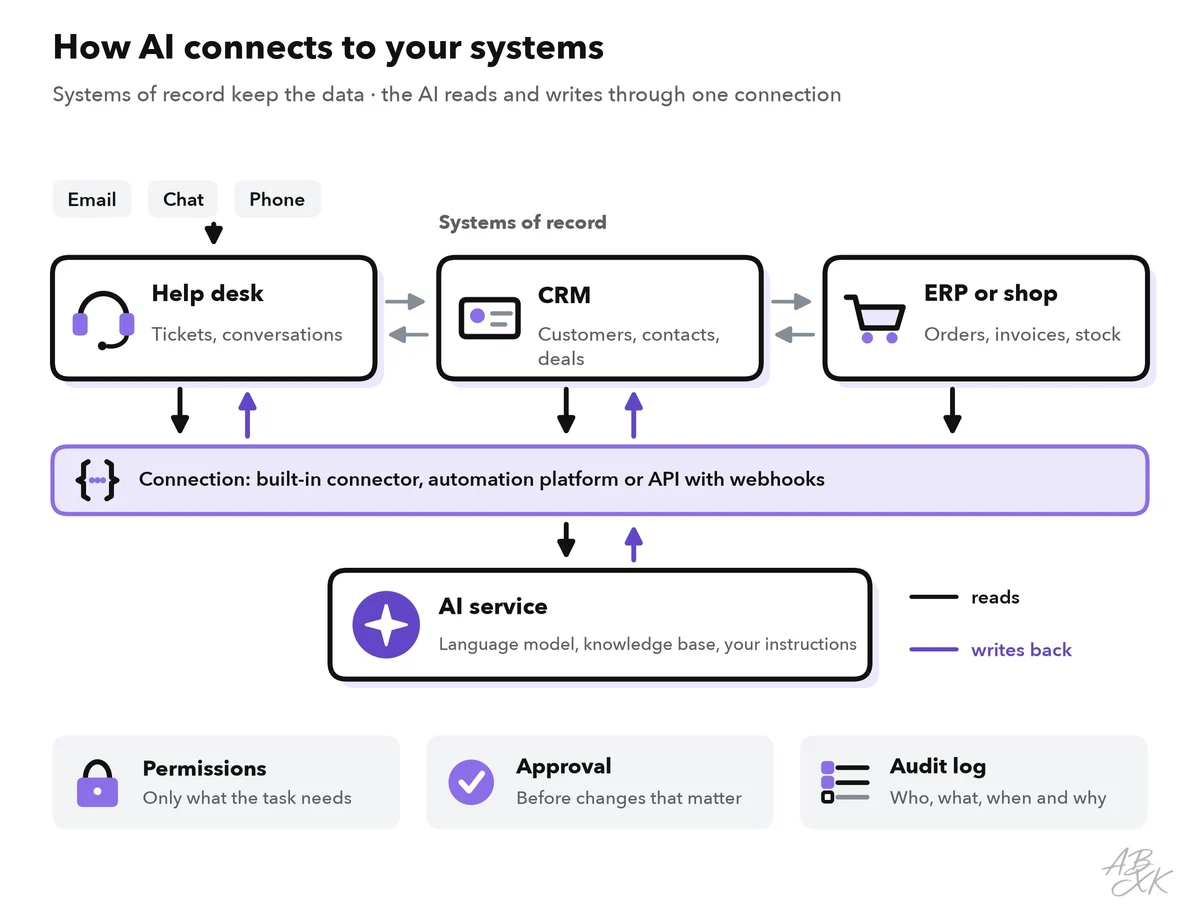
Start with a map, not with a connector. For each piece of data that the AI will use, note which system holds the original, whether the AI only reads it or may also change it, and in which direction it flows.
The key term is system of record: the one system whose value counts for a piece of data. Contact details live in the CRM, conversations in the help desk, orders and invoices in the shop or ERP system (enterprise resource planning, the software for orders, stock and accounting). Every other system holds only a copy.
The example in this part is a company that sells a software subscription to businesses. Its sales team works in a CRM, its support team in a help desk. The company wants three AI functions: a short summary of open tickets on each customer record in the CRM, automatic sorting of incoming tickets, and reply drafts that know the customer’s plan. The data map for these functions looks like this:
| Data | System of record | AI reads | AI writes | Rule |
|---|---|---|---|---|
| Company and contact details | CRM | Yes | Suggestions only | A person approves every change |
| Plan and renewal date | CRM or billing system | Yes | No | Read-only for the AI |
| Tickets and conversations | Help desk | Yes | Tags, category, internal notes | Replies to customers only after approval |
| Summary of open tickets | Help desk, shown in the CRM | – | Yes, as a labeled note | Never overwrites fields, refreshed automatically |
| Payment details | Billing system | No | No | Not connected at all |
Choose how the systems connect
There are three common ways to connect AI with a CRM and a help desk:
- Built-in integration: Many CRMs and help desks offer ready-made connectors to each other and to AI features, set up in a few clicks. This is the least effort, but you only get what the vendor built.
- Automation platform: No-code tools connect many apps with triggers and actions. Level 2 shows how to automate business workflows this way. It is flexible, but every flow needs an owner.
- Your own code: An API (application programming interface) is the defined way in which programs exchange data. Developers can build exactly what you need through it, but they also have to maintain it.
Two more terms come up in every integration. A webhook is a message that one system sends to another automatically when something happens, for example “new ticket created”. Sync (synchronization) keeps the same data in two systems in line. It can run in one direction or in both, in real time or on a schedule. A second direction adds chances for conflicts. So start with one direction per piece of data: the help desk sends the ticket summary to the CRM, and the CRM sends the plan to the help desk. Each system stays the master of its own data.
AI reaches your systems in two ways. Software with AI features is often the system of record itself, such as a CRM or a help desk that adds AI functions. Tools with AI at the core, such as AI agents, usually sit on top of your systems and need a connection to read and write data. In our comparison, both kinds are common in sales and customer service:
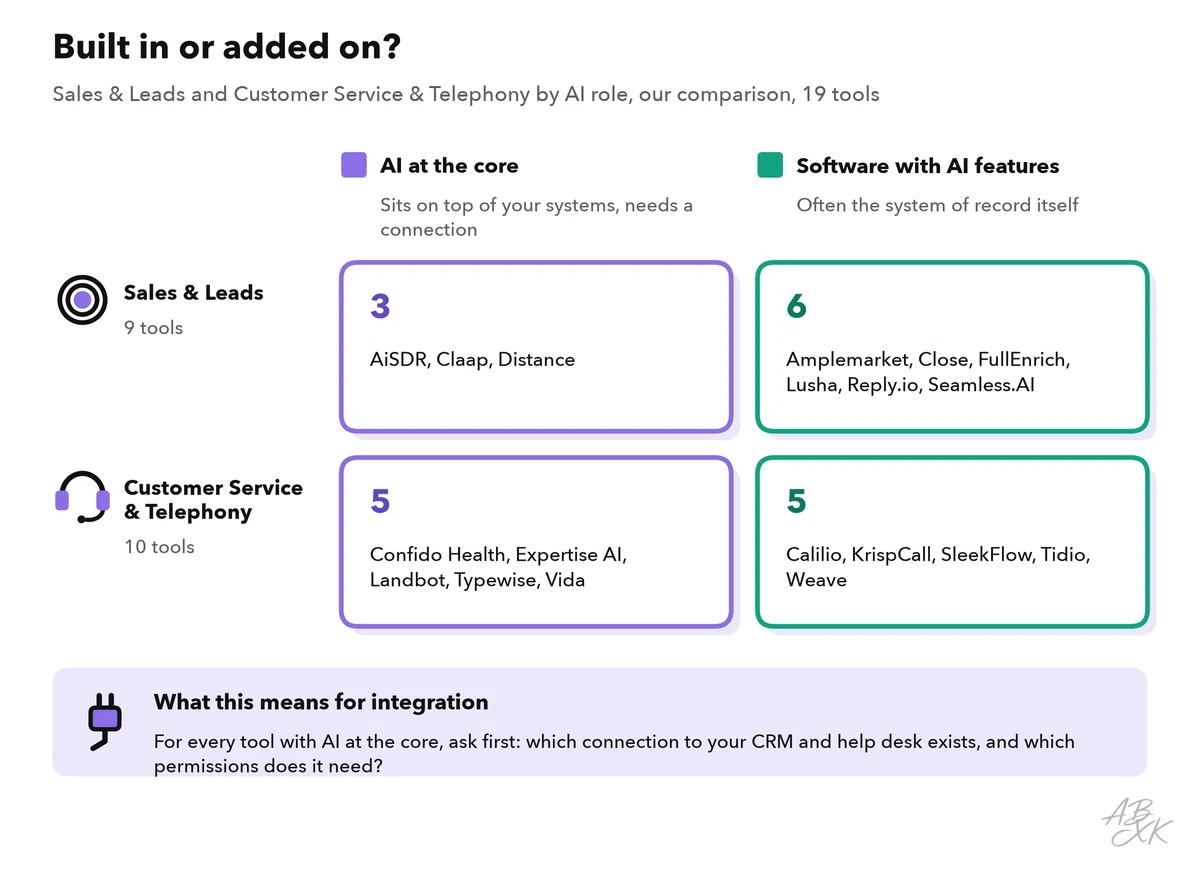
According to the vendors, Close is a CRM with built-in calling, email and automation, SleekFlow brings WhatsApp, Instagram and live chat into one inbox, and Tidio combines an AI agent with live chat and ticketing. Expertise AI builds AI agents for sales and support on your own website, and Typewise offers AI agents that run workflows in CRM and ERP systems. For each of them, the first question is whether it connects to your systems. You can find all 10 tools for customer service in our tool comparison for AI Work:





Short descriptions from our tool comparison, based on the vendors' information — not tested by ABXK.
Give the AI only the access it needs
An AI integration acts with the rights you give it. Treat it like a new colleague with a very fast keyboard: give it the access its task needs, and nothing more. Security experts call this the principle of least privilege.
- A separate account for the AI. Use a dedicated integration user, a service account, instead of a person’s login. Then you can limit its rights, and the logs show what the AI did.
- Read before write. Start with read-only access. Grant write rights field by field when a use case really needs them.
- Respect user permissions. If an agent may not see a customer’s contract in the CRM, the AI must not show it in a summary either. Ask the vendor whether the AI checks the rights of the person who asks.
- Leave out sensitive data. Payment details, health data and HR records do not belong in a customer service AI. The GDPR requires that personal data is limited to what is necessary for the purpose (Article 5(1)(c), data minimization).
- Treat incoming text as data. Customer emails can contain text that tries to give the AI instructions, such as a request to ignore its rules and approve a refund. This is called prompt injection, and it is the first risk in the OWASP Top 10 for LLM Applications 2025 (Source: owasp.org). The same list warns against “excessive agency”: an AI with more functions, rights or autonomy than its task needs.
The defense against both risks is the same: the AI may read, sort and draft, but any action with consequences needs a fixed rule or a person’s approval. Our AI Security section covers the security side in more depth.
Summaries and triage: AI on the record
Two AI functions bring quick value once the systems are connected.
AI summaries on records. The AI condenses a long history into a few lines: open tickets, the last contacts, the customer’s current problem. Before a renewal call, the account manager sees that the customer has two unsolved tickets. Three rules keep summaries trustworthy. Store them as a labeled note, such as “AI summary, created on October 14”, never in fields that people maintain. Link every statement to its source, such as the ticket number. And refresh them automatically, so that nobody acts on an old version.
Ticket triage. Triage means sorting incoming tickets: what is it about, how urgent is it, who should handle it? The AI reads each new ticket and sets a few fields. Rules in the help desk then route the ticket to the right queue. Check each field in its own way:
| Field | Example values | How to check it |
|---|---|---|
| Category | Billing, login problem, bug report, cancellation | Agents correct wrong categories; count the corrections every week |
| Priority | Normal, high, urgent | Define in writing what counts as urgent, such as an outage or a legal threat |
| Language | German, English, French | Spot check a few tickets per language every week |
| Customer | Matching record in the CRM | Unmatched tickets go to a person; never create a new record automatically |
| Mood | Calm, annoyed, angry | Use it as a hint for sorting, never for decisions about the customer |
When the AI is unsure, the ticket goes to a person for sorting. Part 5 of this level explains how to set such thresholds and escalation paths.
Write back only with approval, and log everything
Reading data is safe. Writing changes your records. Decide for each field how the AI may change it. The ladder shows four levels:
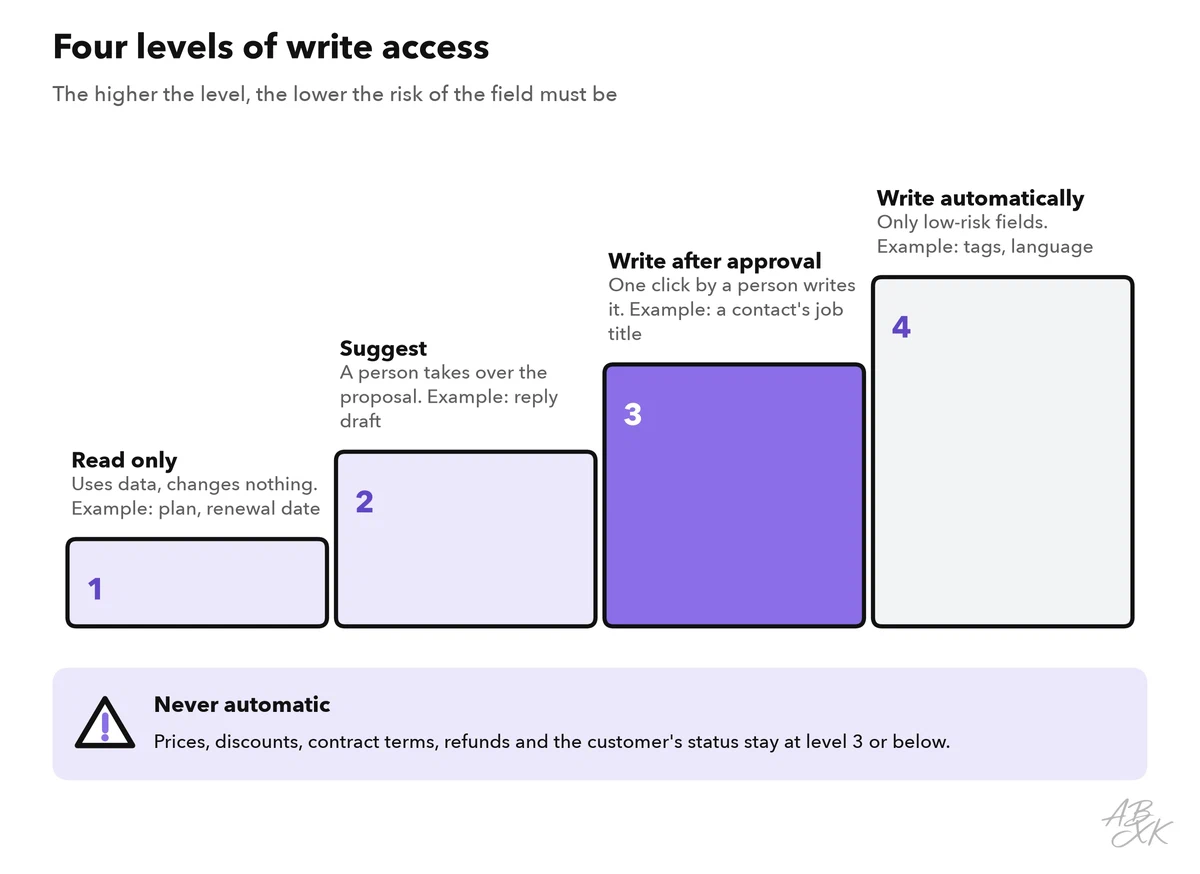
Fields with legal or financial weight, such as prices, discounts, contract terms, refunds or the customer’s status, never get automatic writing. A typical approval looks like this: the AI reads in an email signature that a contact is now head of purchasing. It proposes the change and shows the source. The account manager clicks “approve”, and only then does the CRM change.
An audit trail is a log of who changed what, when and why. For changes made by AI, it needs more detail than for changes made by people, because you must be able to reconstruct how a value came about. Record at least the details in the example below:
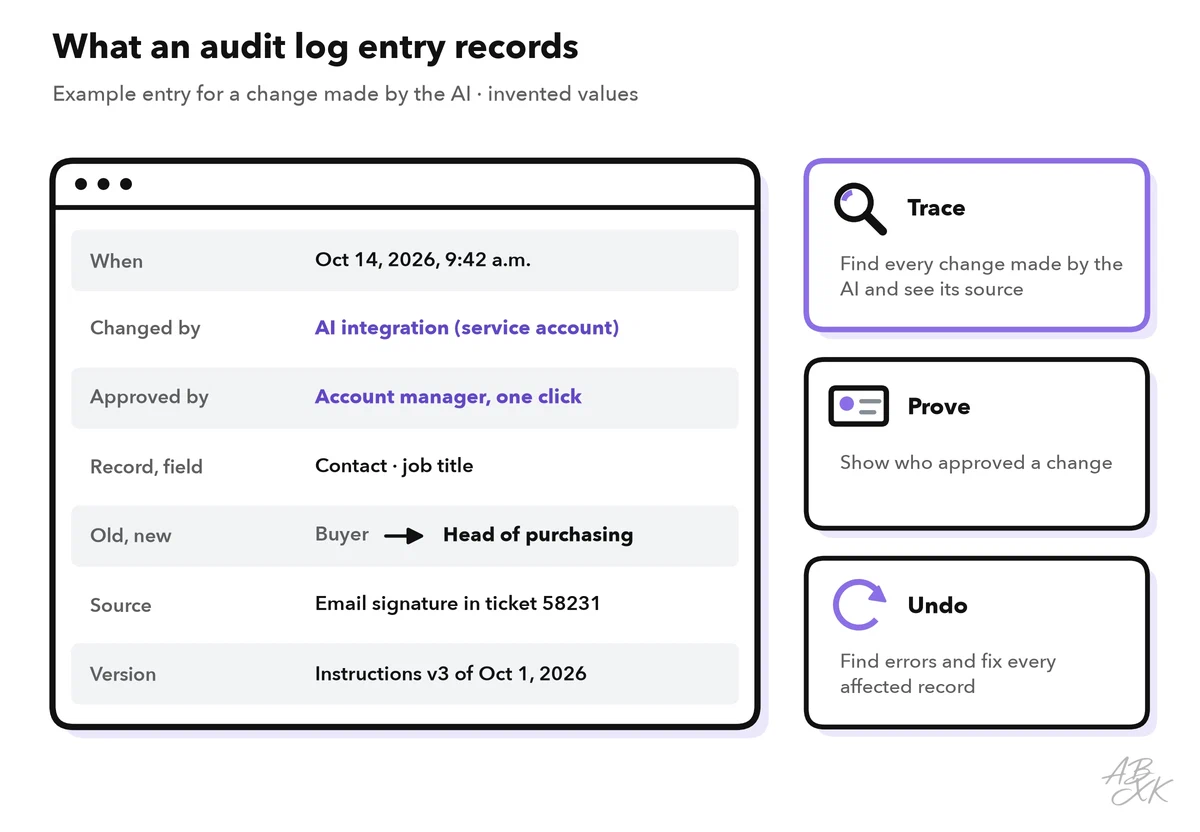
Keep the log long enough to investigate complaints, but not longer than your deletion rules allow. If something goes wrong, the log lets you find every affected record and reverse the changes.
Prevent duplicates and conflicting data
Integrations create duplicates faster than people do. A ticket arrives from a new email address, and the integration creates a new contact, although the customer already exists. Two-way syncs can overwrite each other again and again. Level 0 explains why AI needs good business data. These rules keep the data clean:
| Problem | Typical cause | Rule |
|---|---|---|
| Duplicate contacts | New email address, a typo in the company name | Match on several keys (email, domain, customer number) before you create anything; unclear matches go to a person |
| Two numbers for one customer | Each system has its own ID | Store the other system’s ID in both systems and match on it |
| Values that flip back and forth | Two-way sync, both systems “win” | One system of record per field; a copy never overwrites the original |
| Endless update loops | An update in system A triggers B, which triggers A again | Mark changes made by the integration and skip them on the way back |
| Old summaries | A summary stored once and never refreshed | Store it with a date, refresh it automatically, keep only the latest version |
Many APIs offer an upsert: update the record if it exists, insert it if not. An upsert is only as good as its match key. If the key is unreliable, the upsert quietly creates the duplicates you wanted to avoid.