

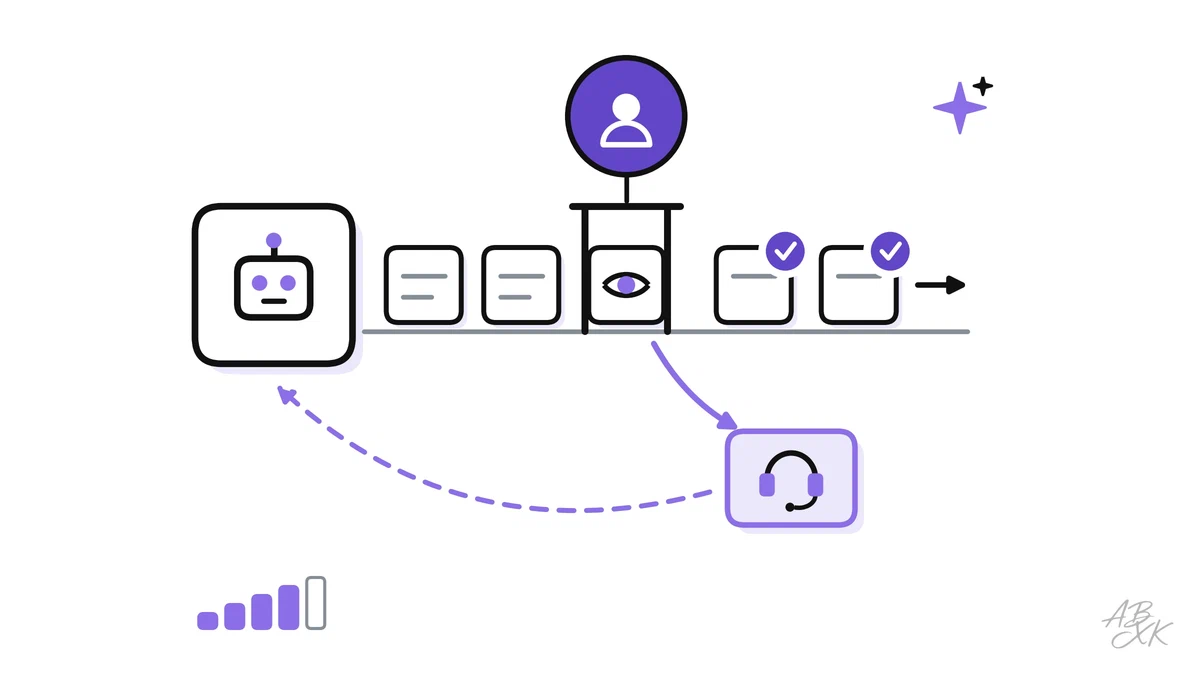
Every AI workflow in this learning path has the same weak spot: the AI is sometimes wrong, and it does not always know when. Human in the loop (HITL) is the answer: people check, approve or take over at defined points. Done badly, it means checking everything, which wastes the time the AI should save, or checking nothing, which lets errors reach customers. Done well, people look exactly where their judgment makes a difference.
This is part 5 of Level 3 in our AI Work learning path, and it connects the earlier parts. The pilot measures quality, the integration limits what the AI may write, and finance and audit showed why sign-off matters. You will learn where to place human checks, how to set confidence thresholds, how sampling works, how to design escalation paths and feedback loops, and who is accountable.
Three levels of human control
The High-Level Expert Group on AI set up by the European Commission distinguishes three levels of oversight (Source: Ethics Guidelines for Trustworthy AI, 2019):
- Human in the loop: a person can step in at every decision, for example by approving each reply before it goes out.
- Human on the loop: the AI acts on its own, while people design the process, monitor it and can intervene.
- Human in command: people oversee the whole system, decide whether and when to use AI at all and can override it.
Most real workflows mix the three. A support team may approve refunds case by case, monitor the routine answers of its AI agent and decide as a team which topics the agent may handle at all.
Whatever level you choose, the human part only works if people keep thinking. In a 2025 survey of 319 knowledge workers by Microsoft Research and Carnegie Mellon University, higher confidence in generative AI went along with less critical thinking, according to the workers’ own reports, while higher confidence in their own skills went along with more. Critical thinking also shifted from doing the task to checking information, fitting AI answers into the work and taking responsibility for the result (Source: Lee et al., CHI 2025). Checks that people approve without reading are not oversight. Give reviewers the time and the criteria to say no.
Place checks where the risk is
Not every output needs the same check. Level 2 used a similar matrix to decide where approvals belong in a workflow. Here, the same idea sets the type of check for every kind of output. Two questions decide: how much damage can an error do, and how easily can you undo it? A wrong tag on a ticket costs a click. A wrong refund or a wrong statement about a contract costs money, trust or a legal dispute, and it cannot be called back once it is sent.
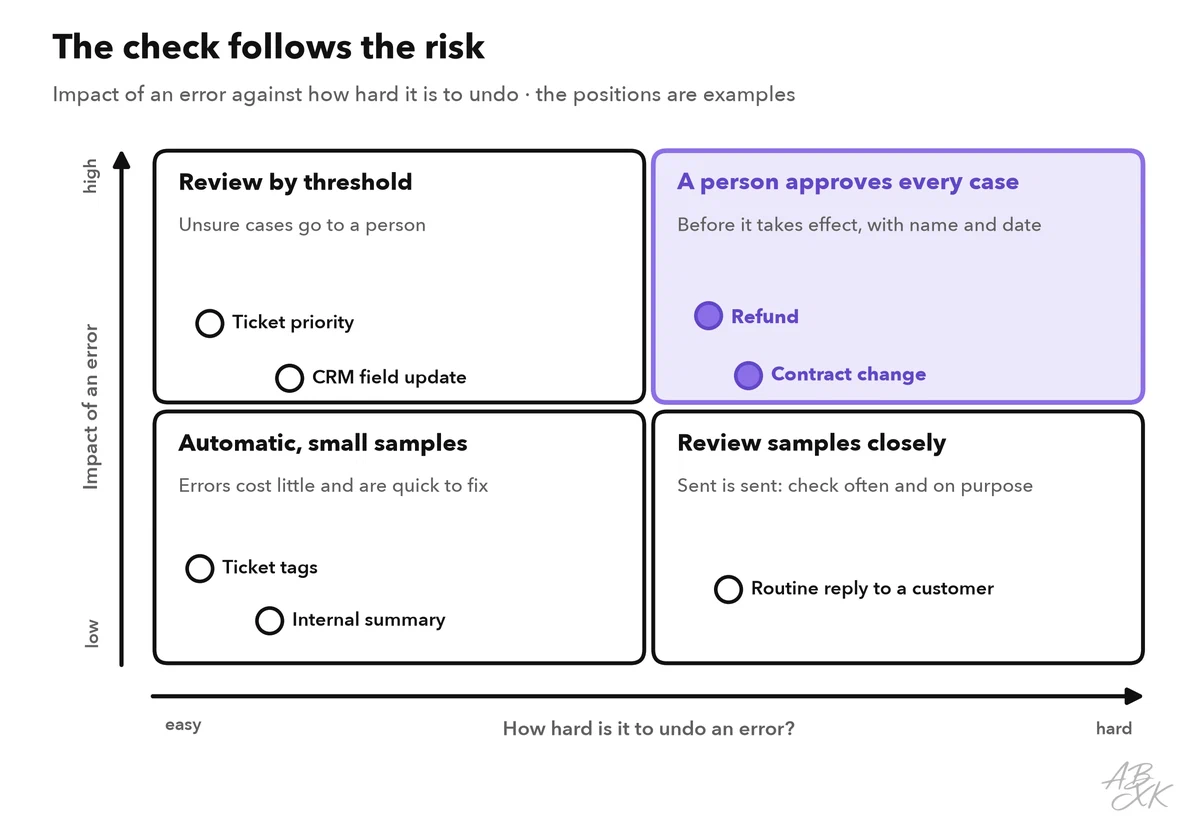
Write down your decision for each type of output. This list becomes the core of your quality plan, and it changes as you learn. An output that proves reliable over months can move from approval to sampling. The table shows the five common types of checks:
| Check type | When it happens | Typical use |
|---|---|---|
| Approval before use | Before the output takes effect | Refunds, contract changes, first weeks of a new AI agent |
| Threshold review | Only when the AI is unsure | Ticket sorting, reply drafts, data extraction |
| Random sample | Afterward, on a share of all outputs | Routine answers the AI sent on its own |
| Escalation | When a case leaves the AI’s scope | Complaints, legal threats, a customer who asks for a person |
| Audit | Regularly, on the whole process | Rules, thresholds, logs and error trends |
Confidence thresholds: when the AI hands over
A confidence threshold is a cut-off value. Above it, the AI’s output goes through; below it, a person reviews the output or takes over the case. Many teams use two thresholds, as in the example below. The value comes from a signal of how certain a result is. Good signals are a classifier’s score for a category, how well a question matched an article in the knowledge base, whether rule checks passed, or whether two runs of the same request agree. A poor signal is the model’s own claim, such as “I am 95% sure”: language models often sound confident when they are wrong.
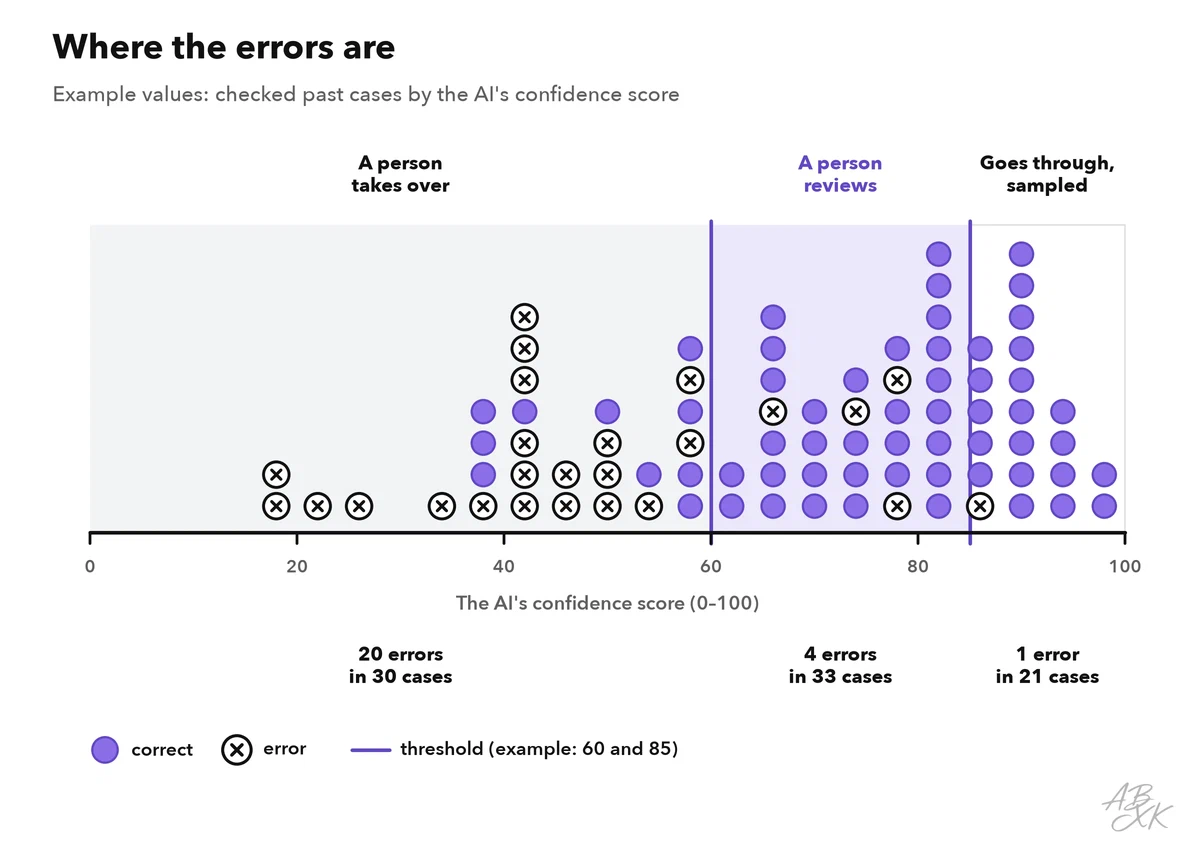
Set thresholds with data, not by feel. Take a few hundred past cases that people have checked, sort them by the signal and look where the errors cluster. Start conservatively, with more cases going to people, and lower the threshold only when your samples show that the results above it are reliable.
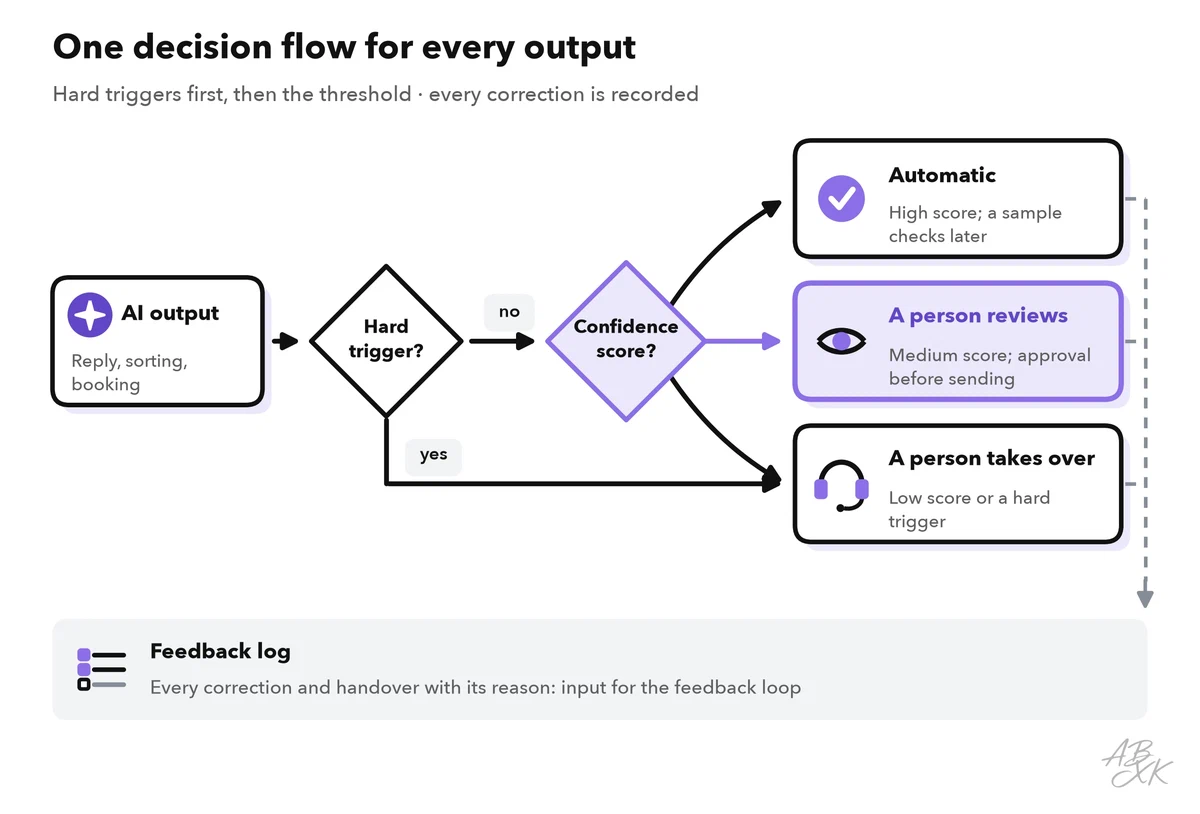
Some cases go to a person whatever the score. Define these hard triggers in writing: a legal threat, a safety problem, a vulnerable customer, a high amount, or simply the request to speak to a person.
Sampling: check what the AI handled alone
For outputs above the threshold, a random sample shows whether the threshold holds. Every week, draw a fixed number of automatically handled cases, for example 50, and check them with a short checklist: correct facts, complete answer, right tone, correct action. Add targeted samples for new topics and for categories with past errors.
A sample tells you less than it seems. If you check 100 cases and find no error, the true error rate can still be up to about 3 percent. Statisticians call this the rule of three: with no errors in n checked cases, the upper limit of the 95 percent confidence interval is about 3 divided by n. To show an error rate below 1 percent, you need about 300 checked cases without an error.
Now and then, let two reviewers check the same 20 cases. If they often disagree, the checklist is unclear, and your error rate measures the reviewers, not the AI.
Escalation paths that work
An escalation path defines who takes over a case, when and with which information. Weak escalation ends in a dead end: the customer repeats everything, or the case waits in a queue that nobody owns. Five rules prevent this:
- Named levels, for example AI agent, then service team, then specialist or team lead.
- Time limits for each level, such as one business hour for urgent cases.
- A complete handover: the AI passes on a summary, what it did and why it handed over.
- A way out for the customer: anyone who asks for a person gets one.
- No ping-pong: a case that a person has taken over does not go back to the AI without a decision.
Customer service platforms usually have handover functions built in. According to the vendors, Tidio combines an AI agent with live chat and ticketing, Typewise offers AI agents that handle requests across channels for larger support teams, and Landbot lets teams build chatbot flows for websites and WhatsApp without code. Test the handover yourself before you go live: start a conversation, ask for a person and look at what arrives on the other side.



Short descriptions from our tool comparison, based on the vendors' information — not tested by ABXK.
You can find all 10 tools for customer service in our tool comparison for AI Work.
Close the loop: turn corrections into improvements
Every correction a person makes is information. If it disappears in daily work, the same error returns tomorrow. A feedback loop collects corrections, finds their cause and fixes it at the root:
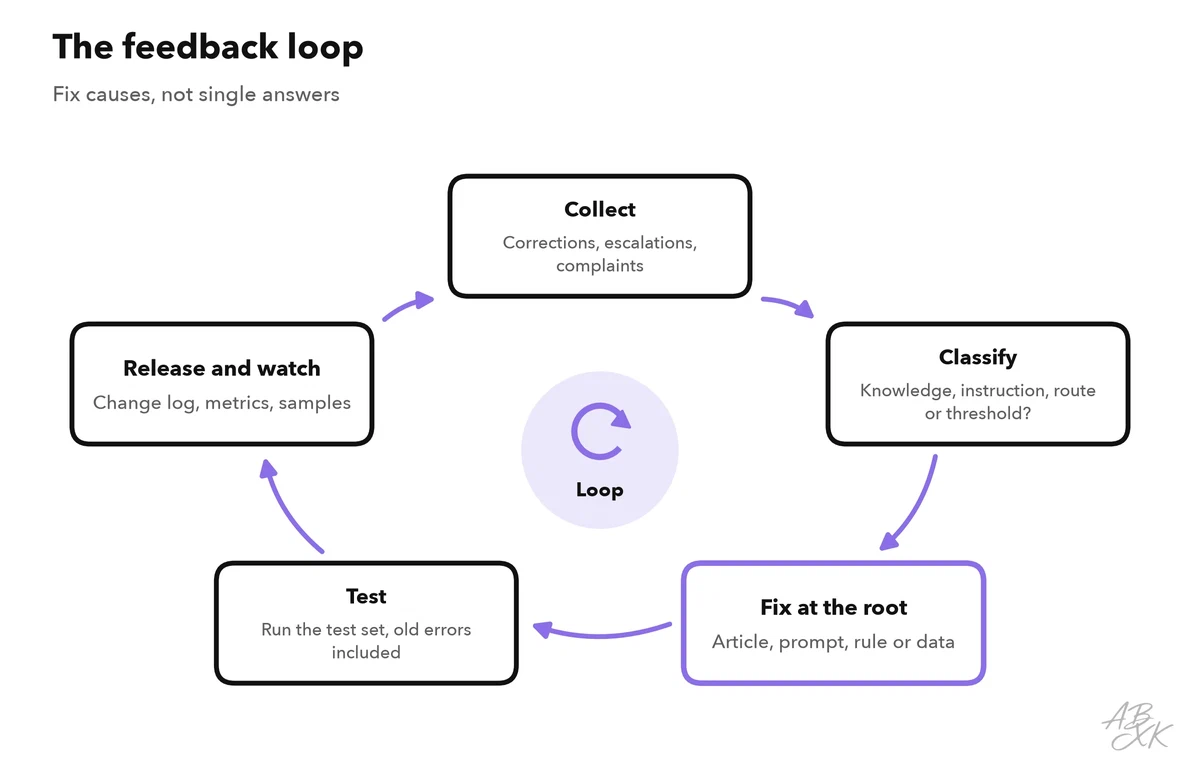
Classify each error by its cause, because each cause needs a different fix. A gap in the knowledge base needs an article, an unclear instruction needs a better prompt, a wrong route needs a rule, and a wrong threshold needs new data. Before you release a change, run it against a test set: a fixed collection of past cases with known correct answers, including the errors you fixed before. If an old error comes back, the change is not ready.
Who is accountable
An AI cannot be accountable; people are. For each AI workflow, name the roles in a simple table, for example with the RACI method: Responsible (does the work), Accountable (owns the result), Consulted (gives input) and Informed (is kept up to date). Each task has exactly one A.
| Task | Process owner | Reviewer | Technical admin | Team lead |
|---|---|---|---|---|
| Set rules, thresholds and hard triggers | A | C | R | C |
| Approve or correct outputs | I | R | – | A |
| Draw and check samples | A | R | I | I |
| Handle escalations | I | R | – | A |
| Fix knowledge, prompts and rules | A | C | R | I |
| Change the workflow itself | A, R | C | C | I |
Level 4 shows how to set up such roles for all AI tools in a company: AI governance for business teams.
Watch for automation bias, which Level 2 introduced for approvals in workflows: a reviewer who approves hundreds of good drafts a day stops reading carefully. The EU AI Act names this risk: for high-risk AI systems, the people who oversee them must remain aware of the tendency to rely too much on the output (Article 14). Besides the countermeasures from Level 2, two habits help when many people review. Limit the number of reviews per person and day. And plant known errors in the review queue now and then: a reviewer who misses them needs a break or a clearer checklist, not more cases.
The law also sets limits when AI decides about people. Under Article 22 GDPR, people have the right not to be subject to a decision based solely on automated processing that has legal or similarly significant effects on them. The exceptions are narrow, and they require safeguards such as the right to human intervention.