

A vendor demo almost always works. It runs on clean data, with a prepared question and a presenter who knows every click. Your team’s week looks different: full inboxes, half-empty CRM fields and colleagues with little time to learn yet another tool. That is why many teams end up with the tool that had the best demo, not the one that fits their work.
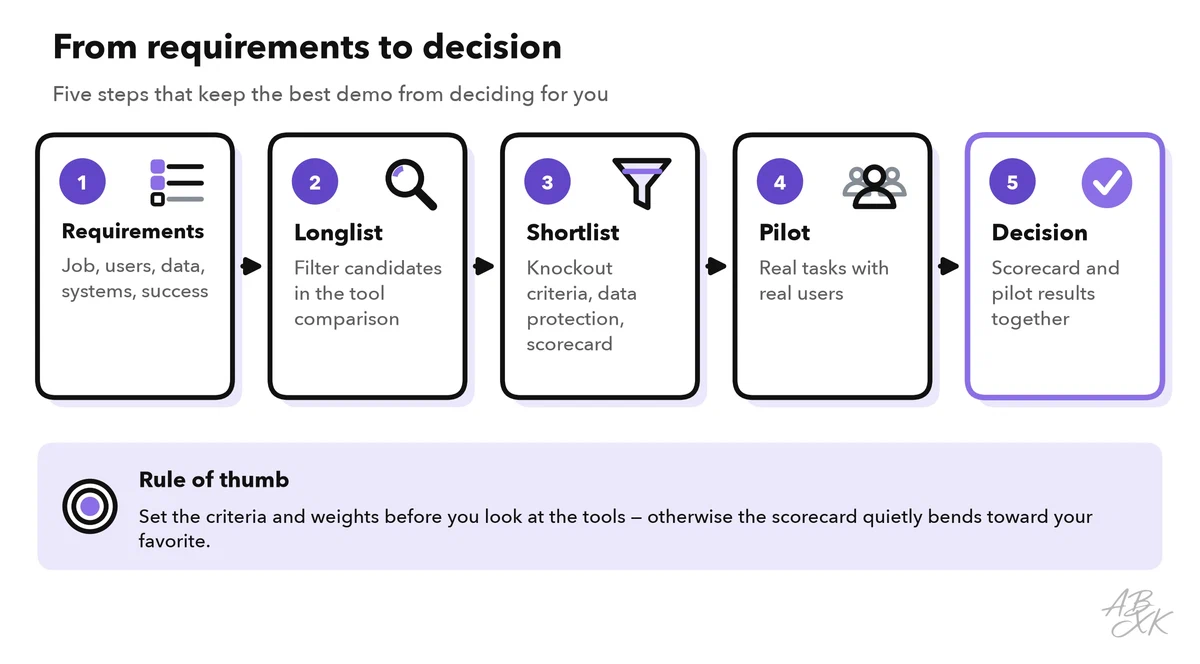
This is part 1 of Level 2 in our AI Work learning path. Level 1 showed what AI can do in sales, service, marketing, e-commerce and reporting. Level 2 is about workflows and quality control, and it starts with the decision that comes before every workflow: which tool to use. You will learn to write requirements, build a longlist with our tool comparison, score candidates with a weighted scorecard, review data protection and test the finalists with pilot users.
Start with the job, not with the tool
Before you look at any product, describe the job in one sentence. A good job statement names the task, the people and the result. For example: “Answer routine customer questions in our web chat in English and German, also in the evening, and hand everything else to our service team.”
Then answer five questions. The table shows them with example answers from a small online shop that wants an AI chat assistant:
| Question | Example answer (online shop) | Why it matters |
|---|---|---|
| Which task, how often? | Questions about delivery, returns and opening hours, every day | Frequent, repetitive tasks pay off first |
| Who will use the tool? | Four service agents and one team lead | The tool must fit their skills and their day |
| Which data goes in? | Order numbers, names, email addresses | Personal data means a data protection review |
| Which systems must it connect to? | Shop system, help desk, email | Without integrations, people copy data by hand |
| What does success look like? | Routine questions answered without an agent, no rise in complaints | You need this later to judge the pilot |
Now sort your requirements into two groups. Must-haves are knockout criteria: a tool that fails one is out, however good it is otherwise. Typical must-haves are a data processing agreement, data storage in a region your company accepts, the languages of your customers and a way to export your data. Nice-to-haves go into the scorecard, where they earn points.
Keep the list of must-haves short. If it has fifteen items, no tool will pass, and you will start to make exceptions. Then the list no longer protects you.
Build a longlist with our tool comparison
A longlist is the first, broad list of candidates, usually five to ten tools. Our tool comparison for AI Work currently lists 46 tools, sorted by department. On our tools page, you can filter all tools by category, area, audience, type and AI role. Then tick two to four tools to see them side by side: what each tool does, who it is for, its AI role, our short assessment and the vendor’s own description.
Two filters save the most time. The first is the audience. Most business tools are built for a specific group of customers, and our comparison records this in the field “Best for”:
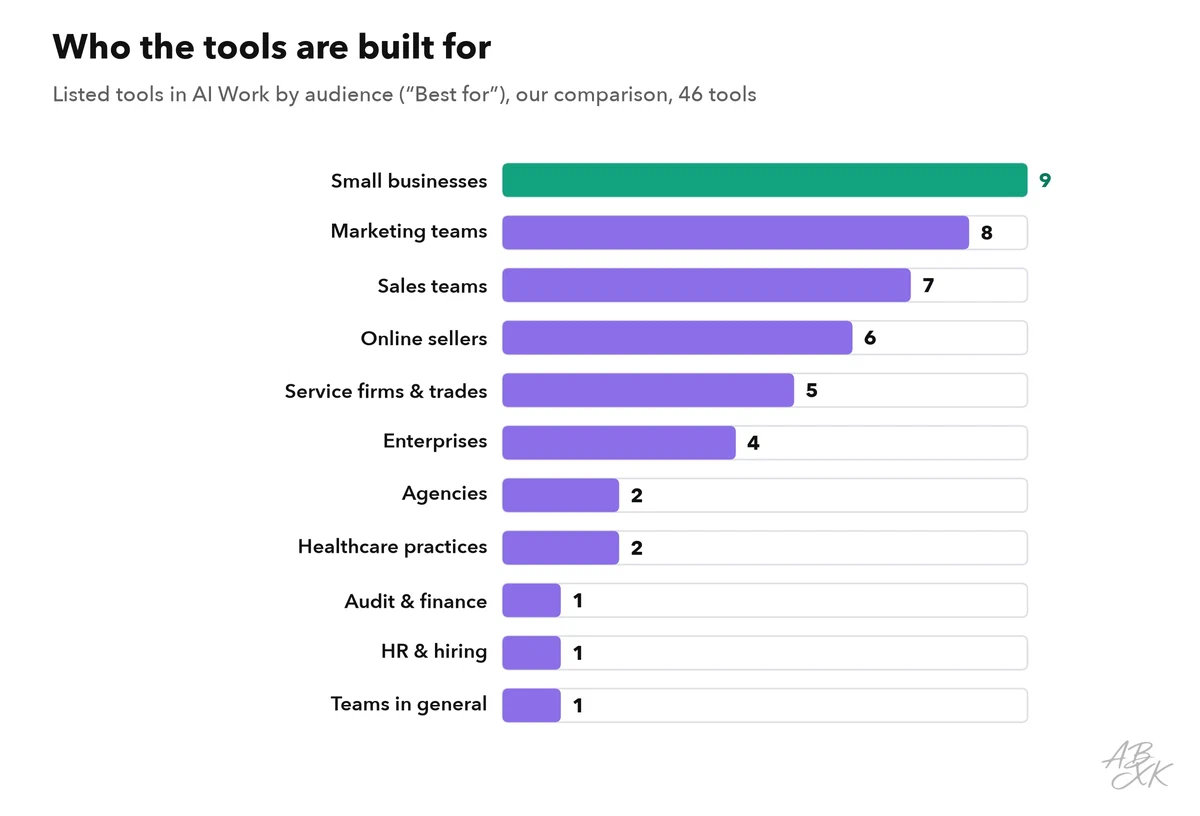
A tool built for large enterprises can be too heavy for a team of five: a long setup, many settings and a sales process with several calls. A tool built for small businesses can lack the controls a large company needs, such as single sign-on or detailed user roles. In customer service, for example, our comparison places Tidio with small online stores and Typewise with larger support teams that have many repetitive cases.
The second filter is the AI role. “AI at the core” means the product is built around AI, such as an AI agent that answers customers on its own. “Software with AI features” means familiar business software, such as a help desk or a CRM, that adds AI functions. The second kind usually changes your workflow less. The first kind can take over more work, but it also needs more checking.
Take the online shop as an example. The area Customer Service & Telephony narrows the list to 10 tools. Three of them fit a small shop with a web chat. According to the vendors, Tidio combines an AI agent with live chat and ticketing, Landbot is a no-code builder for chatbots on websites and WhatsApp, and SleekFlow brings WhatsApp, Instagram and live chat into one inbox:



Short descriptions from our tool comparison, based on the vendors' information — not tested by ABXK.
Our short descriptions and assessments are classifications, not tests. They tell you what a tool is for. Whether it works for your team, only your own test can show. One more signal can help with the shortlist: the section “What companies buy” on our tools page shows, per AI category, which vendors companies pay for most often. It is based on card spending data from Ramp, mostly from US companies (Source: Ramp Rate, ramp.com).
Score the candidates with a weighted scorecard
A weighted scorecard turns a gut decision into a transparent one. It has four parts: the criteria, a weight for each criterion, a score for each tool and a total.
- Choose five to eight criteria. Fewer criteria are easier to score honestly.
- Give each criterion a weight. The weights add up to 100 percent, and the most important criterion gets the most weight.
- Score each tool from 1 to 5 on every criterion. Write down a short reason for each score, such as “answered most test questions correctly, but invented one delivery time”.
- Multiply and add up. Weight times score, added up over all criteria, gives a total between 1 and 5.
The table shows typical criteria for AI tools in a team. The weights are an example for the online shop. Set your own weights before you look at the tools, so that the scores cannot bend the weights.
| Criterion | Example weight | What to check |
|---|---|---|
| Quality on your own tasks | 30% | Results on 20 to 30 real cases from your work, checked by people who know the right answers |
| Fit with workflow and systems | 20% | Integrations with your shop, CRM or help desk; how much copying by hand remains |
| Data protection and security | 15% | How well the tool goes beyond your must-haves: user roles, logs, settings for data retention |
| Ease of use and adoption | 15% | Can a new user work with it after a short introduction? Do the pilot users want to keep it? |
| Control and approvals | 10% | Approval steps, handover to people, a record of what the AI did |
| Vendor and support | 10% | Documentation, support in your language and time zone, product updates, data export |
Cost is missing on purpose. Compare the total cost of the finalists separately: licenses, setup and the time your team spends on checking results. That way, a low price cannot hide a weak result.
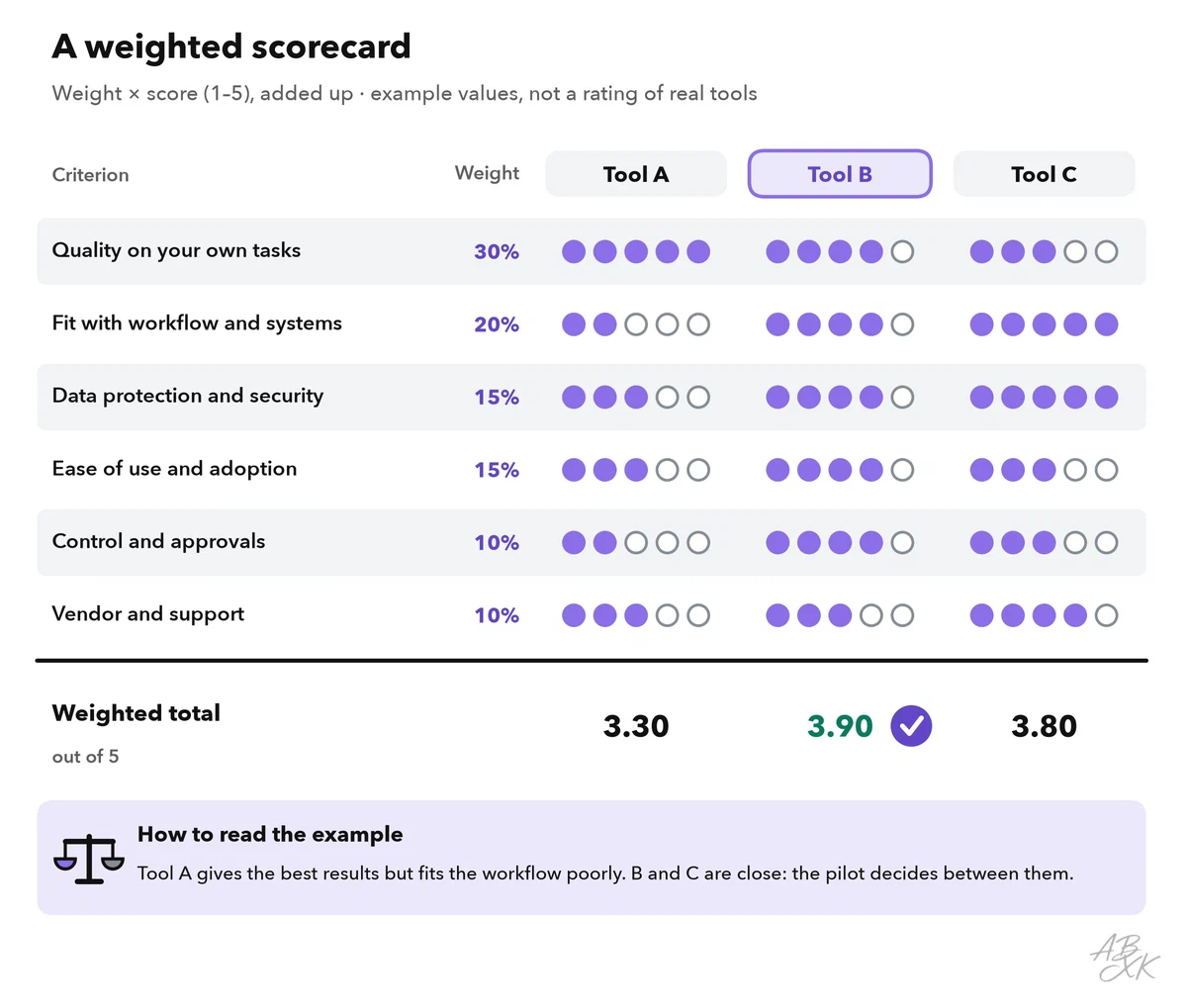
In the example, Tool A gives the best answers, but it fits poorly into the shop’s systems and offers little control. Tool B is good everywhere and gets the highest total, 3.9. Tool C is close behind with 3.8. When two totals are this close, the scorecard has done its job: it has narrowed the field. The pilot decides between the finalists.
Review data protection before anyone uploads data
An AI tool processes whatever your team puts into it: customer emails, order data, call recordings, internal documents. In the EU, the GDPR applies as soon as personal data is involved. Six questions cover the core of a data protection review. Ask the vendor for written answers, and involve your data protection officer or legal team early.
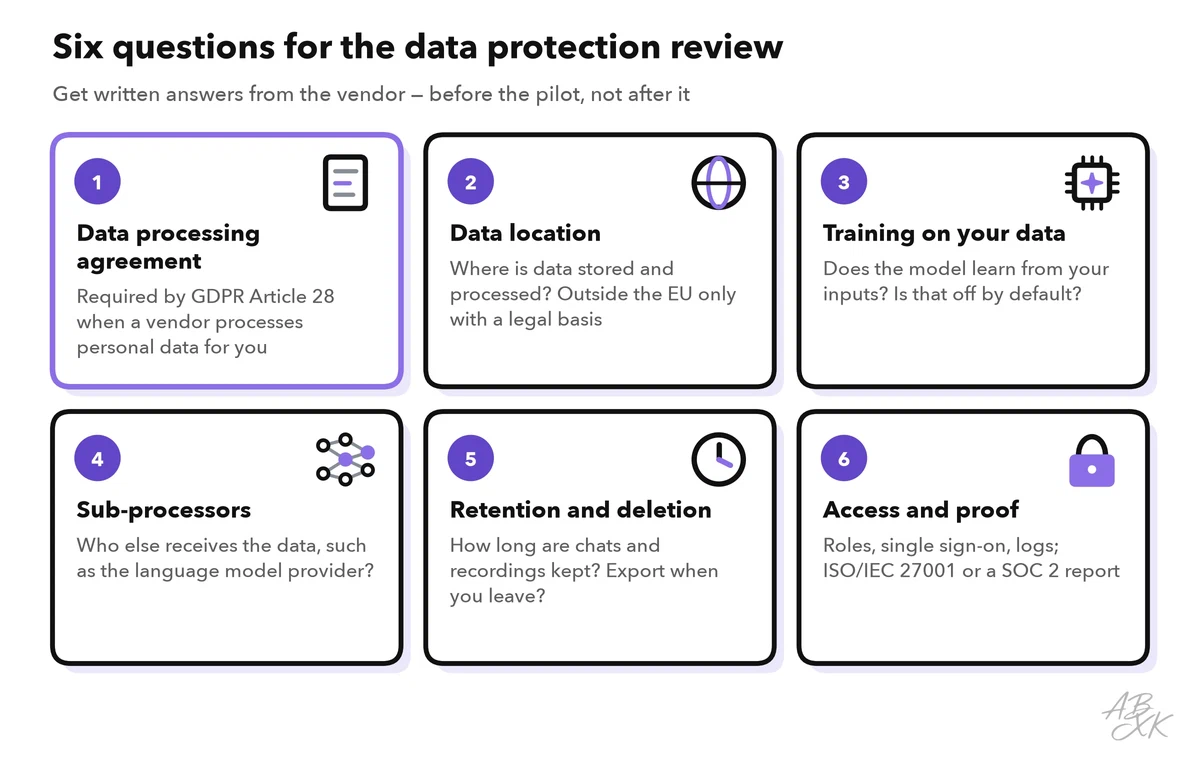
- Data processing agreement (DPA). When a vendor processes personal data on your behalf, the GDPR requires a contract that sets out what it may do with the data (Article 28). Most business vendors offer a standard DPA. If a vendor has none, treat that as a knockout.
- Data location. Ask where data is stored and processed, including backups and support access. Transfers to countries outside the EU need a legal basis, such as an adequacy decision of the European Commission or standard contractual clauses.
- Training on your data. Ask whether the vendor uses your inputs and outputs to train or improve its models, and whether this is switched off by default for business accounts.
- Sub-processors. Many AI tools send your data to the provider of a language model in the background. The vendor’s list of sub-processors shows who else receives the data.
- Retention and deletion. Ask how long prompts, chat logs and recordings are kept, and how you get your data back and deleted when you leave.
- Access and proof. Check user roles, single sign-on and logs of who did what. Certifications such as ISO/IEC 27001 or a SOC 2 report show that independent auditors have checked the vendor’s security controls.
Level 0 explains why every company needs ground rules for using AI at work, including a list of approved tools. A new tool only joins that list after this review.
Test the finalists with pilot users
The scorecard is still a desk exercise. A pilot is a short test with real tasks and a small group of users. It shows what a demo cannot: whether the tool handles your messy cases and whether people actually use it.
Five rules make a tool pilot useful:
- Choose mixed pilot users. Include an enthusiast, a skeptic and someone who is new to the job. If only fans test the tool, you learn little.
- Run the same cases through each finalist. Prepare a set of real tasks, including hard ones, and let each tool handle all of them.
- Measure a baseline first. Note how long the task takes today and how often errors occur, so you can compare.
- Keep it short. Two to four weeks are usually enough for a tool decision.
- Agree on the decision rule in advance. Write down which results mean “adopt”, “adopt with changes” or “stop”.
During the pilot, watch four signals. Use: do the pilot users still work with the tool in the last week, or did use drop after the first days? Benefit: how much time does a task take now, and how many results can be used without major edits? Quality: how many errors do you find in a sample of results? Satisfaction: would the pilot users keep the tool, or do they run a workaround on the side?
Plan a short training for everyone who will use the tool. In the EU, companies that use AI systems must take measures to support the AI literacy of their staff (EU AI Act, Article 4; the duty has applied since February 2, 2025, and was reworded in 2026). Level 3 of this path turns a pilot into a full project with KPIs and a timeline: run an AI pilot project.
Common mistakes when teams choose AI tools
Check your process against this table before you sign a contract:
| Mistake | What happens | Better |
|---|---|---|
| Choosing by demo | The tool shines on prepared examples and fails on your cases | Test with your own cases, including hard ones |
| Setting weights after scoring | The weights quietly bend toward the favorite | Fix criteria and weights before you look at tools |
| Too many must-haves | No tool passes, and exceptions creep in | Three to six real knockout criteria |
| Only enthusiasts in the pilot | Results look better than daily use will be | Mix enthusiasts, skeptics and new colleagues |
| Forgetting the exit | Your data and setup are locked into one tool | Check export and deletion before you sign |
| No owner after the decision | Nobody maintains settings, content or access rights | Name an owner for the tool and for its content |