

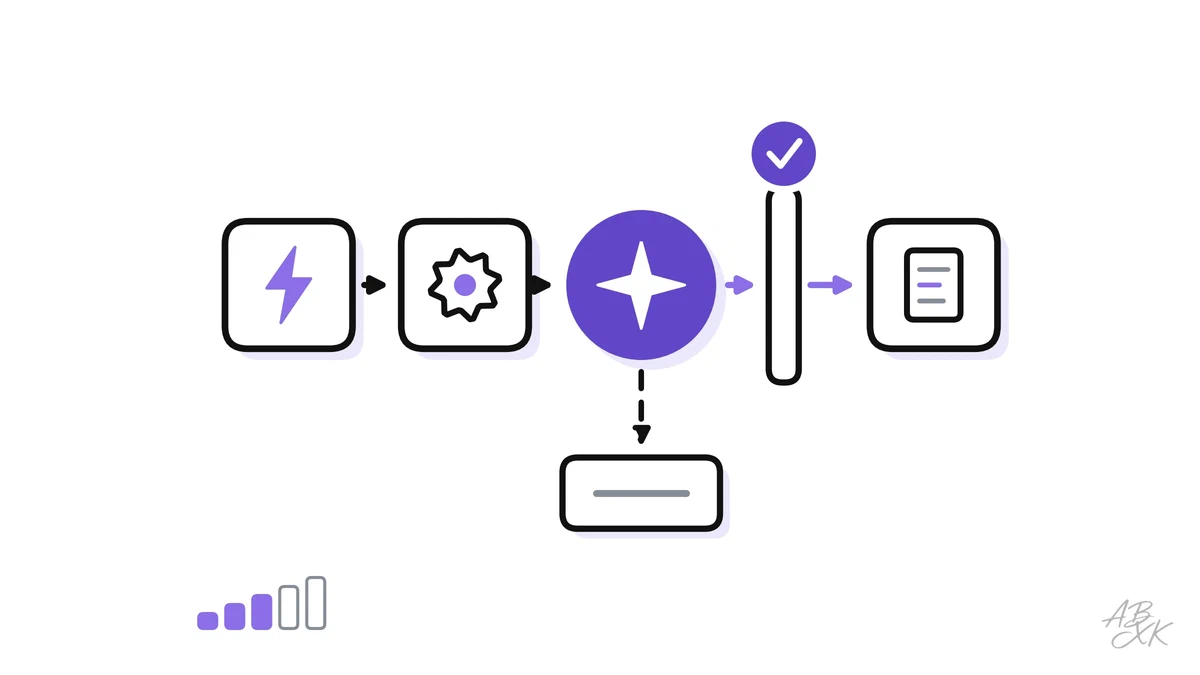
Many teams already automate small things with simple rules: when a form arrives, create a ticket; when an invoice is paid, send a receipt. AI adds a new kind of step to these chains. It can read an email, pull the amounts out of a PDF, sort a request by topic or draft a reply. That makes much more work suitable for automation. It also brings a new kind of error: a rule either works or fails, while an AI step can be wrong and look perfectly confident.
This is part 5 of Level 2 in our AI Work learning path. Level 0 explained the difference between assistants, automations and agents. This part shows how to build an automation with an AI step that you can trust: the five building blocks of a workflow, three examples from everyday operations, where approvals belong, how to handle errors and how to document a workflow so that someone owns it.
The five building blocks of an AI workflow
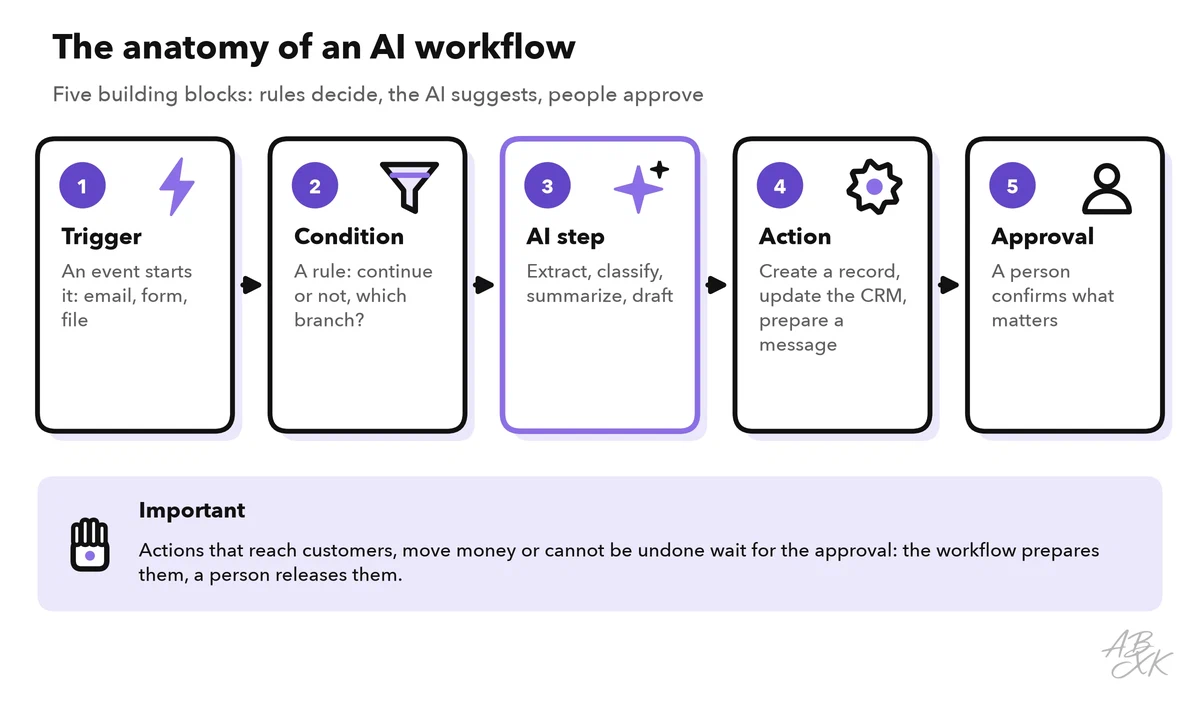
A workflow is a chain of steps that runs on its own once something happens. Most automation tools build it from five building blocks:
- Trigger. The event that starts the workflow: a new email, a submitted form, an uploaded file, a new record in the CRM or a schedule, such as every Monday at 8 a.m.
- Condition. A rule that decides whether the workflow continues and which branch it takes: “only invoices from known suppliers” or “only requests in German”.
- AI step. The part that needs an understanding of language: extract data from a document, classify a request, summarize a case or draft a reply.
- Action. What the workflow changes in other systems: it creates a record, updates the CRM, sends a message or files a document.
- Approval. A person checks and confirms before an action that matters.
One design principle makes AI workflows much more reliable: let rules check the AI. Ask the AI step for structured output, which means fixed fields such as supplier, invoice number, amount and due date instead of free text. Then simple rules can check each field. Is the amount a number? Does this invoice number already exist? Is there a matching purchase order? The AI suggests, while rules and people decide.
Three examples from everyday operations
The same five building blocks fit very different tasks. The table shows three common workflows:
| Building block | Invoice intake | Lead routing | Support triage |
|---|---|---|---|
| Trigger | A PDF invoice arrives in the invoices inbox | Someone submits the contact form | A new ticket comes in |
| Condition | The sender is a known supplier | Not spam; a company email address | Language and channel are supported |
| AI step | Extract supplier, number, amount, due date | Classify the product interest and urgency; summarize | Classify topic and urgency; draft a reply from the knowledge base |
| Action | Create a draft booking | Create the lead in the CRM and assign a rep | Set the priority and route to the right queue |
| Approval | Accounting approves before payment | None for routing; unclear leads go to a person | An agent edits and sends the draft |
| Typical failure | A new invoice layout, a wrong amount | A lead lands in the wrong region | An urgent case is labeled as routine |
The three workflows need different amounts of control. Lead routing needs no approval: a lead in the wrong region is easy to fix, because a colleague simply passes it on. Measure instead how often leads are reassigned. Support triage keeps a person involved where it counts: the AI drafts, but the agent decides what the customer reads. Invoice intake needs the most control, because it ends with money leaving the company.
The figure shows the invoice example in detail. The normal case runs through. Every unclear case lands in a manual queue: a list of cases that the automation could not handle and that a person resolves.
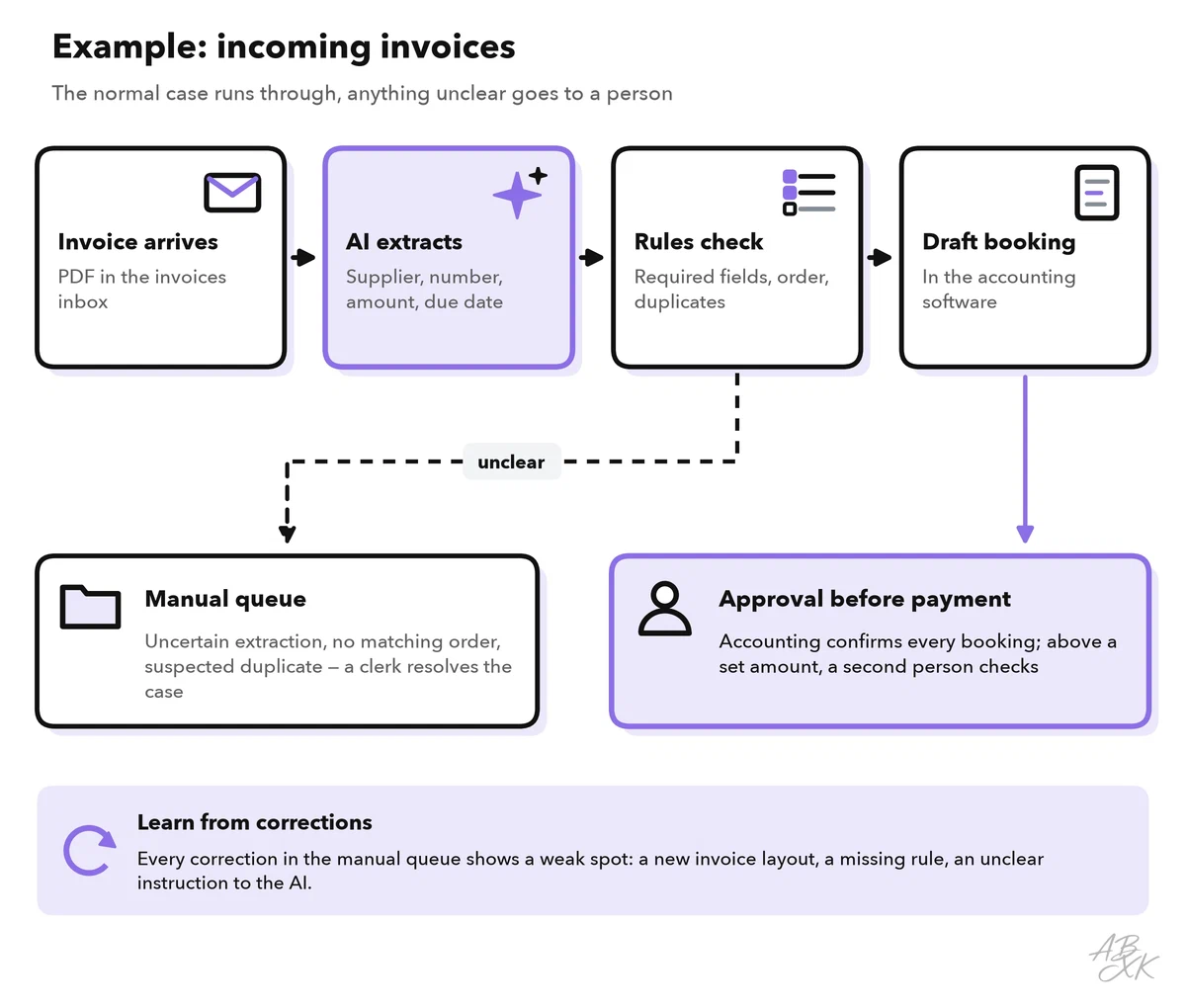
Above a set amount, a second person checks. This four-eyes principle is common in finance, and it applies to automated workflows just as it does to manual ones.
Where do such workflows run? Many business tools have automations built in. According to the vendors, Tidio combines an AI agent with automations for customer service, and Typewise runs workflows in CRM and ERP systems. Ignition automates proposals, engagement letters, billing and payments for accounting and professional services firms. Assembly offers a client portal with forms, contracts, payments and an AI app builder. For workflows that connect many apps, our AI Development comparison lists automation builders under Agents & Automation, such as Turbotic, which builds automations from a description in plain language, according to the vendor:





Short descriptions from our tool comparison, based on the vendors' information — not tested by ABXK.
Where approvals belong
Approvals cost time, so put them where they matter. Two questions decide: How hard is it to undo the step? And who does it affect?
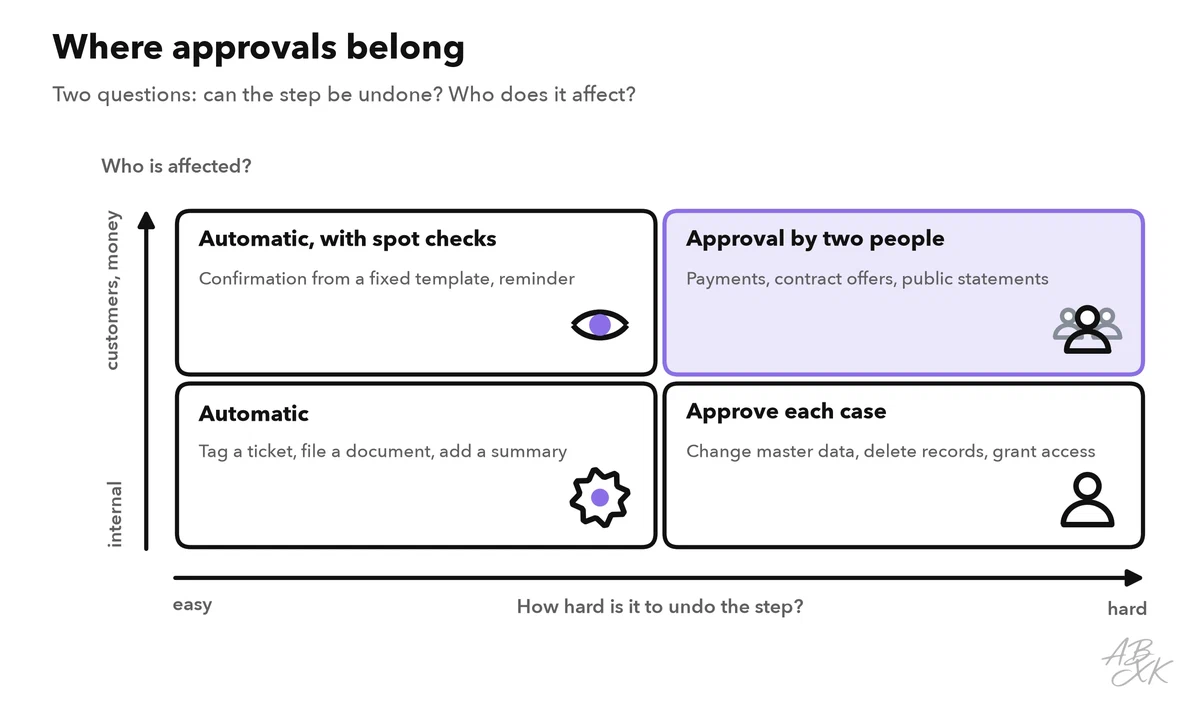
Add an approval also when the AI is unsure, when data is missing and during the first weeks of a new workflow. Then make each approval easy to do well:
- Show the AI’s output next to the source, such as the extracted fields next to the original PDF.
- Highlight what is uncertain instead of making the reviewer search for it.
- Offer three clear choices: approve, edit or reject.
- Record who approved what and when. You will need this record when something goes wrong.
Approvals have a weak spot: people. When an automated system is usually right, reviewers start to approve without really looking. Researchers call this automation bias: people rely too much on automated suggestions and miss errors, especially when they juggle several tasks at once (Source: Parasuraman and Manzey, Human Factors, 2010). Three countermeasures help. Keep approvals for the cases that matter, so reviewers are not flooded. Check a random sample of approved cases every month. And watch how often reviewers change the AI’s output. If that rate stays at zero for months, find out whether the AI is really that good or whether nobody looks anymore. Level 3 covers human checks and escalation in depth.
Error handling: plan for the bad days
Every workflow fails sometimes. The question is whether you notice. The table lists common failures and the safeguards against them:
| What goes wrong | What you notice | Safeguard |
|---|---|---|
| The trigger fires twice | Duplicate records or double messages | Check for duplicates before every action |
| The AI output is incomplete | Empty fields, wrong formats | Check required fields, formats and value ranges; send failures to the manual queue |
| The AI is wrong but sure | The data does not match other sources | Compare with a second source, such as the purchase order |
| A connected system is down | Error messages, nothing gets updated | Retry a few times with a pause, then alert the owner |
| The input changes | A supplier switches to a new invoice layout | Track how often cases end up in the manual queue |
| A silent failure | Nothing happens, and nobody notices | Count cases every day; zero invoices on a weekday is an alert |
The first safeguard deserves a name. An action that does no harm when it runs twice is called idempotent: before the workflow creates a booking, it checks whether that invoice number already exists. Ask whoever builds your workflow to make every action idempotent.
Document each workflow and name an owner
Automations often outlive the people who built them. A workflow that nobody understands is a risk: it keeps running, with access to your systems, until it breaks at the worst moment. Give every workflow a one-page workflow card:
| Field | Example: invoice intake |
|---|---|
| Purpose | Record supplier invoices without typing |
| Owner | Head of accounting for the business side, a named IT contact for the technical side |
| Trigger and systems | Invoices inbox, AI extraction, accounting software |
| Data | Supplier names, amounts, bank details; no customer data |
| AI step | Which model, which prompt version, which fields |
| Approvals | Accounting approves every booking; a second person above a set amount |
| Errors | Manual queue, retries, alerts to the owner |
| Access | A dedicated service account with only the rights it needs |
| Metrics | Invoices processed, share in the manual queue, corrections per week |
| Last review | Date and result of the last check |
Two points on the card prevent the most common problems. First, run every workflow under a service account, a technical account that belongs to the company, not under the personal login of the person who built it. Otherwise, the workflow stops or keeps running with the wrong rights when that person changes roles or leaves. Second, review each workflow regularly, for example every quarter, and after every change to a connected system.
When your workflows read from and write to your CRM or help desk, Level 3 shows how to integrate AI with your CRM and help desk with permissions and audit trails. Level 4 then looks at agentic workflows in operations, where AI agents plan several steps on their own.