

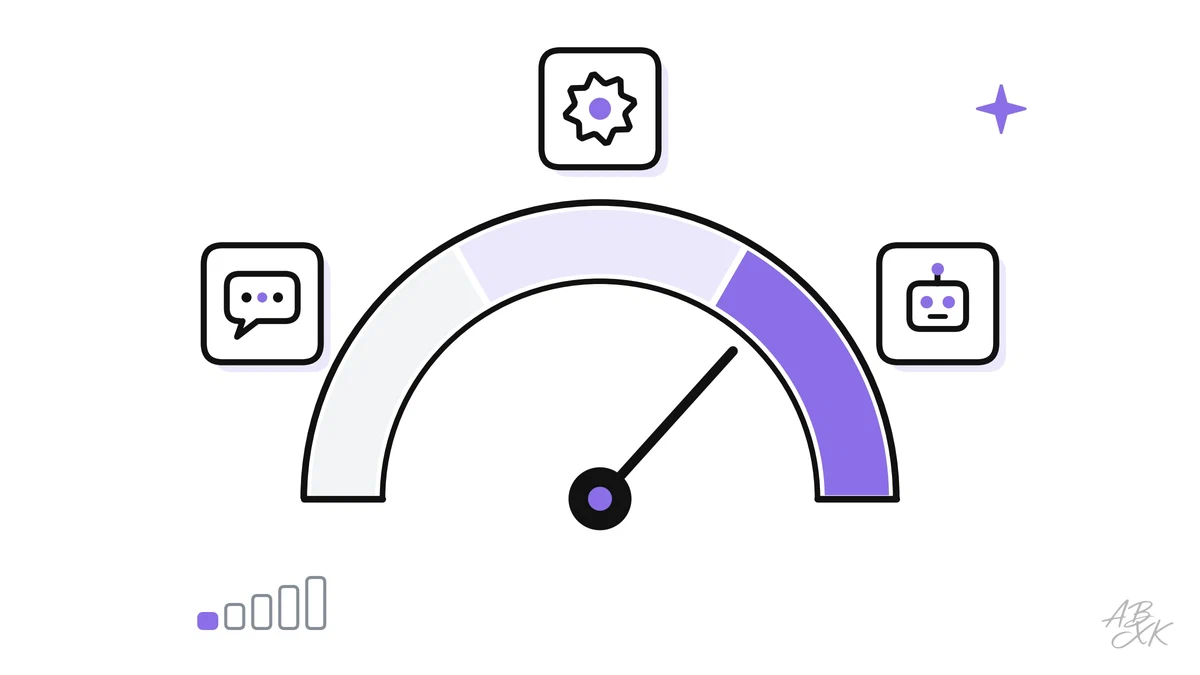
When people talk about AI at work, they often mean very different things. One person means a chat window where they type a question. Another means a workflow that sorts every incoming email by itself. A third means an “AI agent” that writes to customers and books meetings on its own. All three use AI, but they give it very different amounts of freedom.
This is part 3 of Level 0 in our AI Work learning path. You will learn to tell the three levels apart: the assistant, the automation and the agent. For each one, you will see an example, the typical risks and the controls that keep it safe. At the end, you will know how to pick the right level for a task.
Three levels at a glance
The difference between the three levels comes down to one question: who decides what happens next?
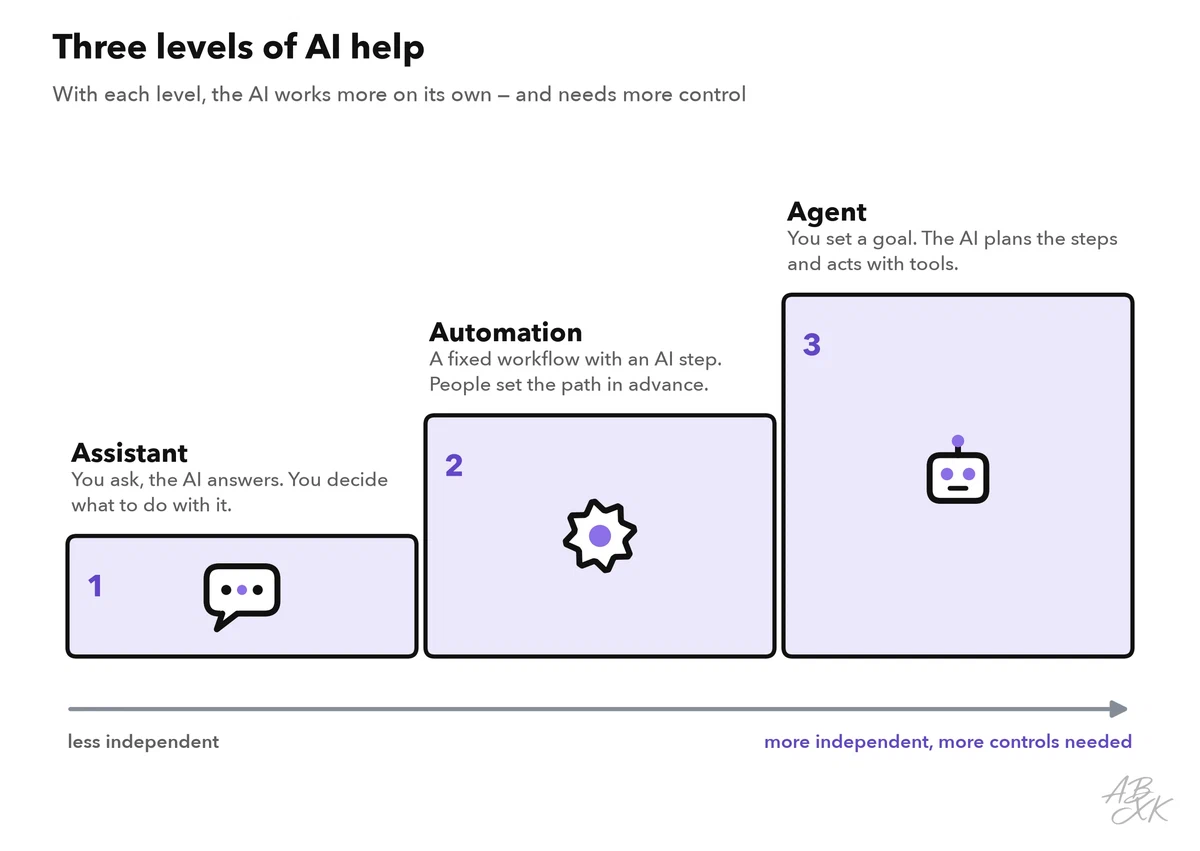
- With an assistant, you decide. You ask, the AI answers, and you choose what to do with the answer.
- With an automation, people decide in advance. They design a fixed workflow, and the AI does one step in it.
- With an agent, the AI decides, within limits. You give it a goal and access to tools, and it works out the steps.
| Assistant | Automation | Agent | |
|---|---|---|---|
| Who starts it? | You, with a request | An event, such as a new email | You or an event, with a goal |
| Who decides the steps? | You, one by one | People, in advance | The AI, while it works |
| Who acts? | You | The workflow, always the same way | The AI, through connected tools |
| Example | Drafting a reply to a complaint | Sorting incoming emails by topic | Answering new leads and booking meetings |
| Main risk | A wrong answer | The same mistake, many times | Wrong actions with real effects |
| Key control | You check every answer | Tests and sample checks | Limited permissions and approvals |
The assistant: you decide
An assistant is what most people know: a chat assistant such as ChatGPT, Gemini or Microsoft Copilot, or an AI button inside a program you already use, such as “suggest a reply” in a help desk. You ask, it answers, and nothing happens until you act.
Here is an example. A service agent gets an angry email about a late delivery. She asks the assistant for a friendly draft that apologizes and explains the next steps. She corrects the delivery date, adds a personal sentence and sends it.
The risk is limited to what you do with the answer. Still, the answer can contain wrong facts, and anything you paste in may leave the company. So the controls are simple: use tools your company has approved, keep confidential data out and check every answer before you use it. Part 5 of this level turns this into ground rules for using AI at work.
The automation: people decide in advance
An automation is a fixed sequence of steps that runs by itself. It starts with a trigger: an event such as a new email, a new form entry or a new invoice. Each step then follows rules that people set up in advance. The AI handles one step in the middle, usually one that needs some understanding of language, such as reading, sorting or summarizing.
Here is an example. Every new email to the support address starts the workflow. The AI step reads it and labels the topic and the urgency. A rule then sends it to the right team, and urgent cases also alert the team lead. Nobody has to sort the inbox by hand anymore.
The path is predictable, which makes automations easier to control than agents. But they run without a person in between, so one mistake can repeat many times before anyone notices. And when something changes, such as a new product or a new email format, the AI step may start to sort things wrongly without any error message.
The controls: test the workflow with real examples before it goes live. Send unclear cases to a person. Check a sample of results every week, and name an owner who watches the error rate. Level 2 shows how to build such workflows step by step.
The agent: the AI decides, within limits
An AI agent gets a goal instead of a fixed path. It has access to tools, such as email, a calendar or the CRM, and decides by itself which steps to take. It plans, acts, checks the result and continues until it reaches the goal or gets stuck. Anthropic, the company behind the Claude models, describes the difference like this: workflows follow predefined paths, while agents direct their own steps and tool use (Source: Anthropic, Building Effective Agents, 2024, anthropic.com).
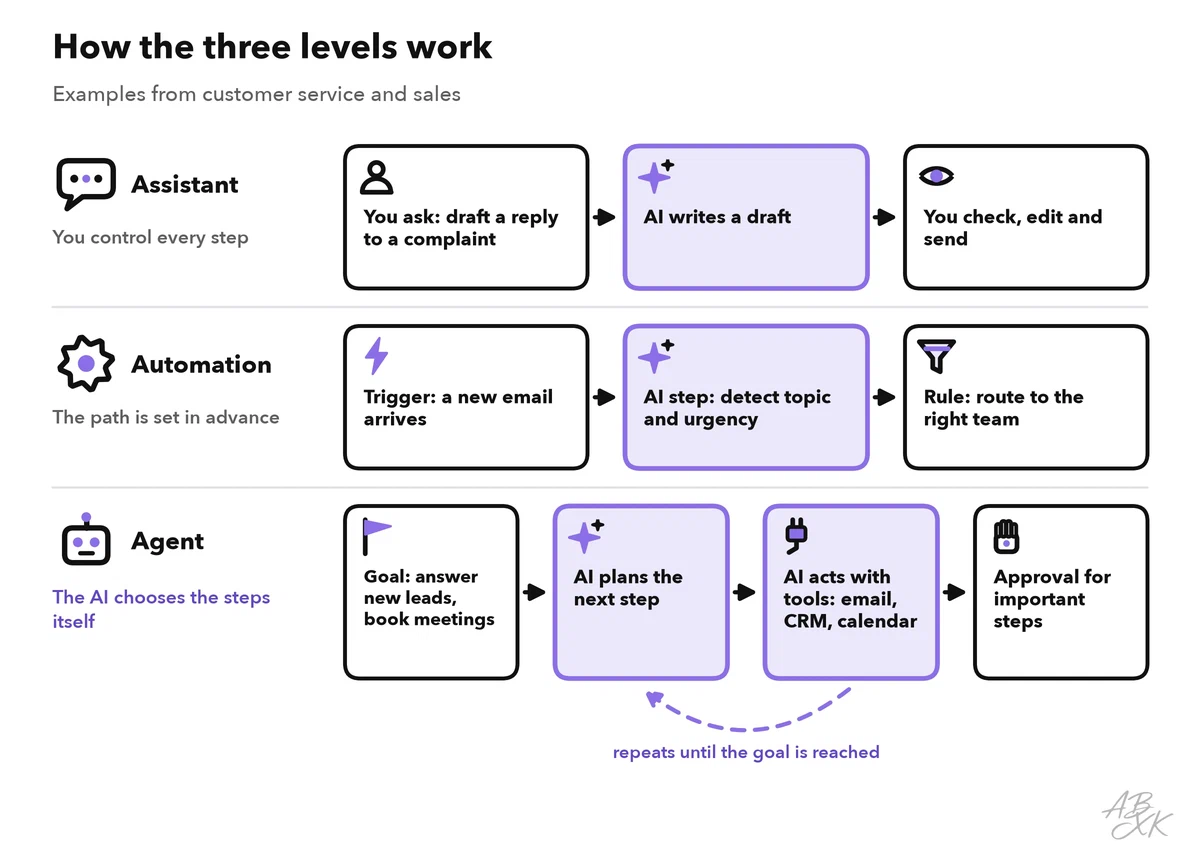
Here is an example. An AI sales agent receives new leads from the website form. It writes a first email, answers the reply, suggests meeting times and books a call in the salesperson’s calendar. In customer service, an agent might look up an order, start a return within clear limits and hand the case over to a person if anything is unusual.
Agents are useful because they act, and that is also the risk. An agent sends real emails, changes real records and can cause real costs, often before a person sees what happened. It can misunderstand the goal, act on wrong data or be misled by text it reads. Attackers can, for example, hide instructions in an email or a web page. This is called prompt injection, and our AI Security section explains how to defend against it. Security experts call a related risk “excessive agency”: an AI system that has more functions, permissions or independence than its task needs (Source: OWASP Top 10 for LLM Applications 2025, owasp.org).
The controls: give the agent only the permissions its task needs. Let a person approve important actions, such as refunds, discounts or messages to key customers. Set limits, for example on the number of emails per day. Keep a log of every action, and make sure someone can stop the agent at any time.
Three tools from our comparison show the levels in practice. According to the vendors, Tidio combines live chat with an AI agent and automations, Reply.io runs automated outreach across several channels, and AiSDR is an AI sales agent that handles first outreach and replies to responses.



Short descriptions from our tool comparison, based on the vendors' information — not tested by ABXK.
Controls grow with each level
The higher the level, the more controls you need, and each level keeps the controls of the level before.
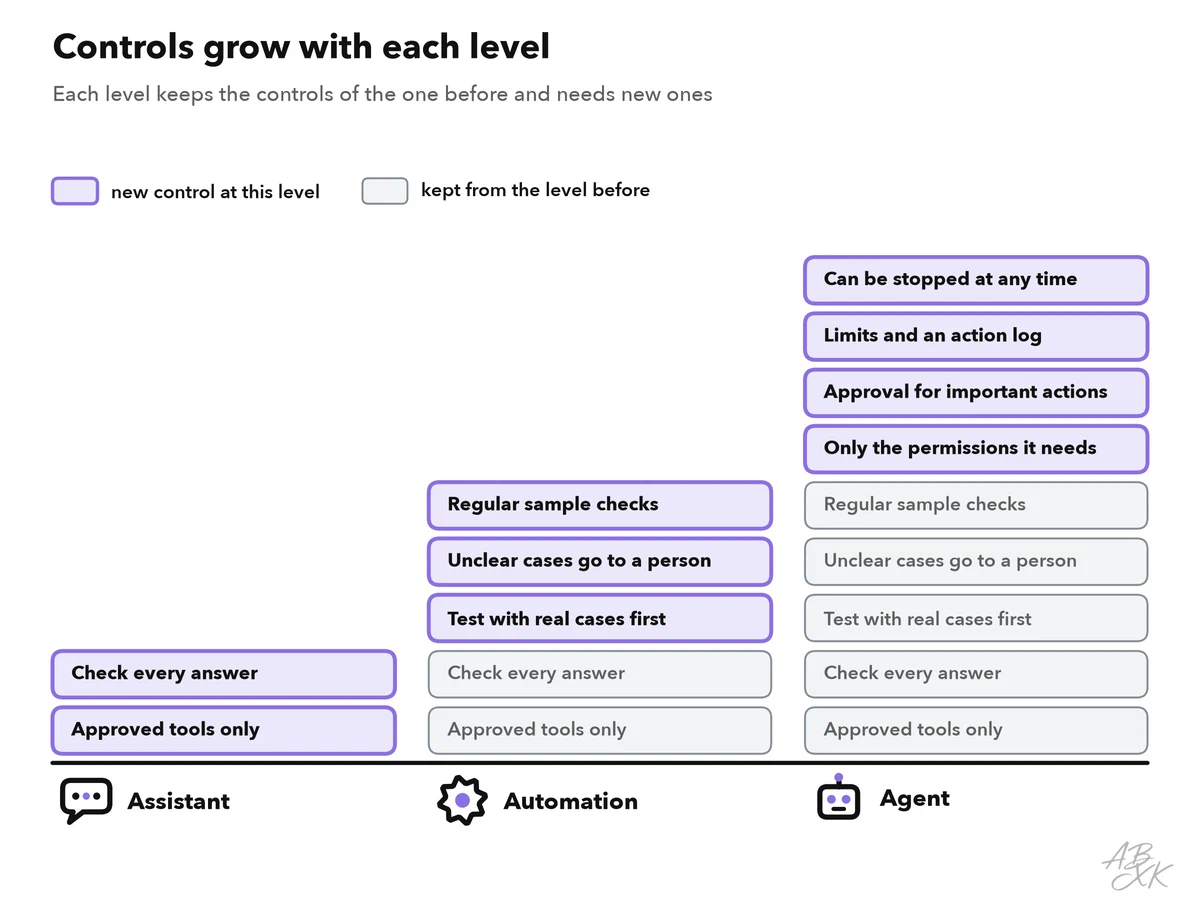
A good way to think about it: the AI earns its independence step by step. Start with the lowest level that does the job, measure how often the AI gets it right, and only then give it more freedom. Level 3 explains where to place human checks so that they catch the mistakes that matter.
Choosing the right level for a task
You do not need an agent for everything. Two questions help you choose: how often does the task come up, and how much harm does a mistake do?
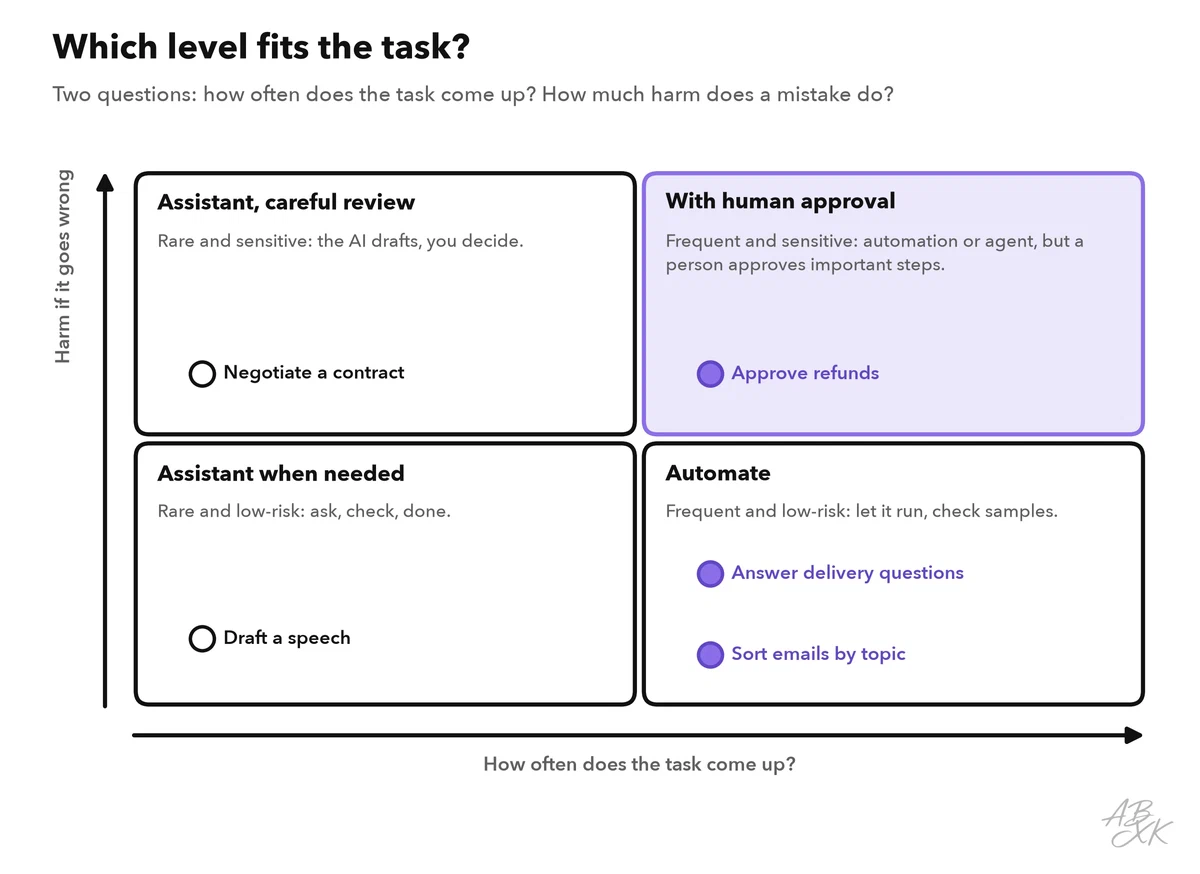
Rare tasks seldom justify building a workflow, so an assistant is enough. Frequent, low-risk tasks are good candidates for an automation. Frequent tasks with real risk can be automated too, but a person approves the important steps. Before you move a task up a level, answer these questions:
| Question | Why it matters |
|---|---|
| Is the task clear, and does it repeat? | Automations and agents need a stable pattern |
| Is the data correct and available? | The AI acts on the data it gets; part 4 of this level covers this |
| Can you tell when a result is wrong? | Without a way to spot errors, mistakes stay hidden |
| Who owns the workflow? | Someone must watch the results and fix problems |
| What happens if it fails? | There must always be a way back to a person |
| Which actions need approval? | Money, promises to customers and changes to records |