

Many customer questions come back every day: Where is my order? How do I return this? When are you open? An AI chatbot can answer them at any hour, in seconds, while your team handles the cases that need a person. Set up badly, the same bot frustrates customers. It gives wrong answers in a confident tone, makes promises the company cannot keep and hides the way to a human.
This is part 2 of Level 1 in our AI Work learning path. Part 1 was about finding new customers; this part is about serving the ones you have. You will learn how an AI chatbot finds its answers, which topics to start with, how to prepare its content, how to hand over to people and how to measure whether it really helps.
How an AI chatbot finds its answers
Older chatbots followed a fixed script: the customer clicked buttons, and the bot walked down a decision tree. AI chatbots understand questions in free text and write answers in their own words. In customer service, they should not answer from general knowledge. They should answer from your knowledge base: the help articles, policies and product data that you approve for the bot. A bot that answers only from such approved content is called grounded. Without grounding, the AI model behind the bot fills gaps with plausible guesses. That is how bots invent return periods, discounts or opening hours that sound right but are not.
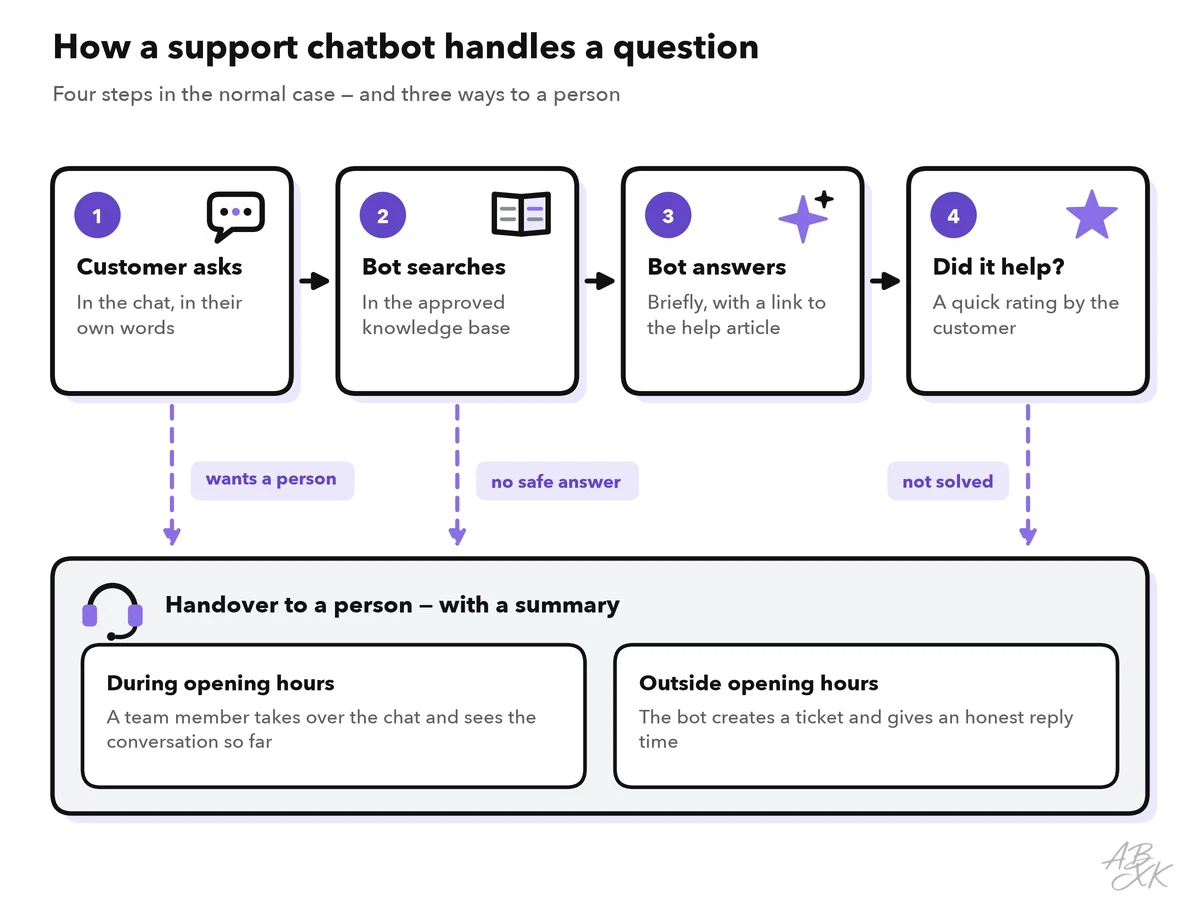
Most tools combine both approaches. Fixed flows work well for tasks with clear steps, such as checking an order status or starting a return. Free-text answers cover the many ways in which customers phrase the same question. In both cases, the most important part of the design is the way out: the moments when the bot hands the conversation to a person.
Choose the first topics
Do not start with everything. Export the requests of the last three months from your email, chat or help desk, sort them by topic and count how often each one comes up. Then pick 10 to 20 topics for the start that come up often, have a clear answer and carry little risk if the answer is wrong.
An AI assistant that your company has approved can help with the sorting. Remove names, email addresses and order numbers first. Then give it a sample of the requests and ask it to group them into topics and count them. Let someone from the service team check the groups: they know which questions only look alike.
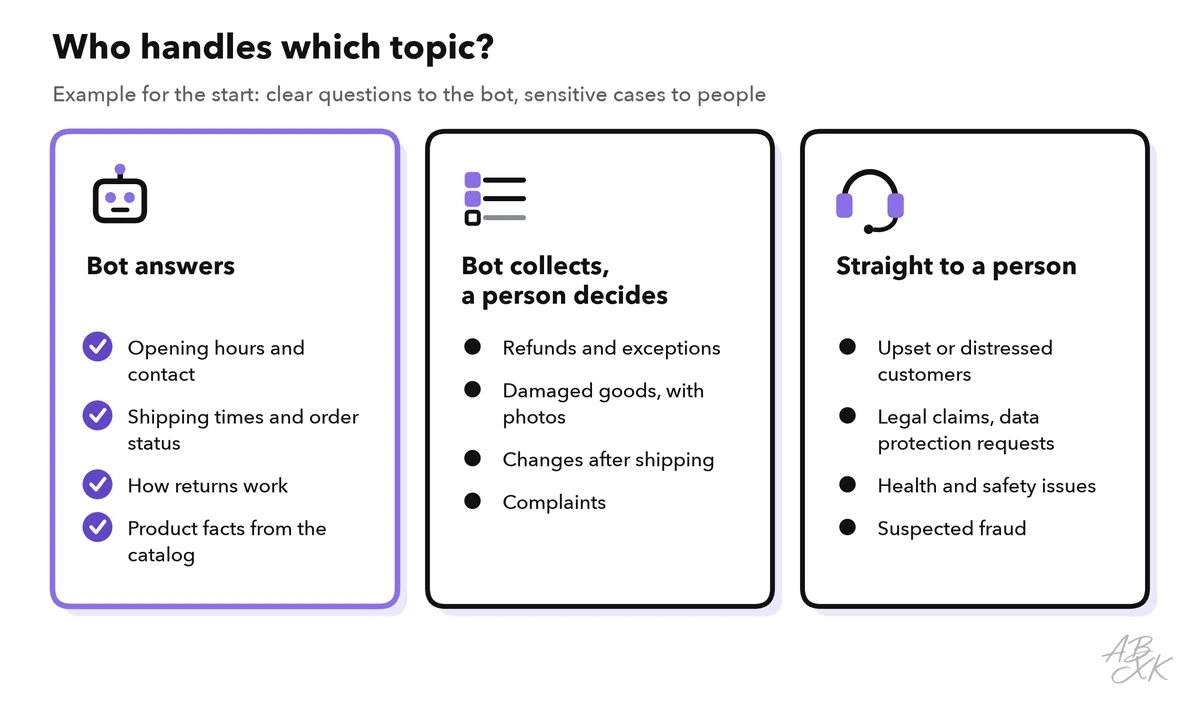
Some topics should go straight to a person, even if the bot could write an answer: upset customers, legal claims, data protection requests, health and safety issues and suspected fraud. For refunds and other exceptions, the bot can collect the details, such as the order number and photos, but a person decides.
Build the knowledge base
The bot can only be as good as the content behind it. If your help pages are outdated, it repeats outdated answers — politely and at scale. Before you switch it on, check the articles for your start topics:
| Rule for each article | Example | Why it matters |
|---|---|---|
| One question, one article | “How do I return an item?” | The bot finds the right passage more reliably |
| State the policy precisely | “Returns within 30 days of delivery, unused, with the receipt” | Vague text leads to vague or invented answers |
| Name the exceptions | “Custom-made items cannot be returned” | Otherwise the bot fills the gap with a guess |
| Add an owner and a review date | “Owner: service lead, review every quarter” | Someone notices when a policy changes |
| Remove old versions | Delete last year’s shipping table | The bot cannot tell which version is valid |
Then set the bot to answer only from this content and to say honestly when it finds nothing. This is not only a matter of quality. The Air Canada case from the Level 0 ground rules for using AI at work shows that a company can be held liable for wrong answers from its chatbot (Source: Moffatt v. Air Canada, 2024 BCCRT 149). Level 0 also explains why AI needs good business data, including documentation.
Set the tone and plan the handover
Write a short tone guide for the bot. Five lines are often enough:
- Address: friendly and polite, first name only if the customer uses it
- Length: at most three sentences, then a link or a question
- Emojis: none, or only in a greeting
- Apologies: apologize once, then help — never blame the customer
- Limits: if unsure, say so and offer a person
Add three example answers in your company’s voice. Many tools have a field for such instructions.
Then make two things clear:
- Customers know it is a bot. Say so in the first message. In the EU, the AI Act requires that people are told when they are interacting with an AI system, unless this is obvious (Article 50).
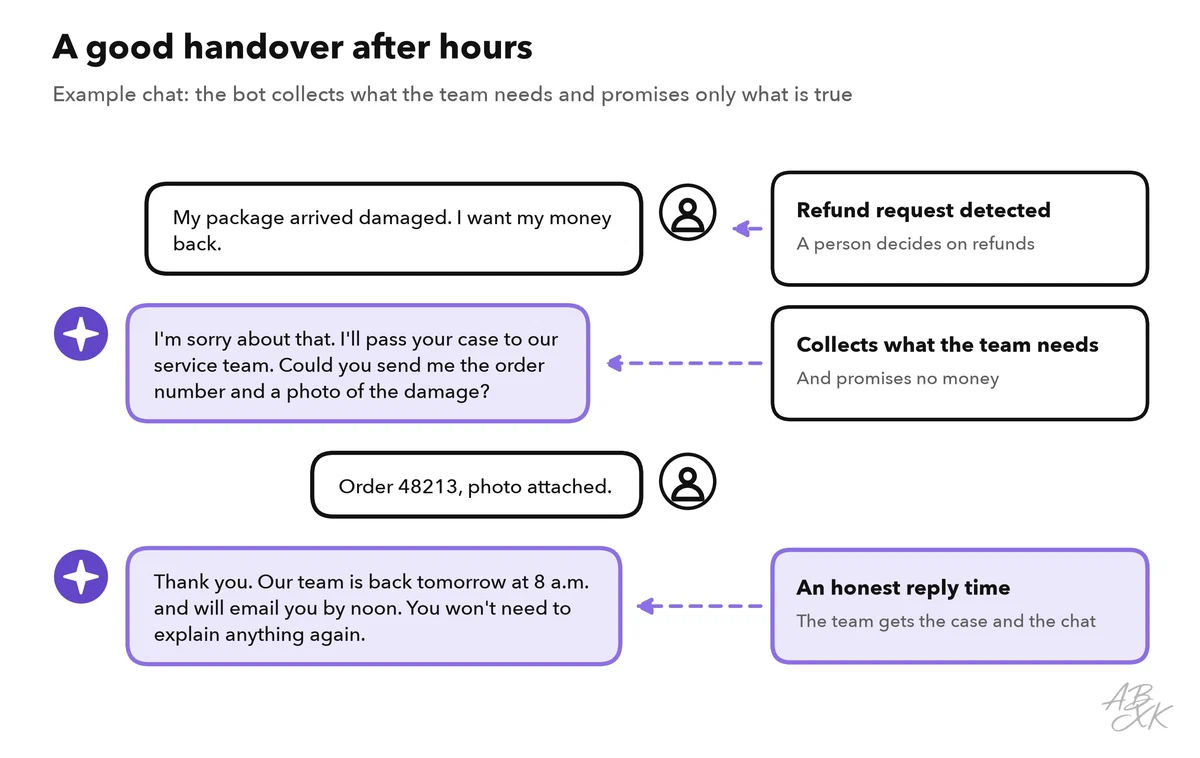
- The way to a person is easy. Offer it at any time, and pass on a short summary so that the customer does not have to repeat everything.
Your team works fixed hours; the bot does not. Outside opening hours, the bot should create a ticket, collect the details and give an honest reply time — not pretend that an agent is about to join.
Choose a tool that fits your team
Tools for customer service range from simple chat widgets for a website to platforms that run AI agents across many channels. Our comparison lists 10 tools in Customer Service & Telephony. The chart shows whom they are built for:
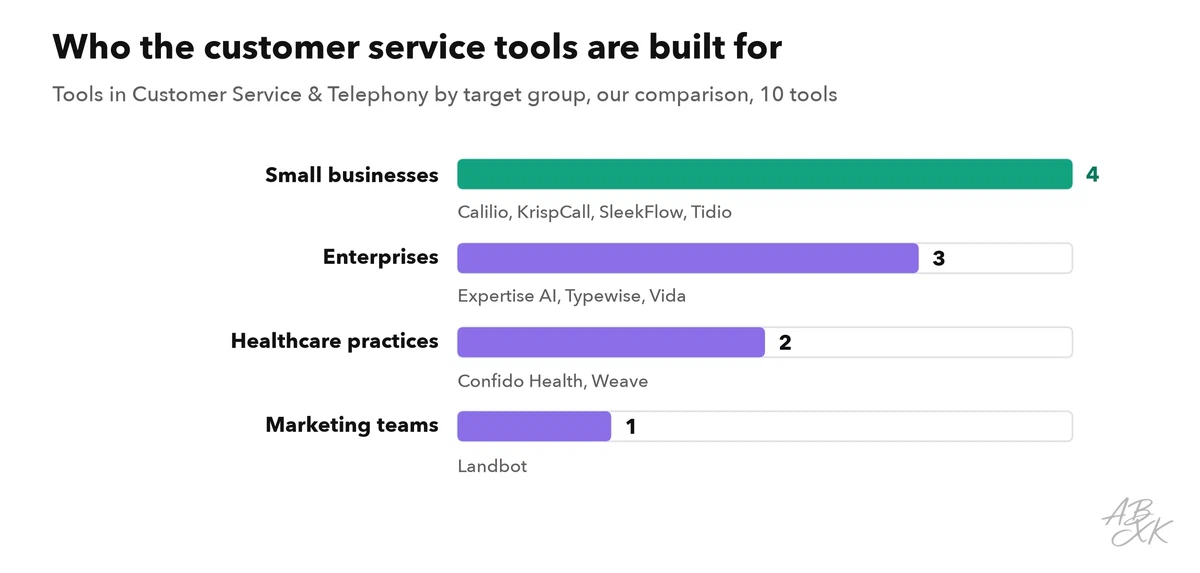
Four examples show the range. According to the vendors, Tidio combines an AI agent called Lyro with live chat and ticketing. Landbot is a no-code builder for chatbots on websites and WhatsApp. SleekFlow brings WhatsApp, Instagram and live chat into one inbox. Typewise targets larger support teams with AI agents that also run workflows in CRM and ERP systems.




Short descriptions from our tool comparison, based on the vendors' information — not tested by ABXK.

Measure what the bot really solves
A bot can look successful on paper while customers give up in frustration. Watch several numbers together:
| Metric | What it shows | Watch out |
|---|---|---|
| Resolution rate | Share of conversations the bot closes without a person | A customer who gives up also counts as “resolved” |
| Handover rate | Share of conversations passed to a person | A very low rate can mean the way to a person is hidden |
| CSAT | Customer satisfaction, often the share of ratings of 4 or 5 on a five-point scale | Only some customers rate; read the comments too |
| Repeat contacts | Customers who come back with the same issue within a few days | The clearest sign of a false “resolved” |
| Unanswered questions | Questions without a match in the knowledge base | Your to-do list for new articles |
Read a sample of conversations every week as well. Numbers show how often something happens; transcripts show why. Level 3 explains how to set up quality checks and escalation in more depth, and Level 2 applies the same ideas to AI phone agents.
Your first 30 days
| Week | Goal | What you do |
|---|---|---|
| 1 | Prepare | Pick 10 to 20 topics, fix their articles, write the tone guide and the handover rules |
| 2 | Test internally | Ask the bot 50 real questions from old tickets, without personal data; fix the content, not just the bot |
| 3 | Start small | Go live on one channel or a few pages, with a visible “talk to a person” option |
| 4 | Review and decide | Compare the metrics with your numbers before the start, read transcripts, decide whether to add topics |