

A sales team, a support team and a finance team all use AI, but rarely in the same way. Sales wants help with research and emails. Support wants fast, correct answers. Finance wants numbers it can trust. And each team needs different data before AI can do anything useful.
This is part 2 of Level 0 in our AI Work learning path. In part 1, you split a job into tasks. Now you get the map for the whole company: five departments, the typical AI use cases in each, the data the AI needs and example tools from our comparison. At the end, you pick a good first use case for your own department.
How to read the department map
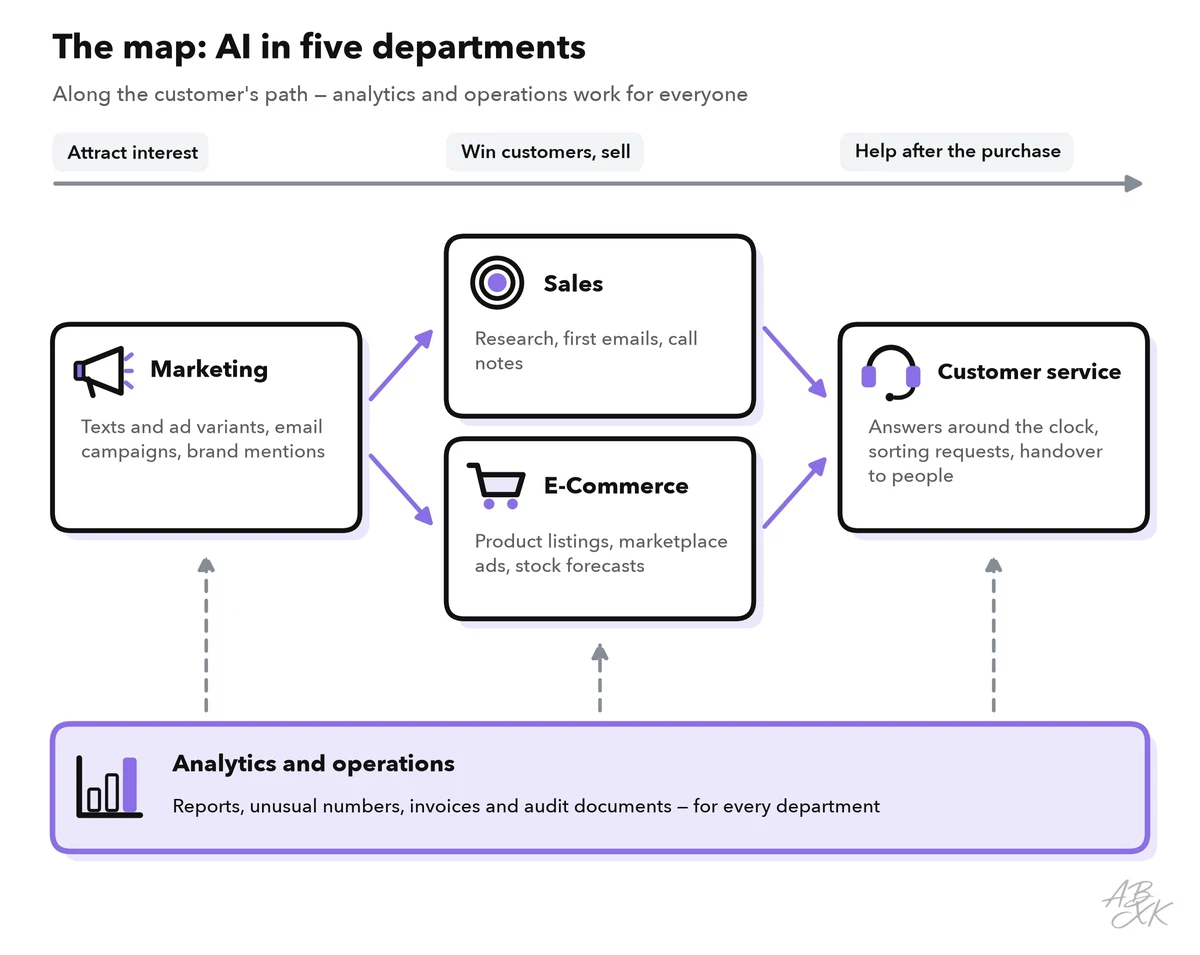
The easiest way to read the map is to follow the path a customer takes. Marketing makes people aware of your products. Sales or an online shop turns that interest into orders. Customer service helps after the purchase. Analytics and operations work in the background for everyone: they measure results, plan stock and handle documents.
For each department on the map, ask three questions:
- What does the AI do here? Usually one of the four kinds of tasks from part 1: drafting, summarizing, sorting or answering.
- What data does it need? AI that works for your business needs your business information: customer records, product data, help articles.
- Who checks the result? Someone in the department must own the quality of what the AI produces.
The table gives a first overview. The tools in the last column are examples from our comparison, not recommendations.
| Department | Typical AI use cases | Example tools in our comparison |
|---|---|---|
| Sales | Research companies and contacts, draft first emails, write call notes | Lusha, Claap, Reply.io |
| Customer service | Answer common questions, sort and route requests, suggest replies, take calls | Tidio, Landbot, Vida |
| Marketing | Draft texts and ad variants, run email campaigns, track brand mentions | AdCreative.ai, GetResponse, Brand24 |
| E-commerce | Write product listings, manage marketplace ads, forecast stock | Teikametrics, Quartile, DataHawk |
| Analytics and operations | Build reports, flag unusual numbers, read invoices and audit documents | Databox, DataSnipper, Snowfire AI |
Five departments up close
Sales: research, outreach and call notes
Salespeople spend much of their time on work around the actual conversation: researching a company, finding the right contact, writing the first email and updating the CRM afterward. A CRM (customer relationship management system) is the database where a company keeps its contacts, deals and conversations. AI helps with all of this. Contact data tools suggest companies that match your ideal customer. Assistants draft first emails. Call tools record a sales call, write structured notes and fill in the CRM.
The human part stays: listening, building trust and negotiating. Keep in mind that business contact details are personal data, so in the EU the data protection rules of the GDPR apply. Level 1 shows how to find and qualify leads with AI.
Customer service: answers, sorting and handover
Customer service gets the same questions again and again: Where is my order? How do I return this? AI can answer such questions around the clock — in a chat window, on WhatsApp or on the phone. It can also sort incoming requests by topic and urgency and suggest replies to human agents.
Two rules matter. First, the AI must answer only from approved, current content, such as your help articles and order data. Second, customers need an easy way to reach a person, especially for complaints and refunds. This hand-off from the bot to a person is called a handover. Level 1 walks you through a first chatbot setup.
Marketing: content, campaigns and monitoring
Marketing produces a lot of text and images: ads, emails, social media posts and landing pages. AI drafts them and creates many variants, so you can test which one works best. It can also scan social media and news for mentions of your brand and sum up what people say.
The risk lies in what gets published. AI can invent product claims or miss your brand voice. So a person approves every text before it goes out, and claims about your products are checked against the facts. Level 1 goes deeper: AI for marketing content and campaigns.
E-commerce: listings, ads and stock
Online sellers manage many products, often on several marketplaces. AI writes and improves product listings, adjusts the bids for ads on marketplaces such as Amazon and forecasts how much stock you need. The data behind these decisions — sales history, stock levels, ad results — comes from your shop and marketplace accounts.
Watch for two risks: listings that promise features the product does not have, and ad spending that grows while nobody looks. Set clear limits and review listings before they go live. Level 1 covers AI for online sellers in detail.
Analytics and operations: reports and documents
This area works for all the others. AI builds reports from several data sources, explains in plain words what changed and flags unusual numbers, such as a sudden drop in orders. In finance and audit work, it reads invoices and contracts and matches them against the records.
Here, correctness comes first. A wrong number in a management report or an audit file can lead to bad decisions. People check the figures, and the definitions behind them must be clear: what exactly counts as an “active customer”? Level 1 explains AI for reports and dashboards.
The data behind the map
Now look at the map from the data side. Some data serves only one department. Other data — customer records, product data and order figures — feeds almost every department. If it is wrong, the mistakes show up everywhere: in the sales email, in the chatbot’s answer and in the monthly report.
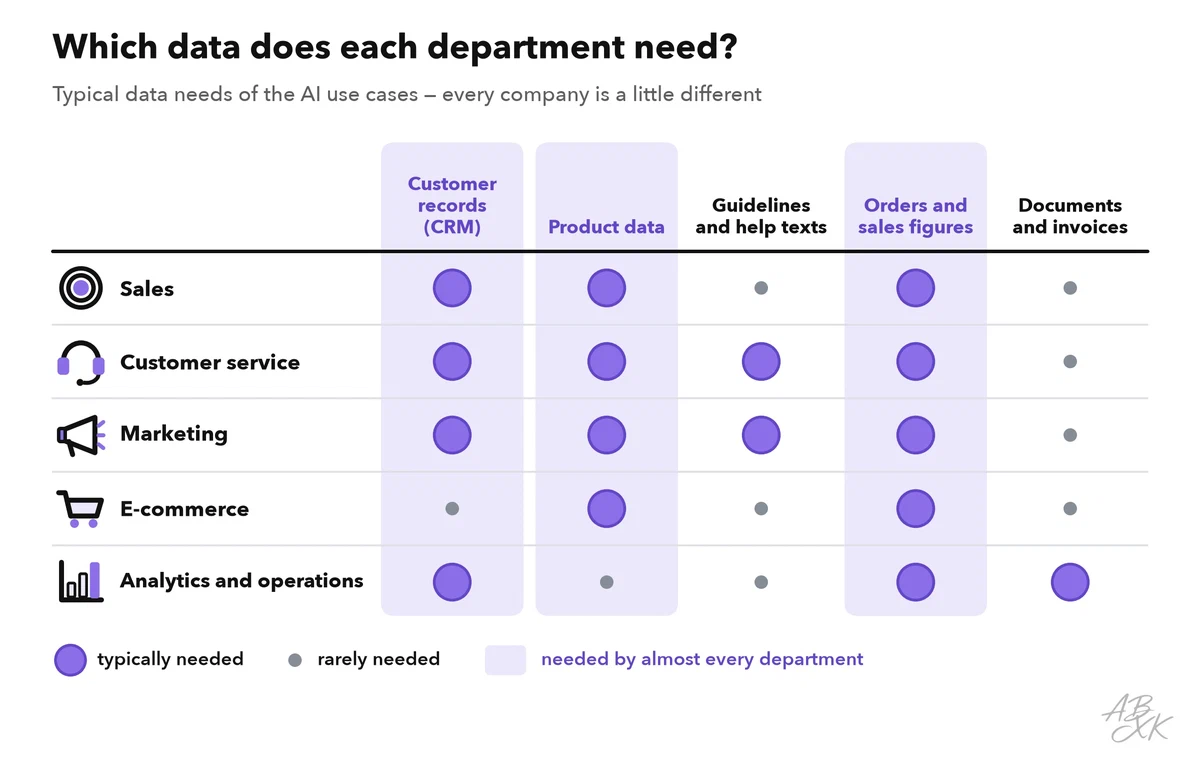
This is why AI projects often start with cleaning up data, not with buying a tool. Part 4 of this level explains what good business data looks like and how to get there.
Two kinds of AI tools
When you look for tools, you will meet two kinds. Some are business software you may already know, such as a CRM, a help desk or an email marketing tool, that has added AI features. Others are built around AI from the start, such as an AI phone agent or an ad generator. Our tool comparison for AI Work lists 46 tools and shows which kind each one is.
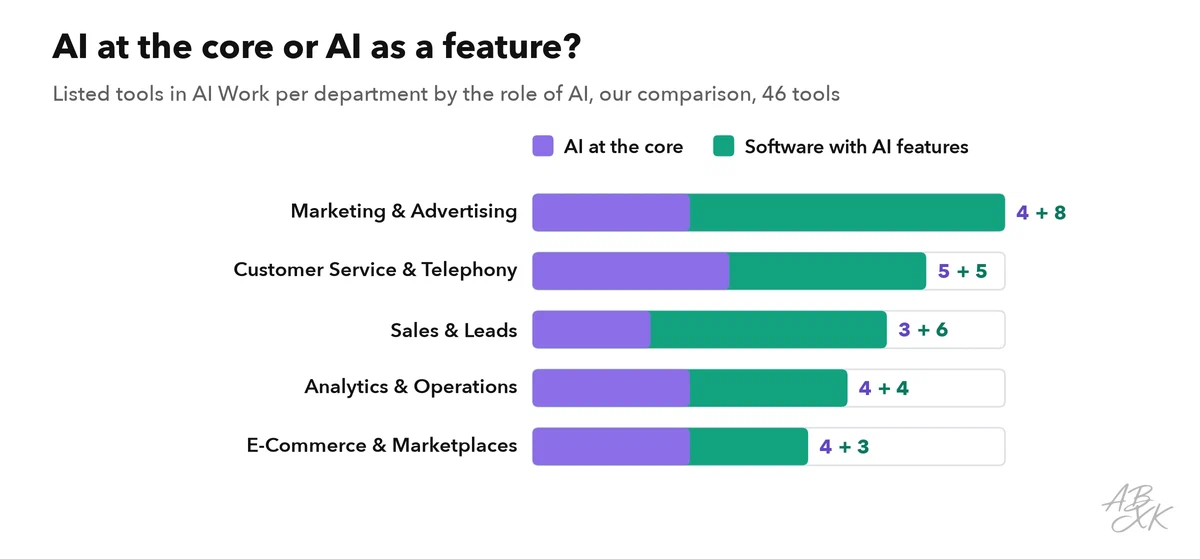
Both kinds appear in every department. Which kind fits depends on your starting point. If your team already uses a CRM or a help desk, look at its AI features first: your data is already there, and your company may already have a contract with the vendor. A specialized AI tool makes sense when a task comes up very often and the built-in features are not enough.
Here is one example tool per department. Each card leads to the tool’s entry in our comparison:





Short descriptions from our tool comparison, based on the vendors' information — not tested by ABXK.
A good first use case for each department
Where should your department start? A good first use case comes up often, carries little risk and is easy to check. Above all, a person who knows the facts sees the result before it reaches a customer or a decision.
| Department | Good first use case | Why it is a safe start | Who checks |
|---|---|---|---|
| Sales | Notes and CRM updates after sales calls | The salesperson knows what was said | The salesperson who led the call |
| Customer service | Suggested replies for human agents | The agent reads every answer before it goes out | The agent |
| Marketing | Variants of an ad text or an email subject line | Nothing is published without approval | The campaign owner |
| E-commerce | First drafts of product descriptions | The facts come from your own product data | The product manager |
| Analytics and operations | Plain-language comments on a weekly report | The numbers stay the same; the AI only explains them | The report owner |
Fully automatic answers to customers come later, once you know how reliable the AI is with your data.