

Invoices, delivery notes, contracts, forms: a lot of business data still arrives on paper or as scanned PDFs. OCR (optical character recognition) turns these images into text that software can work with. With AI, OCR does much more than read letters. It finds the invoice number, splits a table into rows and fills in an accounting record. That saves hours of typing, but it also brings a new kind of error: one that looks perfectly plausible.
This guide explains the three kinds of OCR, what the current OCR benchmarks show, where OCR with AI goes wrong and which checks catch the errors. It ends with a case in which you do not need OCR at all.
Three kinds of OCR
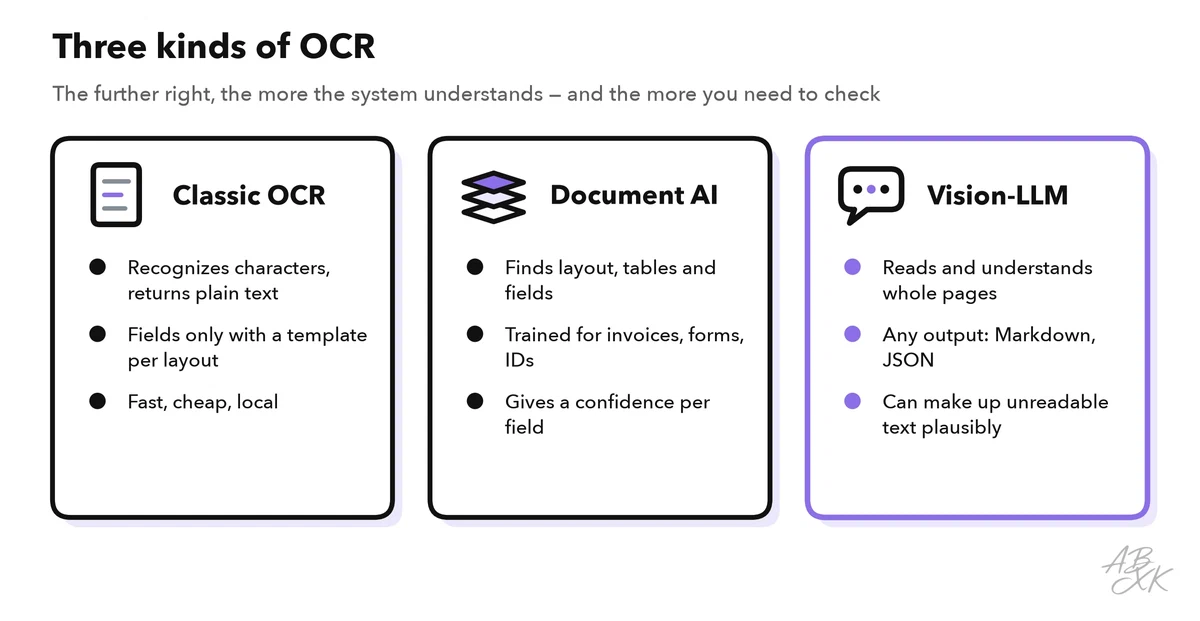
Classic OCR recognizes characters by their shape and returns plain text. Tesseract, an open-source engine first developed at HP and later sponsored by Google, is the best-known example, and most scanners and PDF apps have an OCR function built in. Classic OCR is fast and runs on any computer, but it does not know what it reads: to pull an amount out of an invoice, someone has to define where that amount sits on each layout.
Document AI services add layout analysis and pre-trained models for common document types. Google Document AI, Azure AI Document Intelligence from Microsoft and Amazon Textract recognize invoices, receipts or ID cards, return named fields such as “invoice date” or “total”, and give a confidence score for each field. They work well on the document types they were trained for.
Vision language models (vision LLMs) read a page as an image and understand it in context. You can ask them for Markdown, for JSON with exactly the fields you need, or for an answer to a question about the document. This group includes general models such as Gemini, GPT or Qwen-VL, and specialized document parsers such as PaddleOCR-VL from Baidu, MinerU from Shanghai AI Laboratory and olmOCR from the Allen Institute for AI, which are small enough to run on your own server.
| Classic OCR | Document AI | Vision LLM | |
|---|---|---|---|
| Output | Plain text, often with position | Named fields and tables, with confidence | Text, Markdown or JSON in any structure |
| Strengths | Fast, cheap, runs locally | Reliable on standard documents | Handles new layouts without setup |
| Weaknesses | Needs a template per layout for fields | Weaker on document types it was not trained for | Can invent text that is not on the page |
| Typical use | Searchable archives, simple scans | Invoices, receipts, IDs at volume | Mixed documents, input for LLM workflows |
How AI OCR turns a scan into data
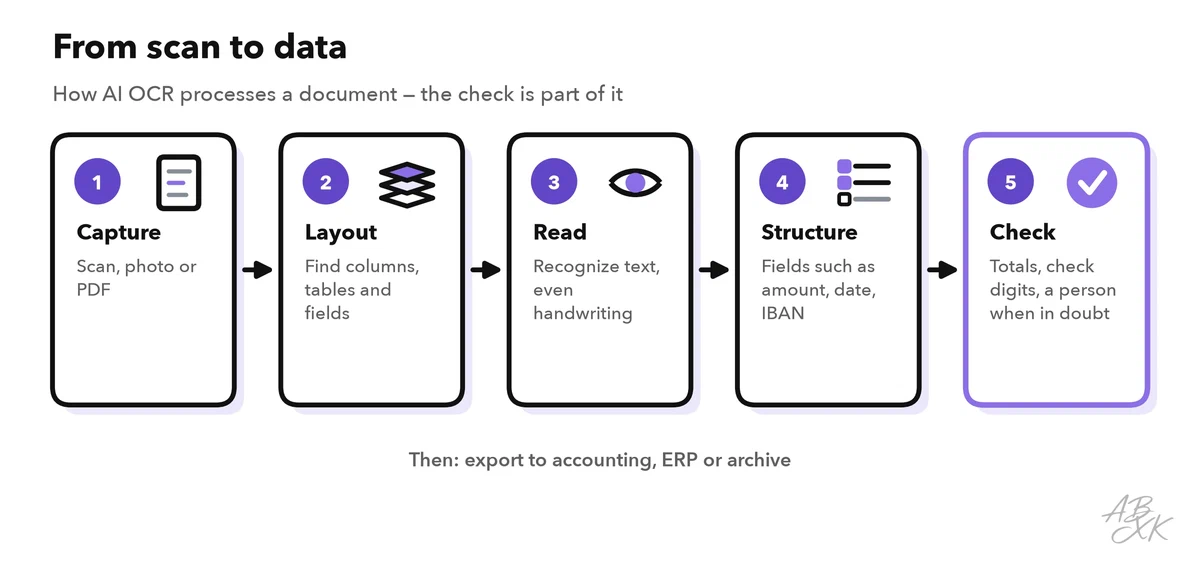
Every OCR workflow runs through the same steps. The quality of the first one limits all others: a crooked phone photo or a fax copy produces more errors at every later step, so scan at a good resolution and straighten pages before processing. The system then finds the layout (columns, tables, stamps), reads the text, maps it to fields such as amount, date and bank account, and finally checks the result before it goes on to accounting, an ERP system or the archive. The last step decides whether OCR saves time or just moves the work to whoever fixes the mistakes later.
What the 2026 OCR benchmarks show
Vendors publish accuracy figures on their own test documents, which makes an OCR comparison difficult. Two open benchmarks test many systems on the same pages.
OmniDocBench from Shanghai AI Laboratory (presented at CVPR 2025) contains 1,651 PDF pages from 10 document types, including academic papers, textbooks, slides, financial reports, newspapers and handwritten notes. It scores text, formulas, tables and reading order together. Selected results from its leaderboard as of September 11, 2026 (Source: github.com/opendatalab/OmniDocBench):
| System | Type | Overall score |
|---|---|---|
| TeleOCR | Specialized document parser | 96.91 |
| PaddleOCR-VL-1.6 | Specialized document parser | 96.34 |
| GLM-OCR | Specialized document parser | 95.22 |
| Gemini 3 Pro | General vision language model | 92.91 |
| Qwen3-VL-235B | General vision language model | 89.78 |
| GPT-5.2 | General vision language model | 86.59 |
| MinerU pipeline | Pipeline of classic tools | 86.47 |
The first eleven places all go to specialized document parsers. General LLMs read documents well, but not best, and many of the leading parsers are open models you can host yourself.
olmOCR-Bench from the Allen Institute for AI checks over 7,000 simple facts on 1,400 documents: is a sentence present, is the reading order right, does a table cell sit under the right header? The best published systems pass about 83 of 100 points; old scans with math, tables and long passages of tiny text are the hardest categories (Source: github.com/allenai/olmocr). Even the best systems still make errors on difficult pages, so a check after OCR stays necessary.
Where OCR with AI goes wrong
Classic OCR fails visibly: a smudged word turns into a jumble of characters that anyone notices. Vision LLMs fail quietly. When a passage is unreadable, they may write something that fits the context instead, such as a plausible date or a rounded amount. The Allen Institute had to fix its own olmOCR model because it invented text on blank pages (Source: github.com/allenai/olmocr). Watch these spots in particular:
- Numbers. One wrong digit in an amount, an IBAN or an invoice number is enough to cause a wrong payment.
- Tables. Cells slip into the neighboring column, especially when a table runs across two pages.
- Handwriting, stamps and notes. A handwritten “paid on” next to the total changes the meaning of the whole document.
- Personal data. Invoices and forms contain names, addresses and bank details. Sending them to a cloud OCR service is processing on your behalf under the GDPR and needs a contract; AI Security covers what to clarify first.
These checks catch most errors before they reach accounting:
| Check | What it catches | How it works |
|---|---|---|
| Confidence threshold | Fields the system is unsure about | Fields below a set confidence go to a person |
| Arithmetic | Wrong amounts | Net plus tax equals gross; line items add up to the total |
| Check digits | Wrong IBANs and tax IDs | IBANs carry check digits that reveal most single-digit typos |
| Master data | Wrong supplier or customer | Compare names and bank details with your own records |
| Duplicates | Double payments | Same invoice number, supplier and amount seen before |
| Sample review | Errors that creep in over time | A person checks a random sample every week |
Clean master data makes the master data check work. Why data quality matters even more with AI, and how to manage it, is covered in our guide to data quality management.
E-invoices: when you need no OCR at all
The best OCR is the one you can skip. A structured e-invoice already contains its data as fields, so reading an image of it would only add errors. Germany has required all businesses to be able to receive structured e-invoices in formats such as XRechnung or ZUGFeRD since January 1, 2025; issuing them becomes mandatory in two steps, in 2027 and 2028 (Source: German Federal Ministry of Finance, bundesfinanzministerium.de). The EU’s “VAT in the Digital Age” package makes e-invoices mandatory for cross-border sales between businesses from July 2030 (Source: Council of the EU, consilium.europa.eu). Process e-invoices directly, and keep OCR for paper, image PDFs and documents from partners who do not send structured data.
How to choose an OCR approach
Start from your documents, not from the technology:
| Question | If yes |
|---|---|
| Do you only need searchable text, for example for an archive? | Classic OCR is enough, often already built into your scanner or PDF app |
| Are most documents standard types such as invoices and receipts? | A document AI service with pre-trained models |
| Do layouts vary a lot, or do you need Markdown or JSON for an AI workflow? | A vision LLM or a specialized document parser |
| Must documents stay on your own servers? | An open model such as PaddleOCR-VL or olmOCR on your own hardware |
| Do you process thousands of pages a day? | Compare speed and cost per page with your own documents before you decide |
Whatever you choose, test it on 50 of your own documents, including bad scans and handwritten notes, and count errors per field, not per page. Our comparison lists 8 tools for analytics and operations, among them DataSnipper, which extracts and cross-checks documents in audit and finance work:

Short descriptions from our tool comparison, based on the vendors' information — not tested by ABXK.AI.