

Copy, paste, ask: that is how most people use AI tools, and it is also how confidential data slips out. Many data leaks with AI tools need no hacker, just a quick paste into the wrong tool. The good news: you rarely need the real data to get good help.
This is part 4 of Level 1 in our AI Security learning path. Part 3 of Level 0 explained what happens to your data in an AI chat: where it is stored, who may read it and how account types differ. This part is about the decision before you paste. You will learn six data classes that need care, three safer ways to get the same help, a ten-second decision rule and what to do if you pasted something by mistake.
Why one paste can be a security problem
Once you paste text into an AI tool, it leaves your control. It is stored on the provider’s servers, and depending on your account, people may review it or the provider may use it for training. It can also turn up where you did not expect it:
- Through bugs. In March 2023, a bug in an open-source library let some ChatGPT users see the titles of other users’ chats (Source: OpenAI, “March 20 ChatGPT outage: Here’s what happened”, 2023).
- Through stolen accounts. Whoever gets into your AI account can read your whole chat history.
- Through shared links and connected apps. A shared chat or a connected app can carry your text further than you meant.
- Through the assistant itself. As part 2 of this level showed, prompt injection can trick an assistant into passing on what it has seen.
OWASP puts the disclosure of sensitive information second in its list of the top ten risks for AI applications (Source: OWASP Top 10 for LLM Applications 2026, LLM02, genai.owasp.org). For you as a user, the safest data is the data you never paste. Before every paste, ask: does the AI really need this to do the task?
Six data classes that need care
A data class is a group of data with the same level of risk. Many companies sort their data into classes such as public, internal, confidential and strictly confidential. For AI tools, six classes need the most care:
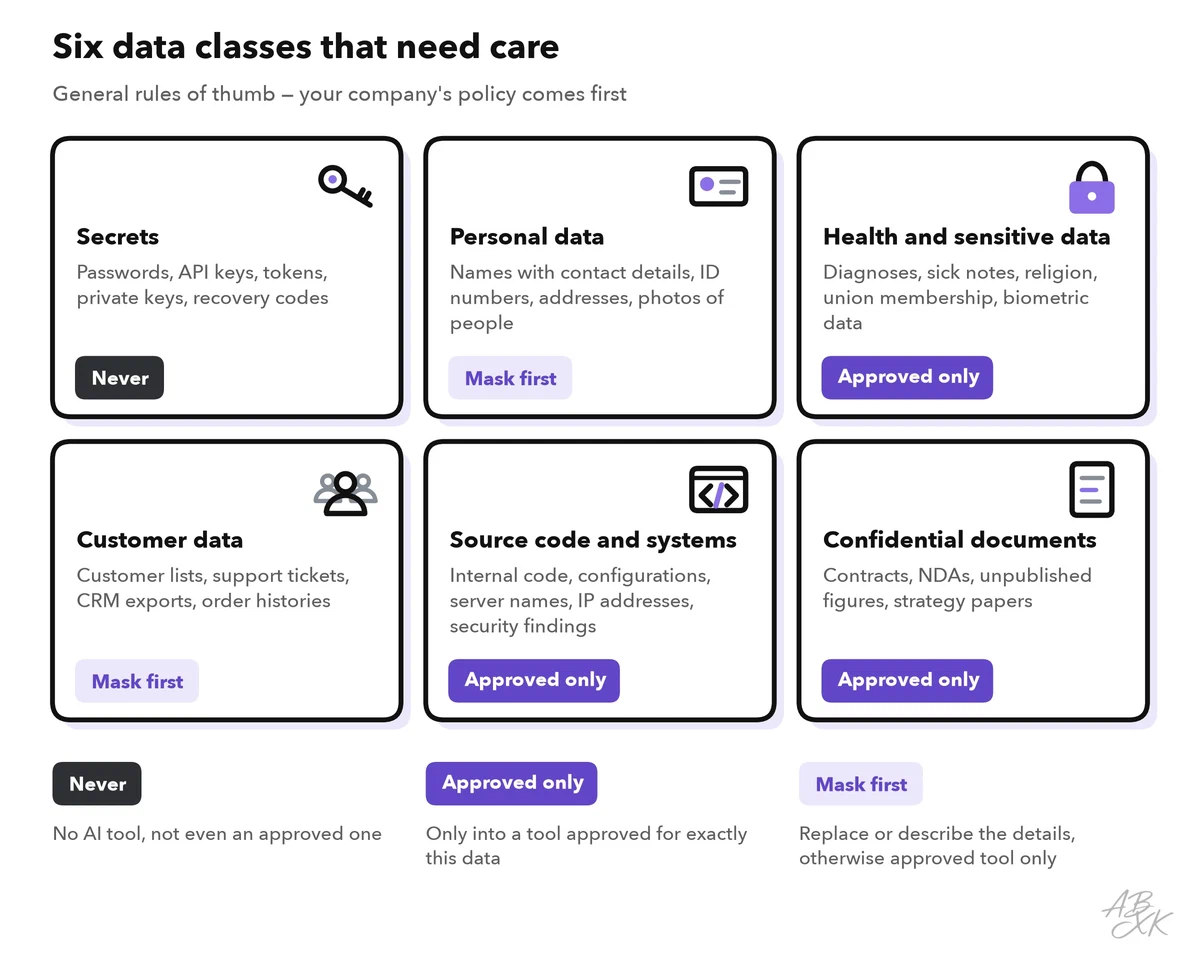
The table shows typical examples and why each class is risky:
| Data class | Examples | Why it is risky |
|---|---|---|
| Secrets | Passwords, API keys, access tokens, private keys, recovery codes | Whoever sees them can log in as you or your company |
| Personal data | Names with email, phone or address, ID numbers, photos of people | Data protection law applies, and a leak harms real people |
| Health and sensitive data | Diagnoses, sick notes, religion, union membership, biometric data | Stricter legal rules apply, and a leak can cause lasting harm |
| Customer data | Customer lists, support tickets, CRM exports, order histories | Customers and contracts expect discretion |
| Source code and systems | Internal code, configuration files, server names, IP addresses, security findings | It shows attackers how your systems work and where they are weak |
| Confidential documents | Contracts, NDAs, unpublished figures, strategy papers | They are often covered by confidentiality agreements that a leak would break |
Two terms help here. Personal data is any information that relates to an identified or identifiable person (GDPR, Article 4). A name counts, and so can a job title combined with a small town. Special categories of personal data include health data, religious beliefs, union membership and biometric data used to identify a person. The GDPR sets stricter rules for them (Article 9). In the US, the HIPAA Privacy Rule protects health information held by health plans, many health care providers and their business associates.
Three safer ways to get the same help
You rarely need the real data. Most tasks work just as well with one of these three approaches:
- Mask it. Replace names, numbers and other details with placeholders such as [Customer A] or [Amount]. The AI can still improve the tone of a reply or the structure of a report.
- Describe it. Instead of pasting a document, describe the situation in a few sentences. This often gives you a better prompt anyway.
- Use an approved tool. For work that needs the real data, use the tool your company has approved for exactly this kind of data.
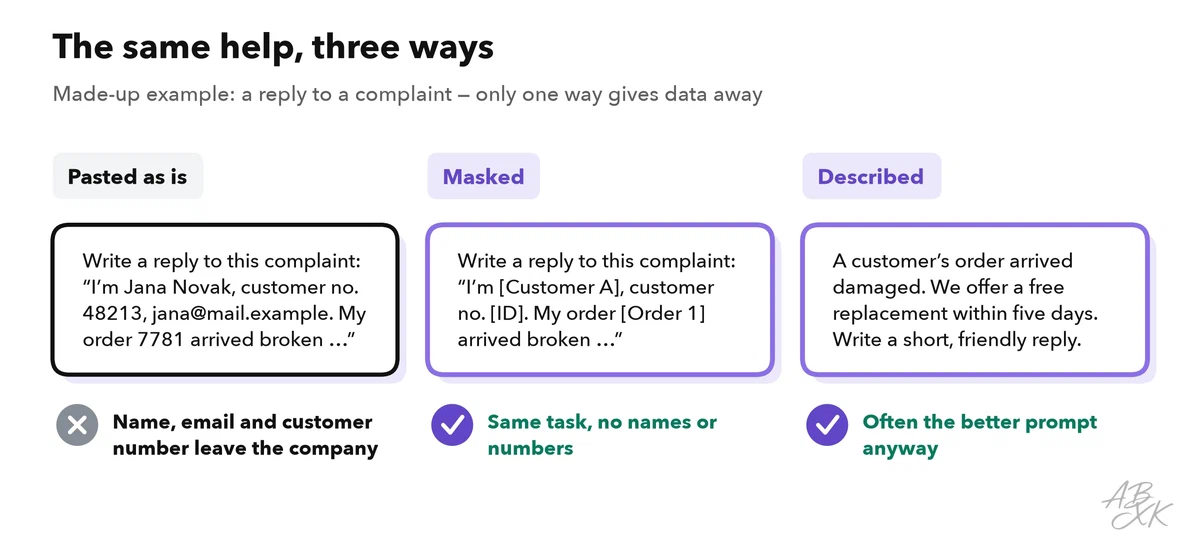
Masking has limits. A rare job title, a small town or a unique event can identify a person even without a name. And as long as your company can link the placeholders back to the person, for example with a list of who is who, the masked data is still personal data under the GDPR. Masking lowers the risk, but it does not make an unapproved tool acceptable for customer data. Level 2 explains masking, pseudonymization and automatic checks in data leakage controls for AI tools, and our guide on protecting personal data with AI tools goes deeper into the techniques.
Which tools are approved? Ask before you start, not after. Our tool comparison alone lists 131 AI tools, and each one handles data in its own way. No company can check them all, so a short list of approved tools is normal. Companies that want firm rules use control layers that decide which AI agents and models may access which data. According to the vendor, Airia is such a platform. Some tools avoid the question entirely: our own AI Text Detector analyzes text in your browser, so nothing is uploaded.


Short descriptions from our tool comparison, based on the vendors' information — not tested by ABXK.
The ten-second decision rule
Before you paste, ask two questions: How sensitive is this data? And is this tool approved for exactly this kind of data? The answers place you in one of four fields:
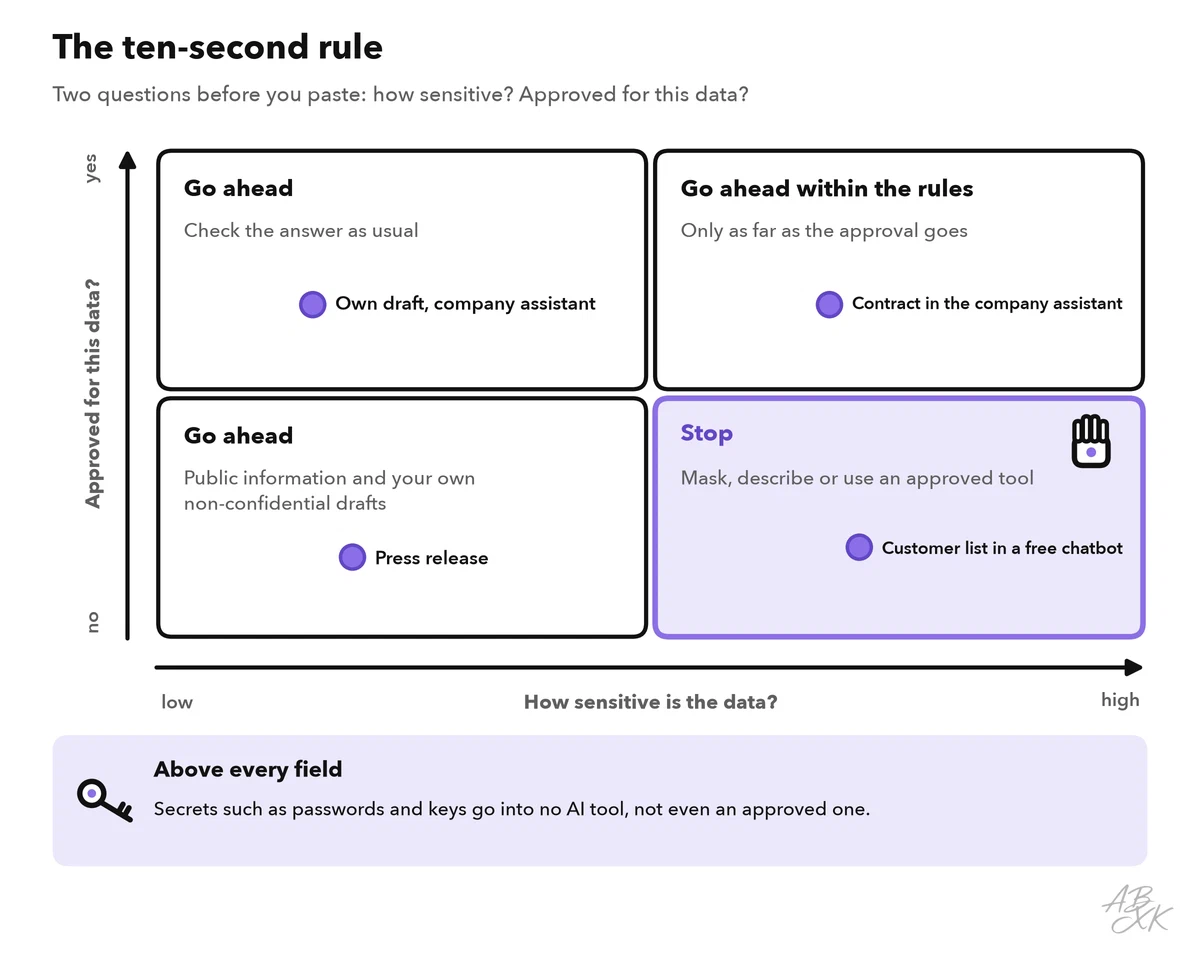
Three fields say go ahead. Only one says stop: sensitive data in a tool that is not approved for it. In that field, you have three ways out, the same ones as above: mask it, describe it or switch to an approved tool.
If you pasted something by mistake
Mistakes happen. What matters is a fast, calm reaction without blame:
| What you pasted | What to do now |
|---|---|
| A password, key or token | Change or revoke it right away. Deleting the chat is not enough. |
| Personal or customer data | Delete the chat and tell your data protection officer or IT team. They decide whether it must be reported. |
| Source code or system details | Tell your security team and replace any secrets the code contained. |
| A confidential document | Delete the chat and inform the person responsible for the document. |
| Anything in a shared chat | Delete the shared link first, then the chat. |
Speed matters for two reasons. Providers may keep copies of deleted chats for a while, for example for abuse checks, so changing a secret protects you more than deleting the chat. And in the EU, a company must report a personal data breach to the data protection authority within 72 hours where feasible. There is no duty to report if the breach is unlikely to put people at risk (GDPR, Article 33). Your company can only meet that deadline if you speak up early.