

You type a question, press Enter and get an answer a few seconds later. It feels like a private conversation, almost like a note to yourself. In reality, your text has traveled to a data center. What happens to it there depends on the provider, your account and a few settings that many people never open.
This guide is part 3 of Level 0 in our AI Security learning path. It covers the second side of AI security from part 1: your data in AI tools. You will learn where your prompts go, how long chats are kept, when people or models see them, how business accounts differ from personal ones and what you should not share at all.
The journey of a prompt
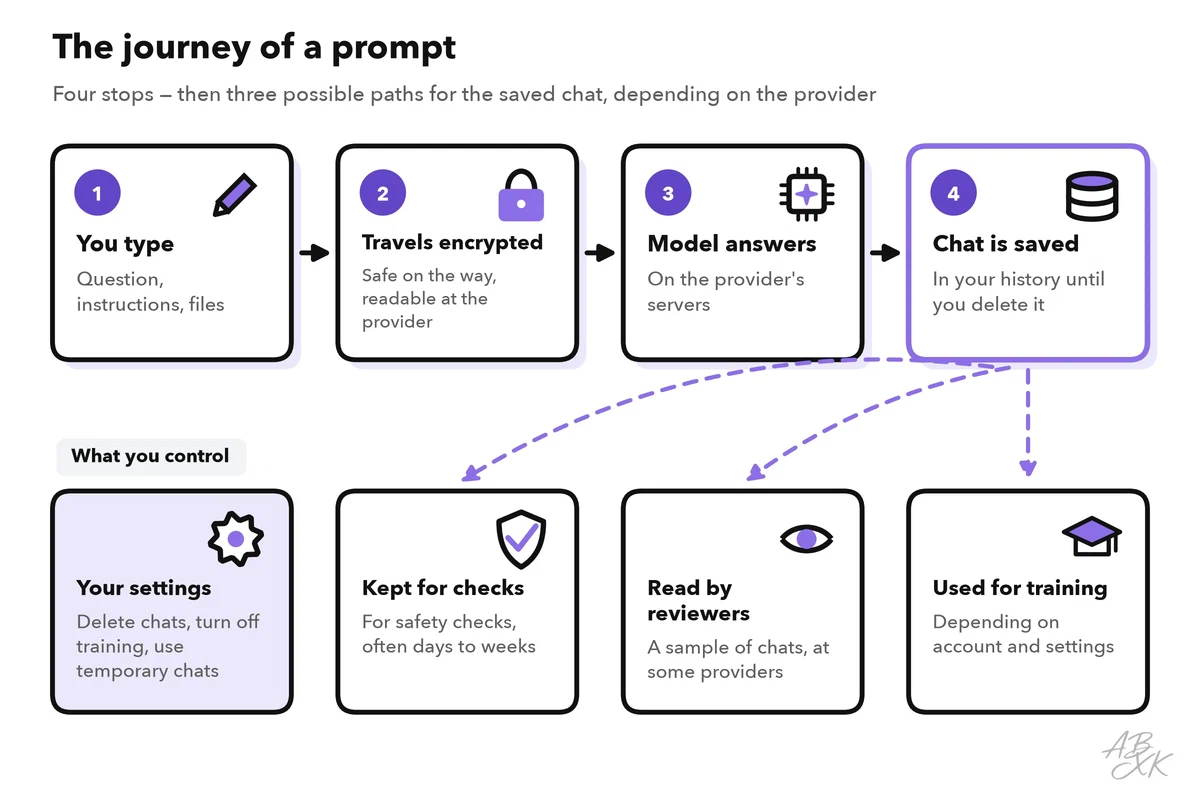
A prompt is everything you send to an AI tool: your question, your instructions and any file you upload. Its journey has four stops:
- You type. The prompt starts on your device, together with the earlier messages of the chat.
- It travels encrypted. The connection to the provider is encrypted, so nobody can read along on the way. On the provider’s servers, however, the text is readable again; it has to be, or the model could not answer.
- The model answers. The model runs on the provider’s computers, not on your phone or laptop. Automated systems also check many requests for abuse.
- The chat is saved. Most assistants keep the chat in your history so you can return to it. From there, copies can take other paths, depending on the provider and your settings.
How long your chats are kept
Your chat history usually stays until you delete it, or until an automatic deletion period runs out, which some assistants let you set. Deleting removes the chat from your view at once; the provider removes it from its systems after a certain period. Two points surprise many people:
- “Off the record” is not zero. Many assistants offer a temporary or incognito chat. OpenAI says temporary chats in ChatGPT do not appear in your history and are not used to train its models. But a copy may be kept for up to 30 days for safety reasons (Source: OpenAI Help Center, Temporary Chat, help.openai.com). Google keeps Gemini chats for 72 hours even when you have switched off the activity setting (Source: Gemini Apps Privacy Hub, support.google.com).
- Some copies stay longer. Google states that Gemini chats that human reviewers have looked at are kept for up to three years, and that deleting your activity does not delete them (same source).
Human review and training
Two more things can happen to a saved chat. Both are normal practice, and both are worth knowing about.
Human review means that trained people at the provider read a sample of conversations, for example to rate the quality of answers. Google states that a subset of Gemini chats is reviewed by humans, and it asks users not to enter confidential information that they would not want a reviewer to see.
Training means that the provider uses conversations to improve future models. On personal accounts, this is often allowed by default or asked as a choice, and you can usually switch it off:
- OpenAI may use content from ChatGPT on personal plans to train its models unless you opt out. If you rate an answer with thumbs up or down, the whole conversation may still be used, even after you opted out (Source: OpenAI, “How your data is used to improve model performance”, openai.com).
- Anthropic changed its consumer terms in 2025: users of Claude’s personal plans choose whether their chats may be used for training. If they allow it, data is kept for up to five years; if not, for 30 days (Source: Anthropic, “Updates to our consumer terms”, August 2025, anthropic.com).
Why does training matter for privacy? Research has shown that language models can memorize parts of their training data and repeat them word for word (Source: Carlini et al., “Extracting Training Data from Large Language Models”, USENIX Security 2021). Providers filter their training data, but the safest text is the text you never pasted.
Personal account, business account or your own computer
The same assistant can follow different rules depending on the account you use. OpenAI, for example, states that by default it does not train on data from ChatGPT Business, ChatGPT Enterprise or its API (Source: OpenAI, Business data privacy, openai.com). Anthropic’s 2025 change does not apply to business plans or the API either.
| Account type | Used for training? | Who controls the settings | Good for |
|---|---|---|---|
| Free or paid personal account | Often yes, unless you switch it off | You | Private use, no confidential work data |
| Business or enterprise plan | Usually not by default; check the contract | Your company’s admins | Work data that your company has approved |
| API for developers | Usually not by default; short storage for abuse checks is common | The company that builds the app | Apps and automations built on a model |
| Model on your own computer | No; nothing leaves your device unless the app sends it | You | Very sensitive text, offline work |
Two details matter at work. First, a business plan comes with a contract that says how the provider may process your company’s data. In the EU, this is a data processing agreement, a contract required by the GDPR when a service provider handles personal data for you. Second, on a business account, your company’s admins set the rules, and depending on the plan they can also access chat records, for example for compliance checks.
The last row of the table is an option, not a must. Open-weight models can be downloaded and run on your own hardware. Our LLM database currently lists 172 models with open weights. Small ones run on a good laptop; large ones need strong graphics hardware.
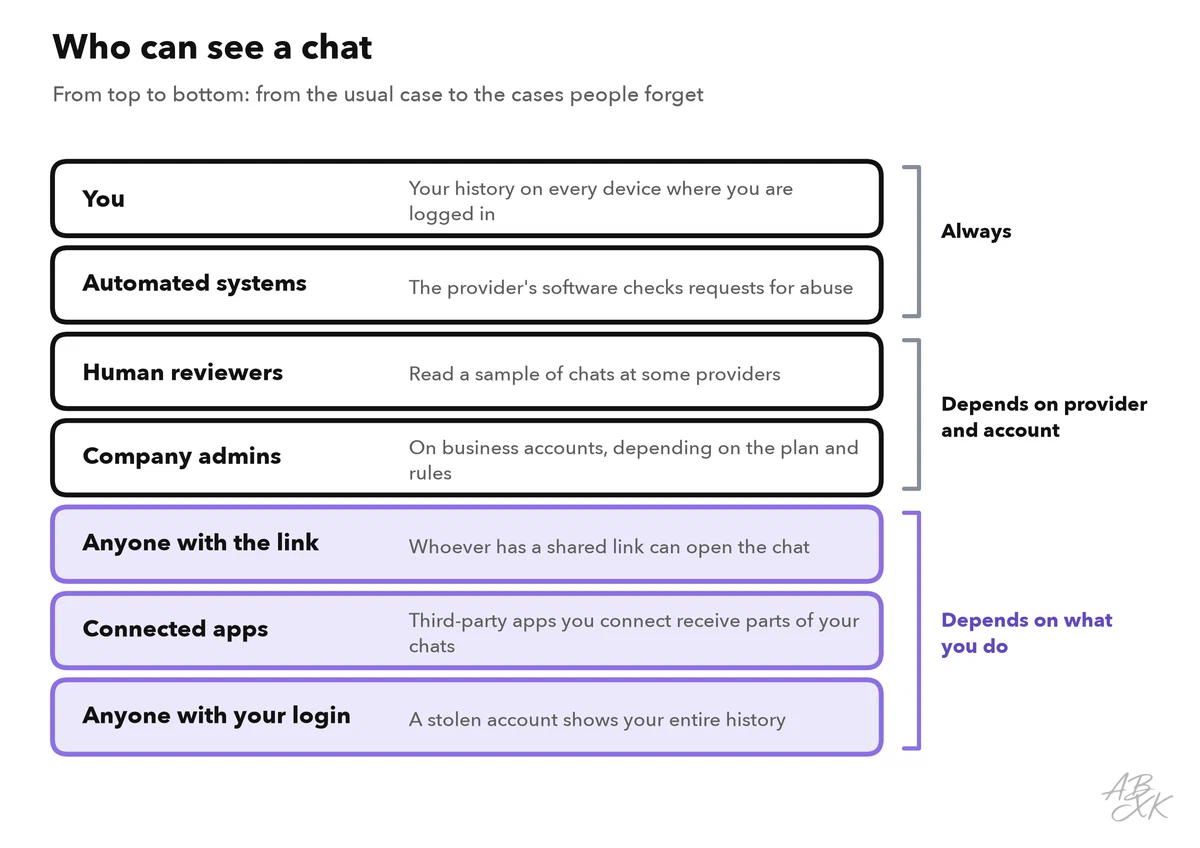
The figure shows who can see a chat. The last layer depends most on you: a stolen login shows a stranger your entire chat history.
Settings worth checking
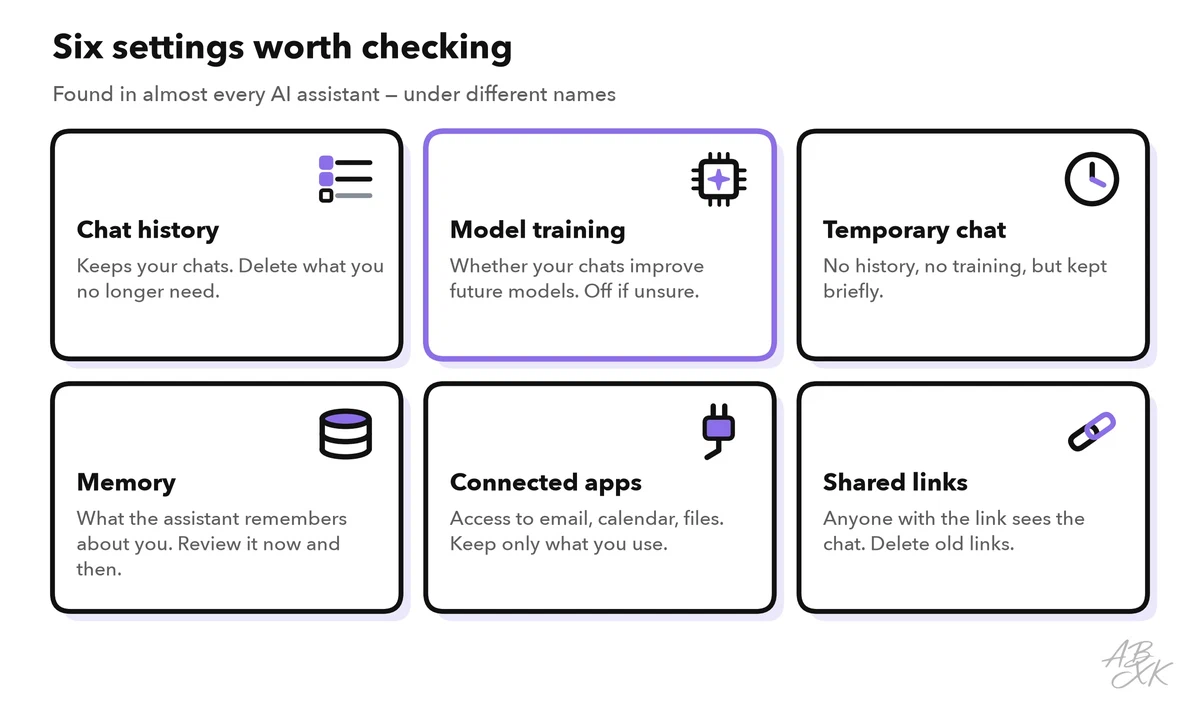
Every major assistant has a privacy or data section in its settings. The names differ, but the same six switches show up again and again. Part 4 of this level adds them to a complete safety checklist for everyday AI users.
Some tools avoid the question entirely because they never upload your text. Our own AI text detector analyzes text right in your browser. At the other end, companies that want to manage their AI tools centrally and securely use platforms such as Airia, according to the vendor. We have not tested the vendor tools.


Short descriptions from our tool comparison, based on the vendors' information — not tested by ABXK.
What to keep out of any AI chat
Settings reduce the risk; they do not remove it. Some data does not belong in a chat with a public AI tool at all, no matter what the settings say:
- Passwords, access codes and keys. No AI task needs them.
- Personal data of other people. Customer lists, employee records, a friend’s health story.
- Your own sensitive numbers. Bank details, ID numbers, health data.
- Company secrets. Unpublished figures, contracts, source code, strategy papers, unless your company has approved the tool for exactly this.
Often you can get the same help without the real data: replace names with placeholders like “Customer A”, round the numbers, or describe the problem instead of pasting the document. Level 1 goes into detail on what not to paste into an AI tool, and our guide on protecting personal data with AI tools shows techniques such as masking.
Practice: a five-minute privacy check
Pick the AI assistant you use most and work through these steps:
- Open the settings and look for a section called privacy, data controls or activity.
- Decide on training. If you do not want your chats to improve future models, switch it off. Note that this usually applies only to new chats.
- Check the history and memory. Delete old chats that contain personal details, and look at what the assistant has stored about you in its memory.
- Review shared links. Many assistants list the chat links you have shared. Delete the ones you no longer need.
- Check connected apps. Remove access to email, calendar or cloud storage that you do not actively use.
- Write down one rule for yourself, for example: “Customer names never go into a personal AI account.”