

A photo of a flooded harbor goes viral. A voice message from your “son” arrives from an unknown number. A video shows a politician saying something shocking. Before you share, pay or react, a few minutes of checking are worth it. You need no special software: most checks work with free search tools and a careful look.
This is part 5 of Level 1 in our AI Security learning path, the last part of this level. Part 5 of Level 0 explained what detectors and content credentials can and cannot do. This part turns that knowledge into a routine: six steps for images, audio and video, how much each clue proves and when to hand a case to experts.
Many fakes need no AI at all
Deepfakes make the headlines, but many false pictures are much simpler. A real photo from another year, another city or another event gets a new caption. Experts call such low-tech tricks cheapfakes. Google researchers studied the images in a large sample of published fact checks. AI-generated images were on the rise. Yet simple tricks, above all real images in a false context, still made up the majority when the data collection ended in November 2023 (Source: Dufour et al., “AMMeBa”, 2024, arxiv.org).
The tools for AI fakes are easy to reach, too. Our tool comparison alone lists 13 text-to-image generators, 11 video generators and 13 voice generators in AI Productivity. The routine below helps against both kinds of fakes, because it checks where a file comes from, not only how it looks.
Six steps for every photo, voice message and video
The routine has six steps. They work for images, audio and video alike, and the first three often settle the question within minutes.
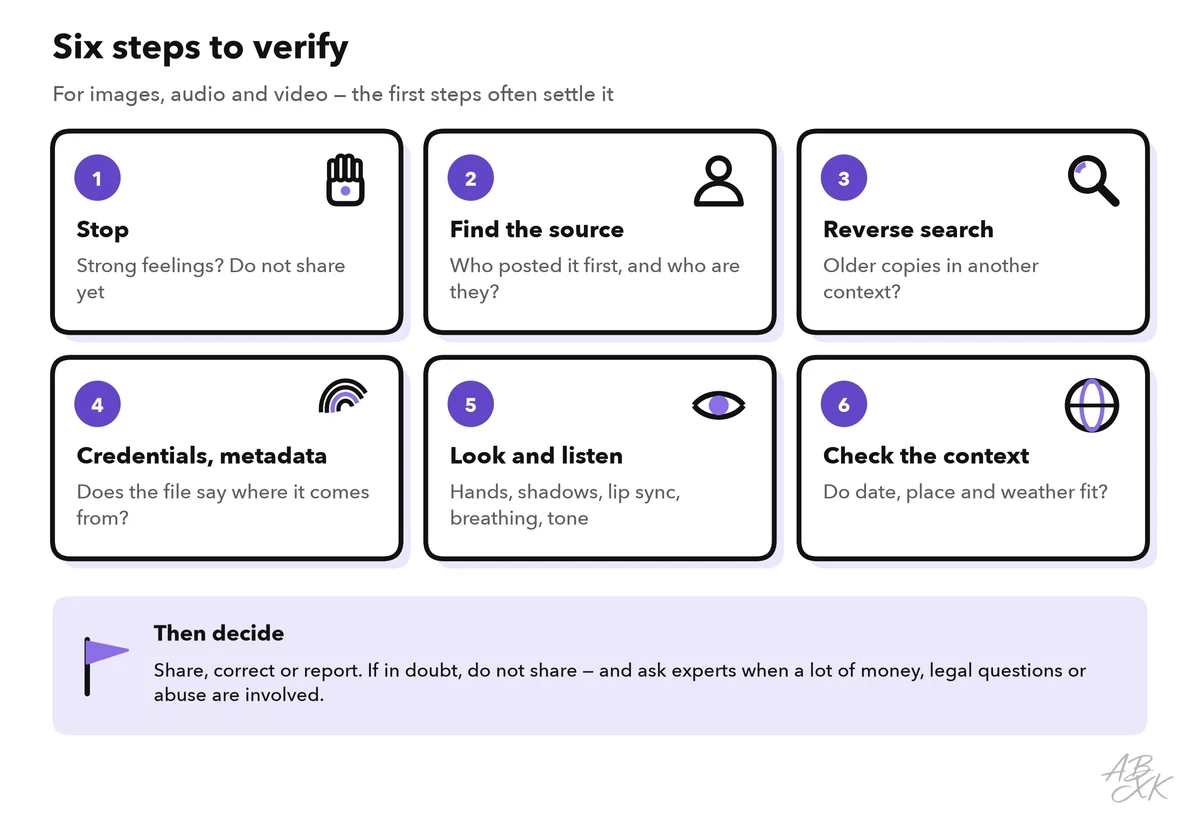
Step 1: stop. Fakes are made to trigger strong feelings: fear, anger, pity or joy. That feeling is your cue to slow down. Do not share, pay or reply yet.
Step 2: find the source. Who posted it first? A repost of a repost is not a source. Open the account and look at its age, its other posts and whether it really belongs to the person or organization it names. A new account with a famous name is a warning sign. For a voice message, the source is the sender: is this a number you already know?
Step 3: search for older copies
A reverse image search uses a picture instead of words and finds where the same or similar pictures appear online. Free options include Google Lens, Bing Visual Search and TinEye. Look for the oldest copy and its original context. TinEye can sort the results by date. In Google, the “About this image” view shows when Google first saw a picture and how other websites describe it (Source: Google, 2023, blog.google).
For a video, take screenshots of a few key moments, such as the first frame, a clear face or a street sign, and search for each one. Journalists often use the free InVID-WeVerify browser plugin, which extracts such key frames automatically.
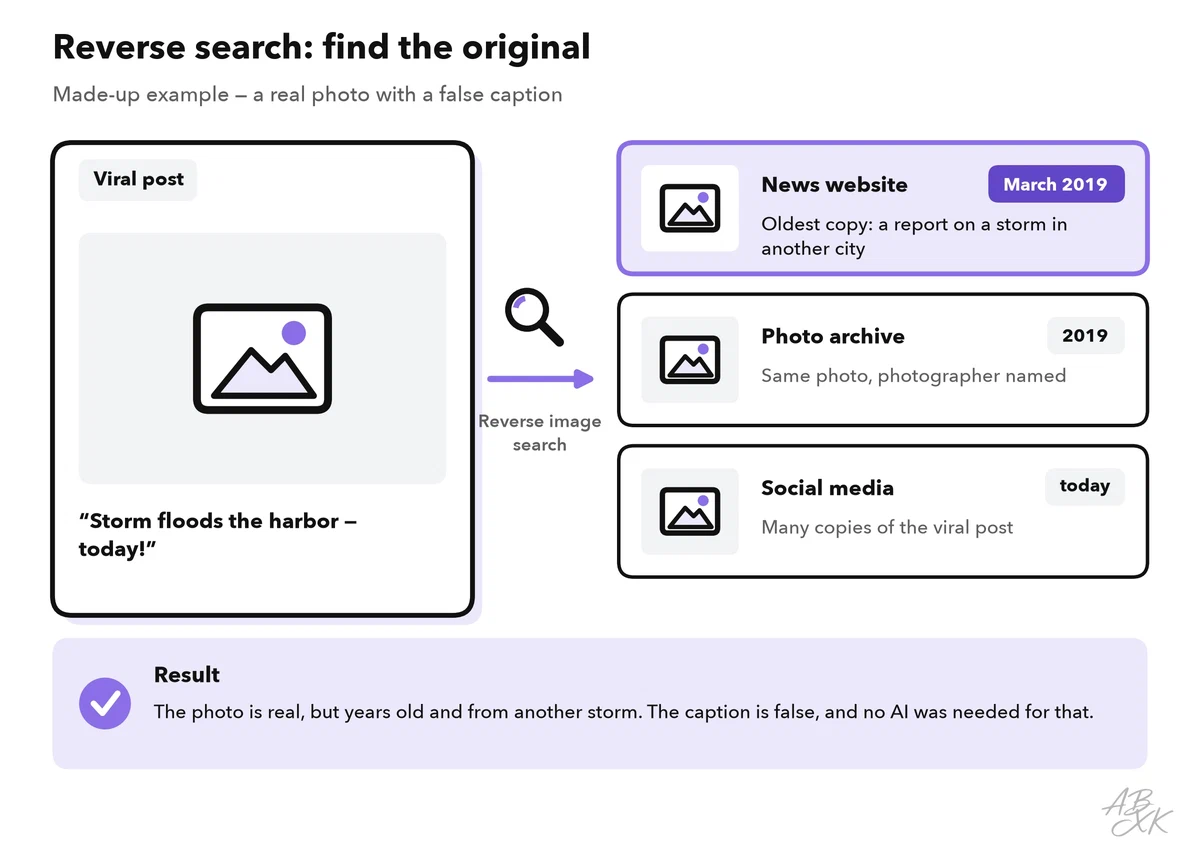
No hit proves nothing. A new picture may not be indexed yet, and an AI-generated image has no original photo to find. In that case, the next steps have to carry the weight.
Step 4: read the file’s origin data
Many files carry information about where they come from. Metadata, in photos often called EXIF data, can include the camera model, the date and sometimes the location. Most photo apps show it in the image’s info or details view. Content credentials, which part 5 of Level 0 introduced, go further. Some cameras and AI tools add them: signed information about which tool made or edited a file. You can check a file for them on the free Verify page of the Content Authenticity Initiative (contentcredentials.org). Google says you can also upload an image to the Gemini app and ask whether Google AI made it. This only covers Google’s own tools (Source: Google, November 2025, blog.google).
Origin data has one big weakness: it gets lost easily.
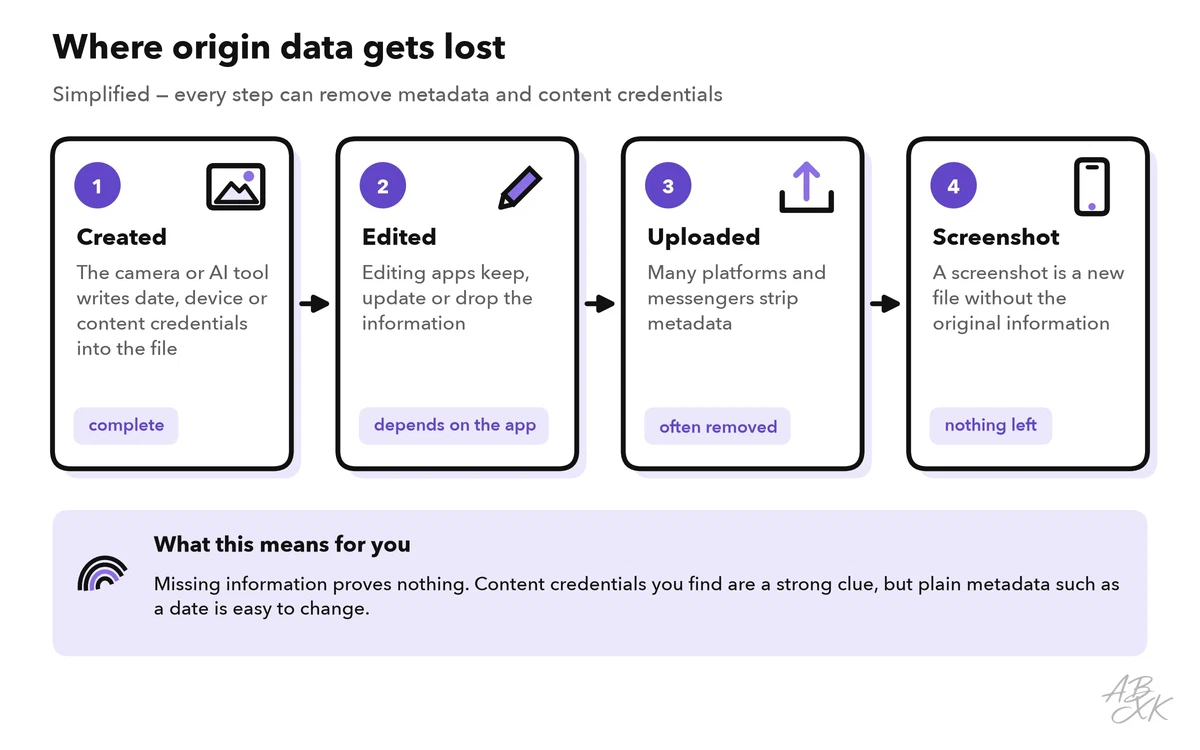
So the result only counts in one direction. Content credentials that you find are a strong clue about how a file was made. Missing credentials prove nothing, and plain metadata such as a date can be changed with any free photo app. If a picture may come from one of the generators below, you know what to look for: according to the vendors, Gemini adds an invisible SynthID watermark, while Adobe Firefly and ChatGPT add content credentials. We have not tested these claims.



Short descriptions from our tool comparison, based on the vendors' information — not tested by ABXK.
Look, listen and check the context
Steps 5 and 6 look at the content itself and at the world around it. The table lists clues that you can check with your own eyes and ears. None of them is proof on its own: newer generators avoid many of these mistakes, and real recordings can show similar flaws.
| Medium | Clues worth a look | Why they are weak on their own |
|---|---|---|
| Images | Hands, text on signs, reflections, shadows, earrings or glasses that do not match | Newer generators fix many of them; real photos have odd details too |
| Audio | Missing breaths, odd pauses, flat emotion, names pronounced wrongly, background noise that does not fit | Bad phone lines and compression cause similar effects |
| Video | Lip sync, blinking, blurry edges around the face and hair, light that changes between frames | Low resolution and short clips hide them |
As Level 0 showed, people cannot reliably tell fake voices from real ones. And fake voices do not only appear in private scams. In January 2024, voters in New Hampshire received robocalls in which an AI-generated voice imitated President Biden and told them not to vote in the primary election. The US Federal Communications Commission later fined the political consultant behind the calls six million US dollars (Source: FCC, September 2024, fcc.gov). When a voice message or call asks for money or data, do not try to judge the voice. Use the callback rule from part 1 of this level: hang up and call back on a number you already know.
Then check the context. Do the date, the place and the weather fit the claim? Compare street signs, shop names, license plates and the language people speak with the place named. Look up the weather records for that day, and check whether the shadows fit the time of day. Search for the event itself: if something big happened, trusted news outlets and official sources will report it, and Google’s Fact Check Explorer finds fact checks that already exist. In May 2023, a picture of an explosion near the Pentagon spread on social media, most likely made with AI. Stock prices dipped briefly, and the local fire department confirmed that there had been no explosion (Source: NPR, May 2023). A statement from an official source settled the case, no matter how real the picture looked.
Our guide How to Spot a Deepfake Video or Image explains the visual clues and the technology of automated detection in more depth.
How much a clue proves, and when to ask experts
Clues differ in weight. One odd detail or a detector score only justifies a closer look. An older copy in another context is a strong hint. Only the original source, the person shown or an expert examination comes close to proof.
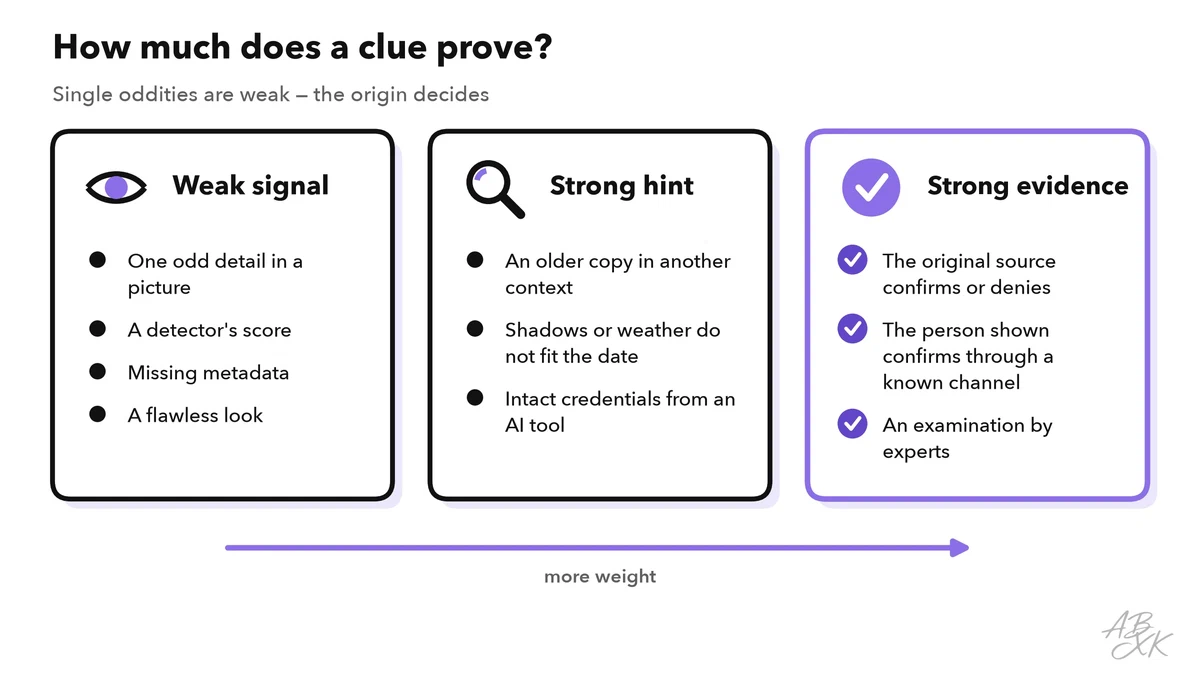
Detector scores sit in the weak column for a reason: they are probabilities, and they fail in both directions. Level 2 explains how AI detectors work and where they fail.
Some cases are too important for a check on your own. Hand them over early, and keep the evidence:
| Situation | Who can help | What to keep |
|---|---|---|
| A voice or video asks for money or access | Your bank, your company’s security team, the police | Messages, phone numbers, payment details and times |
| A fake shows you or someone you know in an intimate or humiliating way | The platform’s report function, the police, a counseling service | Links and screenshots with date and time; do not share the file further |
| You need the media as evidence, for example in court or for an insurance claim | A lawyer or a forensic expert | The original file, not a screenshot or a forwarded copy |
| You want to publish or forward it at work | Your communications team, fact-checkers, the original source | A note of every check you made |