

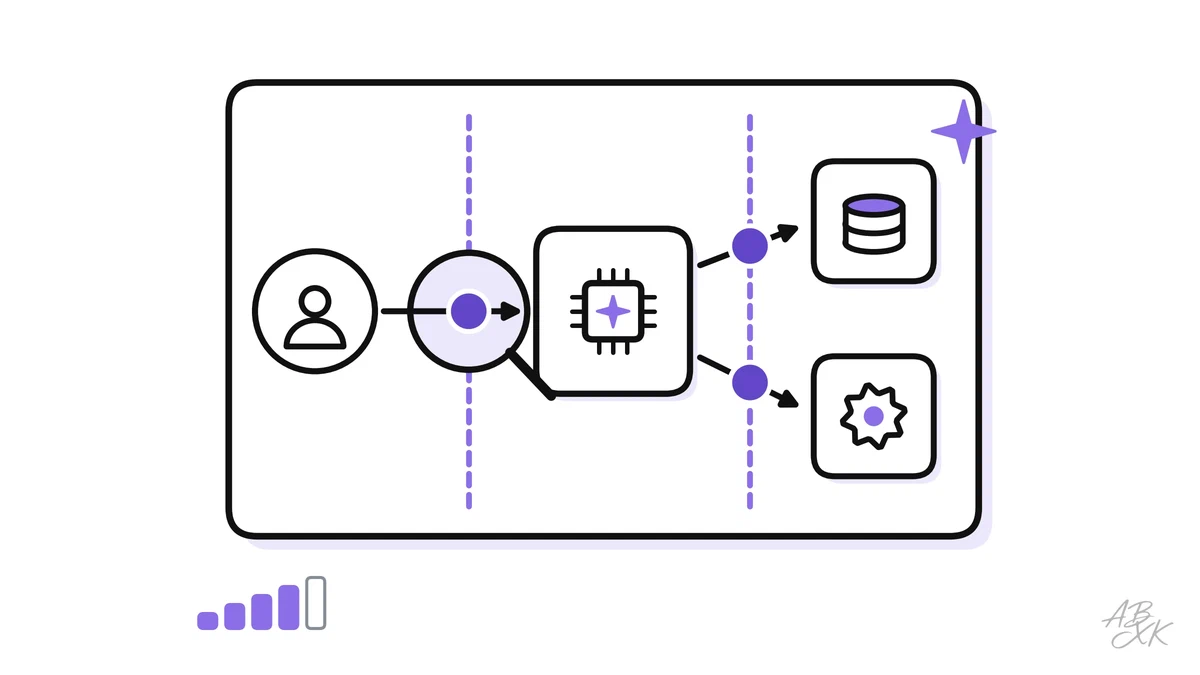
Most security problems in AI apps are not clever new attacks. They are design gaps that nobody looked for: an assistant that reads emails from strangers and can also issue refunds, or a search index that returns documents the user was never allowed to see. Threat modeling is a structured way to find such gaps on paper, before an attacker — or an unlucky customer — finds them in production.
This is part 1 of Level 3 (Advanced) in our AI Security path. You will describe an LLM app as a data flow diagram, mark its trust boundaries, apply the STRIDE method to AI, map the attack surfaces and decide which risks to fix first. It builds on the OWASP Top 10 for LLM Applications from Level 2. All five parts of this level use one example: the online shop’s support assistant from Level 2, which now also reads customer emails.
Four questions behind every threat model
Threat modeling sounds like a heavy process, but its core fits into four questions. The security expert Adam Shostack made them popular, and the Threat Modeling Manifesto builds on them (Source: Threat Modeling Manifesto, 2020, threatmodelingmanifesto.org):
- What are we working on? You draw the system: its parts, its data and how they connect.
- What can go wrong? You list threats, using a method such as STRIDE.
- What are we going to do about it? For each threat, you decide: fix it, reduce it, avoid it or accept it.
- Did we do a good enough job? You check the diagram and test whether the controls work.
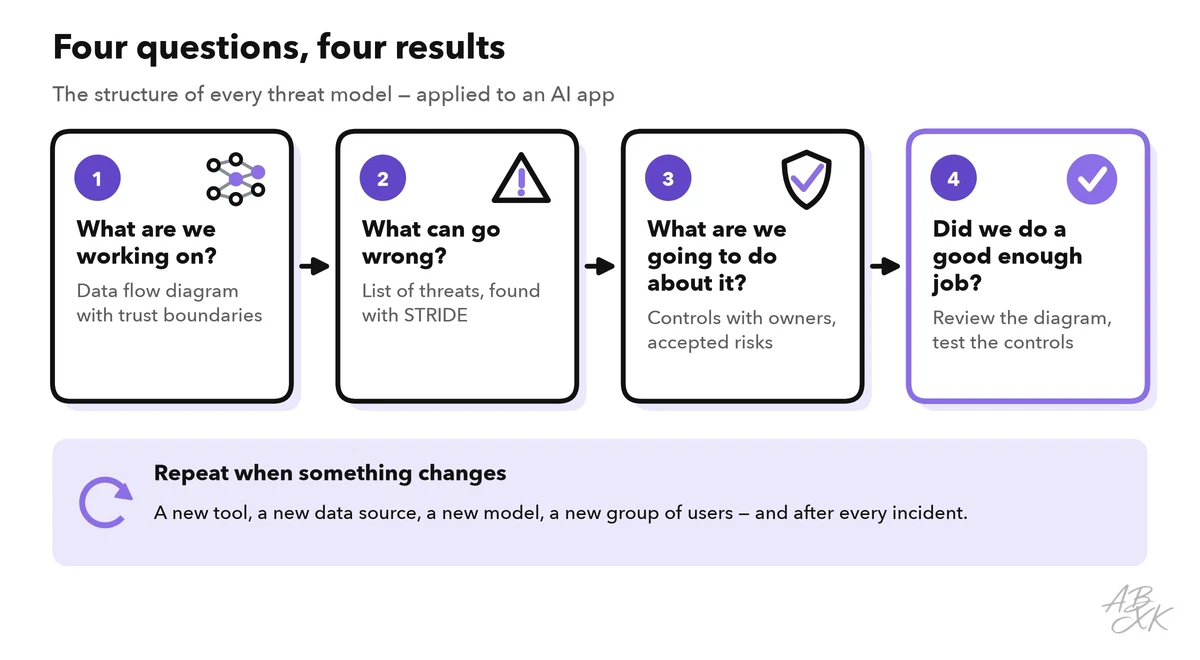
The best time to start is the design phase, when a change still costs a few lines in a document. Repeat the exercise whenever the system changes in a way that matters: a new tool, a new data source, a new model or a new group of users. A small group is enough: someone who builds the app, someone from security and the owner of the data.
Step 1: Draw the system and its trust boundaries
Start with a data flow diagram. It shows four kinds of elements: people and outside systems that send or receive data, processes that work on data, data stores, and the data flows between them. Our example assistant works like this: customers write in a chat or send an email. The app searches help articles and internal notes in a vector database — this is retrieval-augmented generation (RAG). It sends the question and the retrieved text to an LLM through an API, and it can look up orders, create tickets and prepare refunds through tools.
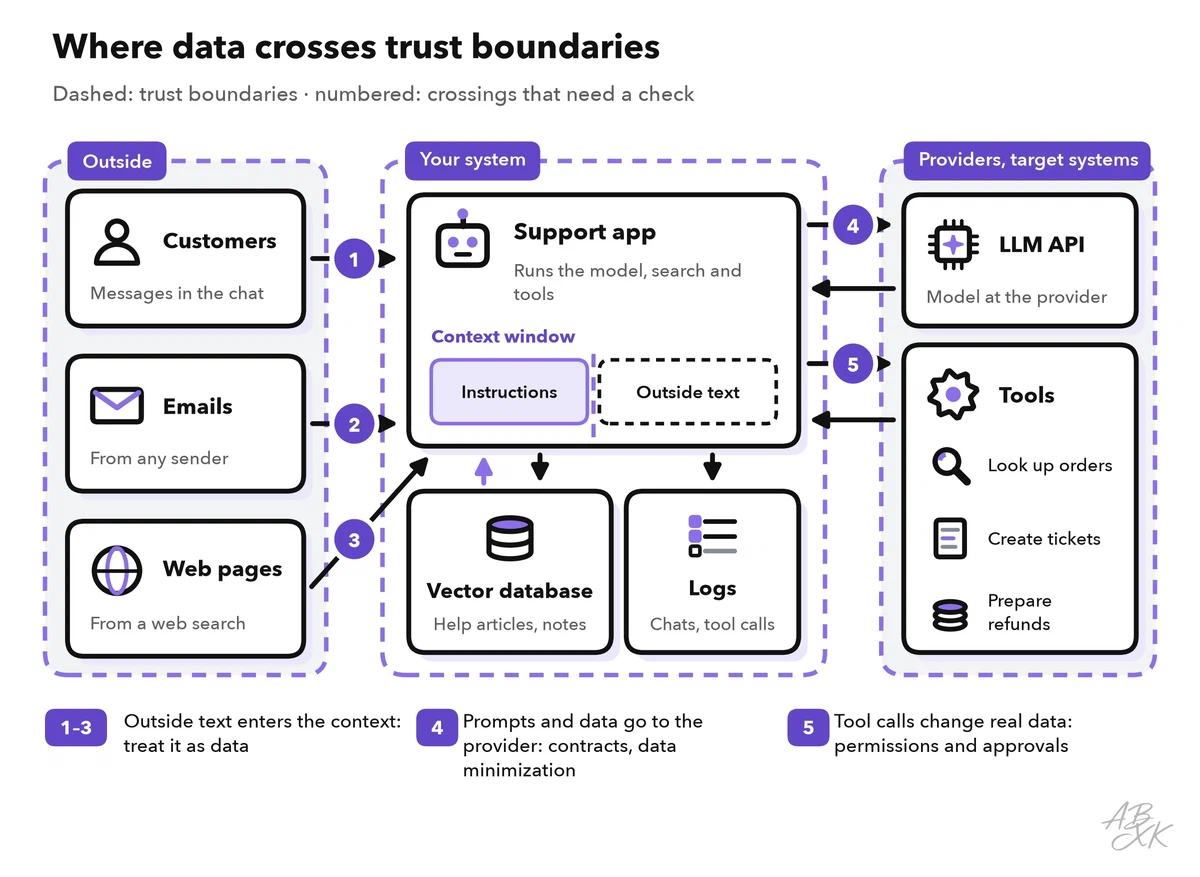
Then mark the trust boundaries. A trust boundary is a line where data passes from one level of trust to another: from the internet into your app, from your app to an outside provider, or from a part that only reads to a part that can change things. Every crossing is a place where you need a check: Who sends this? What may it contain? What may it trigger?
Next, list the assets — what an attacker might want, or what causes harm if it breaks:
- customer and order data, internal notes and documents,
- secrets such as API keys, and the system prompt,
- the actions the tools can perform, such as refunds and emails,
- the model and its settings, and the model files if you host the model yourself,
- logs and chat histories, the usage budget and your company’s reputation.
Every component you add becomes a box in the diagram with its own data and access rights — for example, a vector database such as Pinecone or a platform for building agents such as Devs.ai or MindStudio. Platforms such as Airia, according to the vendor, put one control layer over agents, models, tools and data access. Such a platform does not replace the threat model; it is one more box to draw.




Short descriptions from our tool comparison, based on the vendors' information — not tested by ABXK.
One boundary is special in AI systems: it runs right through the prompt. The model’s context window — everything it sees at once — mixes your trusted instructions with untrusted text: a customer message, an email, a web page, a retrieved document. The model cannot reliably tell instructions from data, which is why prompt injection works. Treat everything that enters the context from outside as untrusted, and treat everything the model outputs as untrusted as well.
Step 2: Find the threats with STRIDE
STRIDE is a checklist of six threat types that engineers at Microsoft developed in the late 1990s. It still works for AI systems because it asks about properties — identity, integrity, accountability, confidentiality, availability and permissions — not about a specific technology. Go through each element and each crossing of your diagram and ask the six questions:
| Threat | Classic question | In an LLM app | Typical control |
|---|---|---|---|
| Spoofing | Can someone pretend to be someone else? | Injected text poses as an instruction from the admin or the system | Authenticate users in the app, never in the prompt; mark outside content as data |
| Tampering | Can someone change data or code? | Poisoned help articles, manipulated training data, a swapped model file | Write access control for sources, hashes and signatures |
| Repudiation | Can someone deny an action? | Nobody can tell which input made the agent issue a refund | Logs with user, prompt version, retrieved documents and tool calls |
| Information disclosure | Can data leak? | The assistant reveals another customer’s order, internal notes or the system prompt | Permission filters in retrieval, no secrets in prompts, output checks |
| Denial of service | Can someone make it unavailable? | Huge inputs or endless agent loops burn the token budget | Rate limits, token budgets, step limits |
| Elevation of privilege | Can someone gain rights they should not have? | An instruction hidden in an email makes the agent use the refund tool for a stranger | Least privilege, the user’s own permissions, human approval |
Two more sources help you check that your list is complete. The OWASP Top 10 for LLM Applications names the most common risk classes, from prompt injection to unbounded consumption. MITRE ATLAS (Adversarial Threat Landscape for Artificial-Intelligence Systems) is a public knowledge base of attacker tactics and techniques against AI systems, with real case studies. It is built like the well-known MITRE ATT&CK framework (Source: MITRE ATLAS, atlas.mitre.org).
STRIDE also has a blind spot: an AI system can cause harm without any attacker. Invented facts, unfair answers and harmful content belong on the same list, even when nobody is “attacking”.
Step 3: Map the attack surfaces
An attack surface is every place where an outsider can put data or instructions into your system. For an LLM app, six surfaces matter most:
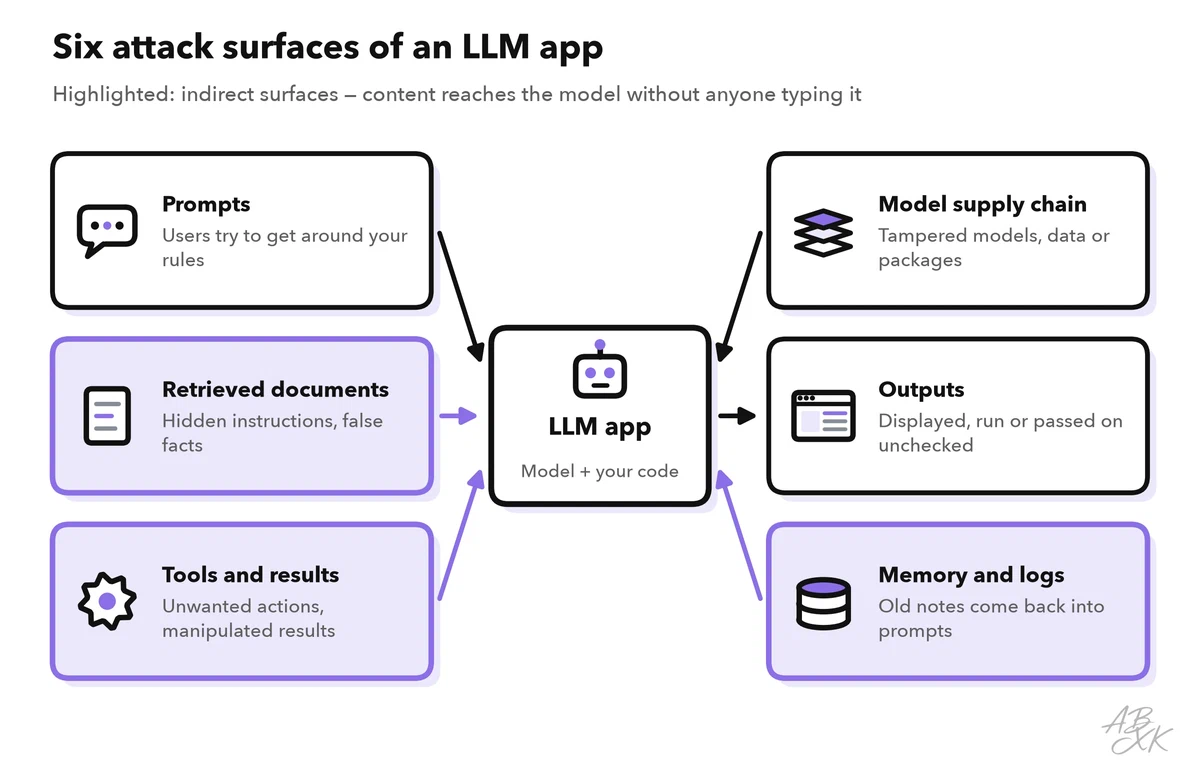
- Prompts: direct input from users, including attempts to get around your rules.
- Retrieved documents: content in the knowledge base or on the web can carry hidden instructions or false facts. Anyone who can write into a source can write into your prompt.
- Tools and their results: each tool is an action the model can trigger, and each tool result is new untrusted input.
- The model supply chain: model files, datasets, packages and plugins from outside. Part 4 of this level covers AI supply chain security.
- Outputs: text that your app displays as a web page, runs as code or passes to another system.
- Memory and logs: stored conversations and notes that come back into later prompts.
The indirect surfaces are the ones teams forget. A customer can only type into the chat. An attacker, however, can send an email that the assistant reads later, or change a public web page that the assistant finds in a search.
Step 4: Rate and rank the risks
You will find more threats than you can fix at once, so rank them. A simple scale works: rate likelihood (How easy is the attack? Can outsiders reach that surface?) and impact (What data, money or safety is at stake? Can you undo the damage?) as low, medium or high.
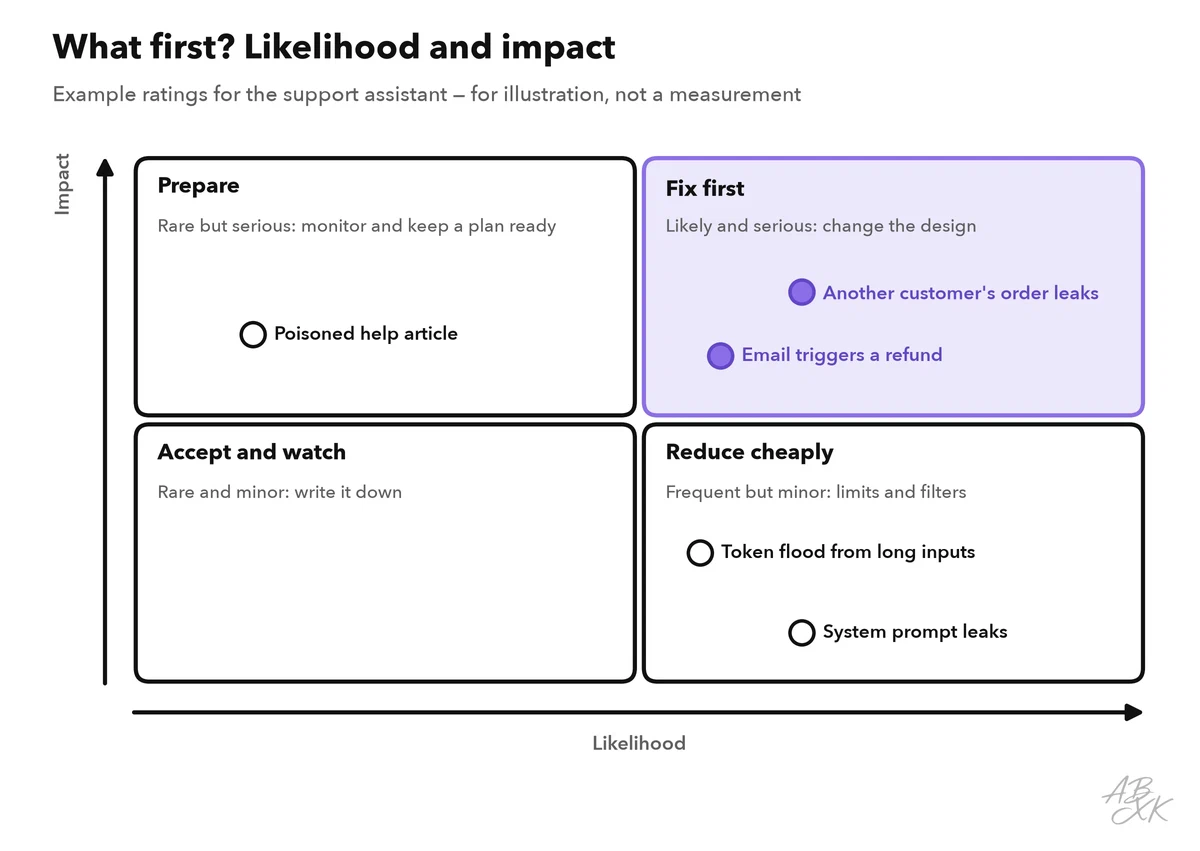
Three rules make the ranking useful:
- Fix high likelihood and high impact first. For our assistant, that is an instruction hidden in an email that leads to a refund.
- Prefer design changes over filters. Removing a capability beats any filter that tries to recognize bad instructions. If the assistant can only prepare a refund and a person approves it, a hidden instruction loses most of its power.
- Write down what you accept. A leaked system prompt may be an acceptable risk if it contains no secrets. Every accepted risk needs an owner and a date for the next review.
The result is a small risk register: one row per threat with its rating, the chosen control, an owner and a test. Part 2 of this level turns the top rows into controls for RAG and AI agents, and part 3 shows how red teaming checks whether those controls hold.
Common mistakes in AI threat models
Most weak threat models fail in the same few ways. Check yours against this list; the security tools in our comparison are in the AI Security section.
| Mistake | Why it hurts | Better |
|---|---|---|
| Treating the model as a trusted component | Injected text can steer it, and its output can carry an attack | Treat model input and output as untrusted data |
| Modeling only the chat window | Emails, documents, web pages and tool results go unexamined | Include every source that reaches the context window |
| Relying on the system prompt for security | “Never reveal X” is a request to the model, not a control | Enforce rules in code: permissions, filters, approvals |
| Forgetting cost and availability | One loop or a flood of long inputs can exhaust the budget | Token budgets, rate limits and step limits |
| One workshop, then never again | New tools and new models change the risks | Update the threat model after every relevant change and after incidents |
| No owner for a risk | Known problems stay open | One name and a review date per row |