

A sales manager pastes a client list into a free chatbot to draft follow-up emails. A developer uses an AI coding assistant with a private account. A team lead connects an AI note-taker that joins every call and can read the whole calendar. Nobody asked IT, and nobody thinks of it as a security issue. This is shadow AI: AI tools and AI features that people use for work without the knowledge or approval of their company.
This is part 5 of Level 2 in our AI Security learning path. Part 2 showed the controls that keep data in approved tools. This part is about the tools that are already in use without approval: why people use them, what can go wrong, how to find them and how to respond so that people move to safe tools instead of hiding their use better.
Why people use AI without approval
The term comes from shadow IT: software and cloud services that teams use without the approval of the IT department. Shadow AI follows the same pattern, but it spreads faster: many AI tools have free plans, work in any browser and give useful results in seconds. In a survey of 31,000 people in 31 countries, 75 percent of knowledge workers said they use AI at work. Of these AI users, 78 percent bring their own AI tools to work. Microsoft calls this “Bring Your Own AI” (Source: Microsoft and LinkedIn, 2024 Work Trend Index).
The reasons are rarely bad intentions:
- There is no approved tool, or the approved one cannot do what people need.
- Approval is slow or unclear. Nobody knows whom to ask, or the answer takes months.
- The rules are unclear. People do not know which data may go into which tool.
- The risk is invisible. Pasting text into a chat feels like using a search engine, not like handing data to a provider.
- The AI is already there. A vendor switches on a new AI feature in software the company already uses.
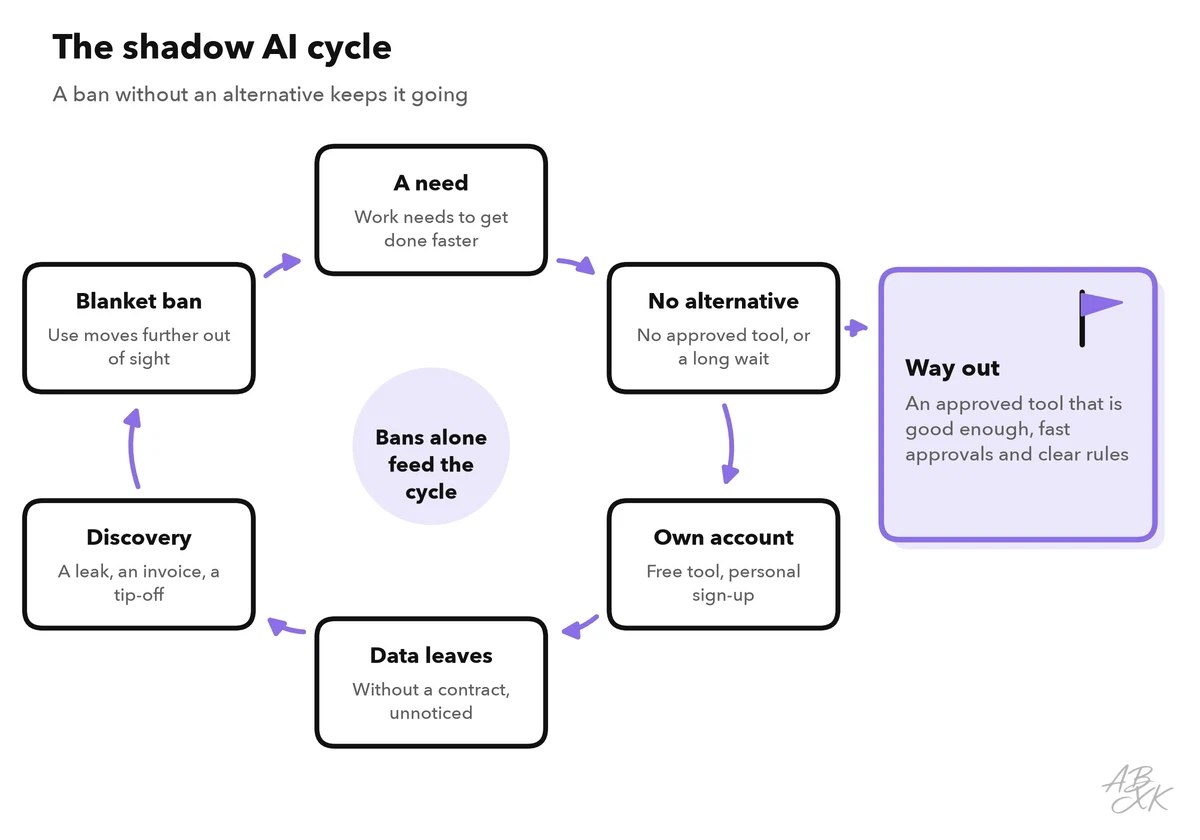
Shadow AI is therefore also a signal: it shows where people need better tools for their work. Companies that react only with bans risk a cycle that makes the problem harder to see.
What can go wrong
Most risks of shadow AI follow from one fact: nobody responsible knows that the tool is in use. So nobody has checked the contract, the settings or the data that flows into it.
| Risk | Example | Why it matters |
|---|---|---|
| Data leaves without a contract | A client list goes into a free chatbot | No data processing agreement, possible training on the data, no way to have it deleted |
| Access to company accounts | An AI note-taker can read calendar and mailbox | The access often stays active after the project ends or the person leaves |
| Unchecked results | An AI summary of a contract misses a clause | Nobody double-checks, because nobody knows that AI was involved |
| Legal duties | An unapproved AI tool ranks job applicants | The EU AI Act treats AI for recruiting as high-risk; the GDPR and, in Germany, the works council apply as well |
| No incident response | The provider of a small tool has a data breach | You cannot assess the damage or inform anyone if you do not know the tool was used |
These risks are real. In IBM’s 2025 study of data breaches at 600 organizations, one in five organizations reported a breach due to shadow AI (Source: IBM, Cost of a Data Breach Report 2025, conducted by the Ponemon Institute). For each person, the most direct protection is knowing what not to paste into an AI tool, as Level 1 explains.
How to find shadow AI
No single source shows all shadow AI. Each one sees part of the picture, so combine several:
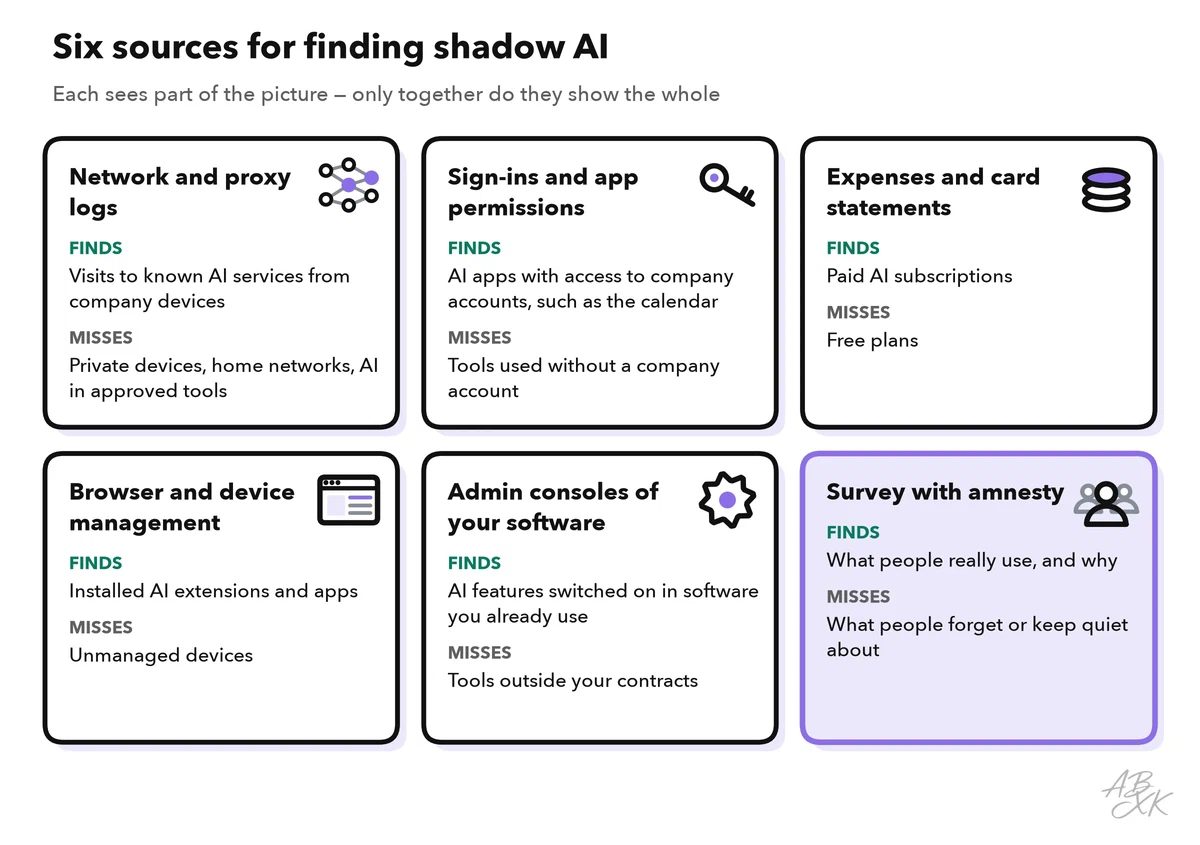
- Network and proxy logs. A secure web gateway filters and logs the web traffic of company devices. A cloud access security broker (CASB) shows which cloud services are in use and how risky they are. Many of these products sort services into categories, often including one for AI tools.
- Sign-ins and app permissions. Many AI tools ask for access to company accounts, for example to read a calendar or a mailbox. The admin consoles of Microsoft Entra ID and Google Workspace show which third-party apps users have given access, and they let you limit who may give it.
- Expenses and card statements. Paid AI subscriptions show up in expense claims. Free plans do not.
- Browser and device management. On managed devices, you can see installed browser extensions and apps. Many AI extensions ask for permission to read every page a person opens.
- Admin consoles of your software. Vendors add AI features to products you already use. Check the AI settings and the release notes of your main applications.
- A survey with amnesty. Ask people which AI tools they use and for what, and promise that honest answers have no consequences. Only a survey tells you why people use a tool.
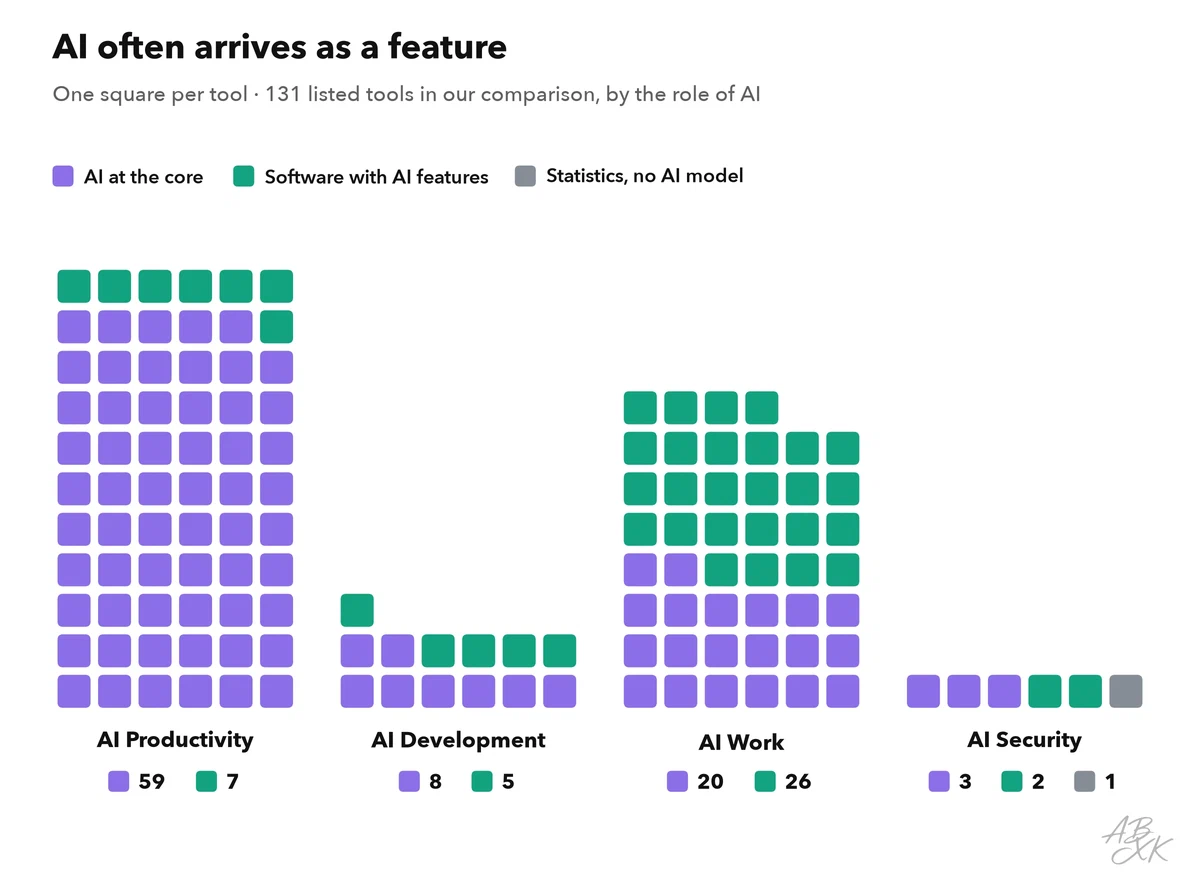
Not every case of shadow AI is a new website. A lot of AI reaches companies as a feature of software they already pay for. Our tool comparison lists 131 tools, and the chart shows how many of them are established software with AI features rather than AI products:
Some shadow AI stays invisible to all of these sources: AI on private phones and models that run locally. Our LLM database lists 172 models with open weights. Their model files are published for download, and smaller models run on an ordinary laptop without any traffic to an AI service. Here, clear rules and a good approved tool help more than any scanner.
Respond with alternatives, not punishment
Once you know which tools are in use, the goal is not to find the guilty. The goal is to move the work to safe tools. If people who answer honestly get punished, the honesty ends, and the use moves to where you cannot see it.
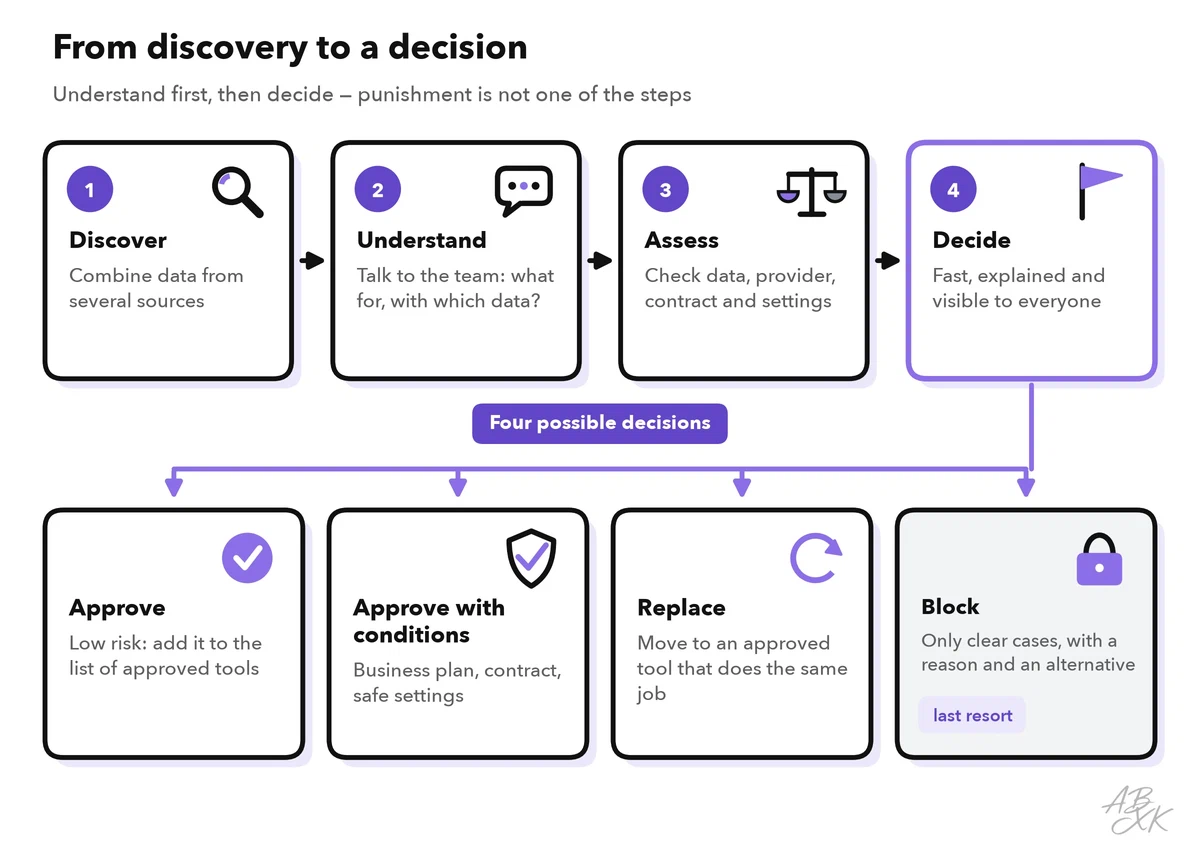
For each tool you find, talk to the people who use it. Which task does it solve? Which data goes in? Then decide with a simple rule:
| Situation | Response |
|---|---|
| Low risk: no personal or confidential data, a reputable provider | Approve it and add it to the list of approved tools |
| Useful, but it needs a business plan with a contract | Approve with conditions: business account, safe settings, contract check |
| An approved tool already does the same job | Replace it: show people the approved tool and help them move |
| Sensitive data and no acceptable terms | Block the clear case, explain why and offer an alternative |
Five things make the response work:
- A good approved tool. It must be good enough for the job, or people go back to their own. In 2023, Samsung restricted generative AI tools on company devices after employees had uploaded sensitive source code to ChatGPT. According to Bloomberg, the internal memo called the restriction temporary, and the company said it was developing its own internal AI tools. A ban and an alternative belong together.
- A fast lane. Requests for low-risk tools should get an answer within days, not months. Publish who decides and how.
- Short, concrete rules. One page that says which data may go into which tool, with examples from your own work. Our AI Work section covers ground rules and governance for business teams.
- Training with real cases. Show what happens to data in a free tool, and how to do the same task in the approved one.
- Technical controls for the clear cases. A managed browser can lead people from unapproved AI sites to the approved tool, as part 2 shows.
Companies that run many AI tools and agents sometimes manage them on a central platform. According to the vendor, Airia is a control layer that secures and governs agents, models, tools and data access. The tools people bring themselves are often helpers for everyday work: meeting assistants, writing helpers and research assistants. Instead of banning a whole category, review one tool of that kind and approve it. Our comparison has examples of each type:



Short descriptions from our tool comparison, based on the vendors' information — not tested by ABXK.
A 30-day plan against shadow AI
The first month needs no big project. It uses data you already have and conversations with the teams:
| Week | What to do | Result |
|---|---|---|
| 1 | Announce the amnesty and run a short survey; pull expense data and app permissions | A first list of AI tools and the reasons behind them |
| 2 | Add network data; sort the tools by the data they see and the number of users | The ten tools that matter most |
| 3 | Decide for each of the ten: approve, approve with conditions, replace or block | Clear answers, published for everyone |
| 4 | Publish the one-page rules and the fast lane; train the teams with the most use | People know where to go next time |
After that, measure every quarter: how many AI tools are in use, how many of them are approved, how many apps have access to company accounts and how long a request takes to get an answer. The trend tells you more than any single number. Level 4 shows how to turn this into a secure AI program.