

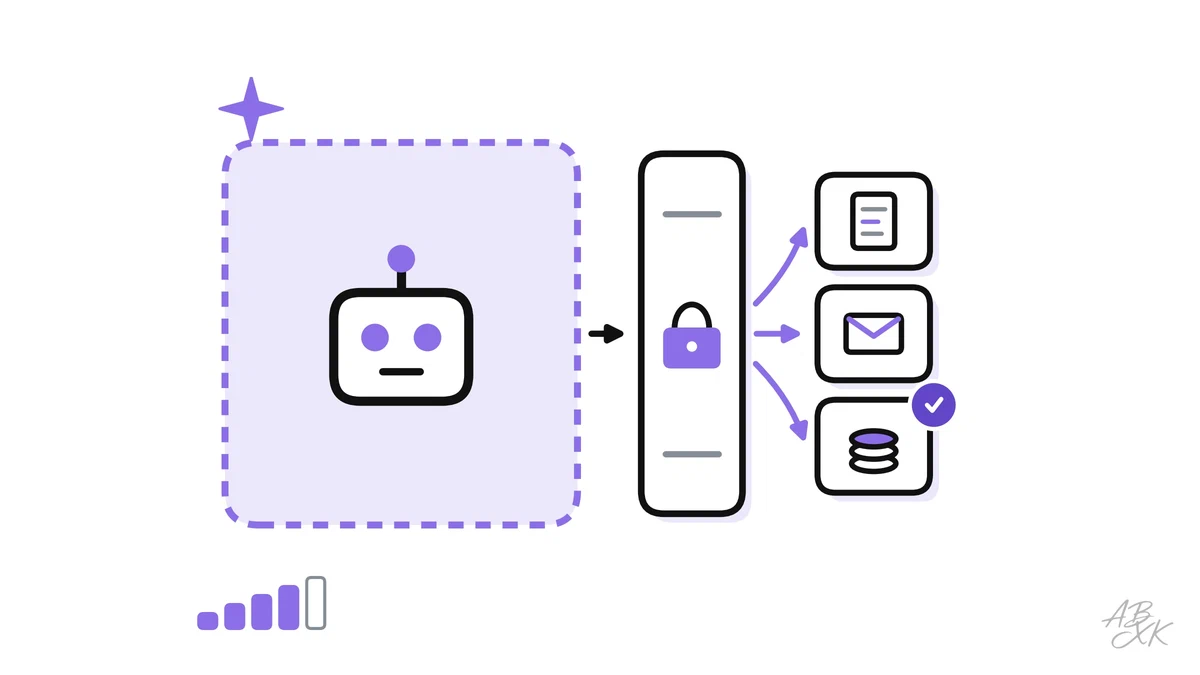
In part 1 of this level, the threat model of our support assistant put two risks at the top: an instruction hidden in an email that triggers a refund, and an answer that shows another customer’s order. Both come from the same design. The assistant reads content it cannot trust, it can see private data, and it can act. This part shows how to build these abilities so that one mistake by the model does not turn into an incident.
This is part 2 of Level 3 (Advanced) in our AI Security path. You will learn how to enforce document-level permissions in retrieval, give tools the least privilege, isolate code in sandboxes, design approval steps, validate outputs and keep audit logs. It builds on threat modeling for AI systems from part 1. How RAG and agents work in general is explained in our AI Development section.
The model is not a security boundary
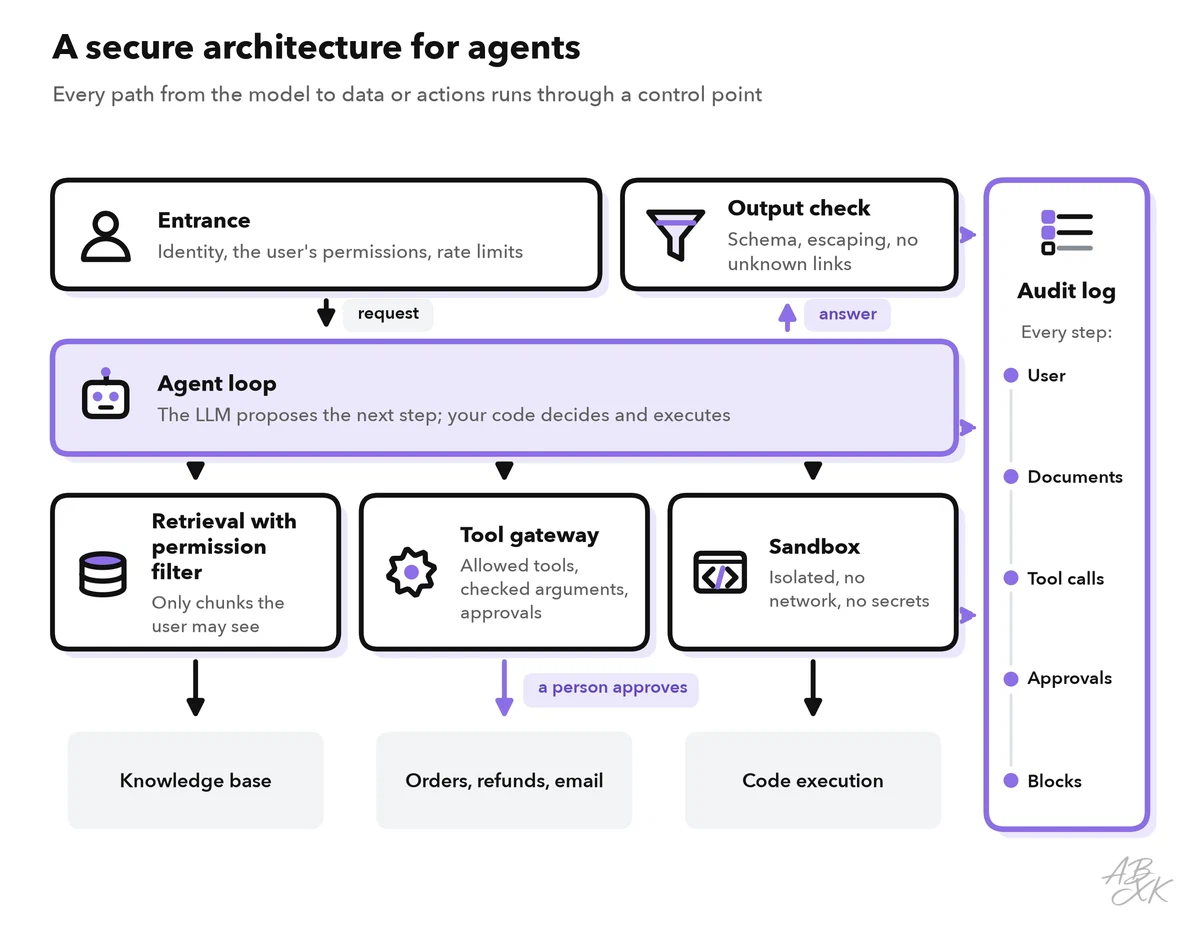
The most important rule comes first: never rely on the model to enforce security. A model follows the instructions in its context, and it cannot reliably tell your instructions from instructions that an attacker has hidden in a document. That is the core of prompt injection. So every security decision has to happen in your code, outside the model: what data the model may see, which tools it may call and which actions need a human.
Meta’s security team has turned this into a simple design rule, the Agents Rule of Two. Part 1 of Level 2 used it as a quick check from the OWASP list; here it shapes the design. Within one session, an agent should have no more than two of three properties: (A) it processes untrustworthy inputs, (B) it has access to sensitive systems or private data, (C) it can change state or communicate externally. If a task needs all three, the agent should not act on its own. At a minimum, it needs supervision: human approval or another reliable check (Source: Meta, “Agents Rule of Two: A Practical Approach to AI Agent Security”, 2025, ai.meta.com).
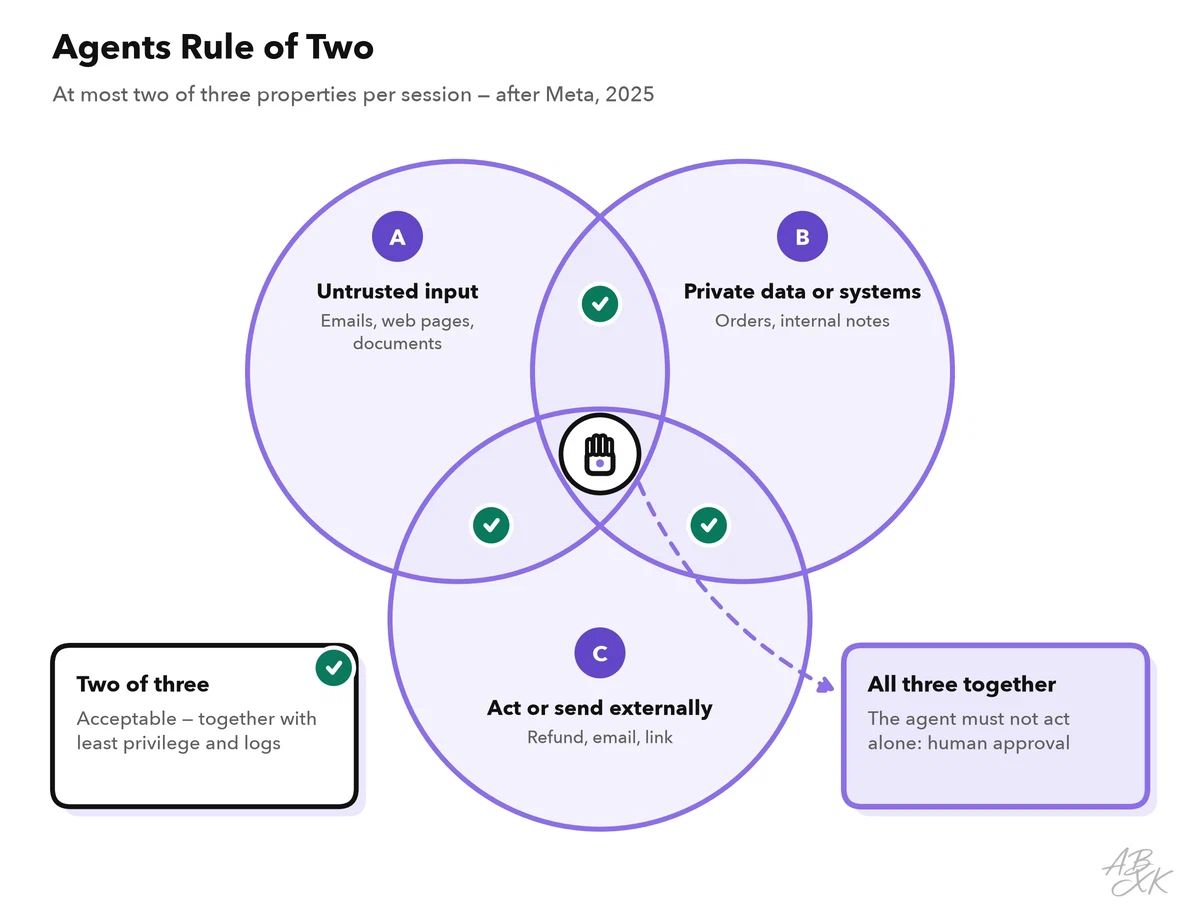
Our support assistant has all three: it reads customer emails (A), it sees orders and internal notes (B), and it can prepare refunds (C). The rest of this part shows the controls that keep this combination under control. Meta itself stresses that the rule does not replace basic principles such as least privilege; it adds to them.
Document-level permissions in retrieval
In a RAG system, a retriever searches the knowledge base and puts the best-matching text pieces, called chunks, into the prompt. The danger: if all documents share one index, the search returns whatever matches best — including chunks the user must not see. The model then summarizes them politely. The OWASP Top 10 for LLM Applications covers this risk under “Vector and Embedding Weaknesses” (Source: OWASP Top 10 for LLM Applications 2026, genai.owasp.org).
The fix is to enforce the permissions of the original documents at search time:
- Store access metadata with every chunk. When you index a document, copy its access rules: owner, groups, customer or tenant ID, classification.
- Filter before the search returns anything. Your code adds the logged-in user’s identity as a filter to every query. The model never sees chunks outside that filter, so it cannot leak them.
- Separate what must never mix. Use a separate index or namespace per customer or tenant when data must stay strictly apart.
- Keep permissions in sync. When someone loses access to a document, or a document is deleted, the index must follow quickly — not at the next monthly rebuild.
- Control who can write. Anyone who can add a document to the knowledge base can place text in your prompt. Review new sources, and keep incoming emails out of the shared index.
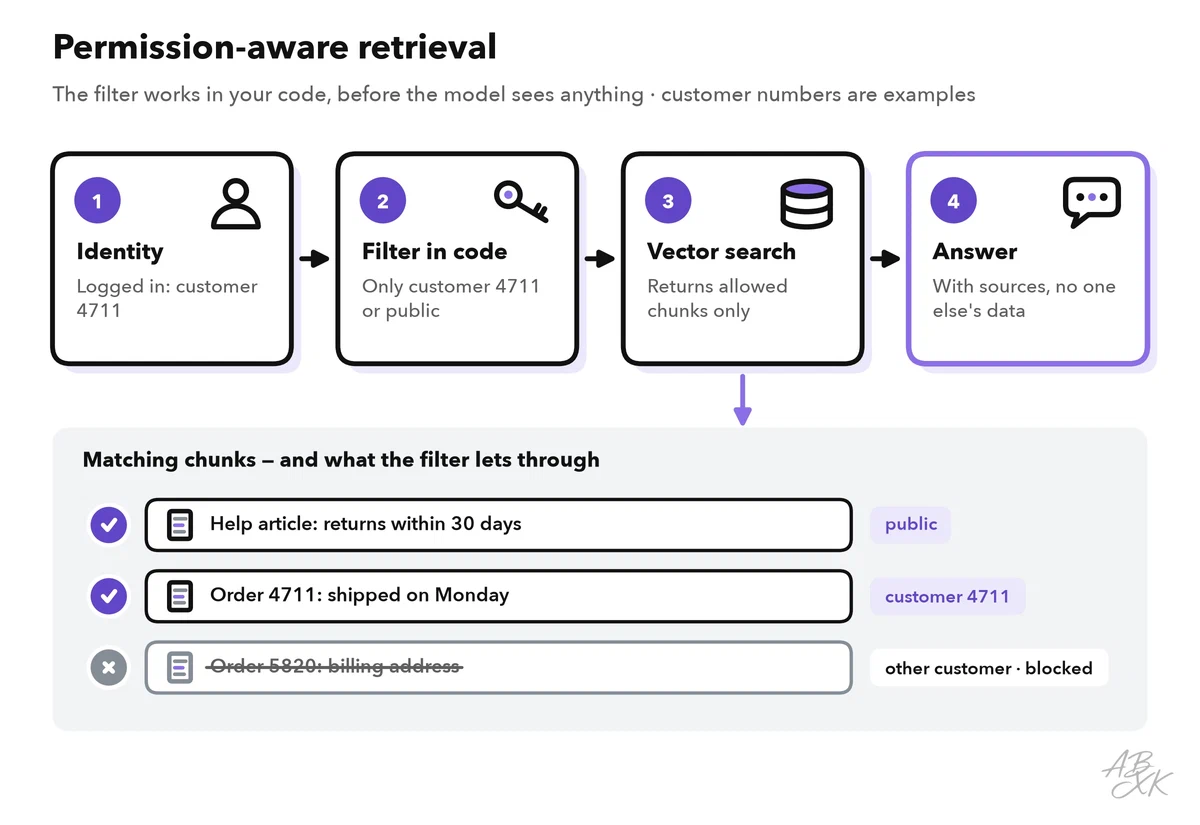
Do not use the model as the filter. An instruction such as “only use documents this user may see” is a request, not a control — by then, the data is already in the context. The same thinking applies to the AI tools your employees use every day; Level 2 covers data leakage controls for AI tools.
Least privilege for tools
Every tool turns text into an action. Part 1 of Level 2 introduced the resulting risk, Excessive Agency, and its three root causes: too much functionality, too many permissions and too much autonomy. The table gives each cause a control and adds two more limits that close common gaps:
| Root cause | Example in the support assistant | Control |
|---|---|---|
| Too much functionality | The ticket tool can also delete tickets | Offer only the functions the task needs: create, not delete |
| Too many permissions | The order tool runs with an admin account | Act with the logged-in user’s own rights or a narrowly scoped key |
| Too much autonomy | Refunds go out without anyone looking | Human approval for actions with an external effect |
| No limits on arguments | A refund higher than the order value | Check arguments in code: at most the order value, original payment method only |
| No limits on volume | A loop creates hundreds of tickets | Rate limits and a budget per session |
Two habits help a lot. First, give tools narrow, specific shapes: prepare_refund(order_id) is much safer than a general call_api(url, body). Second, deny by default: a tool the agent does not have cannot be misused.
Sandboxes for code and browsing
Some agents write and run code, use a command line or browse the web. Treat that code as untrusted, because a prompt injection may have shaped it. Run it in a sandbox — an isolated environment that limits what the code can reach:
- a container or a small virtual machine that is created for the task and destroyed afterward,
- no network access by default, or access only to an allowlist of addresses,
- no secrets, tokens or production credentials inside the sandbox,
- a read-only file system except for one working folder,
- limits on time, memory and processor use.
Never run code written by a model directly on a developer laptop or a production server. For browsing, remember the Rule of Two: an agent that reads arbitrary web pages should not also hold private data and the ability to send it somewhere.
Approval steps and output validation
Human approval is the strongest control for actions that are hard to undo. It only works if you design it well:
- Show the exact action: recipient, amount, full text. Do not show only the model’s summary of what it plans to do.
- Ask only for actions that matter. If people approve fifty routine actions a day, they stop reading. This is called approval fatigue.
- Let the approval happen outside the chat, through a button or a separate system that the model cannot imitate.
Output validation is the other half. The model’s output is untrusted input for the next system. OWASP calls this risk “Improper Output Handling”:
- Ask for structured output and check it against a schema before you act on it.
- Escape model output before you display it on a web page, and never pass it directly to a database query, a shell or an
evalfunction. - Block links and images to unknown domains in chat answers. An injected instruction can hide data in a link address, and the data leaves the moment the browser loads the image.
Audit logs: every step traceable
When something goes wrong, you need to reconstruct what the agent saw and did. Log every step:
- who started the session (user ID, ideally pseudonymized) and when,
- the model and prompt version,
- the IDs of the retrieved documents,
- every tool call with its arguments and its result,
- every approval with the name of the person who approved it,
- every block by a filter or guardrail.
Store logs centrally, protect them against changes and make sure the agent itself cannot write to or delete them. Logs contain personal data, so restrict access and set a retention period. Part 5 of this level shows how these logs feed AI incident response.
Platforms can take over parts of this work. According to the vendor, Airia offers a control layer for agents, models, tools and data access, with policies and audit evidence. When you choose a vector database, an agent builder or an automation platform — for example Pinecone, MindStudio or Turbotic from our comparison — check whether it supports the controls in this part: filters by user or tenant, narrow tool permissions, approvals and exportable logs. Our tool descriptions come from the vendors; we have not tested the tools.




Short descriptions from our tool comparison, based on the vendors' information — not tested by ABXK.
Checklist before an agent goes live
Go through this list before launch and again after every change to tools, data sources or the model:
| Area | Check | Done when |
|---|---|---|
| Rule of Two | Which of A, B and C does the agent combine? | All three only with human approval |
| Retrieval | Are permissions enforced before the model sees any data? | A test user cannot retrieve another test customer’s documents |
| Write access | Who can add content to the knowledge base? | Sources are reviewed; incoming mail is not in the shared index |
| Tools | Does each tool offer only what the task needs, with the user’s rights? | No admin keys; arguments are checked in code |
| Sandbox | Does model-written code run in isolation? | No network by default, no secrets, time limits |
| Approvals | Which actions need a human, and what does that person see? | The exact action is shown; routine actions need no click |
| Output | Is output checked before it is displayed or passed on? | Schema checks; no links or images to unknown domains |
| Logs | Can you reconstruct a session? | Documents, tool calls and approvals are logged and protected |