

For years, the advice against phishing was simple: watch for spelling mistakes, strange greetings and clumsy design. AI has taken most of these clues away. A scammer can now write a flawless, personal message in any language within seconds, and even call you with a voice that sounds like your manager.
This is part 1 of Level 1 in our AI Security learning path, the level about first defenses. It builds on the AI scams from part 2 of Level 0 and takes a closer look at phishing. You will learn what AI changes in phishing, which red flags still work, how the callback rule protects you and which simple processes stop fake payment requests in a company.
What AI changes in phishing
Phishing is a message that pretends to come from someone you trust. Its goal is to make you click a link, enter a password, open a file or send money. When the message is written for one specific person or company, it is called spear phishing.
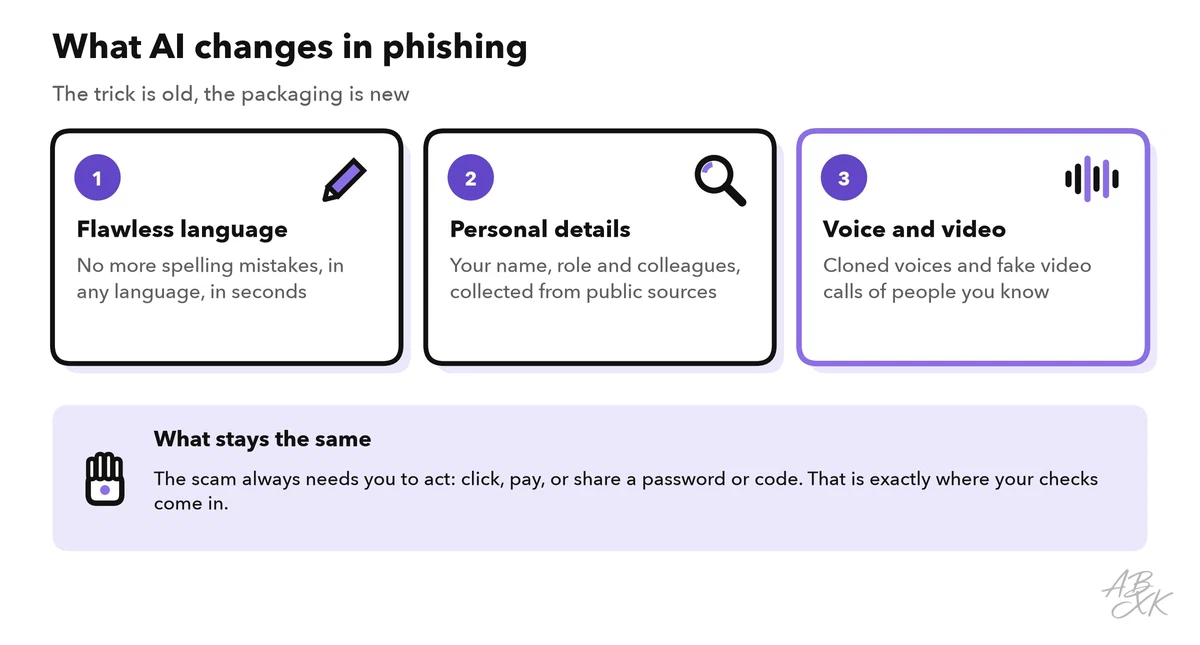
The trick is old. AI changes three things about it:
- Flawless language. The FBI warns that criminals use AI to write believable messages and to translate them. This removes the grammar mistakes that used to give them away.
- Personal details. Your name, your role, your colleagues and your latest post are often public. AI can collect them and turn them into a personal message in seconds. This used to take a criminal hours of work.
- Voice and video. As part 2 of Level 0 showed, a short recording is enough to clone a voice. The FBI reports that criminals use cloned voices of relatives and fake video calls with supposed executives (Source: FBI Internet Crime Complaint Center, alert I-120324-PSA, December 2024, ic3.gov).
Personal messages work. In a 2024 study with 101 participants, phishing emails written fully automatically by AI were clicked by 54 percent of the recipients. That is as often as emails written by human experts. Generic phishing emails were clicked by 12 percent (Source: Heiding et al., 2024, arxiv.org). The study was small, but it shows that convincing phishing has become cheap.
Red flags that still work
Many classic tips no longer help. A perfect text can be fake, and a personal detail proves nothing. The table shows which old signs have lost their value and what to check instead:
| Old red flag | Why it fails today | Check this instead |
|---|---|---|
| Spelling and grammar mistakes | AI writes flawless text in any language | What the message wants: money, passwords, codes or data |
| A generic greeting such as “Dear customer” | AI adds your name, your role and recent events | Whether the details could come from public sources |
| Clumsy design or an odd logo | Copying a brand’s look is easy | The real sender address and where the link leads |
| A voice you do not recognize | A cloned voice sounds like someone you know | Hang up and call back on a number you already have |
| “I saw them on video, so it was them” | Deepfake video can imitate faces in a live call | Confirm the request through a second channel |
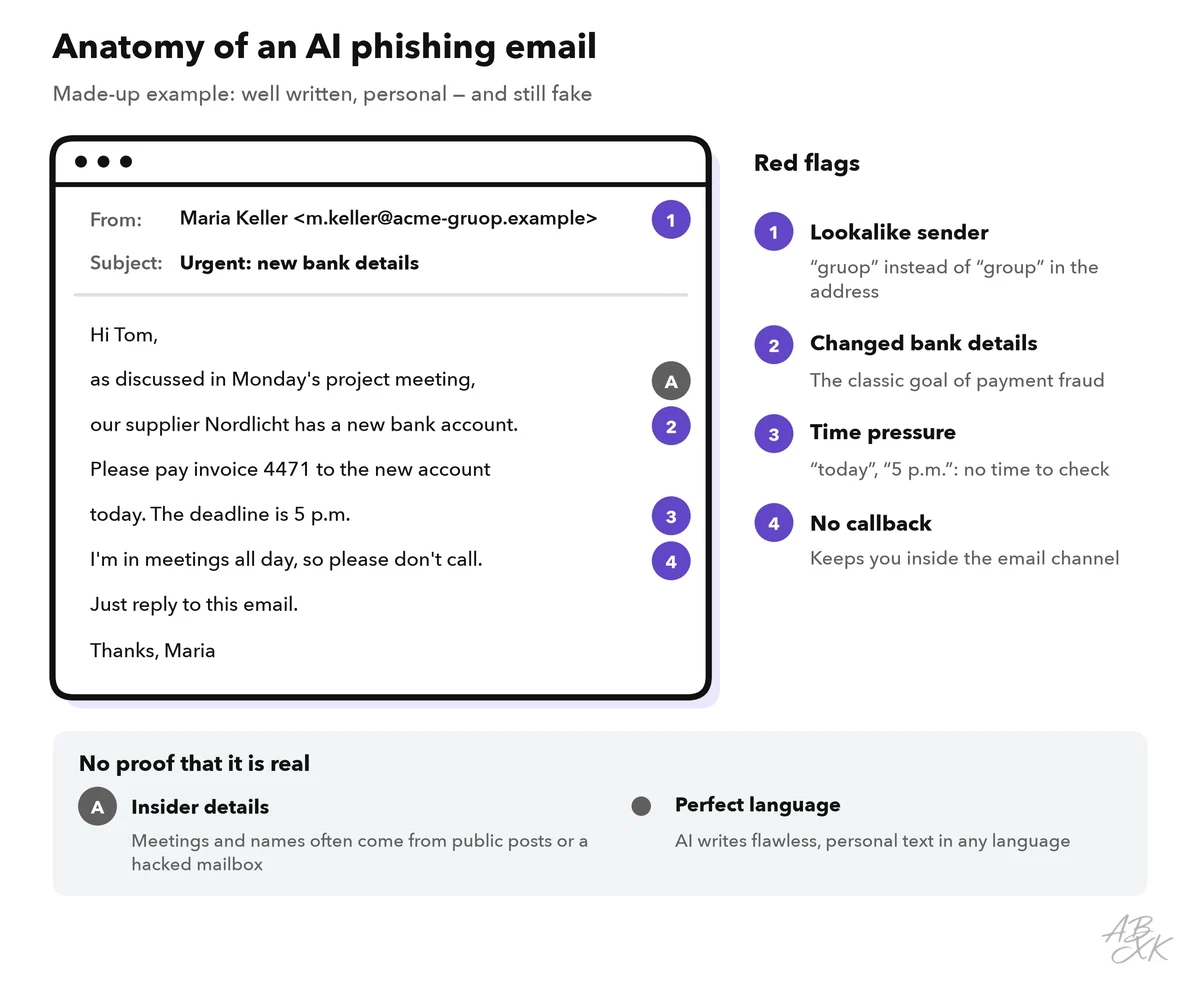
What still gives phishing away is what every scam needs to work: a request that pays off for the criminal, and pressure that stops you from checking. The first four signs below are among the six warning signs from part 2 of Level 0. The fifth is typical of emails and messages:
- An unusual request: new bank details, gift cards, a password, a one-time code or remote access to your computer.
- Time pressure: “today”, “within the hour”, “or your account will be closed”.
- Secrecy: “keep this between us”, “I’m in a meeting, don’t call”.
- A change of channel: from email to a messaging app, or from a known number to a new one.
- A sender or link that does not match: a lookalike domain, a reply address that differs from the sender, or a link whose real target differs from its text.
Can an AI detector help? A tool like our own AI Text Detector estimates whether a text was written by AI. For phishing, that is the wrong question. Honest companies also use AI to write emails, and a scam can be written by hand. What matters is whether the request is genuine.
The callback rule: check through a second channel
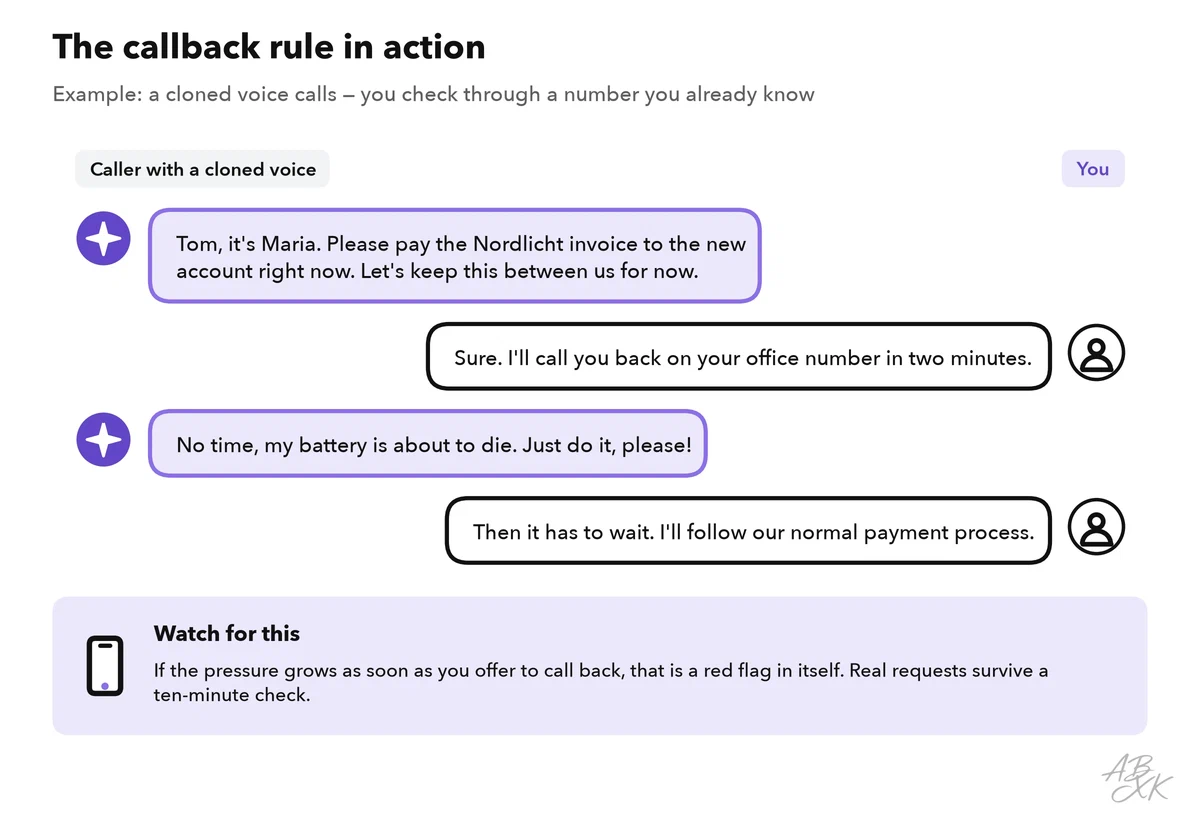
Part 2 of Level 0 introduced the most useful habit against AI scams. It fits in one sentence: if a message asks for money, data or access, confirm it through a channel you choose, not one the message gives you. Against phishing, this means:
- Pause. Real requests survive a ten-minute check. Pressure is part of the attack.
- Find the contact yourself. Use the number saved in your phone, the company directory or the back of your bank card. Never use the number or link in the message.
- Call back or ask in person. If you cannot reach the person, the request waits.
- Never give a one-time code to someone who contacts you. The code proves that you are you. Whoever has it can act in your name.
- Prefer passkeys. A passkey replaces the password. As part 4 of Level 0 explained, it works only on the real website it was created for, so a fake login page cannot capture it.
Part 4 of Level 0 adds a safety checklist for everyday AI users with accounts, two-factor authentication and privacy settings. If a suspicious message comes with a photo, a voice message or a video, part 5 of this level explains how to verify images, audio and video step by step.
Protect payments with a fixed process
In companies, the most expensive form of phishing is business email compromise (BEC). Criminals pose as a manager, a colleague or a supplier and redirect a payment. The FBI reports exposed losses of more than 55 billion US dollars from such scams worldwide between October 2013 and December 2023 (Source: FBI Internet Crime Complaint Center, “Business Email Compromise: The $55 Billion Scam”, September 2024, ic3.gov).
AI makes these attacks more convincing. The Arup case from part 1 of Level 0 shows the new kind of attack: after a video call with a deepfaked chief financial officer and colleagues, an employee in Hong Kong made 15 transfers worth about US$25 million (Source: CNN, May 2024).
A good process takes the pressure off the person who receives the request. It needs four checks, and they apply to every channel: email, phone, chat and video.
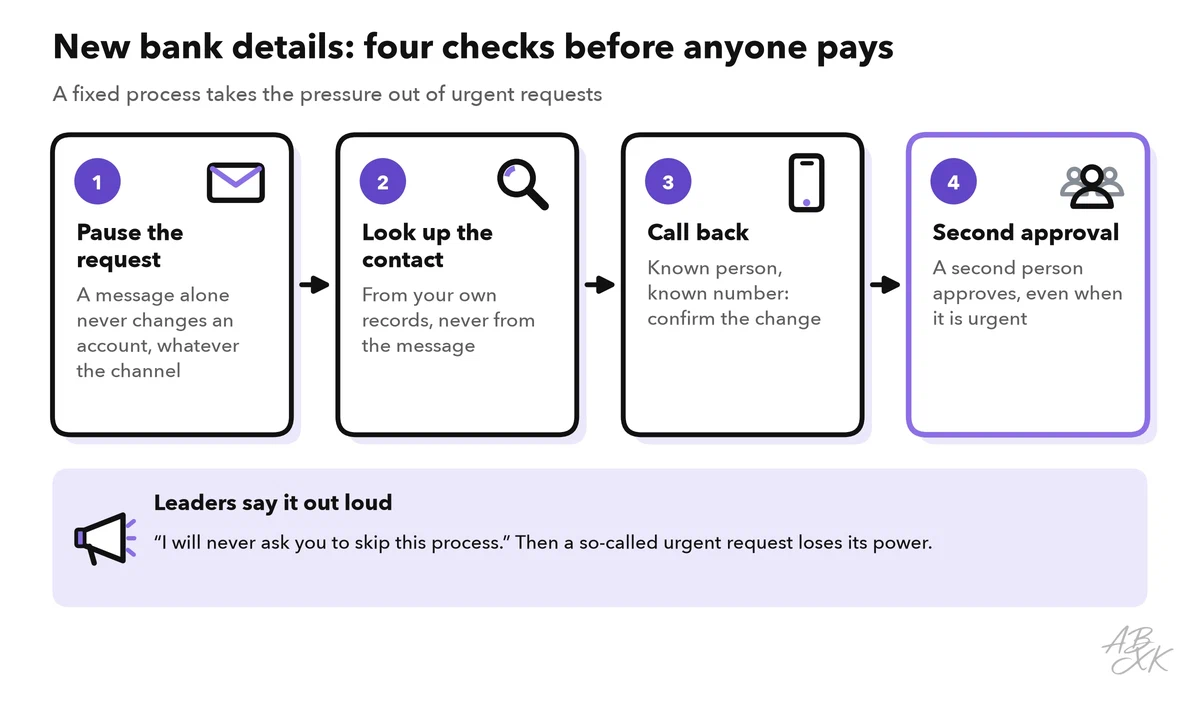
The FBI gives the same core advice: use a second channel to verify requests to change account information. The note at the bottom of the figure matters most. When managers say openly that they will never ask anyone to skip the process, an urgent “special request” from the “CEO” becomes a red flag at once.
Technology catches part of the problem before it reaches people. Email security tools filter suspicious messages and warn users. According to the vendors, Sentaro checks the context and intent of messages and warns of phishing, and Bitdefender protects small and mid-sized businesses against phishing, ransomware and other attacks. No filter catches everything. That is why the process and the callback rule still matter.


Short descriptions from our tool comparison, based on the vendors' information — not tested by ABXK.
Train your team with real examples
A yearly slide deck does not prepare anyone for a cloned voice. Short, regular practice does. This plan takes about 15 minutes a month:
| Step | What you do | Why it helps |
|---|---|---|
| Show | Discuss two or three current examples, including an AI-written email | People see what “perfect” phishing looks like |
| Practice | Role-play a callback: one person calls with an urgent request, the other checks it | The habit only works under pressure after practice |
| Report | Make reporting easy, for example with a report button in the email program | A fast report protects colleagues who got the same message |
| Thank | Thank everyone who reports, false alarms included, and never shame people who clicked | People who fear blame report late or not at all |
| Measure | Count how many people report suspicious messages, not only who clicked | Reporting is the behavior you want to grow |