

A chatbot that answers customers, an assistant that searches your documents, an agent that books appointments: all of them put a large language model (LLM) between people, data and systems. That creates risks that classic security checklists do not cover. The model follows instructions hidden in a web page, repeats what it has read in a document or calls a function that nobody wanted it to call.
This is part 1 of Level 2 in our AI Security learning path. Level 1 explained single risks such as prompt injection. Level 2 is about workflows and quality control, and it starts with the map: the OWASP Top 10 for LLM Applications. You will learn what each of the ten risks means and see an example and a first defense for each. Then you will use the list as a checklist when your team builds or buys an LLM app.
What the OWASP list is and how to read it
OWASP, the Open Worldwide Application Security Project, is a nonprofit foundation known for its Top 10 for web applications. Its GenAI Security Project publishes a separate list for applications built on LLMs. The current edition is the 2026 version from August 2026. It replaced the 2025 version from November 2024 (Source: OWASP Top 10 for LLM Applications 2026, genai.owasp.org).
Each entry describes a risk with examples and lists ways to reduce it. The list is free and written by practitioners. It is not a law and not a standard you can be certified against. Its order is based on a vote of practitioners and, for the first time in 2026, on data from thousands of real incidents. Which risk matters most for your app depends on what the app can read and do.
An LLM application is any software that sends input to a language model and uses its answer: a chatbot, an assistant that searches documents (retrieval-augmented generation, or RAG) or an agent that calls tools. The list looks at the model as one part of your app. For agents that act on their own over many steps, OWASP published a second list in December 2025, the Top 10 for Agentic Applications.
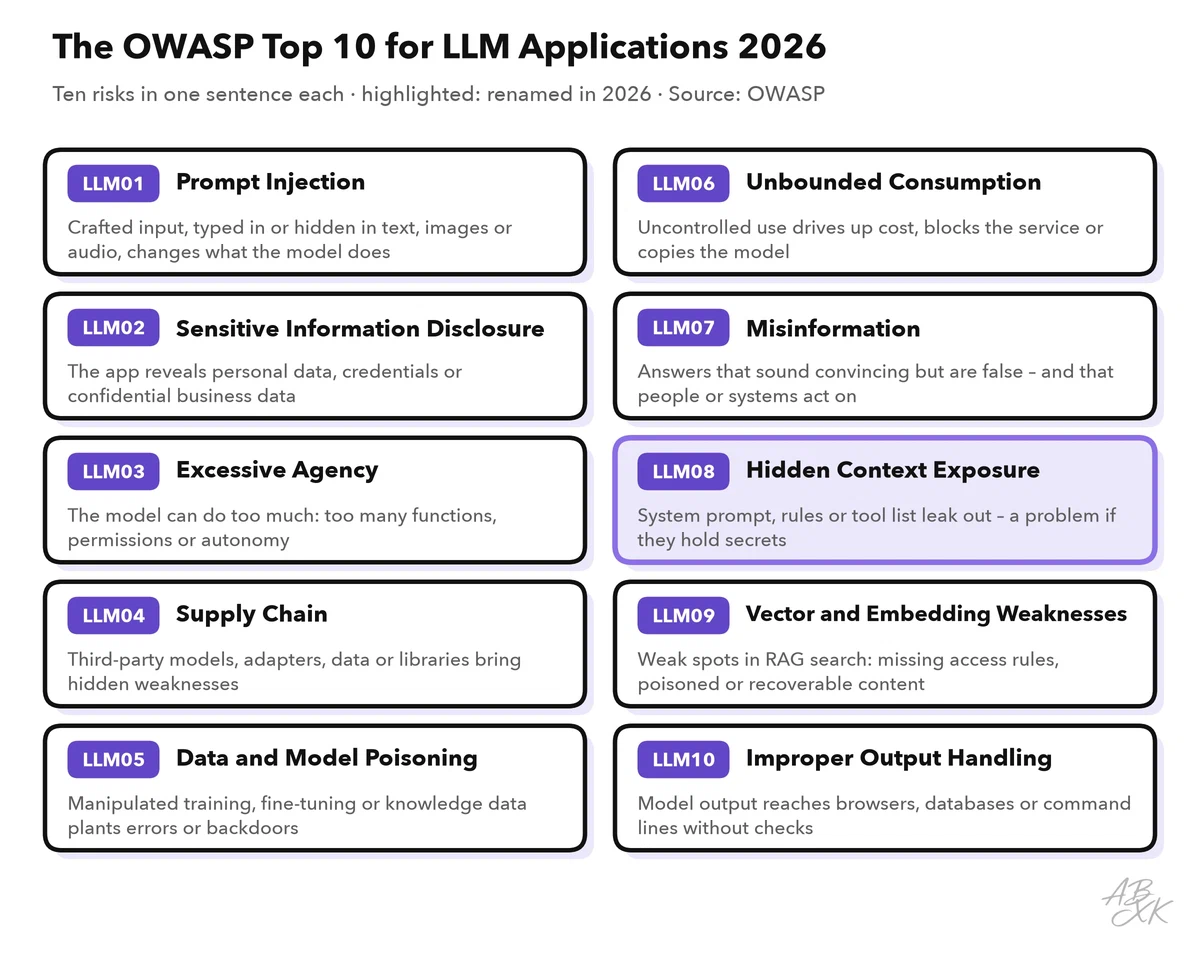
To make the risks concrete, this guide uses one example throughout: a support assistant for an online shop. It answers customers in a chat, searches the shop’s help articles, looks up orders and can start refunds up to a set limit. The table shows how each risk could hit this assistant, and a first defense:
| Risk | How it could hit the shop assistant | First defense |
|---|---|---|
| LLM01 Prompt Injection | A product review contains hidden instructions that tell the assistant to grant a refund | Treat outside content as data; check every refund with rules outside the model |
| LLM02 Sensitive Information Disclosure | The assistant shows another customer’s address from an order | Look up orders only for the logged-in customer; filter personal data in answers |
| LLM03 Excessive Agency | The refund tool can also change prices and delete orders | Give tools only the functions and rights the task needs |
| LLM04 Supply Chain | A downloaded model or library contains malicious code | Use vetted sources, check signatures, keep an inventory |
| LLM05 Data and Model Poisoning | Someone slips false return rules into the help articles | Control who can change the knowledge base; review changes |
| LLM06 Unbounded Consumption | A script sends thousands of very long requests at night | Limits on requests and tokens, a hard spending cap |
| LLM07 Misinformation | The assistant invents a warranty period | Answer from approved sources and hand over when unsure |
| LLM08 Hidden Context Exposure | The hidden instructions contain an API key and the discount rules | No secrets in prompts; enforce rules in code |
| LLM09 Vector and Embedding Weaknesses | Internal pricing notes sit in the same search index as public help articles | Apply access rights inside the search |
| LLM10 Improper Output Handling | The chat window runs a script that ended up in the model’s answer | Encode output before display; never execute it unchecked |
What changed in 2026
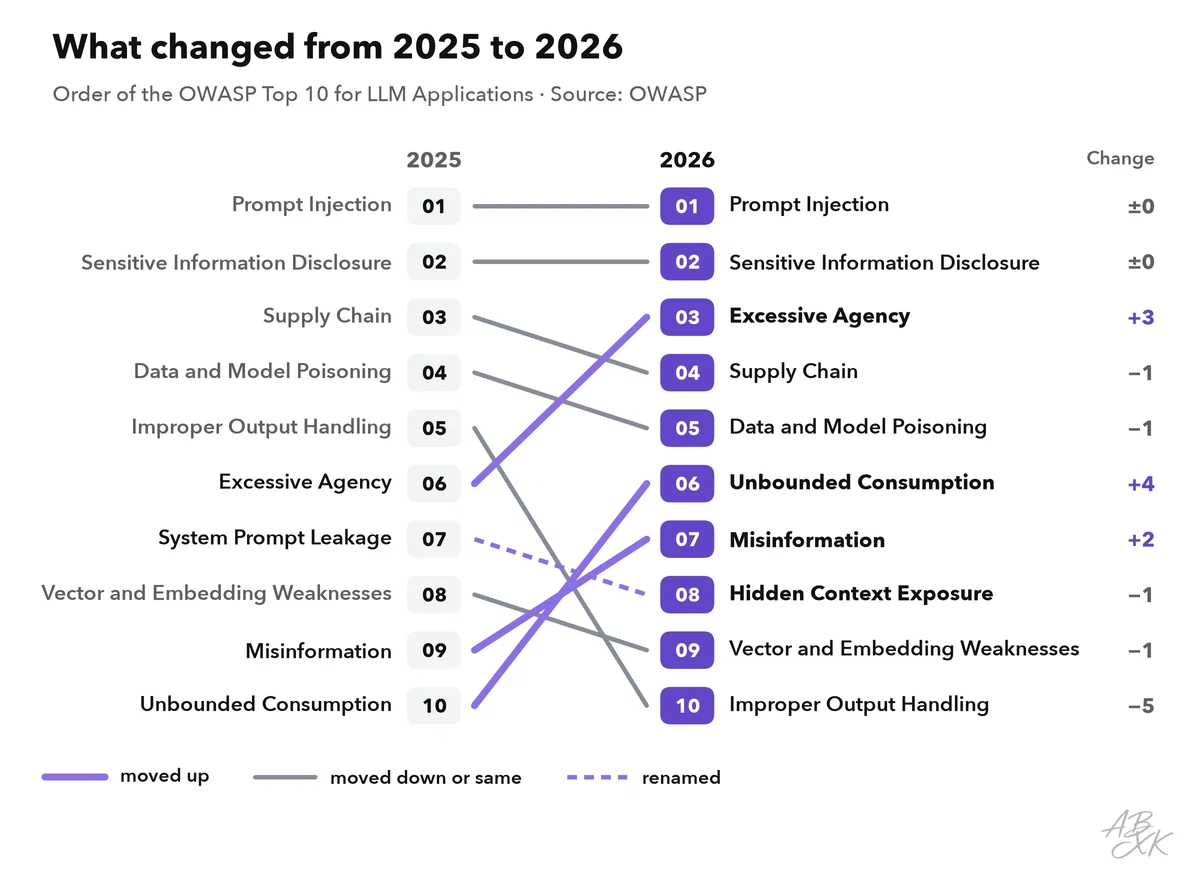
No entry is completely new, but the order moved more than in earlier editions. Excessive Agency climbed from sixth to third. According to OWASP, the vote and the incident data agree that agents are where the damage happens. Misinformation moved up because the incident data showed it far more often than the vote suggested. System Prompt Leakage got a broader name: Hidden Context Exposure. If your checklists use the IDs of 2025, update them. LLM06, for example, meant Excessive Agency in 2025 and means Unbounded Consumption now.
Input risks: prompt injection and hidden context
LLM01 Prompt Injection stays at the top of the list. An attacker writes input that changes what the model does. In a direct injection, the attacker types it into the chat. In an indirect injection, it hides in content the model reads: a web page, an email, a product review, even an image or an audio file. OWASP also counts jailbreaking as a form of prompt injection: input that makes the model ignore its safety rules. Part 3 of this level covers jailbreaks and guardrails.
No filter stops every injection, because a model makes no technical difference between instructions and data. SQL injection has a clean fix, parameterized queries. For LLMs, OWASP says, there is no such equivalent. So the main defense is design. The project leads put it plainly: build the system around the model so that “when the model is fooled, and it will be, nothing important breaks.” In practice, give the model as few rights as possible, mark outside content as data, check what the model returns and let a person approve high-risk actions.
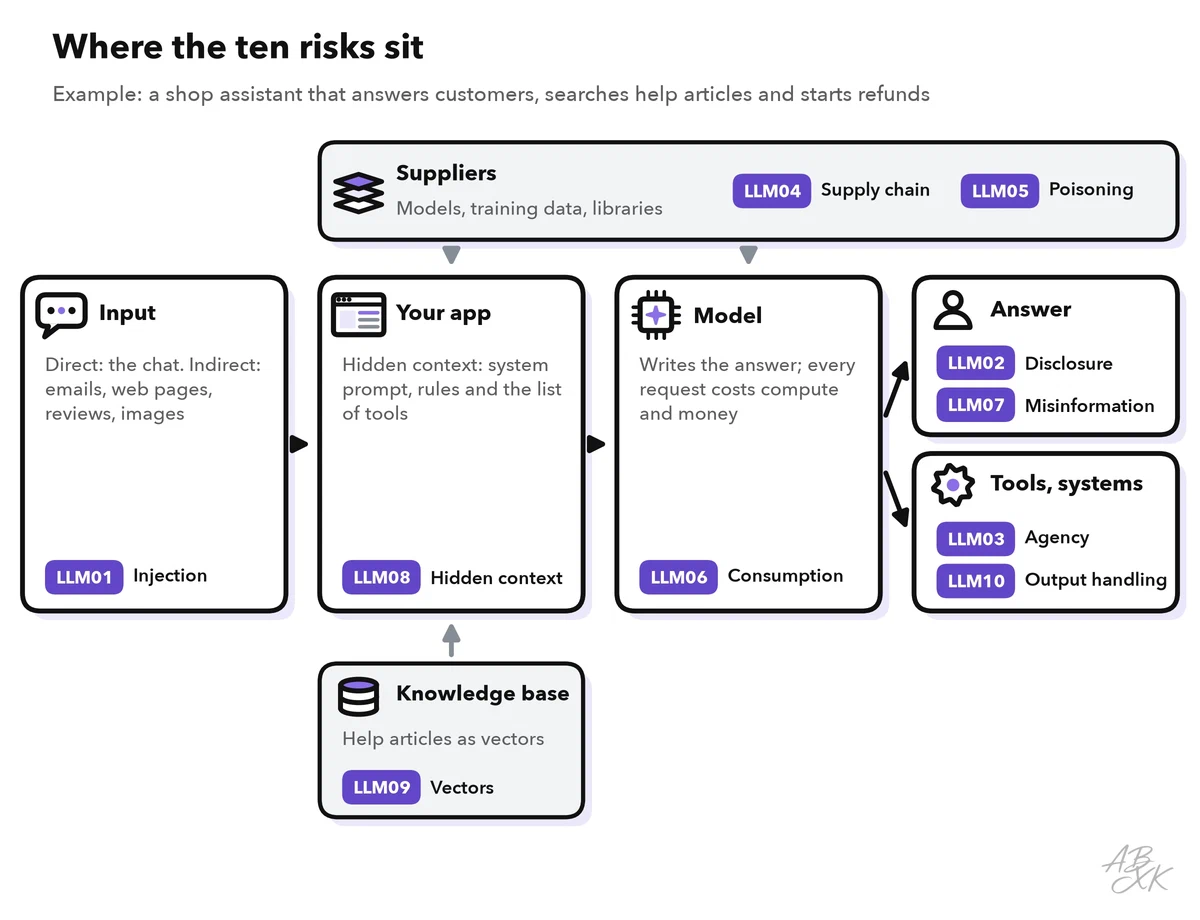
LLM08 Hidden Context Exposure. Every LLM app gives the model information that users do not see: the system prompt with its role and rules, internal policies and the list of tools. The old name, System Prompt Leakage, covered only the first of these. OWASP’s advice: assume that users can get the model to reveal all of it, and never use it as a secret or a security control. The real problem is what teams put into it: passwords, API keys or internal rules such as “refunds up to $50 without a check”. Keep secrets in a secure store and enforce rules in your code, where the model cannot talk its way around them.
Data risks: leaks, poisoning and vector stores
LLM02 Sensitive Information Disclosure holds second place. The app reveals what it should not: personal data, confidential business numbers, credentials or details from training data. Leaks can also travel through tool calls, logs and stored embeddings. A main cause, according to OWASP, is oversharing: the assistant can read more than it should, such as all orders or a drive with old, too-broad permissions. Check access rights before the search, give the model only the data the task needs and filter answers for personal data. Part 2 of this level shows data leakage controls for AI tools.
LLM05 Data and Model Poisoning. Someone manipulates the data a model learns from or looks up: training data, fine-tuning data or the documents of a knowledge base. A poisoned model can even contain a hidden backdoor: it behaves normally until a specific trigger appears. In a 2025 study cited by OWASP, 250 poisoned documents were enough to plant a backdoor. That held for models from 600 million to 13 billion parameters (Souly et al., 2025). For most companies, the realistic case is their own data, such as a changed help article. Track where data comes from, control who can change it and test the model’s behavior after every update.
LLM09 Vector and Embedding Weaknesses. RAG systems turn documents into embeddings, lists of numbers that capture meaning, and store them in a vector database. The search returns what is similar to the question, no matter who may see it, unless you build that in. OWASP sums it up: poisoning makes the system wrong, inversion makes it leak, jamming makes it silent, and access-control failure makes it indiscriminate. Inversion rebuilds text from embeddings, so a leaked vector backup counts as a leak of the documents. The main defense is to apply access rights inside the search query, not as a filter afterwards. Level 3 shows how to secure RAG and AI agents.
Action and output risks: agency, false answers, unsafe handling
LLM03 Excessive Agency. An agent can act: send emails, change records, start payments. OWASP names three root causes: too much functionality, too many permissions and too much autonomy. Its example is an email assistant that only needs to read messages but can also send them. A hidden instruction in an incoming email makes it forward sensitive mails to an attacker. Give each tool only the functions it needs, run it with the rights of the current user and check every action against rules in code. OWASP also suggests grading actions by risk: a support chatbot may approve a refund as store credit on its own, because it can be undone, while a payout to an outside account goes to a person.
LLM07 Misinformation. LLMs produce false statements that sound convincing. This becomes a security and liability problem when people or systems act on them. In 2024, a Canadian tribunal held Air Canada responsible for wrong information about bereavement fares that its website chatbot had given a customer (Moffatt v. Air Canada). Coding assistants sometimes suggest packages that do not exist, and attackers can publish malware under those names. Ground answers in approved sources, show the sources and check a claim before a system acts on it.
LLM10 Improper Output Handling. Model output is untrusted input for every system that receives it. If an app passes it unchecked to a browser, a database or a command line, whoever controls the prompt also controls those systems. Classic web attacks such as cross-site scripting or SQL injection return through this door. A newer case: the chat window loads an image whose web address carries data from the conversation to an attacker’s server. OWASP recommends zero trust: treat the model like any other user, encode output for the place where it appears and use parameterized database queries. Do not load images or link previews from model output automatically. Tenth place does not make this risk small.
Operations risks: supply chain and unbounded consumption
LLM04 Supply Chain. An LLM app is built from parts made by others: models, adapters, datasets, libraries and hosting. Each part can bring vulnerabilities, unclear licenses or hidden manipulation. Downloaded model files need extra care, because some file formats can run code when they are loaded. Our LLM database alone lists 172 models with open weights, whose model files are published for download. Use trusted sources, check signatures and file hashes, and test third-party models for your own use case. A signature proves where a file comes from, not that it is safe. Keep an inventory of all components, a software bill of materials (SBOM). For models and datasets, it is often called an AI BOM.
LLM06 Unbounded Consumption. Every request costs computing time and money. Without limits, a flood of long requests can slow down the service or produce a large bill, which OWASP calls denial of wallet. Reasoning models, which work through many steps before they answer, and agents that turn one request into many tool calls make this worse. Systematic queries can also be used to copy a model’s behavior. Set limits per user on requests and tokens, a hard spending cap that stops processing instead of only sending an alert, and step and time limits for agents.
Use the list in a design review
The list helps most at fixed points: when you design a new LLM feature, before launch and after major changes such as a new model or a new tool. Go through all ten entries with the people who build, run and own the app. For each risk, answer three questions:
- Does it apply? An app without tools has no excessive agency, but every app has inputs and outputs.
- What is the worst realistic outcome? A wrong answer in a demo is not the same as a refund to an attacker.
- Which control is in place, and how do you know it works? A control without a test is a hope, not a control.
For agents, OWASP adds a quick check, Meta’s “Rule of Two”. Can the agent (A) read untrusted input, (B) access sensitive data and (C) change things or send data out? With all three, every action needs human approval. With untrusted input plus one of the others, write down why the remaining risk is acceptable.
You will notice that the same controls come up again and again. That is good news: a few well-built controls cover most of the list.
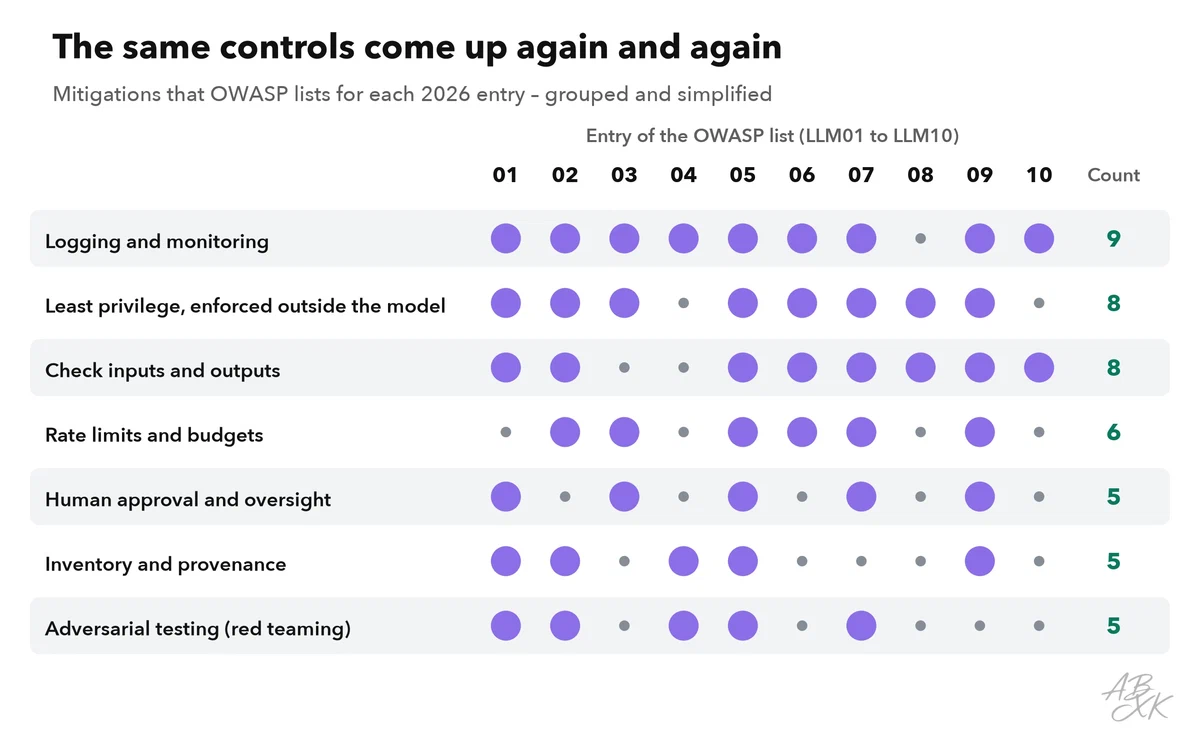
Least privilege enforced outside the model, checks on input and output, and logging appear for almost every entry. Logging and monitoring do not prevent attacks, but they show you when a control has failed. Level 3 turns this review into a full threat model for AI systems.
The list applies to every building block of an LLM app. Our tool comparison has examples of three of them. Pinecone is a vector database for RAG (LLM09). Devs.ai is a platform for building AI apps and agents on your own data (LLM01, LLM03). Airia, according to the vendor, is a control layer that secures and governs agents, models, tools and data access:



Short descriptions from our tool comparison, based on the vendors' information — not tested by ABXK.