

Few teams build an AI system from scratch. They take a model from a provider or a model hub, an embedding model, a vector database, Python packages, datasets for fine-tuning and plugins that give an agent its tools. Each of these parts comes from someone else, and each can bring a risk into your system. Together they form the AI supply chain. Securing it means knowing every part, where it came from and whether you can trust it.
This is part 4 of Level 3 (Advanced) in our AI Security path. You will learn the main supply chain risks — model files that run code, poisoned data, malicious plugins and dependencies — and the defenses: safe formats, signatures, model cards, an AI bill of materials and a vetting process. The OWASP Top 10 for LLM Applications from Level 2 lists “Supply Chain” and “Data and Model Poisoning” as two separate risks (Source: OWASP Top 10 for LLM Applications 2026, genai.owasp.org).
The AI supply chain at a glance
The map shows the parts of our support assistant that come from outside. The left column is where risk enters; the middle column is your chance to stop it.
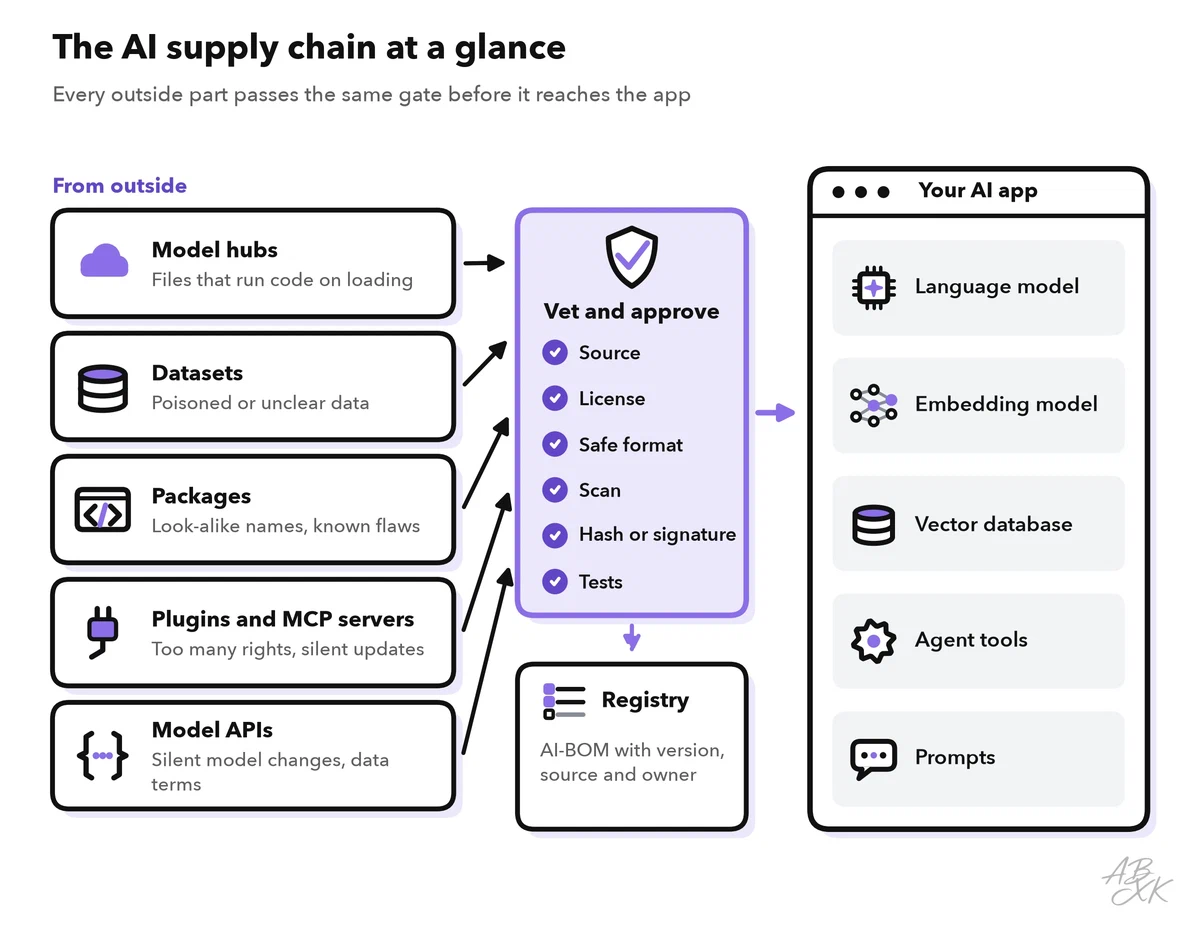
Two rules follow from the map:
- Know what you run. Keep a list of every model, dataset, package and plugin, with version and source.
- Nothing reaches production without a check. New parts and new versions of old parts pass the same gate.
Model files that run code
Model weights are just numbers, but the file format around them is not always harmless. Many older model files use Python’s pickle format. Pickle can store instructions that run when the file is loaded. Loading a manipulated model file can therefore mean running an attacker’s code on your machine.
This is not theoretical. In February 2024, the security company JFrog reported that it had found about 100 models on the Hugging Face platform with harmful code that ran on loading (Source: JFrog Security Research, 2024, jfrog.com). Four defenses help:
- Prefer safe formats. The safetensors format, developed by Hugging Face, stores only the numbers and cannot run code. Since version 2.6 (January 2025), PyTorch’s
torch.loadfunction uses a restricted mode by default that loads weights and simple data types, not arbitrary objects (Source: PyTorch 2.6 release notes, pytorch.org). - Do not run remote code blindly. Some models come with their own Python code, and loading options such as
trust_remote_codein the Hugging Face Transformers library run it. Use them only after you have reviewed the code. - Load new files in isolation. Open untrusted model files in a sandbox without secrets and without network access, as described in part 2 of this level.
- Pin exact versions. Refer to a model by a fixed revision or file hash, not by “latest”. A repository on a model hub can change after you checked it.
Poisoned data and hidden backdoors
Data poisoning means manipulating training or fine-tuning data so that the model learns something it should not: wrong facts, a bias or a hidden backdoor. A backdoor is a behavior that only appears when a certain trigger phrase occurs. In every other test, the model behaves normally, which makes backdoors hard to find.
Poisoning needs less data than many people assume. The OWASP list cites a 2025 study on this, as part 1 of Level 2 mentioned. In it, Anthropic, the UK AI Security Institute and the Alan Turing Institute trained models with 600 million to 13 billion parameters. For every size, 250 poisoned documents were enough to plant a simple backdoor — even though the larger models saw far more clean training data (Source: Anthropic, “A small number of samples can poison LLMs of any size”, 2025, anthropic.com). The backdoor in that study was harmless — it made the model write gibberish — but it shows that size alone does not protect a model.
In your own system, poisoning has three entry points: the base model you download, the data you use for fine-tuning and the documents in your RAG knowledge base. Defenses:
- Know the origin of every dataset: who made it, when and how it was collected. Datasheets for datasets, a documentation format proposed by researchers, describe exactly this.
- Restrict who can change training data and knowledge sources, and log every change.
- Filter and deduplicate data, and check samples by hand.
- Test the model before and after fine-tuning on the same evaluation set and compare the results.
Level 4 covers poisoning and related attacks in depth in adversarial machine learning.
Plugins, tools and dependencies
Agents get their abilities from plugins and tools, today often through the Model Context Protocol (MCP), an open standard for connecting tools and data sources to AI assistants. A plugin runs with the rights you give it, and its tool descriptions go straight into the model’s context. A malicious or compromised plugin can therefore steal data, hide instructions in its descriptions or change its behavior with an update.
Classic software dependencies matter too. Python packages with names that look like popular ones — called typosquatting — can carry malware. AI coding assistants sometimes suggest packages that do not exist, and attackers can register such names. Level 1 explains this risk in hallucinations as a security risk. Defenses:
- Keep an allowlist of approved plugins and MCP servers, and install nothing from unknown sources.
- Review the permissions each plugin asks for, and grant the minimum.
- Pin versions and review updates before you roll them out.
- Use lock files with hashes for packages, and software composition analysis (SCA), a type of tool that checks dependencies for known vulnerabilities.
Proof of origin: model cards, signatures and AI-BOMs
Four kinds of records tell you what you are running:
| Record | What it contains | Question it answers |
|---|---|---|
| Model card | Purpose, training data, evaluations and limits of a model | Is this model fit for my use? |
| Datasheet for a dataset | Origin, collection method and content of a dataset | Where does this data come from? |
| Hash or signature | A cryptographic fingerprint of the files | Are these exactly the files the publisher released? |
| SBOM or AI-BOM | An inventory of all components with versions and sources | What exactly is in my system? |
Model cards were proposed by researchers at Google in 2019 (Source: Mitchell et al., “Model Cards for Model Reporting”, 2019). For signatures, a working group of the Open Source Security Foundation (OpenSSF) released version 1.0 of a model signing library in 2025. It can sign model files with the Sigstore project and check the signature before a model is loaded (Source: Sigstore blog, “Taming the Wild West of ML: Practical Model Signing with Sigstore”, 2025, blog.sigstore.dev). A software bill of materials (SBOM) lists all parts of a piece of software; an AI-BOM extends it to models and datasets. Both common SBOM standards now cover AI: CycloneDX with its machine learning BOM, and SPDX 3.0 with its AI and dataset profiles.
Open-weight models: the biggest download
Many teams run open-weight models — models whose weights anyone can download — on their own servers or in a GPU cloud. Our LLM database lists 172 models with open weights, out of 343 models in total. The chart shows when they were released:
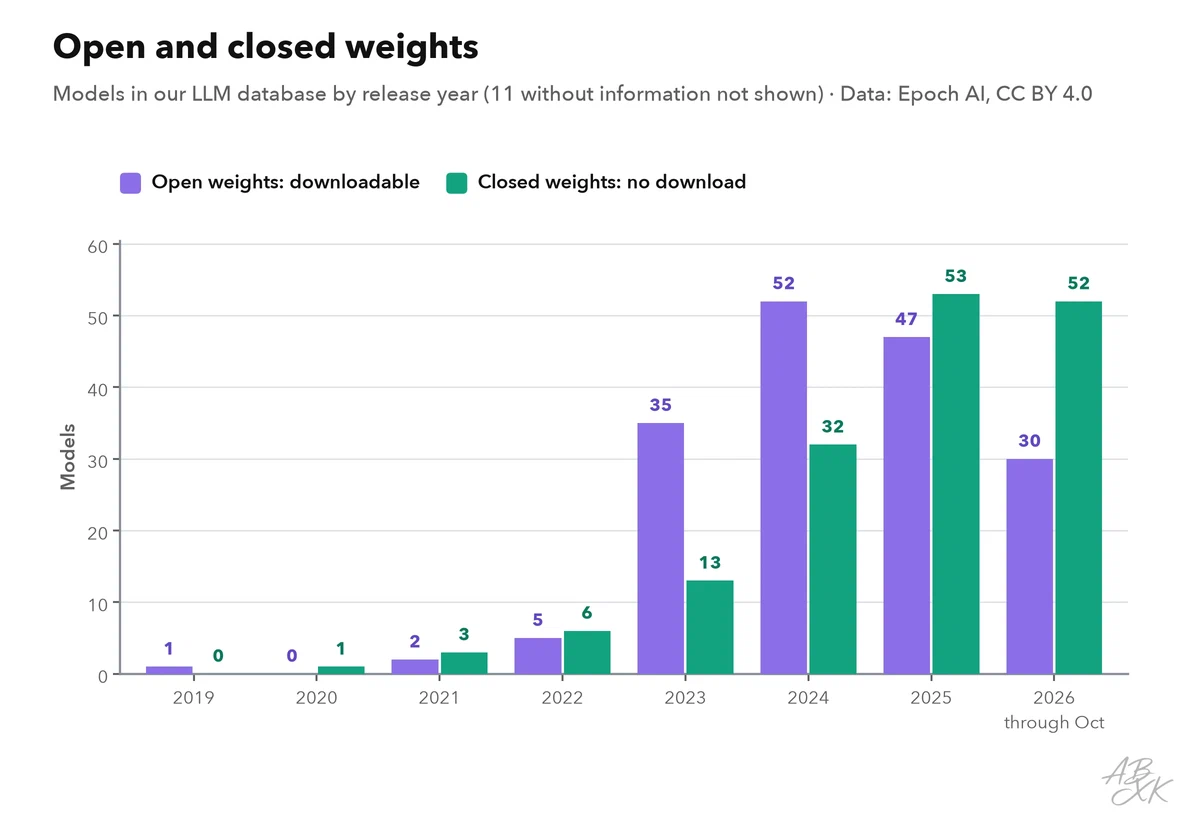
Each of these models is a large download from an outside source. Here are some examples from our database with their overall capability score:
| Model | Released | Weights | ECI | Rank |
|---|---|---|---|---|
| Kimi K3 Moonshot | Jul 16, 2026 | open | 157.4 | 17 |
| DeepSeek V4.1 Flash DeepSeek | Sep 9, 2026 | open | 155.6 | 31 |
| Qwen 3.8 27B Alibaba | Aug 14, 2026 | open | 151.6 | 52 |
| GLM-5.3-Flash Z.ai (Zhipu AI) | Aug 20, 2026 | open | 153.2 | 45 |
| Llama 3-70B Meta AI | Apr 18, 2024 | open | 122.9 | 191 |





ECI = Epoch Capabilities Index, one overall score across many benchmarks; rank among all models with an ECI. Data: Epoch AI, retrieved on October 17, 2026, licensed CC BY 4.0. All models: LLM database.
Open weights are not unsafe in themselves. But with a download, the supply chain checks become your job. With an API, the provider manages the model files, and your checks shift to the contract, the data terms and version changes. If you host models yourself — for example on a GPU cloud such as Runpod — apply the checklist below to every model and every update. Platforms such as Airia, according to the vendor, help companies govern the models, agents and tools they use. We have not tested either tool.


Short descriptions from our tool comparison, based on the vendors' information — not tested by ABXK.
Vetting checklist for AI components
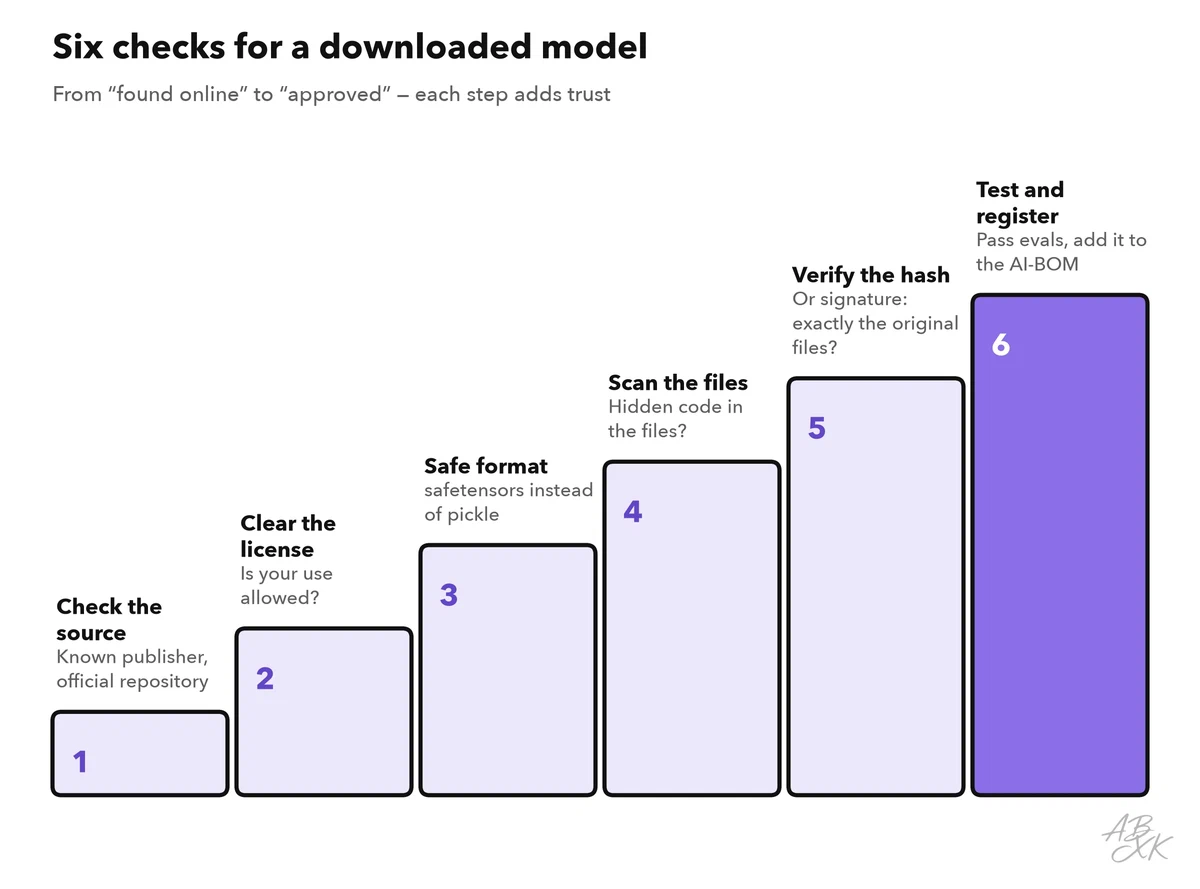
The ladder shows the order of checks for a downloaded model; the table covers all component types.
| Component | Check before use | Evidence to keep |
|---|---|---|
| Model weights | Known publisher, license, safetensors format, scan, hash or signature | Model card, hash, scan result |
| Model API | Contract and data terms, pinned model version, notice of changes | Contract, model version in the logs |
| Datasets | Origin, license, personal data, checks for poisoning | Datasheet, sample review |
| Packages | Exact names, pinned versions with hashes, known vulnerabilities | Lock file, SCA report |
| Plugins and MCP servers | Publisher, permissions, pinned version, review of updates | Allowlist entry, permission review |
| Knowledge base sources | Who can write, review of new sources | Source list, change log |
Every approved component goes into your AI-BOM with its version, source and owner. When a new vulnerability or a malicious package becomes public, this list answers the first question of AI incident response within minutes: are we affected?