

Even a well-built AI system will fail one day. The support assistant shows a customer someone else’s order. A hidden instruction in an email leads to a refund. A model update makes the answers worse overnight, or a package in your supply chain turns out to be malicious. Incident response is the prepared way to handle such events: notice them early, limit the damage, fix the cause and learn from it. A prepared team needs minutes to switch off a risky function. An unprepared team spends those minutes looking for the right person.
This is part 5 of Level 3 (Advanced) in our AI Security path. You will learn what counts as an AI incident, which signals reveal one, what to log so that you can investigate, and how a playbook takes you through five steps: contain, assess, notify, fix and learn. It uses the audit logs from part 2 and the AI-BOM from part 4, and it ends with a complete playbook for our support assistant.
What counts as an AI incident
The OECD defines an AI incident as an event in which the development, use or malfunction of an AI system directly or indirectly leads to harm. The harm can be to people’s health or to critical infrastructure. It can also be a violation of human rights or of laws that protect fundamental rights, labor rights and intellectual property, or harm to property, communities or the environment. An event that could plausibly lead to such harm is an AI hazard (Source: OECD, “Defining AI incidents and related terms”, 2024, oecd.org).
For a company, a simpler rule works well: treat every event in which an AI system causes harm or almost causes it as an incident. That includes near misses — events that were stopped just in time, for example by an approval step. They show you which control did the work and how close you came. AI incidents fall into three groups:
| Type | Example from the support assistant | Typical first signal |
|---|---|---|
| Security incident in your AI system | A hidden instruction in an email makes the agent prepare refunds; an API key leaks; a plugin turns out to be malicious | An alert about unusual tool calls, a warning from a vendor |
| Safety or quality incident | The assistant invents a return policy or insults a customer | A complaint, negative feedback, a failed output check |
| Attack that uses AI against you | A cloned voice of the CEO asks for an urgent payment; a wave of AI-written phishing | A report from an employee, an alert from email security |
The second group is easy to underestimate. In 2024, a Canadian tribunal held Air Canada responsible after its website chatbot told a customer that he could claim a bereavement discount after his flight, which the airline’s policy did not allow. The airline argued that the chatbot was responsible for its own answers; the tribunal did not accept that (Source: Moffatt v. Air Canada, Civil Resolution Tribunal of British Columbia, 2024). A wrong answer can be an incident, even without an attacker.
The third group runs through your normal security process; Level 1 explains phishing in the AI era. The rest of this part focuses on incidents in your own AI systems.
Detection signals: how incidents become visible
Incidents rarely announce themselves. They appear as small signals in different places, and someone has to connect them:
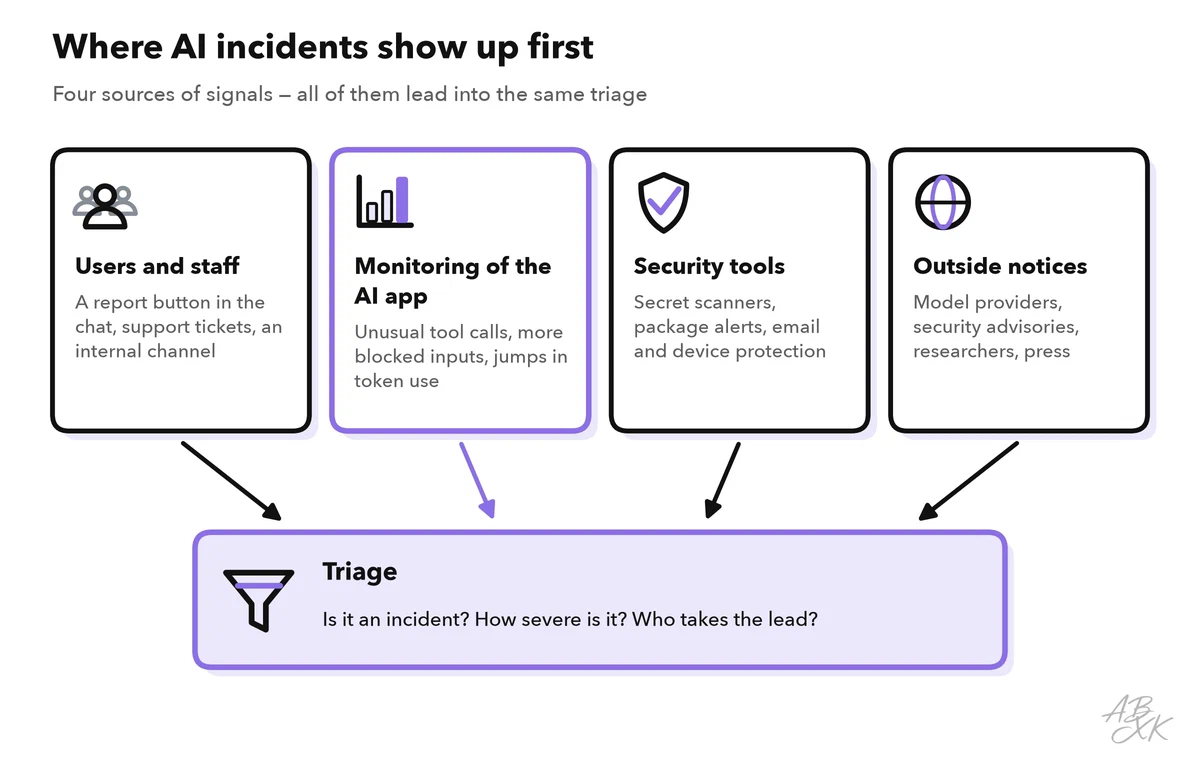
- Users and staff notice wrong or strange answers first. Give them an easy way to report: a “report this answer” button in the chat and a known internal channel. Support staff should know that “the bot promised me a refund” can be an incident, not just a complaint.
- Monitoring of the AI app catches patterns that no single user sees: more tool calls than usual, refunds outside the usual amounts, a spike in blocked inputs or failed output checks, many attempts from one account to extract the system prompt, or a sudden jump in token use.
- Security tools cover the classic paths: scanners for leaked secrets, alerts about vulnerable packages, email security and protection for company devices.
- Outside notices come from model providers, security advisories, researchers who report a vulnerability and sometimes from the press.
Good alerts lead to action. Send an alert only when someone has to act now, give every alert an owner and put everything else on a dashboard. Base the thresholds on normal operation: if the assistant usually prepares 20 refunds a day, 60 in one hour deserves a look (numbers for illustration). Too many alerts cause alert fatigue — people stop reacting, just as they stop reading approvals in part 2.
Some tools deliver part of these signals. According to the vendor, Sentaro checks the context and intent of emails and warns of phishing, and Bitdefender protects company devices against ransomware, phishing and fileless attacks. Airia, according to the vendor, adds policies and audit evidence for AI agents, models and tools. We have not tested these tools.



Short descriptions from our tool comparison, based on the vendors' information — not tested by ABXK.
The logs an investigation needs
When an incident starts, three questions come up at once: What happened? Since when? Who is affected? Only logs can answer them. Part 2 listed what an agent should record. For incident response, four properties of the logs matter as much as their content:
- Correlation: every step of a request carries the same request ID, so you can follow it from the chat message through retrieval and tool calls to the answer.
- Versions: record the model version, the prompt version and the state of the knowledge base with every request. Without them, you cannot reproduce what the system did last Tuesday.
- Retention: incidents are often discovered weeks later. Keep security-relevant logs long enough to cover that gap, and agree on the period with your data protection officer, because logs contain personal data.
- Integrity: store logs where neither the AI system nor its operators can change them, and record who reads them. One time zone for all systems (UTC) makes it possible to build a timeline.
| Question in an investigation | Log data that answers it |
|---|---|
| Which input triggered the action? | Request ID, user input, IDs of the retrieved documents, tool calls with arguments |
| Since when has it been happening? | Timestamps, history of model and prompt versions, changes to the knowledge base |
| Who is affected? | User or customer IDs in tool calls and answers |
| Did data leave the system? | Outgoing tool calls and emails, links and images in answers |
| Is it still happening? | Live view of the same signals after containment |
General monitoring of LLM apps — traces, dashboards, cost and quality metrics — is a topic of its own. Our AI Development section covers it from the developer’s side.
The playbook: contain, assess, notify, fix, learn
A playbook is a written plan for one type of incident: who does what, in which order, with which switches and which contacts. It does not replace your company’s general incident response process; it plugs into it. NIST SP 800-61 Revision 3 describes such a general process in line with the NIST Cybersecurity Framework 2.0. The OWASP GenAI Incident Response Guide adds what is specific to AI systems (Sources: NIST SP 800-61r3, 2025, nist.gov; OWASP GenAI Incident Response Guide 1.0, 2025, genai.owasp.org).
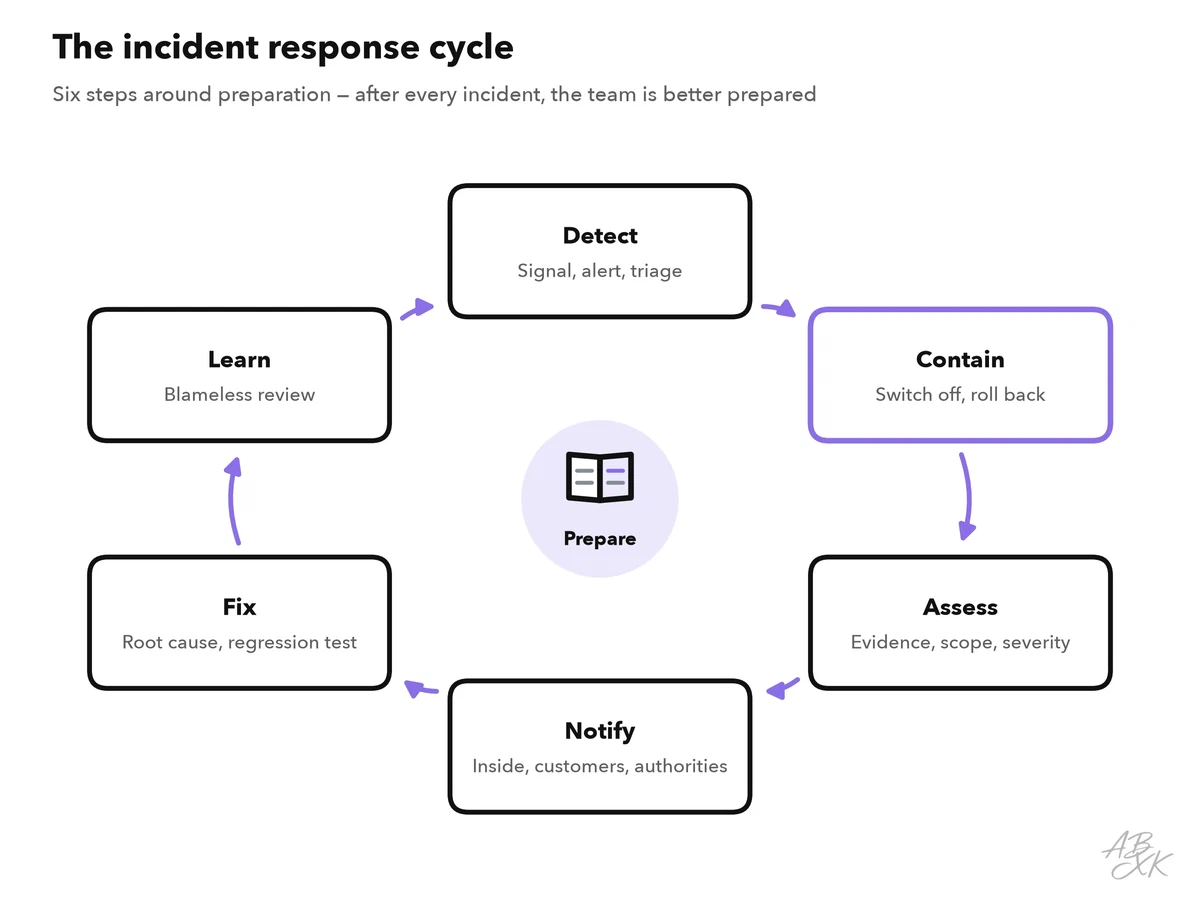
- Contain. Stop the damage first, then investigate. Switch off the affected tool, put the agent into answer-only mode, roll back the prompt or the model version, remove a poisoned document from the index, revoke leaked keys or block an account.
- Assess. Secure the evidence before you change more: copy the logs and the affected documents. Then use the logs to find out what happened, since when and to whom. Rate the severity by impact and reach, as in the risk ranking of part 1.
- Notify. First inform the people inside the company who must decide or act. Then inform those outside who need to know: affected customers, vendors and, where the law requires it, authorities. Under the GDPR, a personal data breach must usually be reported to the supervisory authority without undue delay and, where feasible, within 72 hours of becoming aware of it. The EU AI Act adds a duty for providers of high-risk AI systems to report serious incidents. Clarify in advance with your legal team which duties apply to you; Level 4 explains the legal frameworks in AI governance frameworks.
- Fix. Remove the cause at the right layer: design before permissions, permissions before filters, filters before prompt wording — the same order that part 3 uses for red-team findings. Turn the incident into a regression test, then restore the service step by step and watch the signals closely.
- Learn. Hold a blameless review within a few days: what happened, why the controls did not stop it and what will change. Look for weak systems and processes, not for a person to blame. Then update the threat model, the red-team test cases and the playbook itself.
Roles and communication
An incident needs clear roles, even in a small team where one person holds several of them:
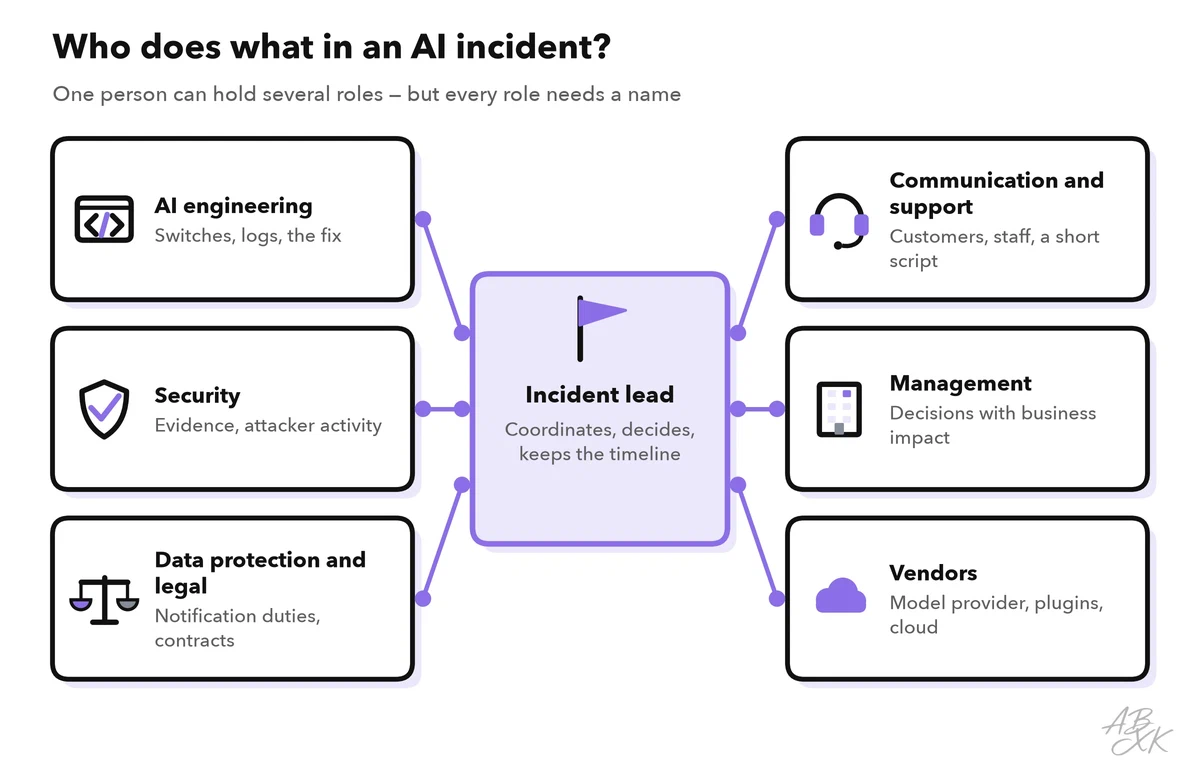
- The incident lead coordinates the response, makes decisions and keeps a timeline of them.
- AI engineering operates the switches, reads the logs and builds the fix.
- Security secures the evidence and looks for attacker activity beyond the AI system.
- Data protection and legal decide on notification duties and check contracts.
- Communication and support inform customers and staff and give support agents a short script.
- Management makes decisions with business impact, such as switching off a feature for several days.
- Vendors — the model provider, plugin publishers, the cloud provider — should hear from you early. They may see the same attack at other customers.
Communication follows a few rules. Use one dedicated channel and keep the decision log there. Share details on a need-to-know basis, because an attacker may still have access. Say what you know, what you do not know yet and when you will give the next update. The NIST AI Risk Management Framework asks organizations to communicate incidents and errors to the relevant AI actors, including affected communities (Source: NIST AI RMF 1.0, MANAGE 4.3, 2023, nist.gov).
You can also learn from other organizations’ incidents. Public collections such as the AI Incident Database and the OECD’s AI Incidents and Hazards Monitor gather reported AI harms. Reading the cases from your industry is a cheap way to test your own playbooks.
A worked playbook: a hidden instruction triggers refunds
Here is the playbook for the top risk from part 1 of this level: an email with a hidden instruction makes the support assistant prepare refunds for orders that do not qualify.
| Step | What the team does | Who |
|---|---|---|
| Detect | An alert fires: three times more refunds per hour than usual. A support agent reports an odd refund | On-call engineer |
| Contain | Switch off the refund tool, keep the chat in answer-only mode and pause the processing of incoming emails | On-call engineer, approved by the incident lead |
| Assess | Copy the logs; find the email through the IDs of the retrieved documents; list all affected orders; check whether money has been paid out; search for similar emails | Incident lead, security |
| Notify | Ask the payment team to stop open refunds; inform management; involve the data protection officer if customer data was exposed | Incident lead |
| Fix | The tool only prepares refunds and a person approves them; emails no longer enter the shared context; a harmless test instruction becomes a regression test | AI engineering |
| Learn | Blameless review within a week; update the threat model, the red-team test cases and this playbook | Whole team |