

Many people start with AI the same way: they type a short question, get a generic answer and decide that the tool is not very useful. The problem is usually not the tool. It is the request. A few extra sentences often turn a vague answer into something you can actually use.
This is part 4 of Level 0. You will learn what a prompt is, a simple three-part formula for clear requests, how to improve an answer with follow-up questions, and which beginner mistakes to avoid. All examples work in any general chat assistant.
What a prompt is
A prompt is everything you give an AI assistant to work with: your question or instruction, plus any text, file or image you add. You usually type it, and in many apps you can also speak it.
The assistant knows only what is in your prompt and in the conversation so far. It does not know your company, your reader or the email you got yesterday. As part 3 explained, it writes the most likely answer to what it sees. If your prompt is vague, the most likely answer is vague, too.
A simple formula: task, context, format
You do not need special tricks for a good prompt. Three parts cover most everyday requests:
- Task: What should the assistant do? Start with a clear verb: write, summarize, explain, list, rewrite, translate, compare.
- Context: What does it need to know? Who is the reader, what is the situation, which facts must it use, and what should it avoid?
- Format: What should the result look like? Think of length, structure (an email, bullet points, a table) and tone.
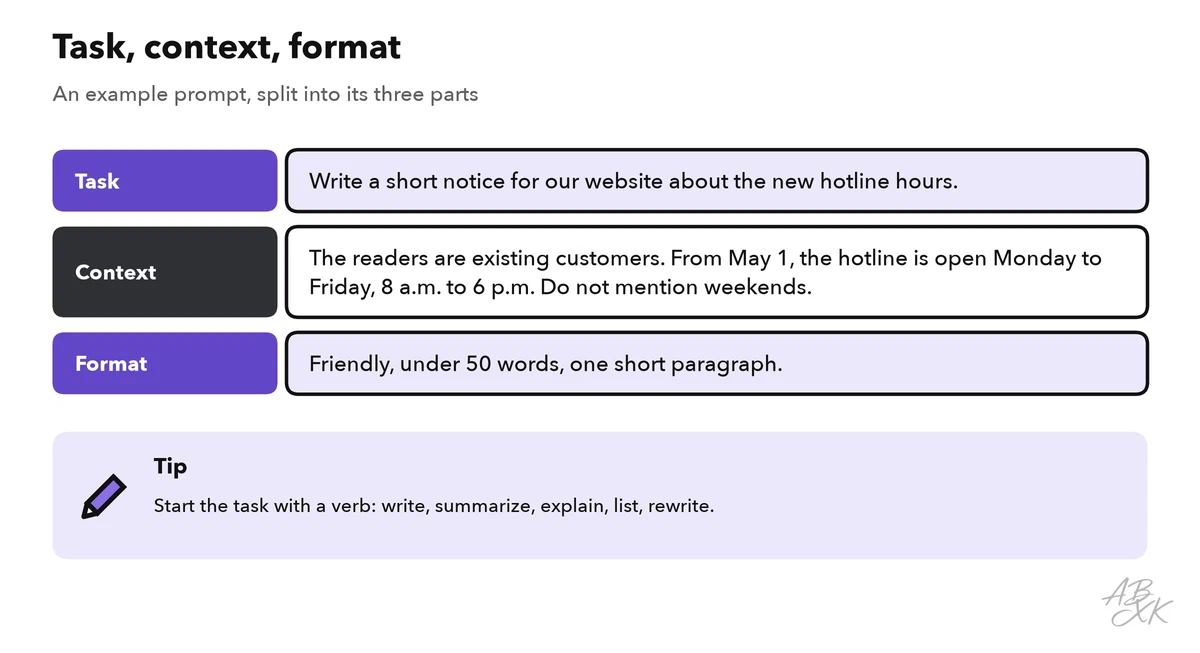
The order is not strict, but starting with the task helps the assistant — and you — stay focused. If you paste a longer text, such as an email or a report, keep it clearly apart from your instructions, for example by writing “Text:” before it. Level 1 adds a fourth building block, the role, and shows how examples improve results: see prompting basics.
Vague and clear prompts side by side
Here is the same request twice. The first prompt leaves the assistant guessing. The second gives it what it needs.
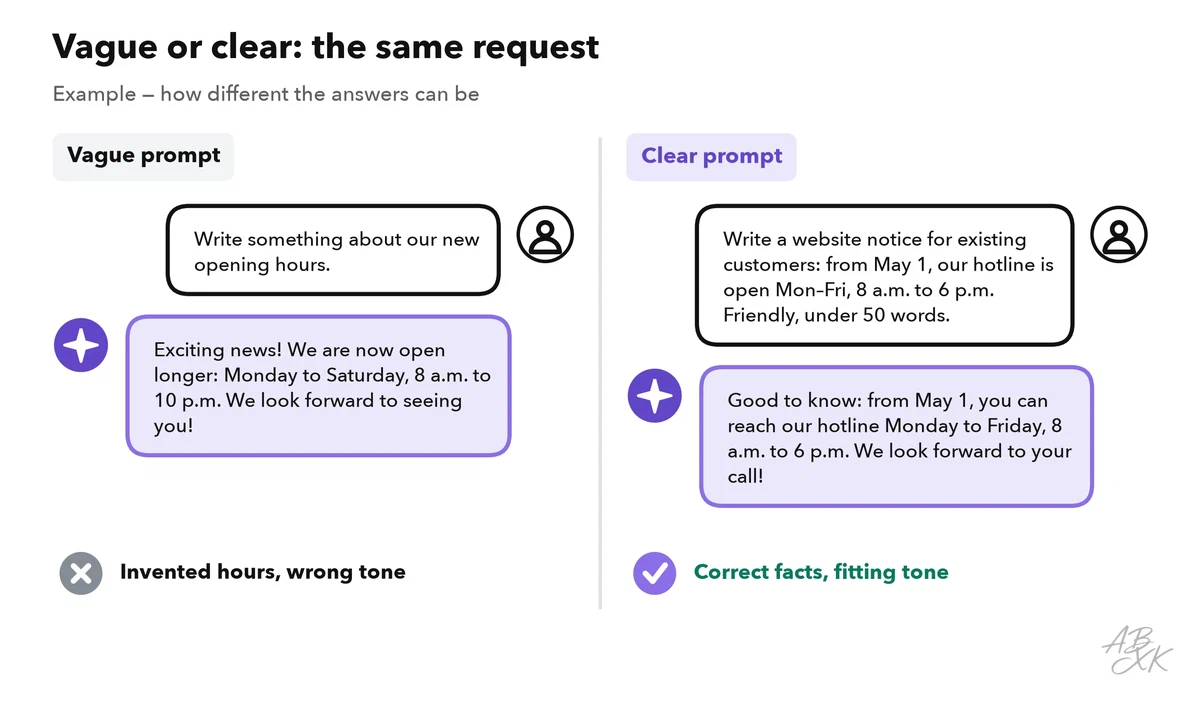
Look at what happens with the vague prompt: the assistant fills the gaps with guesses. It invents opening hours, picks a cheerful tone you did not ask for and has no idea who will read the text. The clear prompt removes the guesswork, because the facts, the reader and the length are all there.
The table shows more before-and-after pairs from everyday work:
| Vague prompt | Clear prompt |
|---|---|
| “Summarize this.” | “Summarize this report in five bullet points for my manager. Focus on costs and deadlines. Text: …” |
| “Write a post about our webinar.” | “Write a LinkedIn post of up to 80 words that invites HR managers to our free webinar on onboarding. Friendly, no hashtags.” |
| “Help me with my presentation.” | “Suggest an outline for a 10-minute talk to new colleagues about our travel expense process. Six slides, one line each.” |
| “Explain AI.” | “Explain in three sentences, without jargon, what a large language model is. The reader is a new trainee in accounting.” |
| “Make it better.” | “Make this email shorter (under 100 words) and friendlier. Keep all names and dates exactly as they are.” |
Follow-up questions: the second prompt matters most
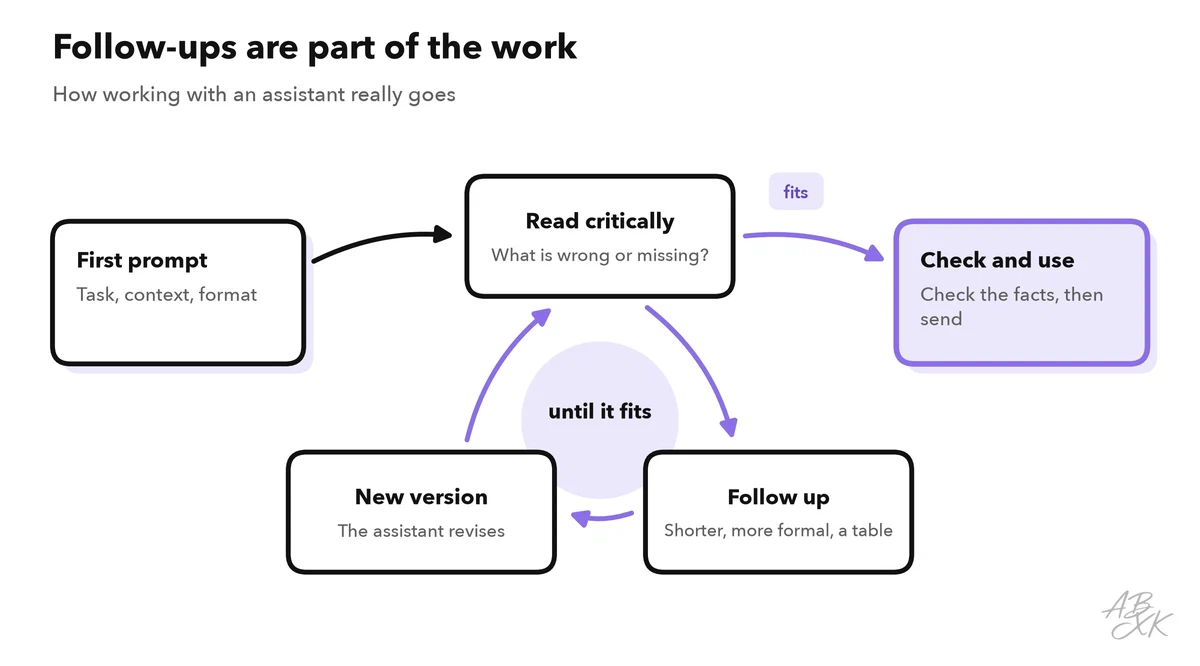
The first answer is a draft, not the end of the conversation. The assistant remembers the chat, so you can improve the result step by step without repeating everything. Useful follow-ups are short:
- “Shorter, please — half the length.”
- “More formal. The reader is a customer.”
- “Put this into a table with three columns.”
- “What did you assume? List your assumptions.”
- “Before you write, ask me three questions about what you need to know.”
The last one is especially useful when you are not sure what context to give. The assistant then tells you what is missing.
Start a new chat when you switch to a different topic. Otherwise, instructions from the old task can mix into the new one.
Which assistant you use for this matters less than how you ask. The formula works the same in both of these well-known general assistants from our comparison. We list them in the Text-to-Image area because of their image features, but both handle text as well as images:


Short descriptions from our tool comparison, based on the vendors' information — not tested by ABXK.
Common beginner mistakes and how to fix them
Most weak answers come from a handful of habits. Each of them is easy to fix:
| Mistake | What happens | Better |
|---|---|---|
| A one-line request without context | A generic answer that fits nobody | Add the reader, the goal and one or two key facts |
| Several tasks in one prompt | The assistant does some of them only halfway | One task per prompt, or number the steps |
| Asking for facts and trusting them | Invented numbers, names or sources | Check the facts; for research, use a tool that shows its sources |
| Pasting confidential data | Your data ends up with the provider | Use placeholders such as “Customer A”, or an approved tool |
| Starting over after a weak answer | You lose the parts that were good | Improve it with a follow-up instead |
| Accepting the first draft | Generic wording and the wrong tone | Read like an editor, then ask for changes |
When a prompt works well, save it. A small collection of your best prompts — for status emails, meeting summaries or customer replies — saves time every week. Level 3 shows how to turn them into reusable templates.