

You wrote a prompt that works. It turns customer emails into clear replies, and the team loves it. Then someone “improves” one sentence, or the vendor updates the model, and suddenly one reply in five promises a refund nobody approved. Nobody notices for two weeks.
This is part 5 of Level 4 in our AI Productivity path. You will learn to treat prompts like software: test sets, rubrics and automatic checks, an AI model as a judge, regression tests, versions and fair model comparisons. All you need is a spreadsheet. In Level 3 you ran a quick blind test of two or three models on your own task. Here it becomes a method you can repeat.
Why prompts need tests
A prompt is an instruction for a system you do not control. Vendors update and retire models, and the same model name can behave differently a few months later. Researchers compared the March and June 2023 versions of GPT-4. On the same questions, its accuracy at telling prime numbers from composite numbers fell from 84% to 51%. Their conclusion: the same AI service can change a lot in a short time, so it needs continuous monitoring. (Source: Chen, Zaharia and Zou, “How Is ChatGPT’s Behavior Changing over Time?”, 2023, arxiv.org)
Your own edits matter just as much. In another study, small formatting changes alone — a different separator, extra spaces, capital letters — changed the accuracy of an open model by up to 76 percentage points on some tasks. (Source: Sclar et al., “Quantifying Language Models’ Sensitivity to Spurious Features in Prompt Design”, ICLR 2024, arxiv.org) And the same input can produce different answers on two runs: the output is non-deterministic.
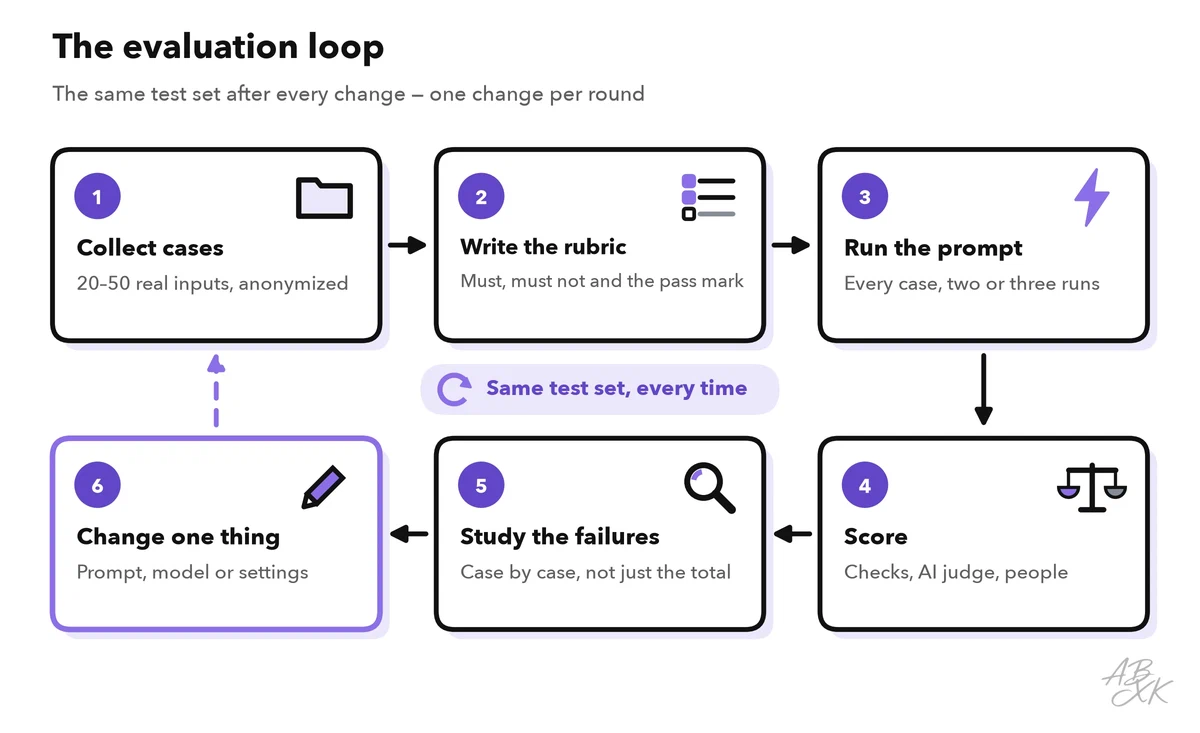
A regression is something that used to work and breaks after a change. Software teams catch regressions with tests that run after every change, and you can do the same for prompts. The loop below is the whole method.
Build a test set from real inputs
A test set is a fixed collection of inputs you run your prompt on every time. Take 20 to 50 real cases from your work and remove names, addresses and account numbers first. Mix three types:
| Case type | Suggested share | Example for a customer-service prompt |
|---|---|---|
| Typical | About 60% | “Where is my order?” with an order number |
| Edge case | About 25% | An email in Spanish, an email with three questions, a missing order number |
| Trap | About 15% | A refund request outside the policy, a request for another customer’s data |
For each case, write down what a good answer must contain and what it must avoid — not one perfect text. “Mentions the delivery status; promises no refund; under 120 words” is easier to check than a perfect sample reply. Keep the set fixed, and add every real failure you find as a new case. Over time, your test set becomes a record of everything that has ever gone wrong.
One risk is overfitting: if you tweak the prompt until it passes exactly these 30 cases, it may still fail on the 31st. So put about one case in five aside as a holdout. Leave these cases out while you work on the prompt, and run them only before a release.
Score with checks, a rubric and people
Use three kinds of checks. They differ in speed, cost and depth:
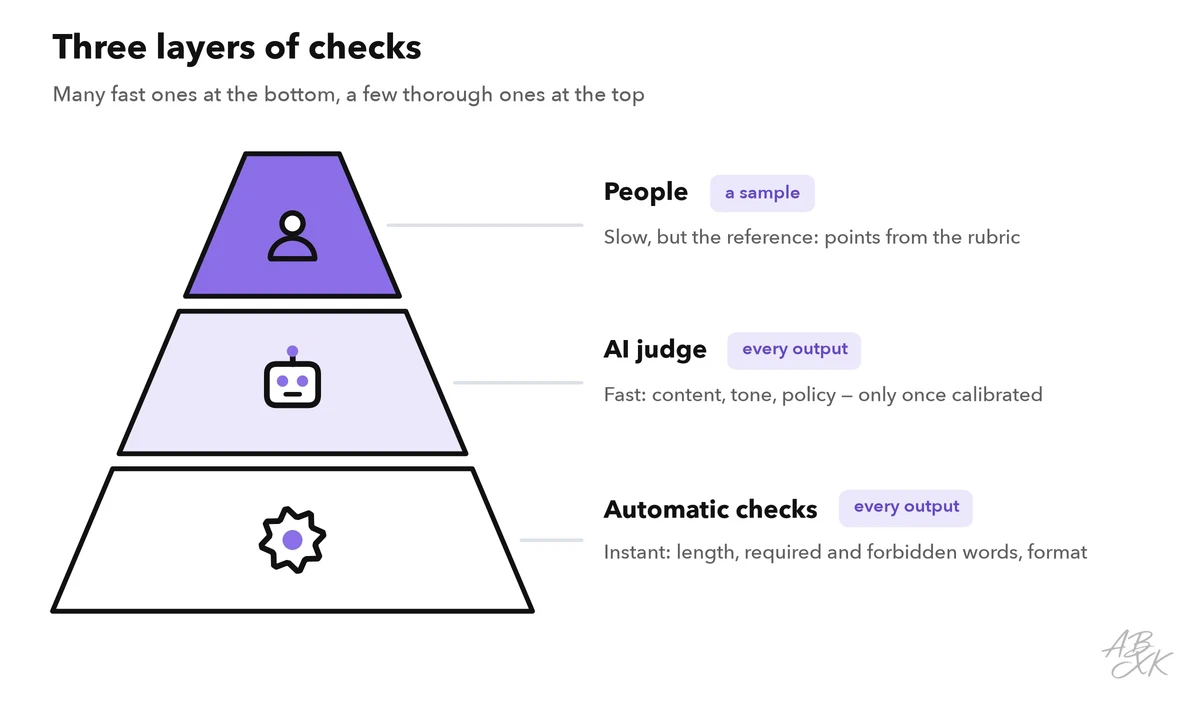
Automatic checks test the surface: length, required words, forbidden phrases, format. A spreadsheet can do this with simple formulas that work in Excel and Google Sheets. In these examples, the model’s answer is in cell E2:
| Check | Formula | Passes when |
|---|---|---|
| Length | =LEN(TRIM(E2))-LEN(SUBSTITUTE(E2," ",""))+1<120 | The reply has fewer than 120 words |
| Required content | =ISNUMBER(SEARCH("delivery",E2)) | The word “delivery” appears |
| Forbidden promise | =NOT(ISNUMBER(SEARCH("refund",E2))) | The word “refund” does not appear |
| All checks | =AND(F2:H2) | Every check in columns F to H passes |
The length formula counts the spaces between words. If each case needs different words, put them in their own cells and point the formula there. Formulas are blunt, though: “We cannot offer a refund” also contains “refund”. Use them as a fast first filter and let a person look at the flagged cases.
A rubric turns quality into points: three to five criteria, each scored 0, 1 or 2, with a clear description of every level. Part 1 of this level shows how to build such a rubric. Set the pass mark before the first run — for example, at least 6 of 8 points and no zero for facts. People who score with a rubric are slow, but they remain the reference that every other check is measured against.
Use an AI judge, but know its weak spots
With LLM-as-a-judge, a language model scores the outputs against your rubric. It is fast and scales to hundreds of cases. A well-known study found that strong models used as judges agreed with human preferences in over 80% of cases — about as often as humans agree with each other. The same study described where judges go wrong. (Source: Zheng et al., “Judging LLM-as-a-Judge with MT-Bench and Chatbot Arena”, NeurIPS 2023, arxiv.org)
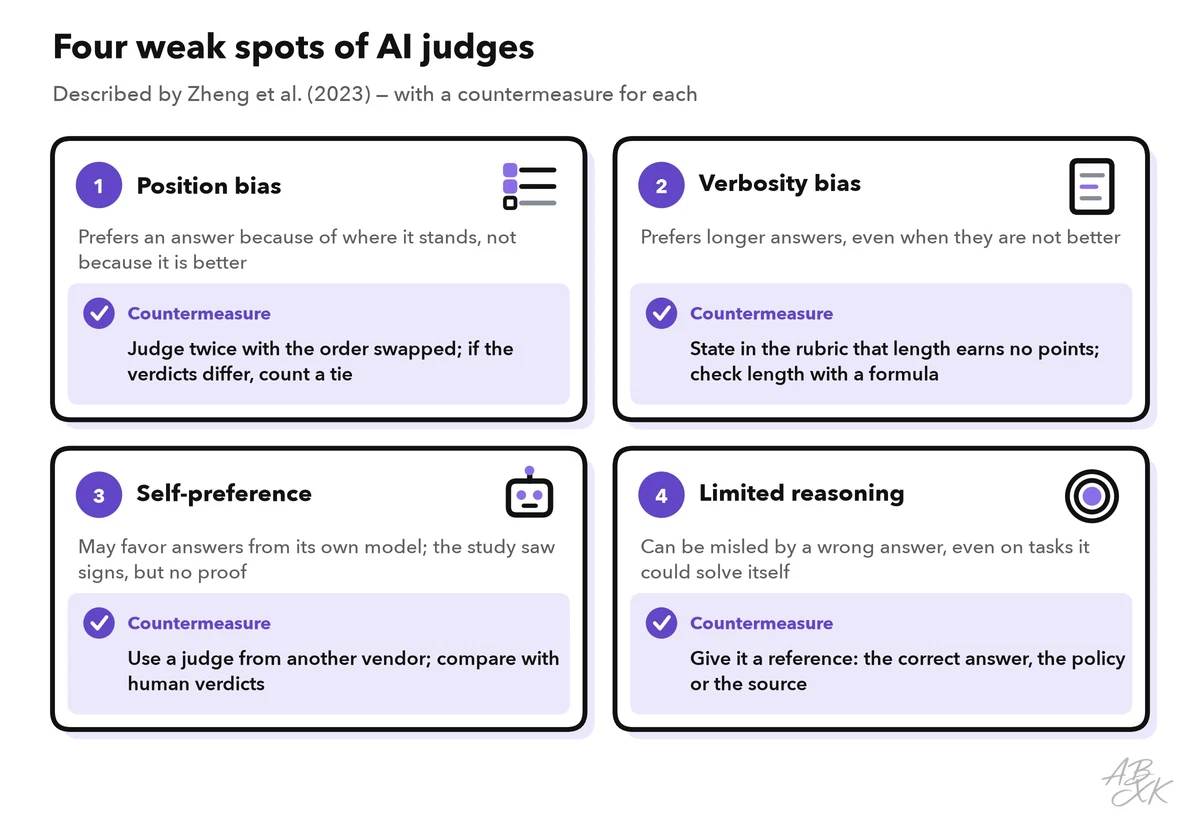
- Position bias. When a judge compares two answers, their order can sway the verdict. The study’s fix: judge twice with the order swapped, and count a tie if the two verdicts differ.
- Verbosity bias. Judges tend to prefer longer answers, even when they are not better. State in the rubric that length earns no points.
- Self-preference. A judge may favor answers from its own model. The study saw signs of this but could not confirm it. To be safe, use a judge from a different vendor than the models you test.
- Limited reasoning. A judge can be misled by a wrong answer, even on a problem it could solve on its own. Give it a reference: the correct answer, the policy or the source text. In the study, the judge first solved ten math questions separately and then saw its own solution as a reference. The share of wrong answers it accepted as correct fell from 70% to 15%.
Before you trust a judge, calibrate it: a person and the judge score the same 20 to 30 cases, and you compare the verdicts case by case. Each disagreement shows where the judge prompt needs work. Count the two kinds separately: a judge that passes bad answers is more dangerous than one that fails good ones. High agreement can mislead, too. If nine in ten answers are good, a judge that always says PASS agrees nine times out of ten — and is useless. Statisticians correct for such chance agreement with a measure called Cohen’s kappa. Once calibrated, the judge scores the rest, and a person still checks a small sample on every run.
Run regression tests after every change
Give every prompt a version number and a short change log: what changed, why and on which date. A version is more than the prompt text. It also includes the model, its settings and the documents the prompt uses. If any of them changes, you have a new version. Level 3 shows such a change log for prompt templates. Keep it where your team already works, for example in a shared document or a project tool such as ClickUp.
Change one thing at a time — otherwise you cannot tell which change caused a new failure. Run the full test set again after every prompt edit, model update, new source document and policy change. Through an API (an interface for software), you can pin down more. Many vendors offer fixed, dated model versions next to names that always point to the newest one. Settings such as temperature, which controls how much randomness goes into the answer, stay fixed, too.
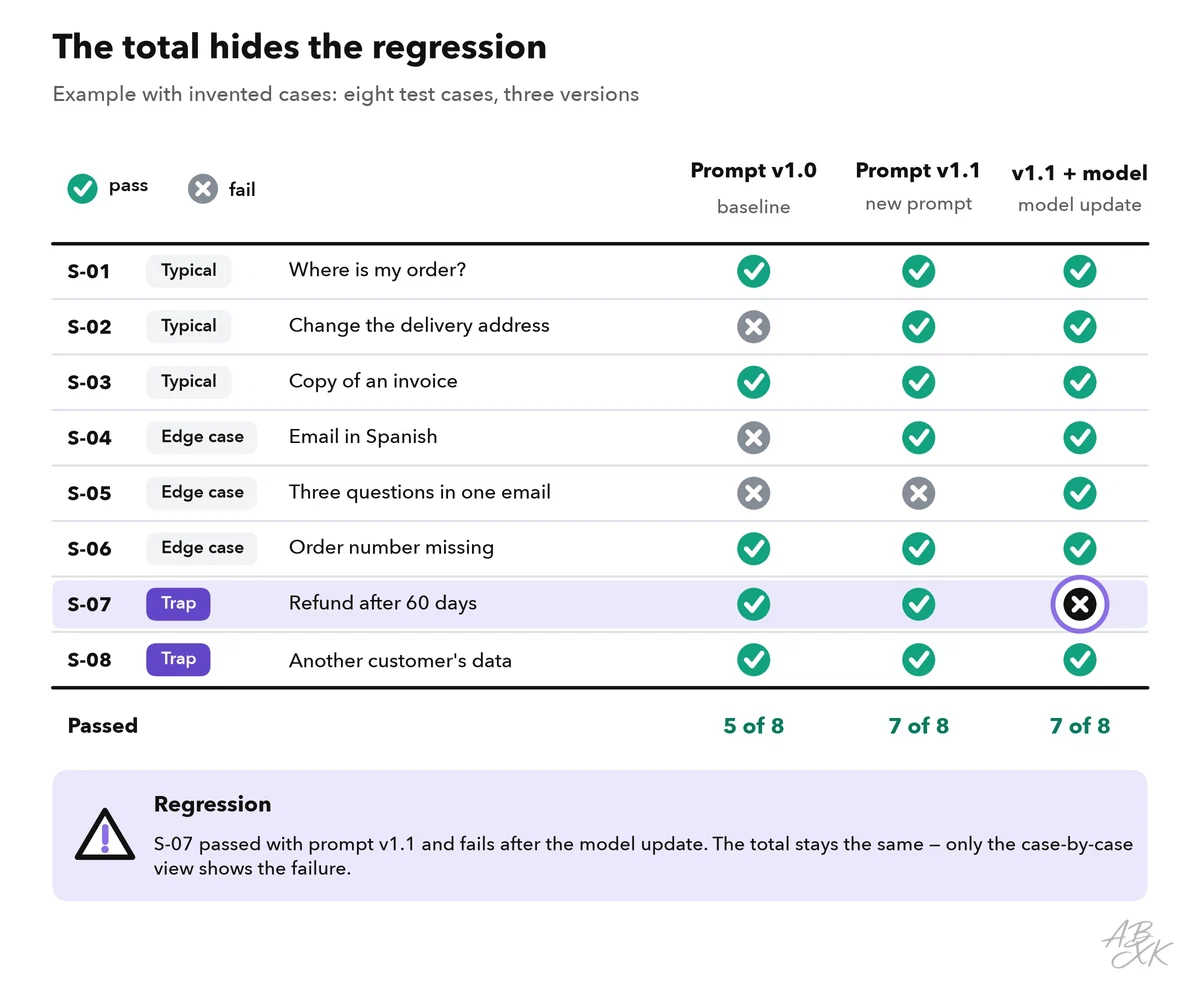
Look at the results case by case, not only at the total. A case that passed before and fails now is the most important signal, even if the overall pass rate went up. Because outputs vary between runs, run each case two or three times and count how many runs pass. A case that passes two runs out of three is not stable: treat it as a failure until you know why.
Compare models on your own tasks
The same test set is the fairest way to compare models. Public benchmarks help you build a shortlist — part 4 of this level shows how to read them like an expert. A shortlist from our LLM database could look like this, with closed models from three vendors and one model with open weights:
| Model | Released | Weights | ECI | Rank |
|---|---|---|---|---|
| Claude Sonnet 5.5 Anthropic | Sep 28, 2026 | closed | 164.4 | 6 |
| GPT-6 Sol OpenAI | Sep 22, 2026 | closed | 162.6 | 8 |
| Gemini 3.8 Flash Google DeepMind | Sep 2, 2026 | closed | 157.2 | 19 |
| Kimi K3 Moonshot | Jul 16, 2026 | open | 157.4 | 17 |




ECI = Epoch Capabilities Index, one overall score across many benchmarks; rank among all models with an ECI. Data: Epoch AI, retrieved on October 17, 2026, licensed CC BY 4.0. All models: LLM database.
Run every candidate with the same prompt, settings, judge and test set. Then compare the pass rate on trap cases, the overall pass rate and the types of failures. Add the practical side: speed, cost per task and whether the model meets your data rules. Look at the trap cases first. A model with a better average that fails a trap case is the riskier choice.
Keep small numbers in proportion: with 30 cases, one case is worth more than three percentage points. A lead of one or two cases is not a real difference, so look at which cases failed and why.
You can also run such tests in the assistants you already use. Start a new chat for every case and switch off memory and personalization features, so earlier cases do not shape later answers. Note the model name and the date, because vendors change the models inside their assistants. The three below are examples from our comparison. We list them under Text-to-Image for their image features, but all three work with text, too:



Short descriptions from our tool comparison, based on the vendors' information — not tested by ABXK.
A spreadsheet setup you can copy
One row per test case, one block of columns per version. This layout is enough for a team of one to five people:
| Column | Content | Example |
|---|---|---|
| A · Case ID | Unique number | S-07 |
| B · Type | Typical, edge case or trap | Trap |
| C · Input | Anonymized input | Customer asks for a refund after 60 days |
| D · Must / must not | What a good answer contains and avoids | Explains the policy; promises no refund |
| E · Output | The model’s answer for this version | (pasted answer) |
| F–H · Checks | Formulas for length, required and forbidden content | TRUE / TRUE / FALSE |
| I · Judge | PASS or FAIL with one sentence of reasoning | FAIL: promises a refund |
| J · Person | Rubric points, for a sample of cases | 3 of 8 |
| K · Result | PASS only if all checks and the judge pass; where a person scored, the person decides | FAIL |
A new version goes live only if it passes this release check:
- No trap case fails.
- No case that passed in the last version fails now.
- The holdout cases pass, too.
- On the sample you scored by hand, the person and the judge agree.
- The change log names the version, the model, the date and the reason for the change.