

A clear prompt gets you one good answer. A prompt pattern gets you good answers every time the same kind of task comes back. A prompt pattern is a proven way to structure a request for a problem that keeps coming up. This guide covers seven of them: few-shot examples, step-by-step instructions, plan first, checklists, constraints, critique and revise, and role play for feedback.
This is part 1 of Level 2 in our AI Productivity learning path. Level 1 introduced the four building blocks of a prompt: role, task, context and format. The patterns build on those blocks. For each pattern, you will see the problem it solves, a before-and-after example and its limits. All examples work in any general chat assistant.
Seven patterns for seven typical problems
Weak answers tend to fail in the same few ways. The format is different every time. A step is missing. A long text goes in a direction you did not want. Or the draft looks fine, but nobody has checked it against what you actually need. Each pattern targets one of these problems.
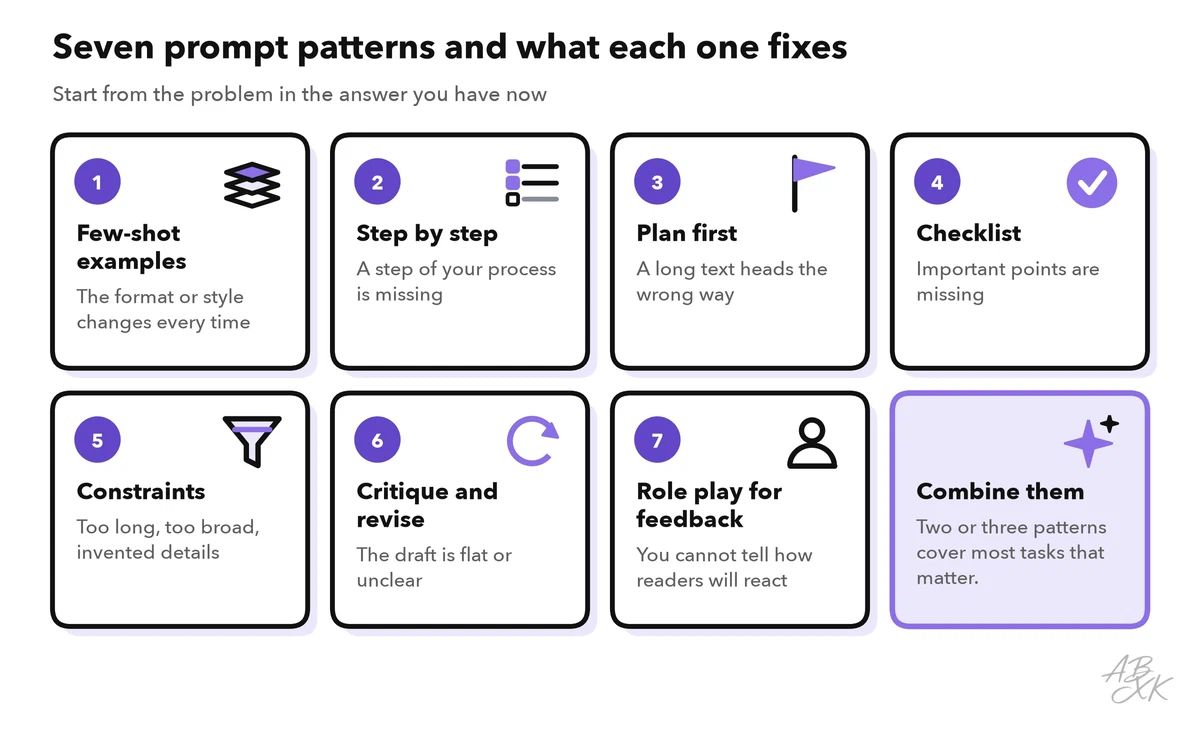
You rarely need all seven at once. Look at what is wrong with your current answer, and add the pattern that fixes it. Two or three patterns together cover most tasks that matter.
Show, don’t tell: few-shot examples
Some things are hard to describe but easy to show: a house style, a fixed layout or the way your team labels support tickets. An example in the prompt shows the assistant what a good result looks like. A prompt with one example is called one-shot, a prompt with several examples few-shot, and a prompt without any examples zero-shot.
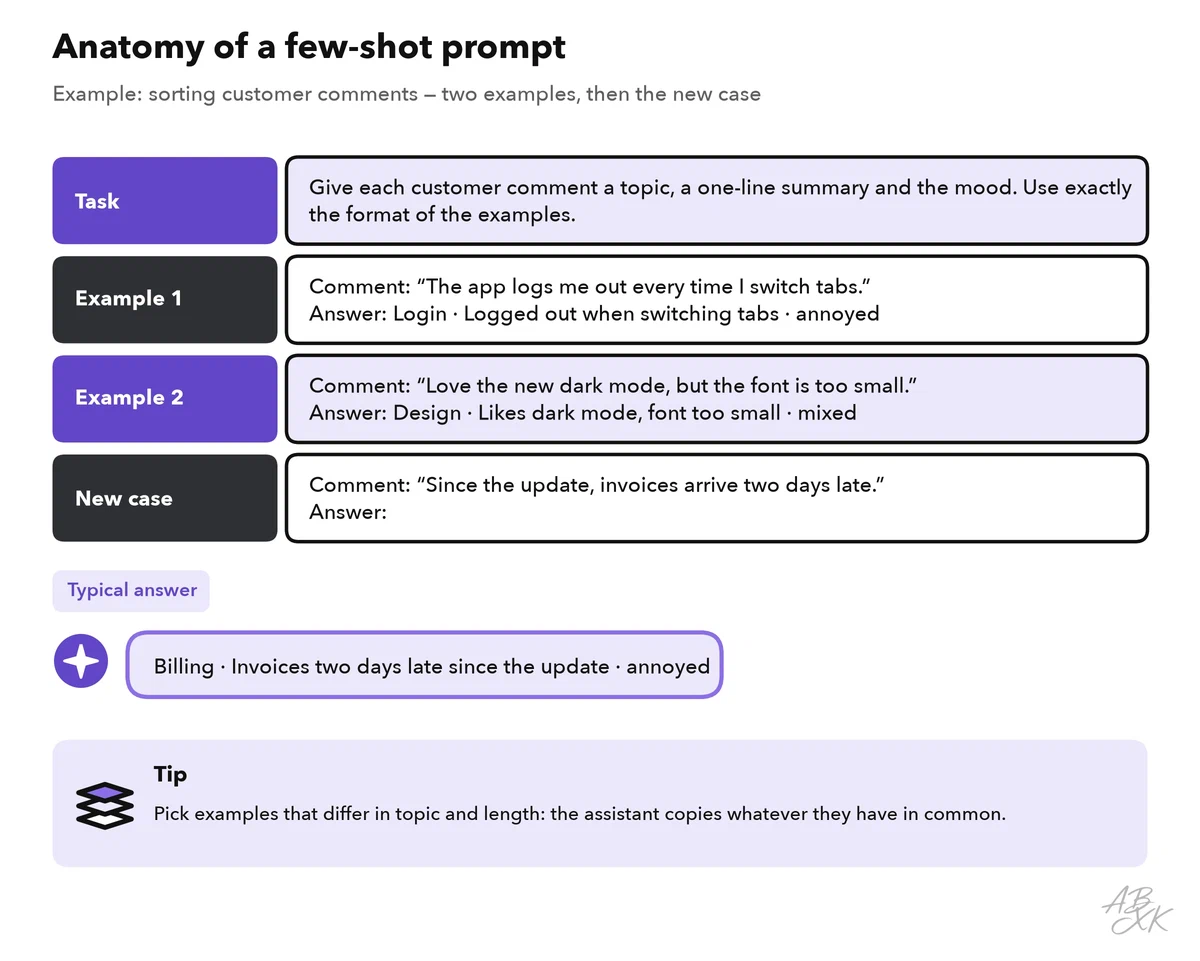
Examples work because the assistant copies them closely. That is also their risk: it copies the length, the structure and the tone, and sometimes the content, too. These rules keep it under control:
- Start without examples. Add them when the format or style is still off.
- Use two or three examples that differ in topic and length. The assistant then learns the pattern, not a single case.
- Mark them clearly, for example with “Example 1:” and a delimiter such as ###. Add: “Follow the format of the examples, not their content.”
- Make sure every example is correct. The assistant repeats mistakes as faithfully as good choices.
Here is the pattern in a typical request:
- Before: “Write product descriptions in our style.”
- After: “Write a description for the product below. Match the length, structure and tone of the two examples. Example 1: ### … ### Example 2: ### … ### Product: …”
Give the steps, or ask for a plan first
Two patterns control the order of the work.
Step-by-step instructions fit tasks with a fixed procedure: the way your team writes meeting minutes, checks an invoice or answers a complaint. Write the procedure as numbered steps. The assistant is then less likely to skip a step or change the order, and you can see at once which step went wrong.
- Before: “Turn these notes into meeting minutes.”
- After: “Turn the notes below into minutes. 1. List every decision. 2. List the open questions. 3. List the tasks with owner and due date; write ’no owner’ if nobody is named. 4. Put a three-sentence overview at the top.”
You know the idea from the meeting notes template in Level 1. Numbered steps go one step further: they also say what to do in each step, for example when an owner is missing.
Many assistants now also offer a reasoning or “thinking” mode. In this mode, the model works through a problem before it answers. For its own reasoning models, OpenAI’s prompting guide calls the instruction “think step by step” unnecessary. (Source: OpenAI, “Reasoning best practices”, developers.openai.com) Your own steps are a different matter. They describe how your team wants the job done, and no model can guess that.
Plan first fits larger pieces of work, such as a report, a presentation or a project plan. Instead of asking for the finished result, ask for a plan. Correct the plan, and only then ask for the work, one section at a time.
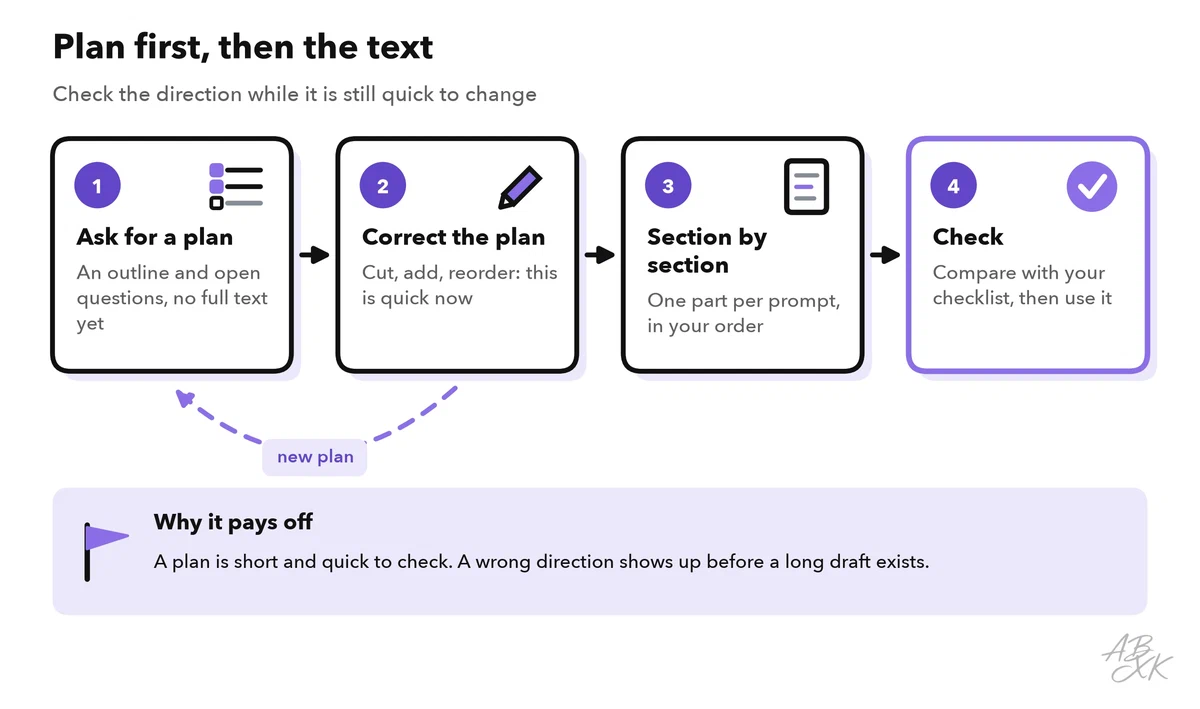
A plan is short, so it is quick to check. If the direction is wrong, you notice before a long draft exists. You are also less tempted to keep a weak text just because it is already there.
- Before: “Write a project report for the board.”
- After: “I need a two-page project report for the board. Do not write it yet. First suggest an outline: section titles with one line each. Then list the facts you still need from me.”
Define “done”: checklists and constraints
Many answers are not wrong; they are just not finished. A checklist in the prompt tells the assistant what a finished result must contain. Ask it to check its answer against the list before it replies, and to name any point it could not meet. You can then use the same list for your own review.
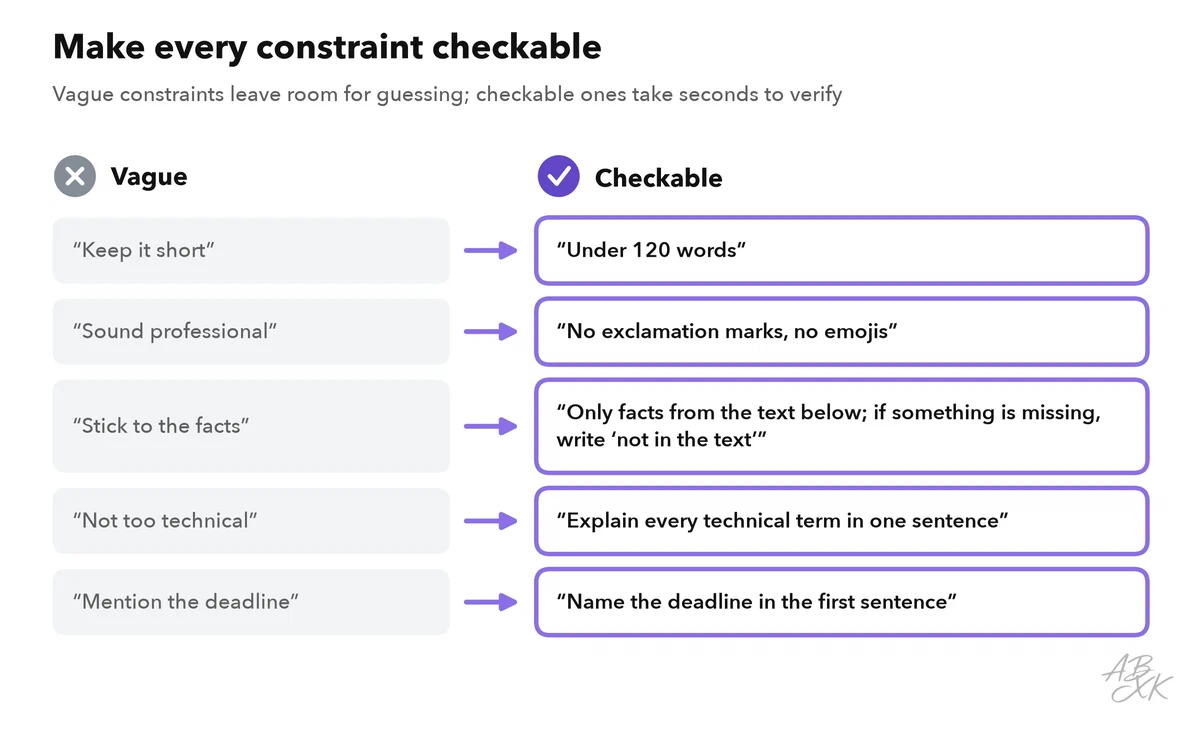
Constraints are limits on length, scope, sources and wording. They work best when you can check them: “keep it short” leaves room for guessing, “under 120 words” does not. Say what the assistant should do, not only what it should avoid. And give it a way out. Tell it to use only the text you provide and to write “not in the text” when something is missing. Then it has a clear alternative to guessing. That reduces invented details, but it does not rule them out.
Critique and revise: let the assistant review its draft
In the critique-and-revise pattern, the assistant first writes a draft. Next, it reviews the draft against your checklist and lists the weak points. Then it writes a new version that fixes exactly those points. You can ask for all three steps in one prompt. Separate messages work better, though: you see the critique and can add your own points before the revision.
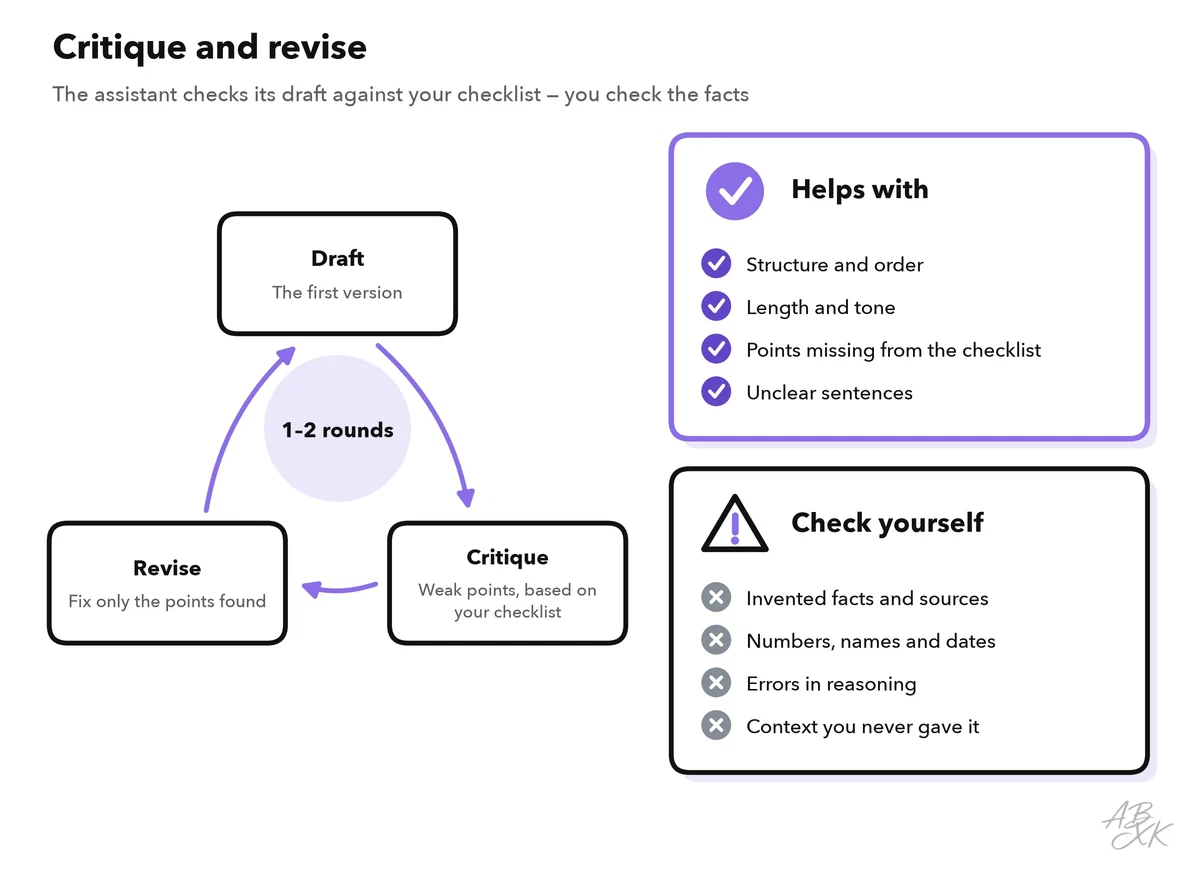
Research supports the pattern and also shows its limits. In one study, drafts got better on several tasks when the same model gave feedback on its own output and then revised it. (Source: Madaan et al., “Self-Refine: Iterative Refinement with Self-Feedback”, 2023, arxiv.org) Another study found that without outside feedback, models struggle to correct their own reasoning. Their results can even get worse after a “correction”. (Source: Huang et al., “Large Language Models Cannot Self-Correct Reasoning Yet”, ICLR 2024, arxiv.org)
In practice, use critique and revise for the form: structure, completeness, length and tone. Do not treat it as a fact check. The model reviews its draft with the same knowledge that produced it, so an invented number can easily survive the review. Check facts against your sources, or let a second assistant review the text in a fresh chat. Part 5 of this level shows a complete routine to check AI output for errors. Stop after one or two rounds. If the draft is still weak, the prompt usually lacks context or a clear checklist.
Role play for feedback
In the role play pattern, the assistant plays the reader of your own text: a skeptical customer, a busy manager or a new colleague. Use it before you send something important. The simulated reader points out gaps, objections and unclear passages while you can still fix them.
- Before: “Is my budget request good?” This invites a polite, general answer.
- After: “Act as the head of finance who has to approve this budget request. List the five questions you would ask before you say yes. Be critical, and do not rewrite the text.”
Ask for questions and objections, not for a verdict. And remember what Level 1 said about roles: a role sets a point of view, but it does not add knowledge. The simulated head of finance is only a guess at the real one. Use the role play to prepare, not as a replacement for feedback from real people.
Which pattern for which problem
The patterns are not tied to one product. They work in ChatGPT, Gemini, Meta AI and other assistants, whichever model runs behind them. Our LLM database lists 343 language models, and they do not all react the same way to the same prompt. So test a pattern in the assistant you actually use. Here are three general assistants from our comparison. We list them in the Text-to-Image area because of their image features, but all three also work with text:



Short descriptions from our tool comparison, based on the vendors' information — not tested by ABXK.
Use the table as a diagnosis. Start from the problem you see in the answer, not from the pattern:
| Problem in the answer | Pattern | Add to your prompt |
|---|---|---|
| Format or style changes every time | Few-shot examples | “Match the format of these two examples: …” |
| A step of the process is missing | Step-by-step instructions | “1. … 2. … 3. …” |
| A long text heads the wrong way | Plan first | “Do not write it yet. First suggest an outline.” |
| Important points are missing | Checklist | “Check your answer against this list: …” |
| Too long, too broad or with invented details | Constraints | “Under 150 words. Use only the text below; if something is missing, write ’not in the text’.” |
| The draft is flat or unclear | Critique and revise | “List the three weakest points of your draft, then fix them.” |
| You cannot tell how readers will react | Role play for feedback | “Act as [reader]. List the questions you would ask.” |
Then practice with a task that comes back every week:
- Run your usual prompt and write down the biggest weakness of the answer.
- Find that weakness in the table and add the matching pattern.
- Run both versions on the same input. Which answer needed fewer edits?
- Keep the better prompt. Level 3 shows how to turn it into a reusable template, and Level 4 how to test prompts on many real cases.