

Most weeks do not fail for lack of effort. They fail because your calendar and your task list live in different places. Meetings fill the calendar, tasks pile up in a list, and urgent requests eat the hours you meant for important work. AI planning tools connect the two: they find time for your tasks, protect blocks for focused work and rebuild the plan when something changes. What they cannot do is decide what matters.
This is part 3 of Level 2 in our AI Productivity learning path. You will learn how AI scheduling works and how to sort your tasks with an AI assistant without handing over the decision. You will also see where project tools with AI features fit in, what an AI calendar cannot know, and a weekly routine of about 30 minutes that keeps your plan realistic.
How AI scheduling works
An AI calendar is a calendar app or add-on that plans your time for you. You tell it what needs to get done, and it decides when. This is called auto-scheduling: the tool reads your calendar, finds free slots and books time for each task before its due date.
To do this, the tool needs three facts about every task — how long it takes, when it is due and how important it is — plus your working hours. It then follows your rules, for example “focus time only in the morning” or “no tasks after 5 p.m.” Whenever your calendar changes, it recalculates the plan.
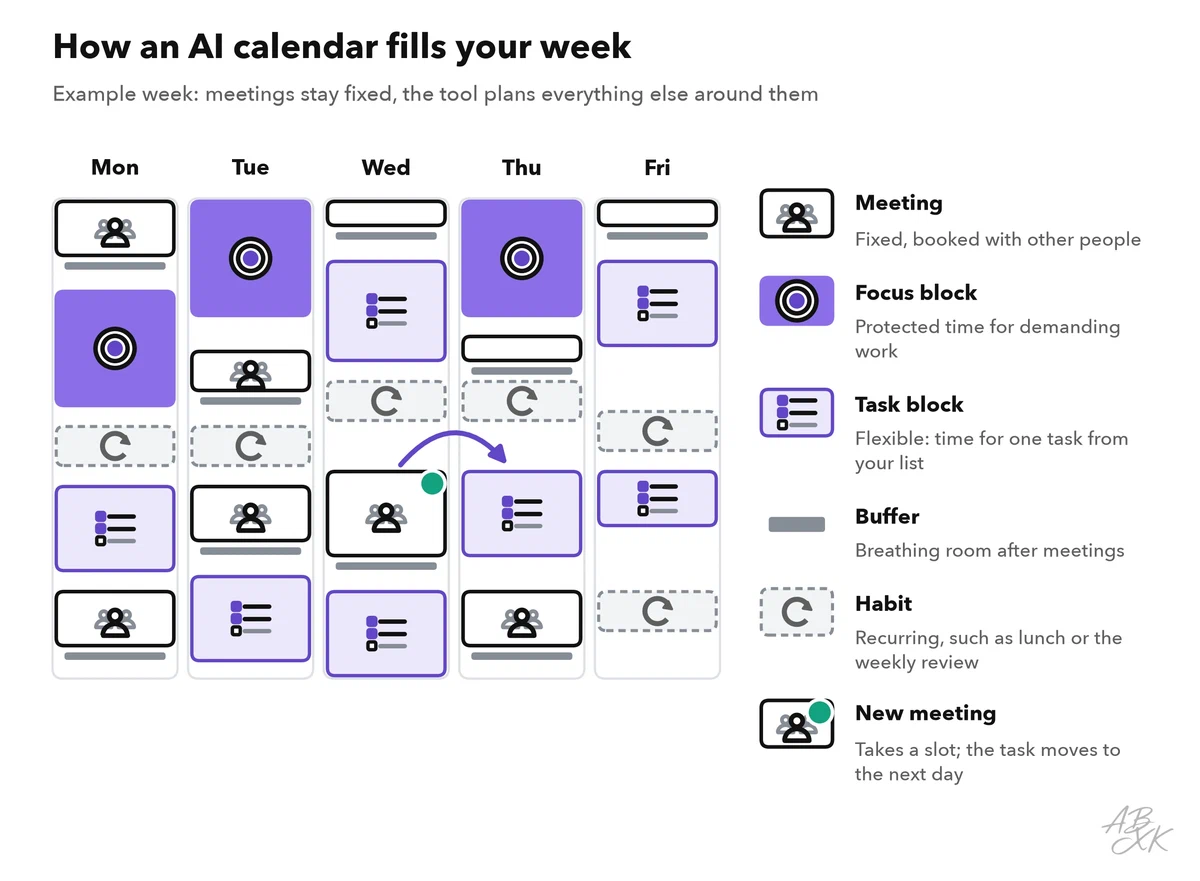
The figure shows the building blocks of a week that an AI calendar plans. The table explains each one:
| Block | What it is | How the tool treats it | Example setting |
|---|---|---|---|
| Meeting | An appointment with other people | Fixed: the tool plans around it | — |
| Focus block | Time without meetings or messages for demanding work | Protected: can show as busy so that nobody books over it | Two hours on three mornings a week |
| Task block | Time reserved for one task from your list | Flexible: moves when a meeting takes the slot | Before the due date; split tasks longer than two hours |
| Buffer | A short break after a meeting | Added automatically | 15 minutes after each meeting |
| Habit | A recurring block, such as lunch or a weekly review | Repeats within a time window you set | Lunch between noon and 2 p.m. |
The key idea is the difference between fixed and flexible events. A meeting with five people is fixed. Your own task block is flexible: if a client books Wednesday afternoon, the tool moves the task to the next free slot that still meets the due date. You no longer have to rebuild the week by hand.
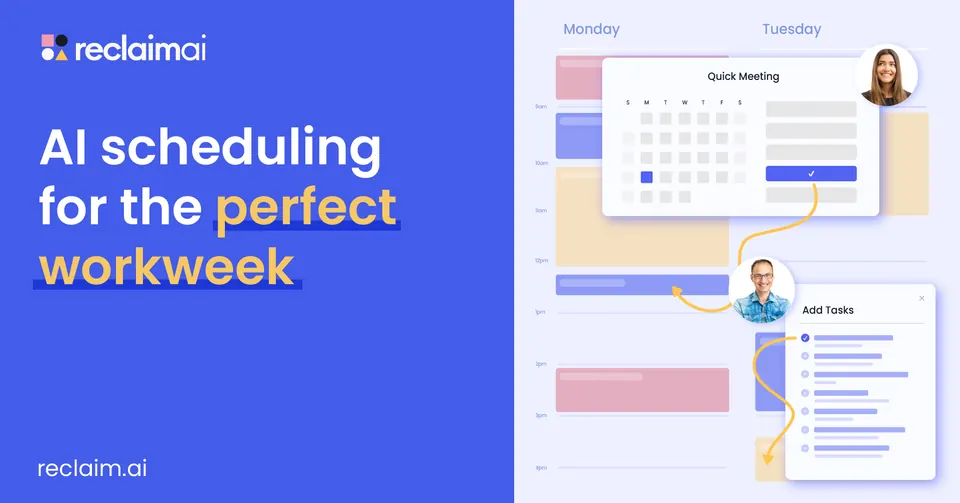
According to the vendor, Reclaim.ai schedules tasks, habits, meetings and breaks automatically and protects focus time. It works on top of Google Calendar and Outlook.
A general chat assistant such as ChatGPT or Gemini can also draft a week plan from a task list you paste in. Without a connection to your calendar, though, it only sees what you paste, and it does not notice when your week changes.
Sort your tasks before the tool schedules them
An AI calendar decides when a task happens. It does not decide which tasks deserve your best hours. A simple tool for that question is the priority matrix: you sort every task by two questions, “Is it important?” and “Is it urgent?” This grid is often called the Eisenhower matrix.
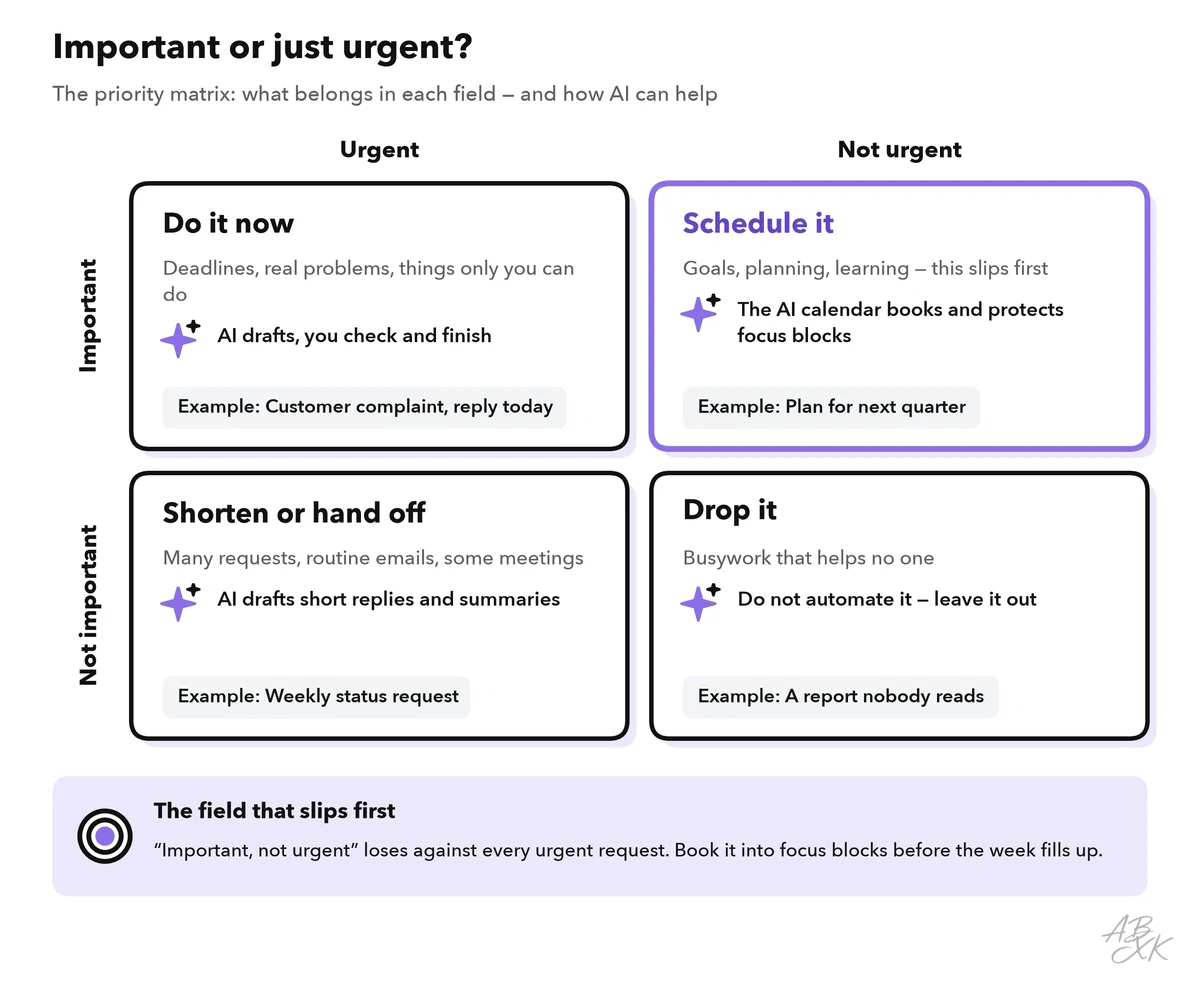
Important means the task moves one of your real goals forward. Urgent means a deadline is close or someone is waiting. The trap is that urgent tasks feel important. The field that suffers most is “important, not urgent”: planning, learning, the project that is due in two months. This is where an AI calendar helps most, because it can reserve focus blocks for this work before the week fills up.
A chat assistant can do the first round of sorting. Paste your task list, add your goals and ask for the matrix. As with every prompt, remove names and confidential details first.
Read the answer as a suggestion. The model judges importance from the words in your list. It cannot know that “Call Ms. Lee” is the most important task of the month because she is about to sign a contract. Move tasks where you know better, and look closely at the [unclear] list: these tasks need a decision before any tool can plan them. Part 1 of this level shows more prompt patterns that work for requests like this one.
Project tools with AI features
Many tasks are not yours alone. In a team, tasks live in a project tool: a shared app in which every task has an owner, a due date and a status. Our comparison lists 6 tools for meetings and planning. For planning your week, two groups matter:
- AI at the core: the AI is the product. Reclaim.ai plans your calendar. TheTop is listed in our comparison as an assistant that condenses your day into one daily brief. Its website now presents a product for large companies that makes AI costs and usage visible, so check which product you would actually get.
- Software with AI features: a project tool in which AI is one function among many. ClickUp combines tasks, docs, goals and chat in one app. Backlog is a smaller alternative with a focus on software teams. It offers task and bug tracking, Kanban boards (tasks as cards in columns such as To do, Doing and Done) and Gantt charts (tasks as bars on a timeline).




Short descriptions from our tool comparison, based on the vendors' information — not tested by ABXK.
AI features in project tools often help with the text around tasks: they draft a task description, summarize a long comment thread or write a status update from the tasks that were completed. Which features a tool offers, and in which plan, changes often. Check the vendor’s current information before you choose.
The two groups work best together. The project tool holds the shared truth: who does what by when. The AI calendar turns your share of it into time in your week. Some AI calendars can import tasks from project tools; check the list of integrations (connections to other apps) before you rely on it. Otherwise, copy the tasks for the week into your calendar tool during your weekly planning.
What an AI calendar cannot know
An AI calendar is good at arithmetic: durations, gaps and due dates. It knows nothing about the reasons behind them.
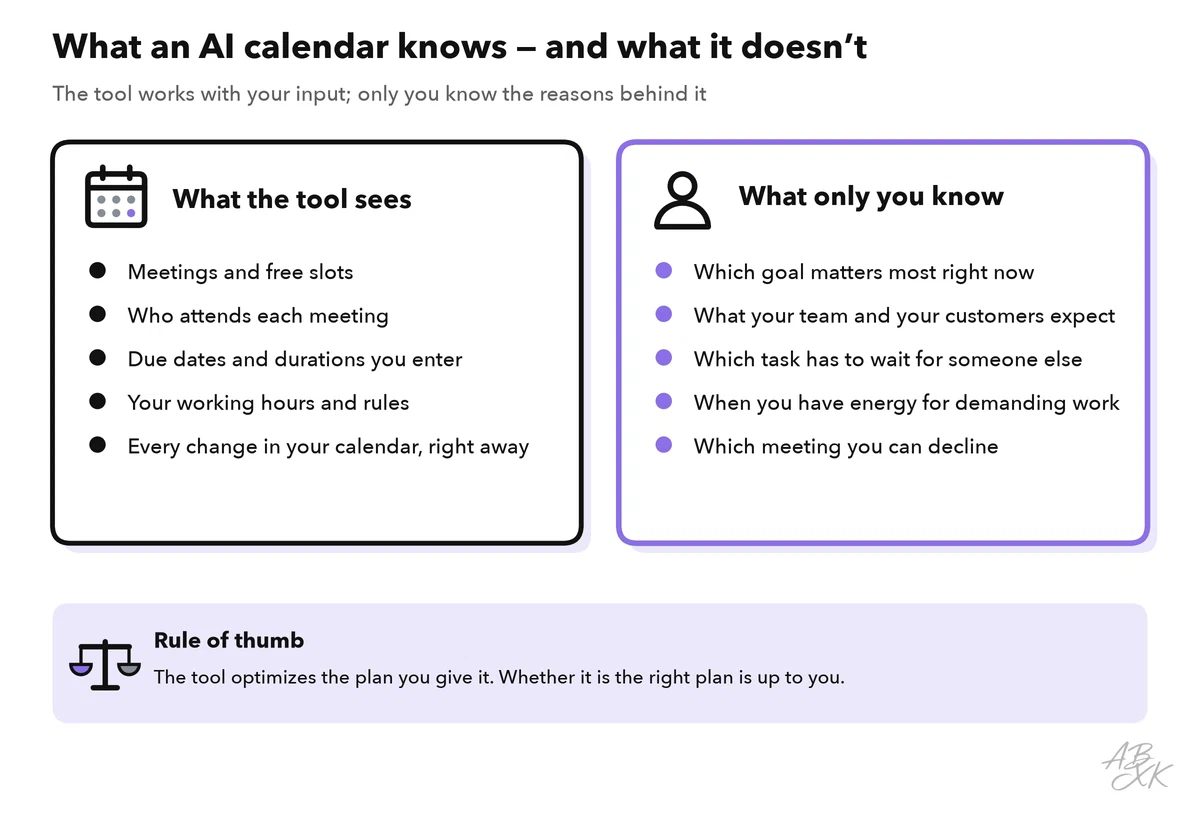
This leads to four typical problems:
- Wrong priorities, perfectly planned. If your order is wrong, the tool builds a very efficient week around the wrong work.
- No room to breathe. A tool that fills every gap creates days without slack. One meeting that runs late then pushes everything back. Leave part of each day unplanned on purpose.
- Endless moving. A flexible task can move again and again without anyone noticing. If a task has moved three times, it needs a decision, not a new slot: do it, hand it off or delete it.
- Invisible energy. The tool does not know that you write best at 9 a.m. or that you are tired after three meetings in a row. Turn this knowledge into rules, such as focus time only in the morning.
A weekly planning routine in 30 minutes
Tools help most when you use them in a fixed rhythm. The routine below takes about 30 minutes once a week, on Friday afternoon or Monday morning, plus five minutes each morning. Treat the times as a starting point.
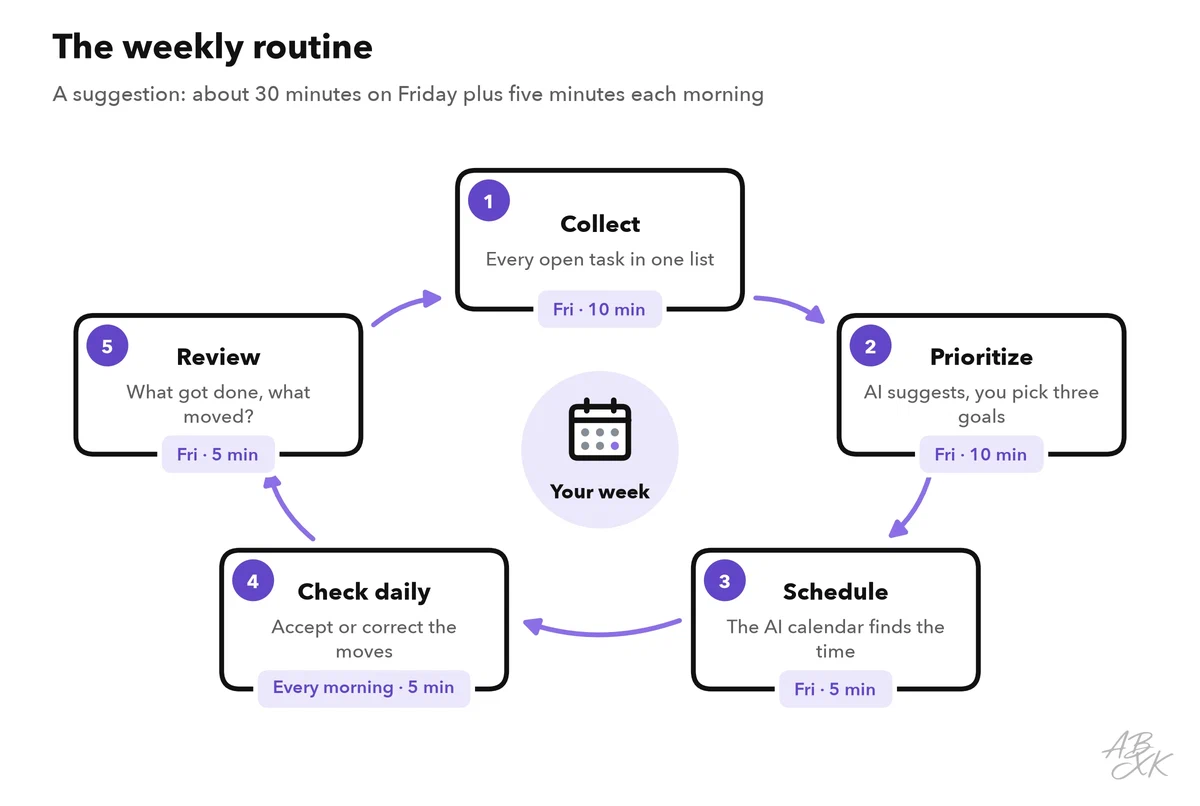
| Step | When | What the AI does | What you do |
|---|---|---|---|
| 1. Collect | Friday, 10 min | Lists action items from meeting notes and emails | Put every open task into one list |
| 2. Prioritize | Friday, 10 min | Suggests how to sort the tasks in the matrix | Choose up to three goals for the week |
| 3. Schedule | Friday, 5 min | Places tasks, focus blocks and buffers | Check durations and due dates |
| 4. Check daily | Every morning, 5 min | Moves tasks when meetings change | Accept or correct the moves |
| 5. Review | Friday, 5 min | Summarizes what got done and what moved | Decide about tasks that keep moving |
On Friday, start with step 5 for the week that is ending, then run steps 1 to 3 for the next one. For step 1, meeting notes are a good source. Level 1 shows how to turn a meeting into clear action items with an owner and a due date. For step 5, a short prompt is enough:
“Here are the tasks I finished this week and the tasks that moved. In five bullet points, list what got done, what slipped and one likely reason for each slip. Then list the open tasks for next week. Do not add tasks that are not in my lists.”
Compare the AI’s review with your own memory of the week: a task that is missing from the list is easy to overlook. Once the routine runs smoothly, it can become part of a longer chain of tools, and Level 3 shows how to build a personal AI workflow. If you want to know whether the AI calendar really saves you time, Level 4 explains how to measure AI productivity gains.
Common planning mistakes and how to fix them
Many problems with AI planning come from the input, not from the tool. The table lists the most common mistakes:
| Mistake | What happens | Fix |
|---|---|---|
| Durations are too optimistic | Tasks overflow, and the plan breaks by midweek | Track real times for two weeks and adjust your estimates |
| Everything is “high priority” | The tool has nothing to rank by | Allow at most three top priorities per week |
| Focus blocks show as free | Colleagues book meetings over them | Mark them as busy and give them a clear name |
| No buffers | One late meeting delays the whole afternoon | Add buffers after meetings |
| The calendar is completely full | No room for the unexpected | Leave part of each day unplanned |
| A task moves again and again | A decision is being put off | After the third move: do it, hand it off or delete it |
| The AI’s sorting goes unchecked | The wrong task gets your best hours | Review the plan in your weekly routine |