

A colleague swears by one AI tool, a newsletter praises another, and a few new ones appear every week. It is easy to sign up for three tools in one afternoon and use none of them a month later. It is just as easy to paste company data into a tool that nobody has checked.
This is part 5, the last part of Level 0. In part 2, you learned the main types of AI tools and when a general chat assistant is enough. Now you get a checklist of eight questions and a quick way to build a shortlist with the filters of our tool comparison. You also get a plan for a one-week test and a decision table for common situations at work.
Start with one task, not with a tool
Many people choose the other way around. They hear about a popular tool, sign up and then look for something to do with it. This rarely works, because a tool only saves time when it fits a task you already do often.
So start with one concrete task. Describe it in one sentence: what goes in, what should come out and how often you do it. For example: “Every Monday, I turn my notes from three meetings into a status email for my team.” Part 2 called these the input and the output of a tool.
Then check what you already have. Maybe your company has approved a chat assistant, or the software you use every day has added AI features. Try your task there first. A new tool means a new account, a new place that stores your data and new things to learn. You need one only when nothing you already have does the job.
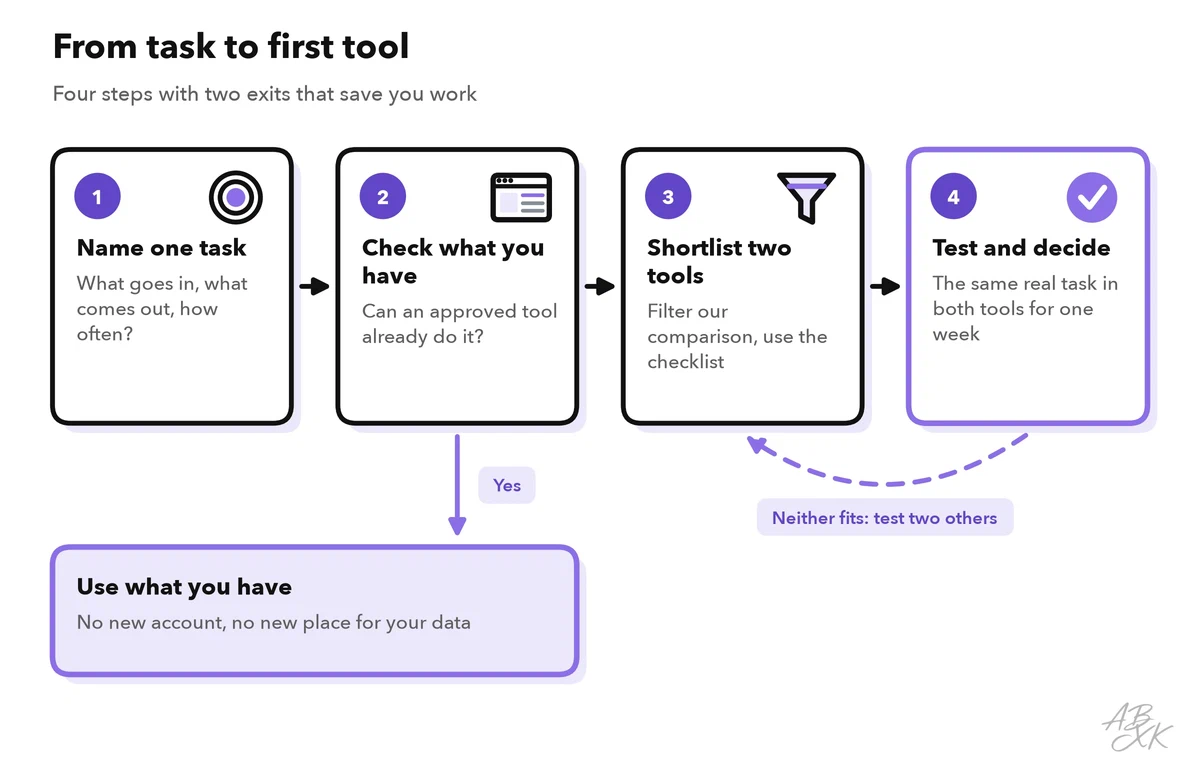
The route has two exits that save you work. If an approved tool already does the task, you stop after step 2. If neither tool on your shortlist passes the test, you go back to step 3 and try two others — instead of keeping a tool that does not fit.
The checklist: eight questions before you sign up
When you have one or two candidates, go through eight questions. You do not need perfect answers. But a clear “no” to one of them is often enough to rule a tool out.
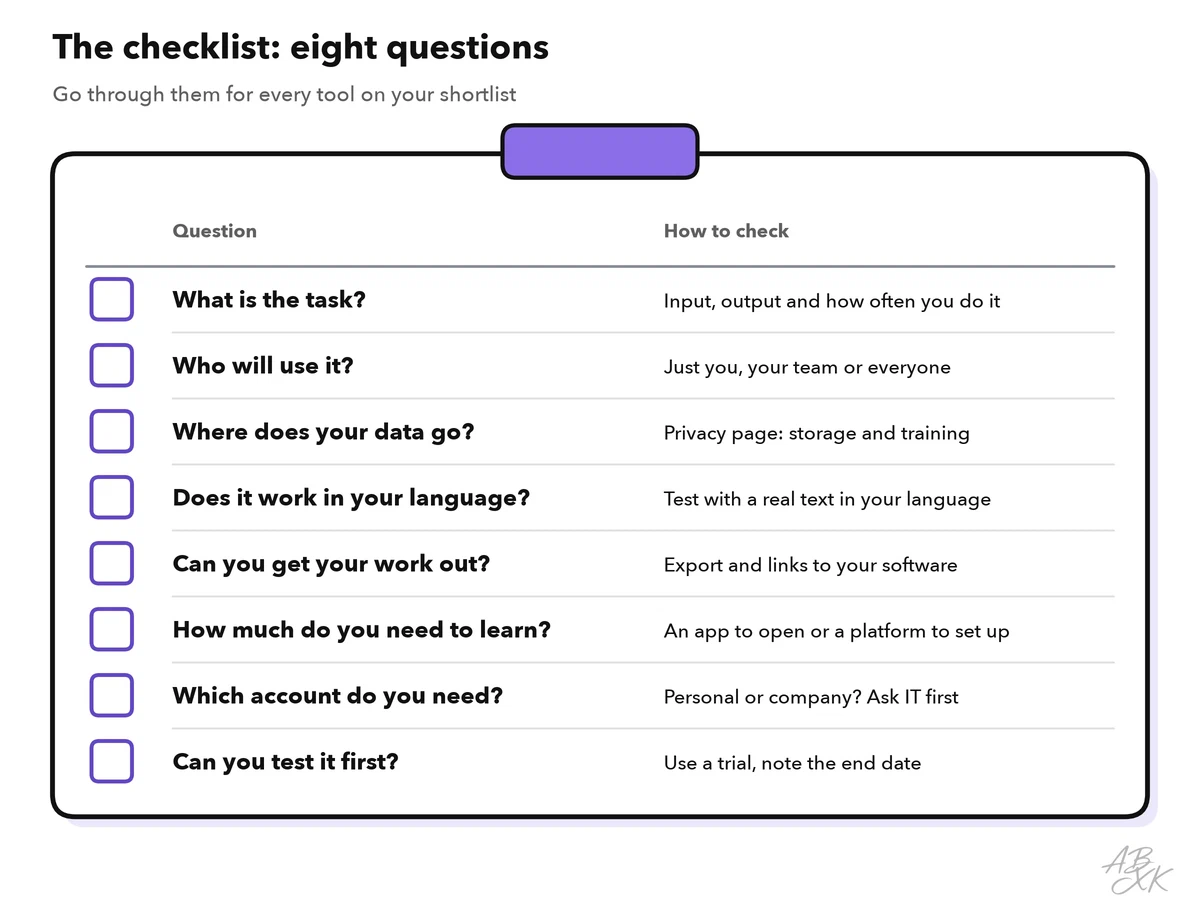
- What is the task? Name your one task. A tool that does twenty things, but not yours, is the wrong tool.
- Who will use it? Only you, your team or the whole company? A tool for a team needs shared access and the same rules for everyone.
- Where does your data go? Most AI tools send what you type or upload to the provider’s servers and process it there. Read the provider’s privacy information: Where is your data stored? Is it used to train AI models, and can you switch that off? In the EU, the GDPR (General Data Protection Regulation) sets strict rules for personal data. Ask your company before you use a tool with names, email addresses or customer details. Our AI Security section explains how to protect personal data in more detail.
- Does it work in your language? Look at the menus, but above all at the results. Quality can differ between languages, so test with a real text in the language you work in. For tools that read text aloud or create voices, listen to the voices in your language.
- Can you get your work out? Check the export: can you download results in formats your team uses, such as a PDF, a Word file or a slide deck? Check the integrations too: connections to software you already use, such as your calendar, email or video calls. According to the vendor, Reclaim.ai, for example, works on top of Google Calendar and Outlook.
- How much do you need to learn? Some tools you open and use within minutes. Others need setup or programming first. In our comparison, the type “Platform / API” marks tools that you often use through code or other software. An API (application programming interface) is a way for programs to talk to each other — usually a job for developers.
- Which account do you need? A personal account is quick, but the work stays tied to you. With a company account, your IT team can usually manage access, and colleagues can share results. Ask before you sign up with your work email.
- Can you test it first? Many tools offer a free plan or a trial period. Use it for real work, not for a demo. Some trials turn into a paid plan unless you cancel, so put the end date in your calendar.
Let our tool comparison build the shortlist
You do not have to search the whole internet. Our tool comparison lists 131 tools in four categories, 66 of them in AI Productivity. Its filters match several questions from the checklist. You can also tick two to four tools and compare them side by side, row by row.
| Your question | Filter on our tools page | A good choice for your first tool |
|---|---|---|
| What is the task? | Area | The area of your task, such as Meetings & Planning |
| Who will use it? | Best for | The group that matches you, such as Teams in general |
| How much do you need to learn? | Type | App |
| A new product or a feature in software you know? | AI role | “Software with AI features” if you already use that software |
| Which candidate fits best? | Side-by-side comparison | Two to four tools from your shortlist |
The filter Best for shows who a tool is made for — our assessment, based on the vendor’s information. In AI Productivity, the picture is clear:
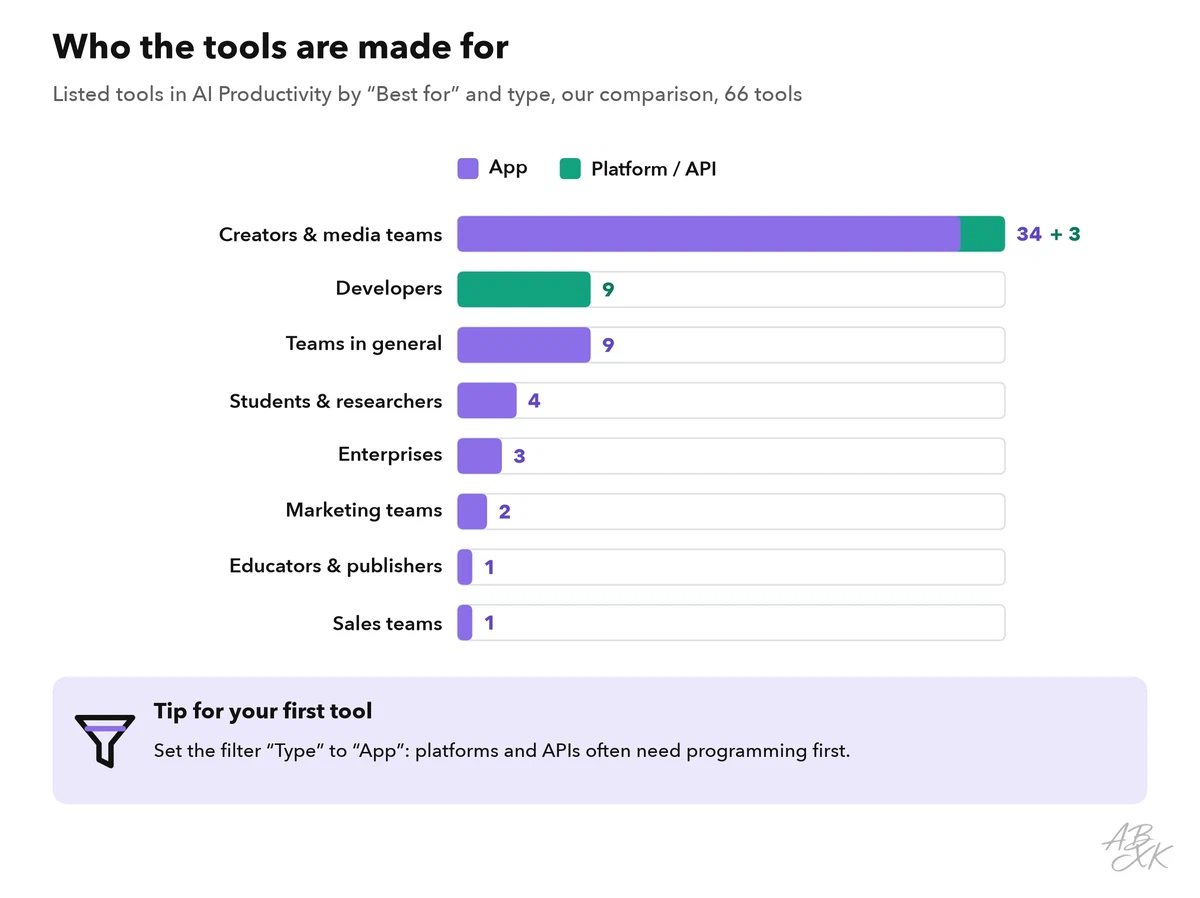
The largest group of tools in this category is made for creators and media teams, because image, video, voice and music generators make up a large part of it. Tools for developers usually come as a platform or API. That is a good reason to set the filter “Type” to “App” for your first tool: you open an app and start right away, while a platform often needs programming first.
Keep in mind what the comparison can and cannot do. Its short assessments are based on the vendors’ own information — we have not tested these tools, and we do not track prices. The comparison helps you build a shortlist. Your own test decides.
Test two tools with real work for one week
A tool can look perfect on its website and still not fit your work. A short, fair test shows the difference. Use the same real task in both tools. After each test, write down the same three things: the minutes it took, how much you had to fix and anything that worried you.
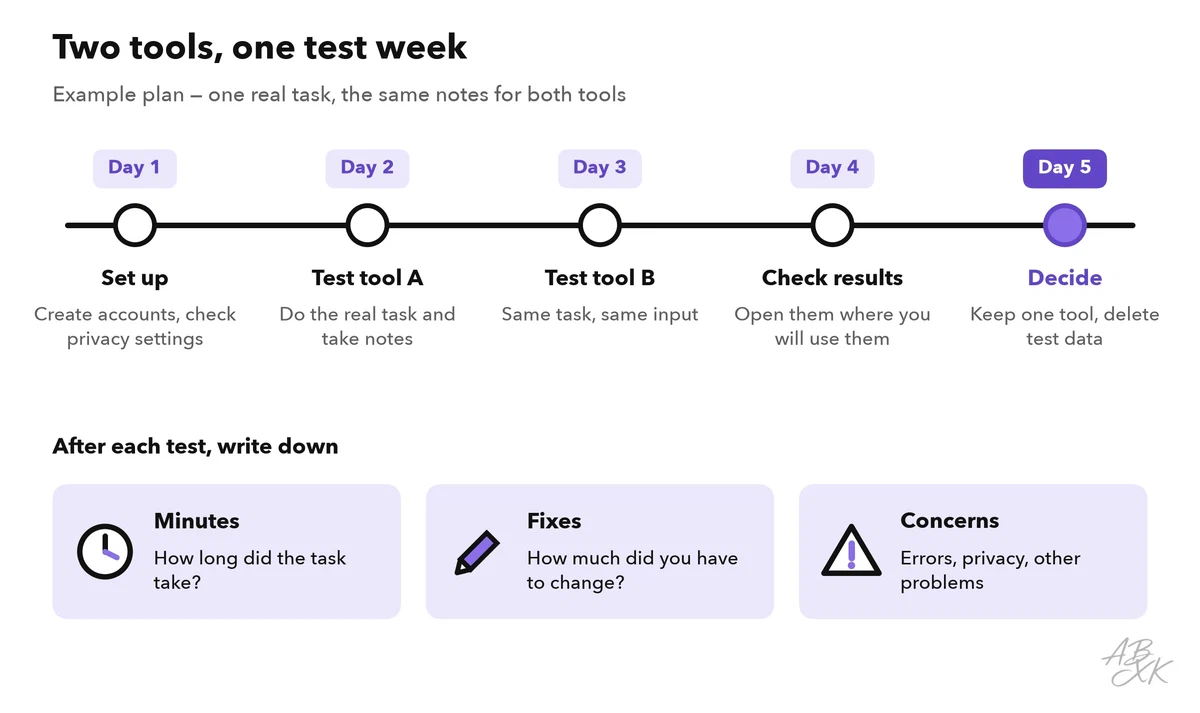
Two details make the test fair. First, give both tools the same input. If tool A gets a clear request and tool B a vague one, you compare your prompts, not the tools — part 4 showed how much the request matters. Second, check each result where you will really use it: send the email draft to yourself, open the exported slides in your presentation software, share the meeting summary with a colleague.
At the end of the week, keep one tool at most. Cancel the trials you do not need, and delete the data you uploaded for the test where the tool allows it. If neither tool saved you time, that is a useful result, too: the assistant you already have may be enough for your task.
Decision table: your first tool by situation
Find the row that matches your situation best. The tools named here are examples from our comparison. They are starting points for your own test, not test winners.
| Your situation | Start with | Check first |
|---|---|---|
| Your company has approved an AI assistant | That assistant — no new tool | Which data you may enter |
| You mainly write, rewrite and summarize text | A general chat assistant, such as ChatGPT or Google Gemini | Privacy settings and quality in your language |
| You spend many hours in video calls | A meeting assistant, such as MeetGeek | Consent of everyone in the call; where recordings are stored |
| You build slides every week | A presentation maker, such as Gamma | Export to the format your team uses |
| Your calendar is full and focus time disappears | A planner, such as Reclaim.ai | That it works with your calendar; who can see your schedule |
| You need answers from your own documents | A research assistant that cites your files, such as Nouswise | Whether you may upload these documents |
| You edit podcasts or videos | An editor that works through the transcript, such as Descript | Time to learn; export formats |
| The tool you want is marked “Platform / API” | Not as a first tool, unless you can program | Ask a developer or your IT team |
| You would need to upload customer or personal data | No tool yet | Ask your IT or data protection team |
Here are the specialists from the table. Each card leads to the tool’s entry in our comparison:





Short descriptions from our tool comparison, based on the vendors' information — not tested by ABXK.
If you choose a meeting assistant, read AI meeting notes in Level 1 before your first recording. It explains what to tell participants and how to check the summary.