

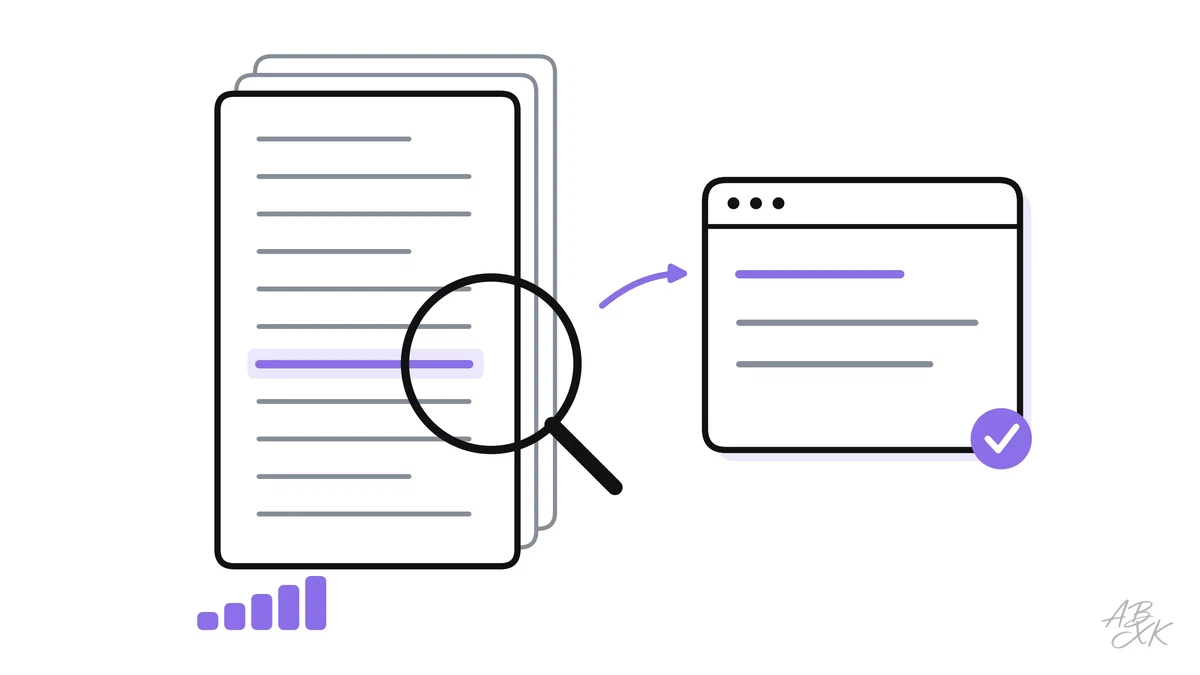
You upload a 60-page contract to an AI assistant and ask a simple question. The answer sounds sure, but it misses the clause on page 41. Or it quotes a sentence that is not in the contract at all. Long documents are where AI assistants fail most quietly — and where good technique makes the biggest difference.
This is part 2 of Level 4 in our AI Productivity path. Context engineering means deciding what goes into the model’s input, in which order and in which form. It is the step after writing a good prompt. You will learn what a context window really holds and why models lose details in the middle of long inputs. You will also learn five techniques that work without any programming, and how to check an answer about a document you have not read in full.
What a context window holds
You met the context window in Level 0: the maximum amount of text a model can consider at once. It is measured in tokens — pieces of words. OpenAI gives a rule of thumb for English: one token is about four characters or three quarters of a word, so 100 tokens are about 75 words. Other languages, German for example, often need more tokens for the same content.
A rough example: a contract with 60 pages of about 500 words each has 30,000 words. That is around 40,000 tokens. Whether that fits depends on the model and the tool. Our LLM database tracks 343 models and their test results; for the exact window size of the model you use, check the vendor’s documentation, because it changes with new versions.
The window holds more than your document. It also holds the tool’s own instructions, the chat history, every uploaded file, your question — and the answer, which needs space too.
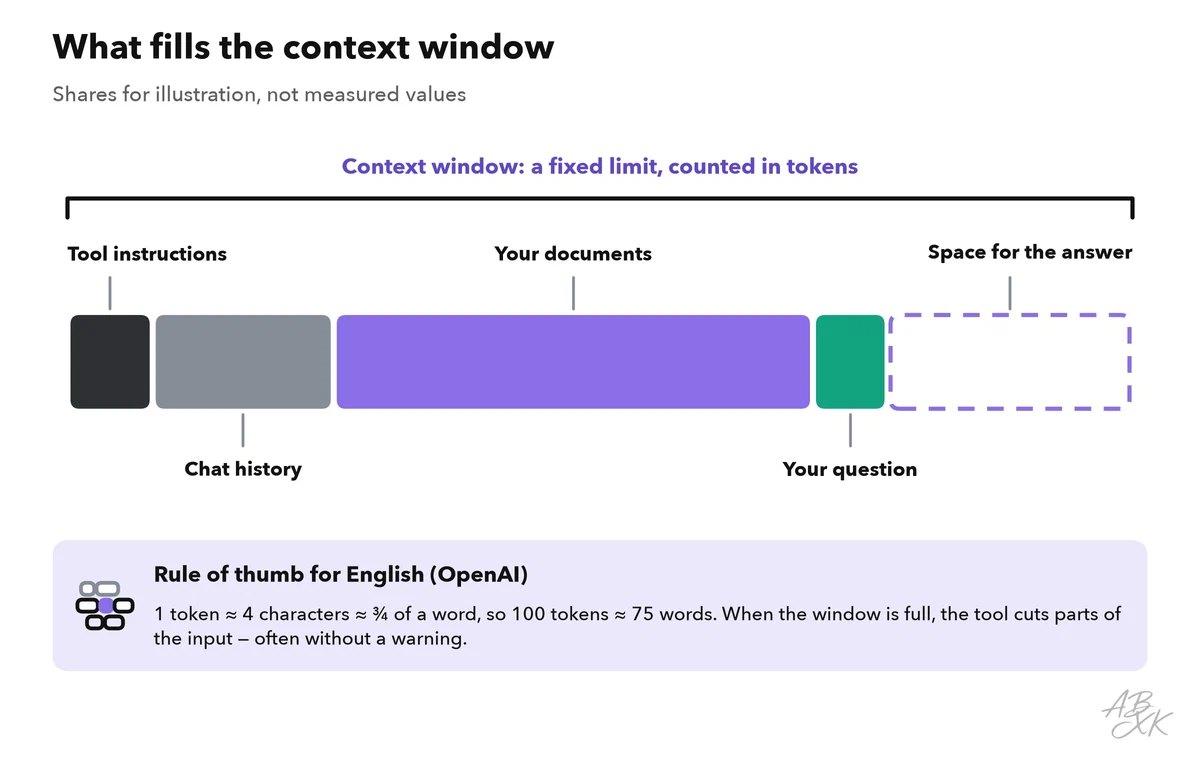
When the window is full, something has to give. The tool cuts, shortens or skips parts of the input — often without a clear warning. A long chat with several uploaded files is the classic case: what you discussed an hour ago may simply no longer be there.
Bigger is not the same as better: lost in the middle
Even when a document fits, the model does not read it the way you do. A well-known study tested how language models use long inputs. Accuracy was highest when the relevant information stood at the beginning or the end of the input, and it dropped significantly when it stood in the middle. (Source: Liu et al., “Lost in the Middle: How Language Models Use Long Contexts”, 2023, published in Transactions of the Association for Computational Linguistics in 2024, arxiv.org)
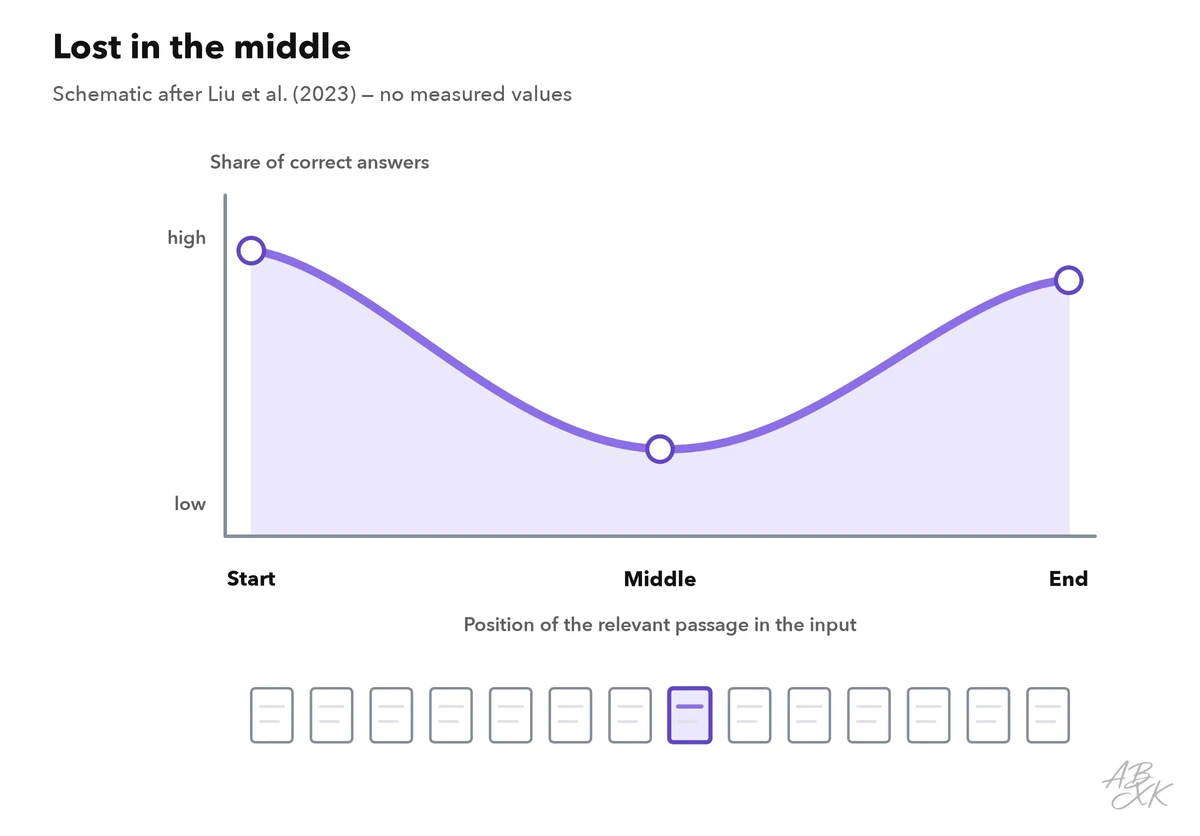
That study tested models from 2023, and newer models may behave differently. The practical lesson still holds: the more irrelevant text surrounds the passage you care about, the higher the risk that the model overlooks it or mixes it up with a similar one. You may have heard of “needle in a haystack” tests, where one planted sentence hides in a long text. Passing them shows that a model can find one fact. It does not show that it can connect ten facts spread across a document.
Five techniques that work without code
| Technique | What you do | Best for | Main risk |
|---|---|---|---|
| Trim | Remove what the question does not need: annexes, boilerplate, old versions | Every long document | You cut the one part that mattered |
| Structure | Mark each document and section with a name and an ID; put the documents first and your question last | Several documents at once | Little — this almost always helps |
| Chunk | Split the document into parts of a few pages and work through them one by one | Very long documents | Links between parts get lost; overlap helps |
| Summarize, then ask | Summarize every part with the same template, then ask your question about the summaries | Overview questions | Details vanish in the summaries |
| Retrieve | A search step picks the passages that match your question and gives only those to the model | Questions about large collections | If the search misses a passage, the answer misses it too |
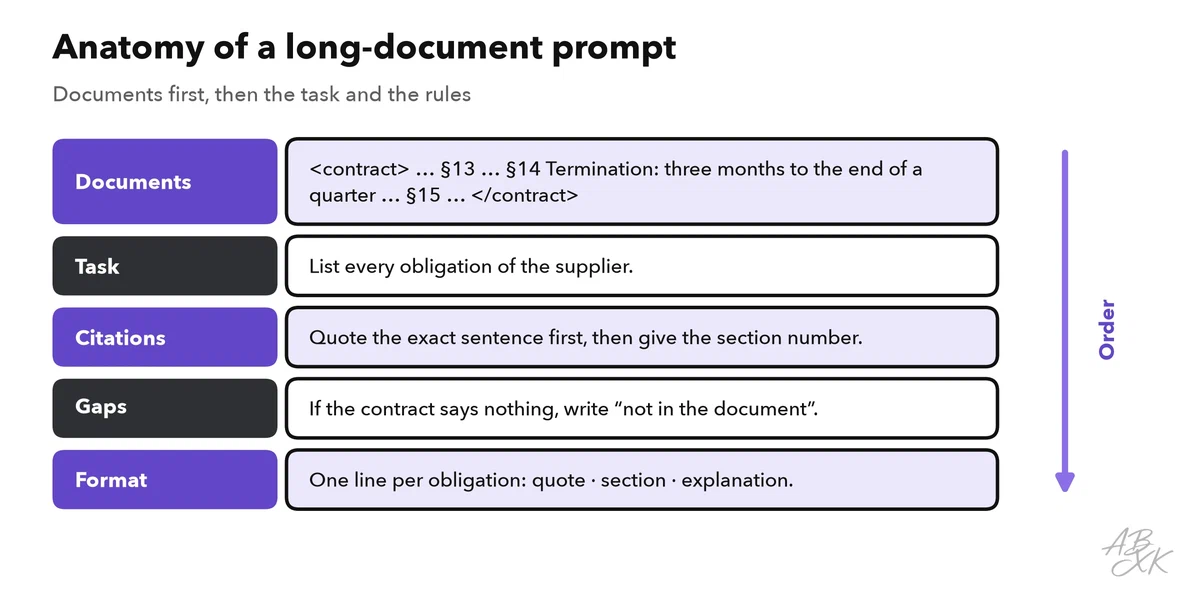
The order inside your input matters as well. Anthropic’s prompting guide for Claude recommends putting long documents at the top, the question at the end, and asking the model to quote the relevant passages before it answers. (Source: Anthropic, Claude prompting best practices, platform.claude.com)
Prepare the input before you ask
Many wrong answers start before the question: the tool never read the document the way you think it did. Four habits prevent most of these problems:
- Check what the tool really read. Ask for the heading of the last section and the number of pages. If the answer is wrong, the file was cut off or only partly loaded.
- Watch out for scanned PDFs. A scan is a picture of text. The tool first has to recognize the letters (OCR, optical character recognition), and that step makes mistakes. Compare a few sentences with the original.
- Give tables a clear shape. Tables copied from PDFs often lose their columns. Paste them as text with clear column names, or ask about them separately.
- Start fresh for a new task. A long chat is a long document too. Open a new chat and paste a short brief with the facts that still matter, instead of relying on what the tool may still remember.
Retrieval explained for non-developers
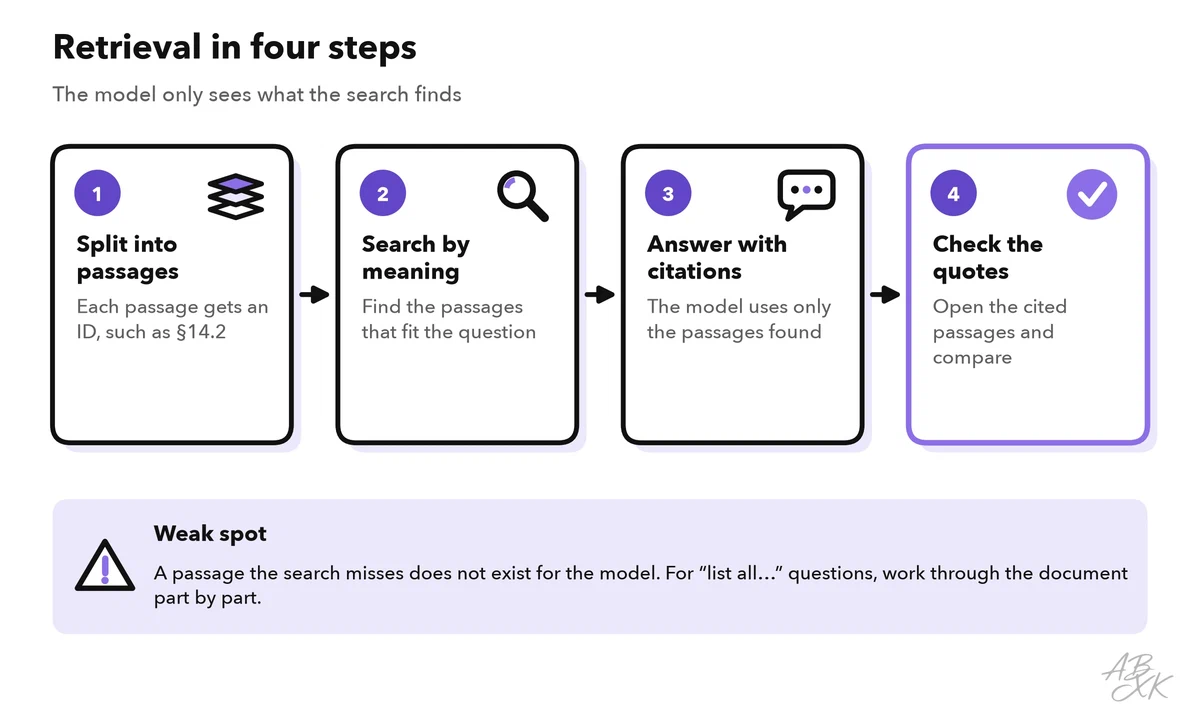
Retrieval-augmented generation (RAG) adds a search step before the model answers. The tool splits your sources into small passages and stores them. When you ask a question, it finds the passages that match the meaning of the question — not only the exact words — and puts them into the model’s input. The model then answers from those passages and can point to them.
You do not need to build this yourself. Research tools such as Nouswise ground their answers in the sources you upload, and Consensus searches academic papers, according to the vendors. Meeting and audio tools turn long recordings into transcripts — which are long documents too.




Short descriptions from our tool comparison, based on the vendors' information — not tested by ABXK.
Retrieval has one big weakness: the model only knows the passages the search returned. Questions like “list all…” or “is there any clause about…” are hard, because the answer may be spread over many places. For such completeness questions, go through the document part by part instead. Level 1 explains how to research with AI and check the sources; if you want to build your own retrieval system, the AI Development section covers the technical side.
Check answers about long documents
An answer about a long document is only useful if you can check it without reading everything. These checks take minutes:
| Check | How | What it catches |
|---|---|---|
| Quote check | Search each quoted sentence in the source (Ctrl+F or Cmd+F) | Invented or altered quotes |
| Known-answer test | Ask a question whose answer you already know, ideally from the middle of the document | Details lost in the middle |
| Order test | Ask again with the parts in a different order, and compare the answers | Answers that depend on position |
| Completeness test | For “list all” questions, work part by part and merge the lists | Missing items |
| Number check | Compare every number with the original table or page | Mixed-up or rounded figures |
A failed check is useful information. It tells you whether to trim harder, split into smaller parts or switch to retrieval. Level 2 shows a full routine to check AI output for errors, and part 5 of this level shows how to turn such checks into a repeatable test set.
Worked example: a 60-page supplier contract
You need every obligation of a supplier from a long contract, with section numbers, for a meeting tomorrow. Here is a routine that combines the techniques above:
- Trim. Remove the price annexes and signature pages. Keep the section numbers in the text.
- Chunk. Split the contract into six parts along its chapters. Name them “Part 1 of 6” and so on.
- Extract per part. Send each part with the prompt from the box above. Ask for quotes and section numbers.
- Merge. Put the six lists together and ask the model to remove duplicates — without adding anything new.
- Check. Run the quote check on every item. Then ask for the notice period, which you know is in section 14, as a known-answer test.
- Ask your real questions on the merged list, not on the full contract.
The result is a list you can defend in the meeting: every line points to a section you can open. If the known-answer test fails, the part that contains section 14 needs a second pass.