

AI output rarely looks wrong. The text reads well, the table is neat and the tone is confident, even when a number is invented or a source does not exist. That is why checking is a skill of its own. You need to know where errors hide and how to find them quickly, without doing the whole task a second time.
This is part 5 of Level 2 in our AI Productivity learning path. In Level 1, you learned to research with AI and check the sources behind an answer. This part applies to all AI output, from emails to reports. You will learn six kinds of errors, a five-step checking routine and lateral reading. You will also see how AI can help with the check and when to stop using AI for a task.
Six kinds of errors in AI output
Many people know the term hallucination: a statement that sounds plausible but is false or made up. Hallucinations are only one kind of error, though. These six kinds cover most of what goes wrong in everyday work:
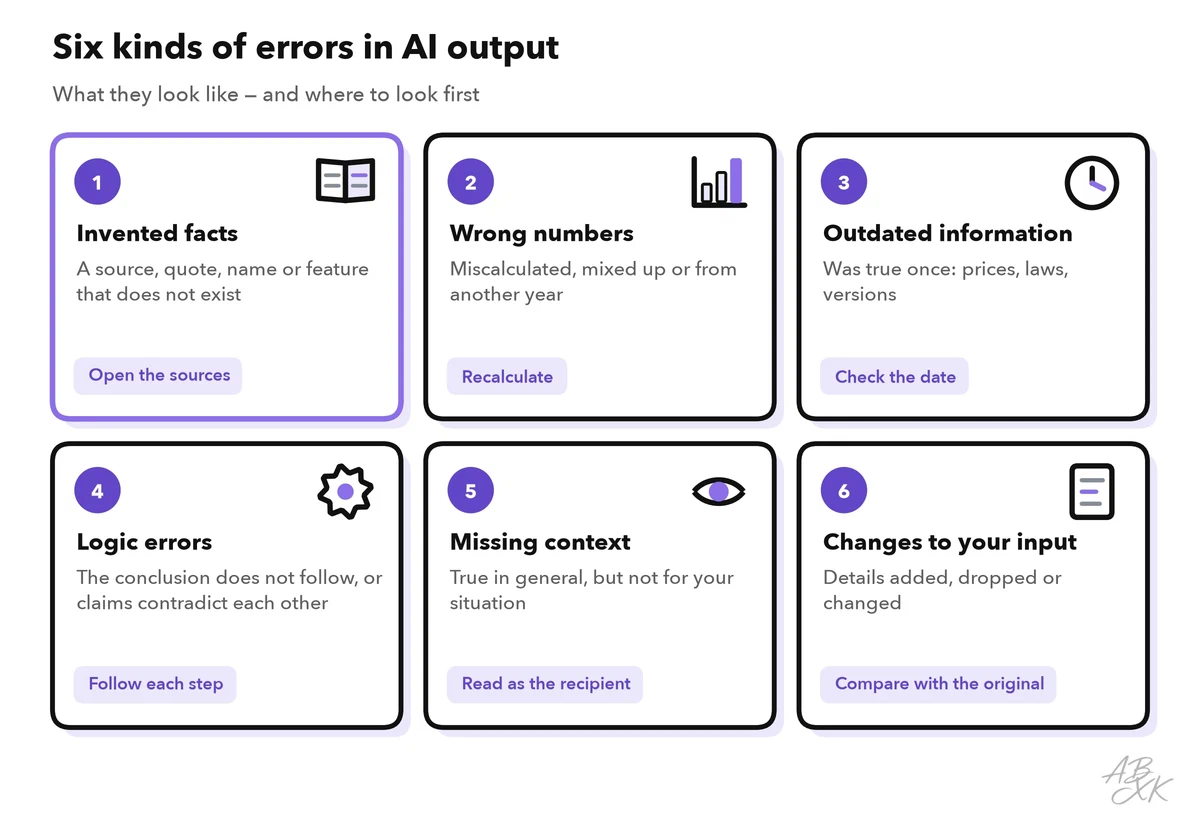
- Invented facts. A study, a quote, a court case or a product feature that does not exist. The details look real: an author, a year, even a page number.
- Wrong numbers. A total that does not add up, a percentage of the wrong base or a figure from another year. A language model writes numbers the same way it writes words: as likely text. Unless the tool actually runs a calculation, nobody has done the math.
- Outdated information. A model learns from data up to a certain date, its knowledge cutoff. Prices, laws, product versions and job titles may have changed since then.
- Logic errors. Every sentence sounds right, but the conclusion does not follow, two statements contradict each other, or a step is missing.
- Missing context. The answer is correct in general but wrong for you. It ignores your country, your industry, an exception in your contract or the other side of an argument.
- Changes to your input. A summary or rewrite adds a detail, drops a condition or turns “we discussed” into “we decided”.
The last two are the hardest to spot, because nothing in the text looks wrong. You only find them when you compare the output with the original or think about the person who will read it.
Why fluent answers can still be wrong
A language model writes the most likely next words. It has no reliable sense of which facts it knows well and which it does not. A 2025 paper by OpenAI researchers adds another reason: training and common tests reward guessing. On a test, an answer like “I don’t know” earns no points, while a confident guess is sometimes right. So models learn to guess. (Source: Kalai et al., “Why Language Models Hallucinate”, 2025, arxiv.org)
Benchmarks, standard tests that all models take in the same way, show how large the problem still is. In Level 1, you met SimpleQA Verified: short factual questions with exactly one correct answer, which the models answer from memory, without a web search. The score is the share of questions a model answers correctly. These are the leaders in our LLM data:
| # | Model | Released | Result |
|---|---|---|---|
| 1 | Gemini 4 Argon (high) Google DeepMind | Sep 30, 2026 | 76.0% |
| 2 | GPT-6 Astra (max) OpenAI | Sep 3, 2026 | 75.6% |
| 3 | GPT-6.1 Sol (max) OpenAI | Sep 29, 2026 | 73.9% |
| 4 | Gemini 3.1 Pro Preview Google DeepMind | Feb 19, 2026 | 73.5% |
| 5 | Claude Opus 5.5 (max) Anthropic | Sep 22, 2026 | 72.2% |



Short factual questions with exactly one correct answer, answered without tools. It shows how much a model really knows and how often it invents an answer instead of admitting that it does not know. Data: Epoch AI, retrieved on October 17, 2026, licensed CC BY 4.0. All models: LLM database.
Level 1 showed how the best score has risen over time. This chart shows the whole field: every tested model as one dot, placed by its score. Even the best model misses a clear share of these simple questions, and most models score far lower.
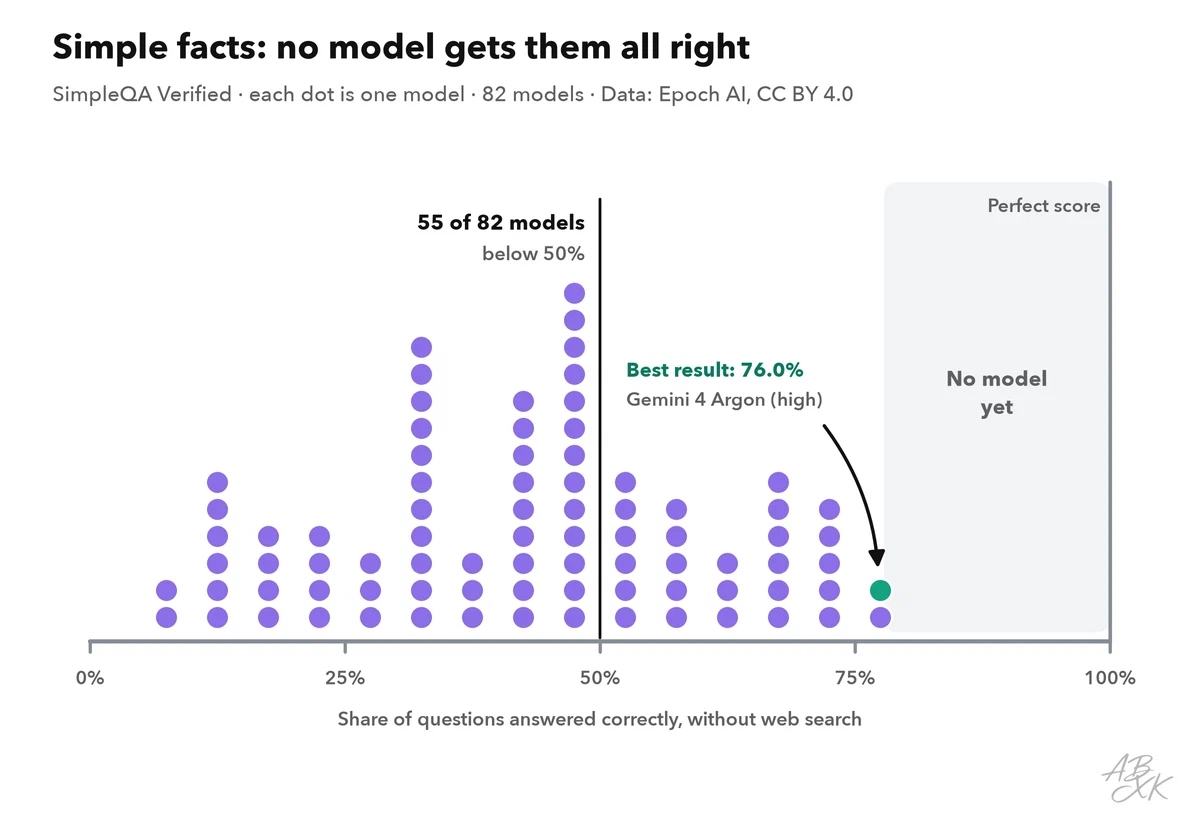
Assistants with web search can do better on such questions, but they bring their own errors, such as a real source that says something else. And a good benchmark score is an average: it tells you nothing about the one answer in front of you. You can compare all models in our LLM database.
These errors reach finished, paid work, too. In 2025, Deloitte Australia agreed to partly refund the Australian government for a report. The report contained a made-up quote from a federal court judgment and references to research papers that do not exist. The corrected version disclosed that a generative AI system had been used in writing the report. (Source: Associated Press, October 2025)
Errors also slip through because checking feels less necessary the more you trust the tool. In a 2025 survey of 319 knowledge workers by Microsoft Research and Carnegie Mellon University, people with more confidence in generative AI reported less critical thinking, while people with more confidence in their own skills reported more. Critical thinking did not disappear. It moved to checking information, fitting the answer into the work and taking responsibility for the result (Source: Lee et al., CHI 2025). That is exactly the job of the routine below.
A five-step routine for checking
You do not need to check every word with the same care: a note to yourself needs less checking than a report for your board.
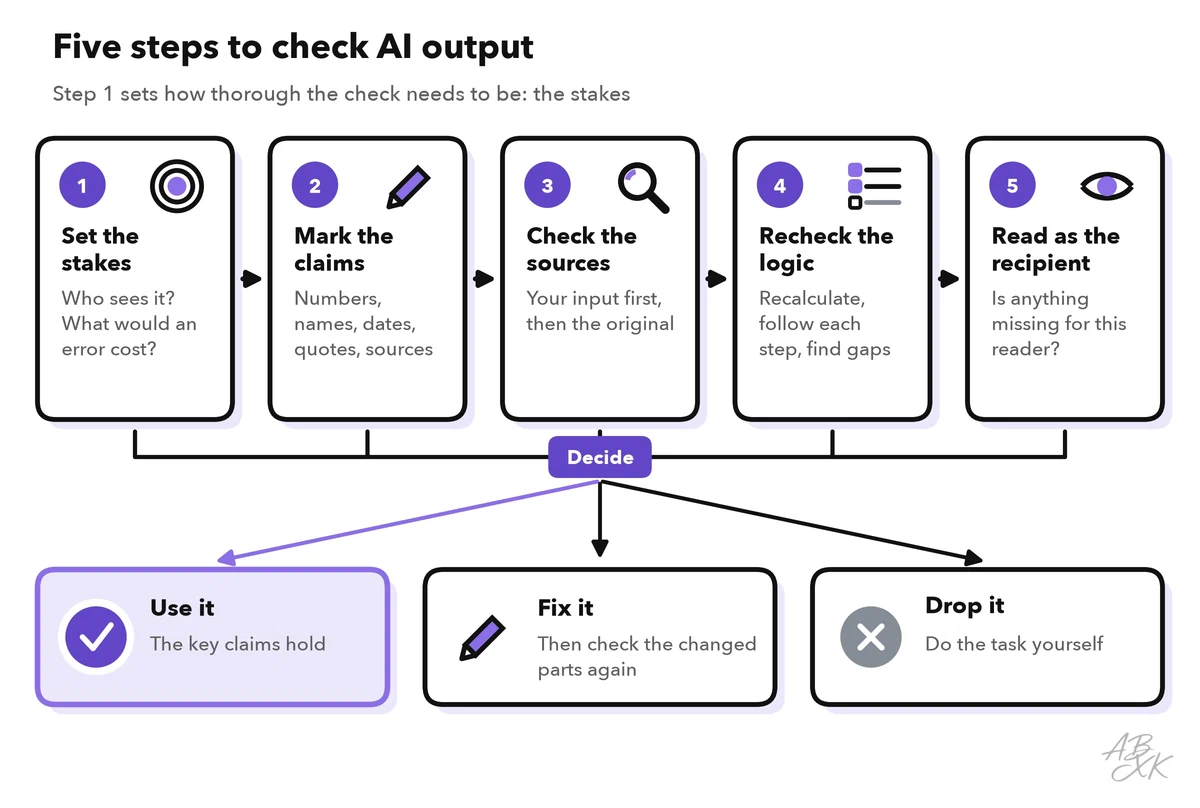
- Set the stakes. Who will see the result, and what would an error cost? A quick read is enough for an internal draft. A customer email, a report or anything public needs all five steps.
- Mark the claims. Mark everything that can be true or false: numbers, names, dates, quotes, sources and strong words such as “always”, “never” or “the only”.
- Check the sources. Start with your own input. Does each claim appear in the text, data or notes you gave the tool? For every other claim, find the original source.
- Recheck the logic. Recalculate the key numbers. Follow the argument step by step, and look for contradictions and gaps.
- Read as the recipient. Does the result fit this reader and this decision? What would they ask that the text does not answer?
Then decide: use the result, fix it and check the changed parts again, or drop it and do the task yourself. The table shows how to check the most common claims quickly:
| Claim in the output | How to check it | Typical error |
|---|---|---|
| Number or calculation | Recalculate it, compare it with your data, check the unit and the time period | Wrong total, percentage of the wrong base, figure from another year |
| Name, job title or product | Compare it with your records or the organization’s own website | Similar name, outdated title, a feature that does not exist |
| Date or deadline | Compare it with the source; check the year, weekday and time zone | Wrong year, a deadline that has moved |
| Quote | Find the exact words in the original | Words nobody said, or a quote taken out of context |
| Source or link | Open it, find the passage, check the author and date | The source does not exist or says something else |
| Summary of your text | Put it next to the original and go through it point by point | Added, dropped or changed details |
Lateral reading: judge a source from the outside
Step 3 often takes you to a website you do not know. How do you judge it quickly? Researchers at Stanford University watched professional fact-checkers, historians and students evaluate websites. The fact-checkers were the fastest and the most accurate. They left an unknown page early and opened new tabs to find out what others said about it. The researchers called this lateral reading. The historians and students mostly stayed on the page and were often fooled by a professional design, a logo or a long list of references. (Source: Wineburg and McGrew, Stanford History Education Group, 2017)
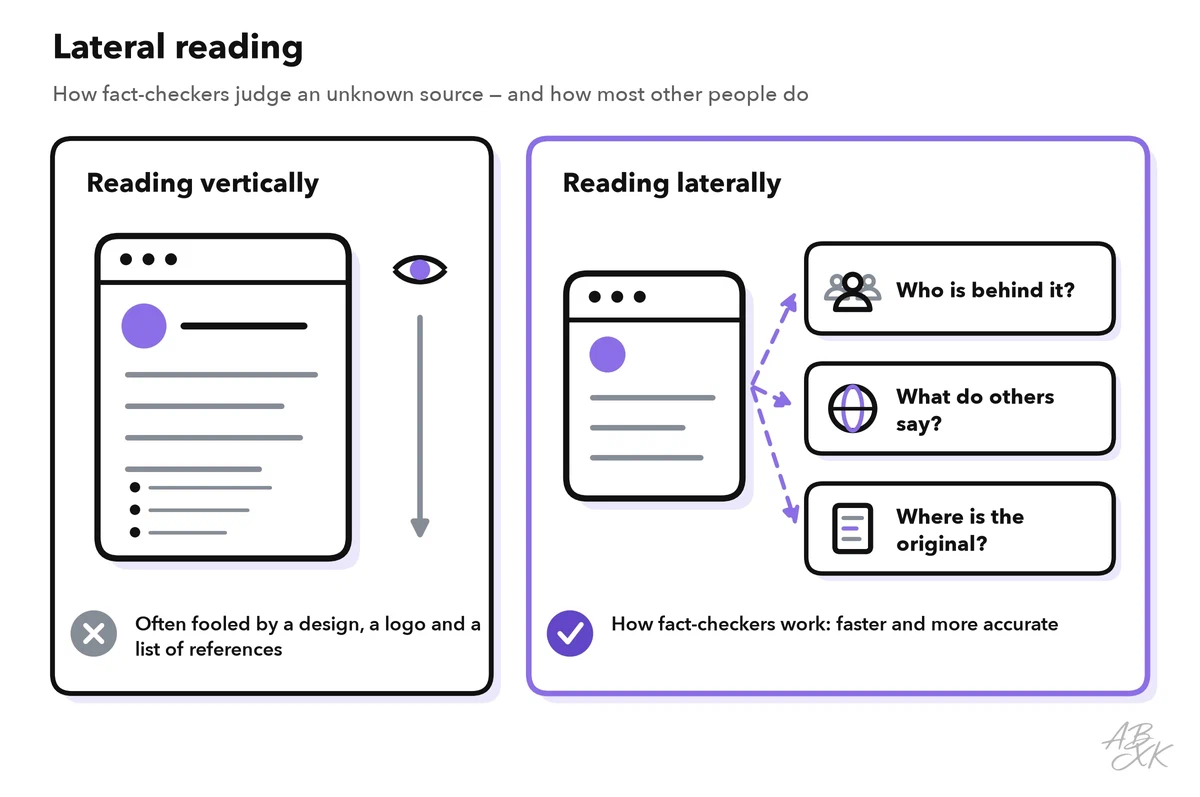
For a claim from an AI answer, lateral reading means asking four questions:
- Who is behind it? Search for the organization or the author. Is it a research institute, a public agency, a company that sells something, or an interest group?
- What do others say? Look for independent reports on the same claim. If only one site makes it, be careful.
- Where does it come from? Follow the claim back to the original: the study, the statistic, the law or the press release.
- When was it published? Check the date of the original, not of the page that repeats it.
Let AI help with the check — but not decide
AI tools can speed up checking. They cannot replace it, because the weaknesses that cause errors also affect the check. Four methods help in practice:
| Method | What it helps with | What to watch out for |
|---|---|---|
| Ask where each claim comes from | Shows which claims rest only on the model’s memory | The labels can be wrong, too |
| Ask how sure the model is | Points to claims the model itself doubts | Models often sound more certain than they are |
| Ask again in a new chat | Invented details often change from one answer to the next | A model can repeat the same error every time |
| Ask a second model | A fresh look catches some factual and logic errors | Models can share errors; check disagreements yourself |
Ask where each claim comes from. After an important answer, send: “List every factual claim in your answer. For each one, say whether it comes from my text, from a source you can name, or from your general knowledge.” Check the claims from general knowledge first.
Ask how sure the model is, but treat the answer as a hint. In one study, models that stated their confidence in words tended to be overconfident. (Source: Xiong et al., ICLR 2024, arxiv.org)
Ask again in a new chat. Invented details are often unstable. Researchers at the University of Oxford showed that when a model gives answers with different meanings to the same question, the answer is more likely to be made up. (Source: Farquhar et al., Nature, 2024) The reverse does not hold: an answer that stays the same can still be wrong.
Ask a second model. Paste the draft or the list of claims into a different assistant, in a new chat, and ask it to check each point. Where the two disagree, check the source yourself. Agreement is no proof, because models learn from similar texts and can share mistakes. The same limit applies to the critique-and-revise pattern from part 1 of this level: it improves the form, not the facts.
For research questions, a tool that shows its sources makes the check faster. Our comparison lists such tools under Writing & Research. According to the vendors, Consensus searches academic papers and summarizes their findings, and Nouswise grounds its answers in the sources you upload. General assistants such as ChatGPT or Gemini can serve as the second model. We list them under Text-to-Image because of their image features, but both also work with text.




Short descriptions from our tool comparison, based on the vendors' information — not tested by ABXK.
When to stop using AI for a task
Sometimes the check shows that AI is the wrong tool for the task. Two questions decide: How much does an error cost? And how much effort does it take to check the result?
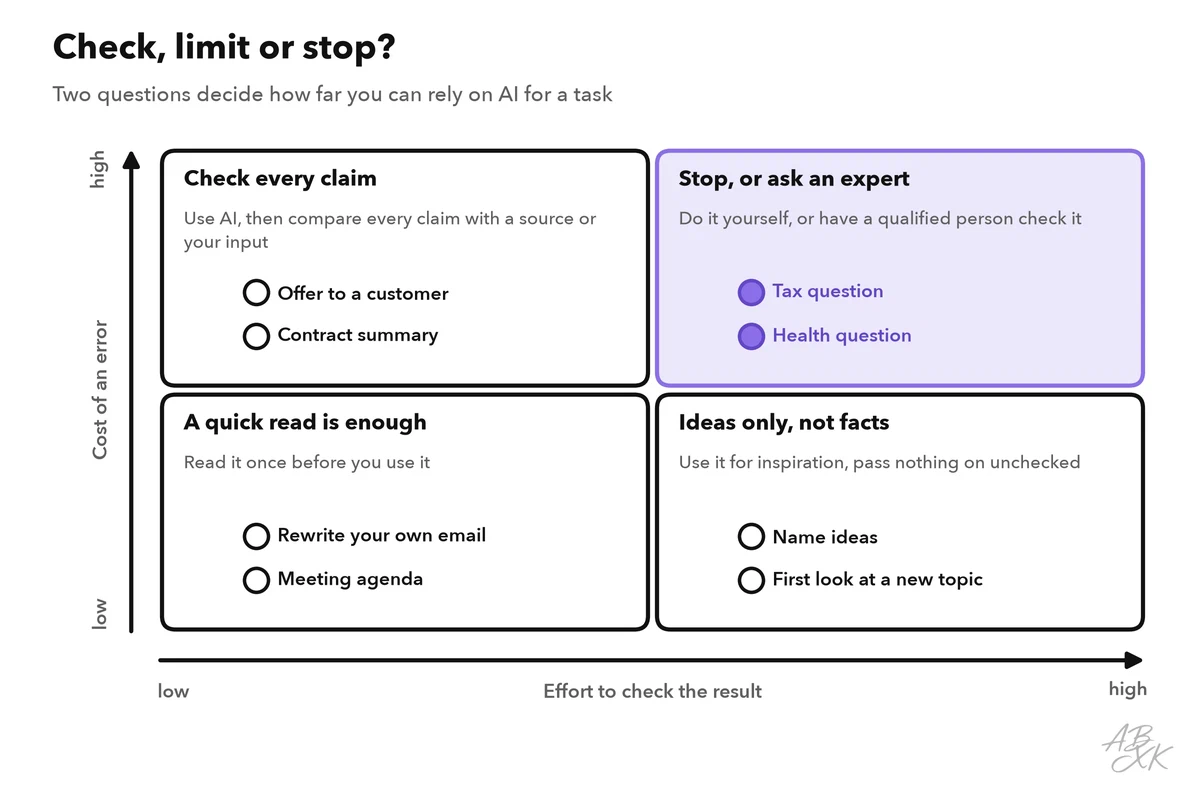
Stop using AI for a task, or keep it to small helper jobs, when you see one of these signs:
- Checking takes longer than doing. If you have to verify almost every sentence, write the text yourself.
- You cannot judge the result. Without the knowledge or the sources to check it, you cannot take responsibility for it.
- The same error keeps coming back. After two rounds of corrections, a better prompt rarely helps. The model may simply lack the knowledge.
- The tool lacks what the task needs. It has no access to current data or your internal documents, or the information is too confidential to share.
- The decision is high-stakes. Legal, medical, financial or personnel decisions need a qualified person. AI can help prepare them, but it should not make them.