

A product video needs a voiceover and some music underneath. AI tools make both in minutes: a text-to-speech (TTS) tool reads your script aloud, and a music generator writes a track from one sentence. The real work is in the details, such as a name the voice gets wrong or music that drowns out the speaker.
This is part 4 of Level 3 in our AI Productivity learning path. In Level 2, you edited recordings through their transcript and fixed small slips with an AI voice. Here you produce the audio itself. You choose a voice, control pronunciation and pacing, and prompt music. Then you mix voice and music, clear the rights and label the result.
Voice first, music second: the production flow
Audio for content runs on two tracks that meet in the mix. The voice track starts with a script, the music track with a short brief. Make the voice first: it carries the message and sets the timing. The music then follows its length and pauses, just as the pictures do in part 3 of this level, from script to clip.
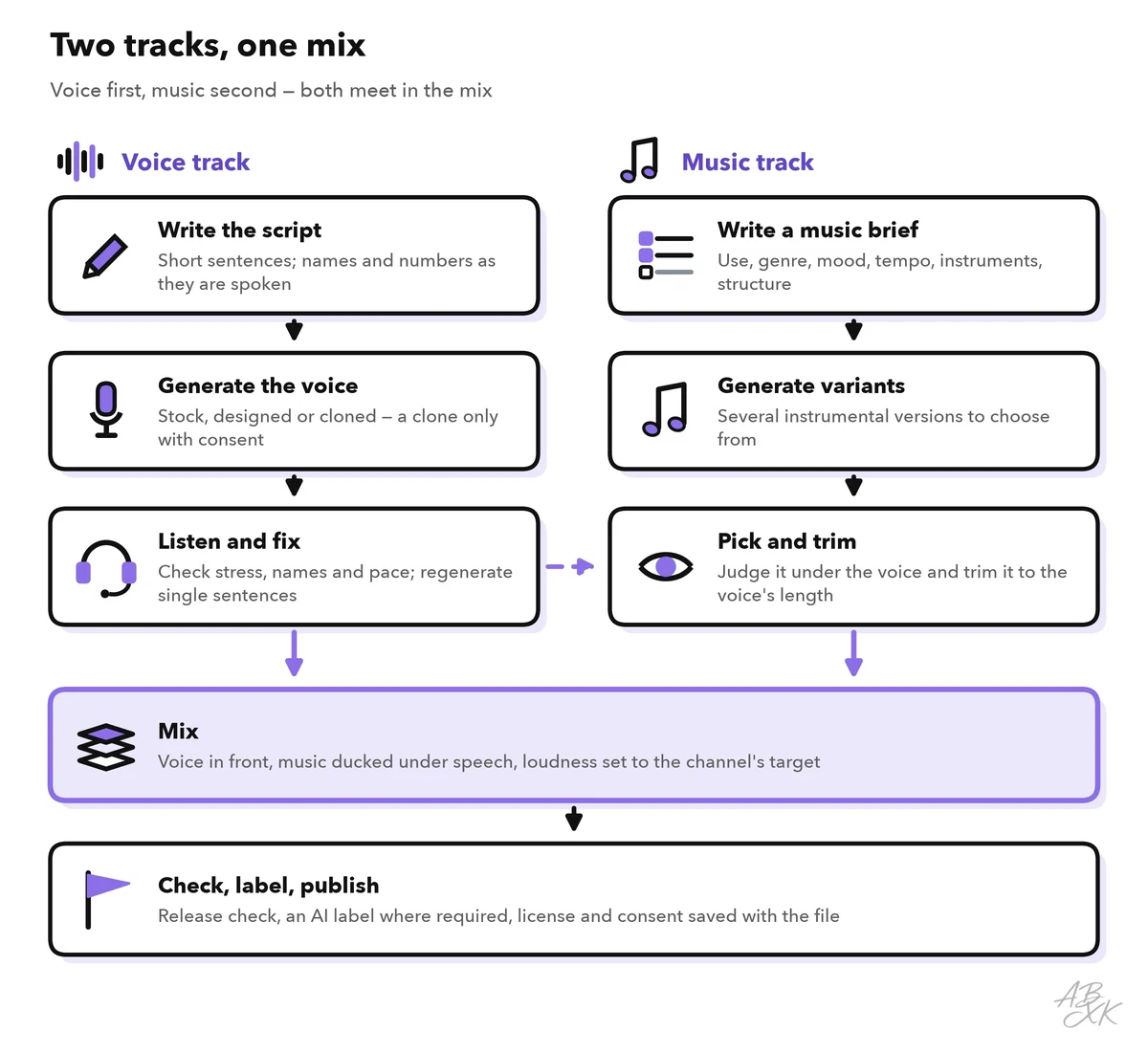
At every step, the AI generates and you judge. Plan for several takes. Save the prompt and settings of each take you keep, so that later versions sound the same.
AI voices suit explainers, training videos, product updates and audio versions of articles. Record a real person when their own voice matters, as in personal messages, customer stories or apologies.
Stock, designed or cloned: three ways to get a voice
Modern text-to-speech predicts not only the sounds of words but also the prosody: the melody, rhythm and stress of speech. That is why AI voices sound natural, and why they still stress a wrong word now and then. You can get a voice in three ways:
- Stock voice. You pick a ready-made voice from the tool’s library. It is the fastest start, but other customers can use the same voice.
- Designed voice. You describe the voice you want in words, and the tool creates a new one. According to the vendor, Hume’s Octave model works this way. The result must not imitate a real person.
- Cloned voice. A voice clone is a synthetic copy of a real person’s voice, made from recordings of that person. It can say anything in a voice that listeners trust: the most useful option and the riskiest.
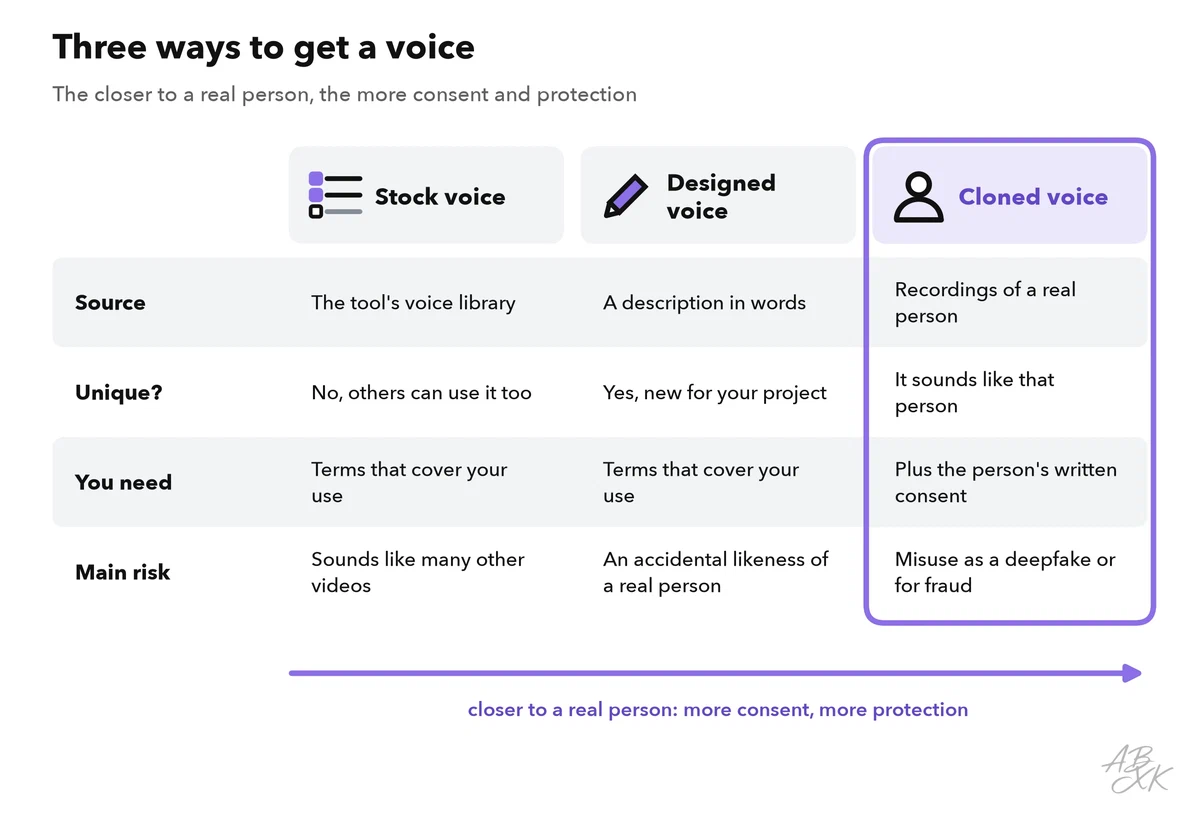
Level 2 set the basic rule for clones: no consent, no clone. For regular production, make the consent specific. A voice is part of a person’s identity, and in many countries the law protects it. The written consent should name:
- the purpose and the types of content, such as product videos but no ads,
- the languages and channels,
- who may use the clone, and for how long,
- that the clone will be deleted at the end, and how the speaker can withdraw consent.
The same applies to your own voice: whoever can use your clone can make you say anything.
According to the vendors, ElevenLabs offers text to speech, voice cloning and dubbing. Murf AI makes voiceovers and dubs videos, and Speechify reads documents aloud. Our comparison lists 13 text-to-voice tools, and our ABXK Ranking of text-to-voice generators shows which of them lead right now. Test a paragraph of your own script, with your product names, in two or three of them.



Short descriptions from our tool comparison, based on the vendors' information — not tested by ABXK.
Pronunciation and pacing: write for the ear
Many problems in AI voiceovers start in the script. A text-to-speech model has to guess how to say anything that is not a plain word. Typical trouble spots are names, abbreviations, numbers, dates and units. Words with two pronunciations are tricky too, such as “live” in “a live event” and in “we live here”.
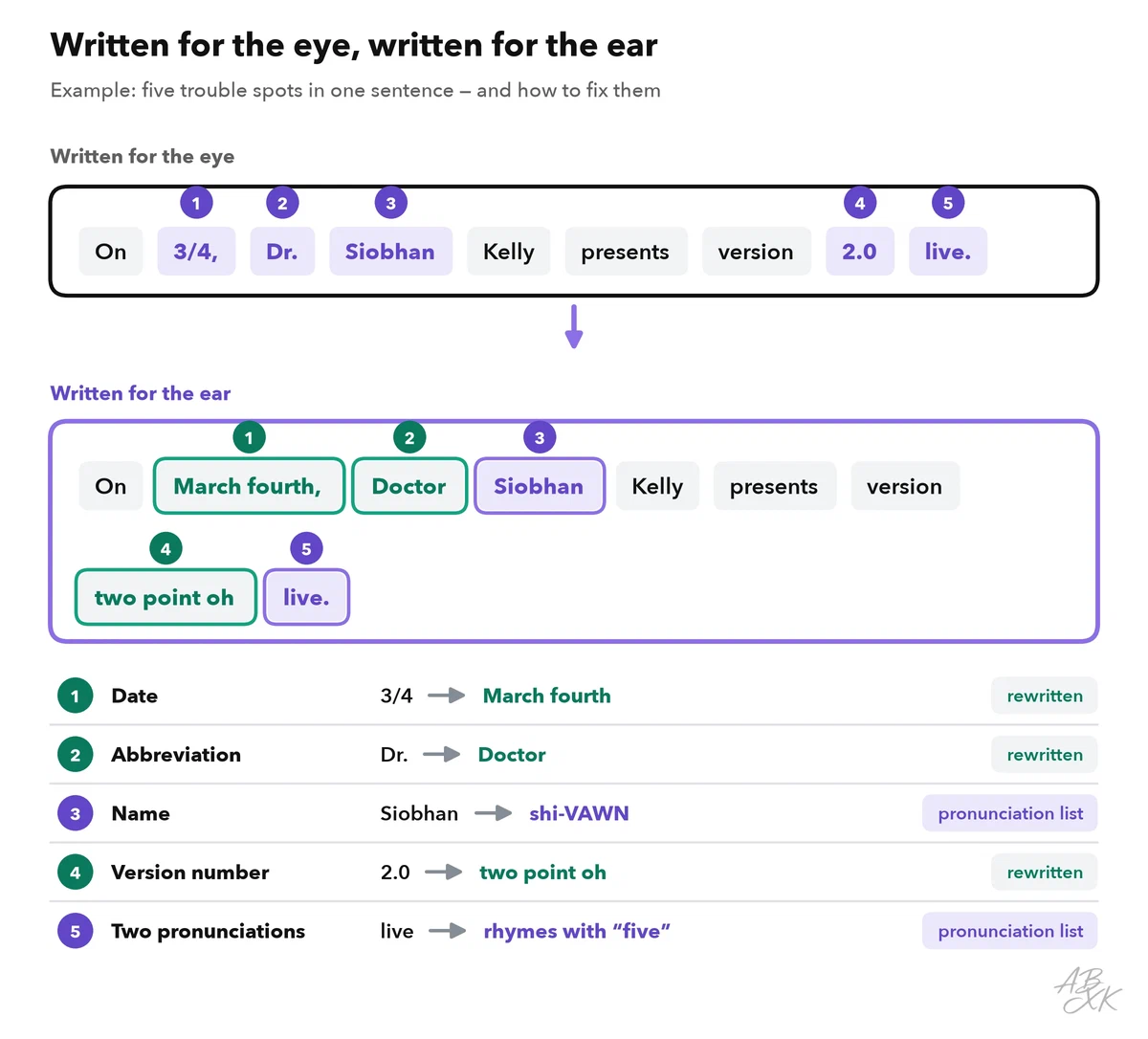
You can fix these spots in four ways, from simple to technical:
- Rewrite for speaking. Write dates, abbreviations and numbers the way they should sound: “March fourth”, “Doctor”, “two point oh”.
- Use the tool’s controls. Depending on the tool, you can add pauses, change the speed, stress a word or regenerate one sentence.
- Keep a pronunciation list. Note every name and term once with its spoken form. Some tools store such a list as a pronunciation dictionary and reuse it across projects, so you fix a name only once.
- Use SSML where it is supported. The Speech Synthesis Markup Language (SSML) is a W3C standard for marking up text for speech: pauses, how to read a number, the exact pronunciation of a word (Source: W3C, Speech Synthesis Markup Language 1.1, w3.org). Cloud services such as Amazon Polly and Google Cloud Text-to-Speech accept it, which helps when you generate audio automatically.
A pronunciation list for a product team could start like this:
| Written | Spoken as | Why it needs an entry |
|---|---|---|
| Nordlicht | NORD-licht | Brand name; the stress is on the first part |
| Siobhan | shi-VAWN | Irish name; the spelling does not show the sound |
| 3/4 | March fourth | Date or fraction? And date formats differ by country |
| 2.0 | two point oh | Version numbers: decide once, use everywhere |
| SQL | S-Q-L or “sequel” | Teams say it differently; pick one |
| live (event) | rhymes with “five” | Same spelling, two pronunciations |
Pacing is the other half. Listeners cannot read a sentence twice, so write short sentences with one idea each. Most voices pause longer after a period than after a comma, so punctuation sets the pauses. Measure the pace of your voice once: count the words of a test paragraph and divide by its length in minutes. Then plan scripts for a fixed slot. An example with an assumed pace of 150 words per minute: a 60-second video with four seconds of music at each end leaves 52 seconds, or about 130 words.
Prompt music by genre, mood and structure
Music generators come in two kinds. Song generators write complete songs with vocals. According to the vendors, Suno makes songs from a text prompt, and Udio lets you edit them section by section. Production music tools make instrumental tracks for videos, podcasts and ads. AIVA, for example, composes orchestral music and exports MIDI: the notes rather than the sound, so you can change the instruments later.
Under a voiceover, you usually need instrumental music, because sung words compete with spoken words. A good music prompt first says what the track is for and then describes the sound. Tempo is given in BPM, beats per minute.
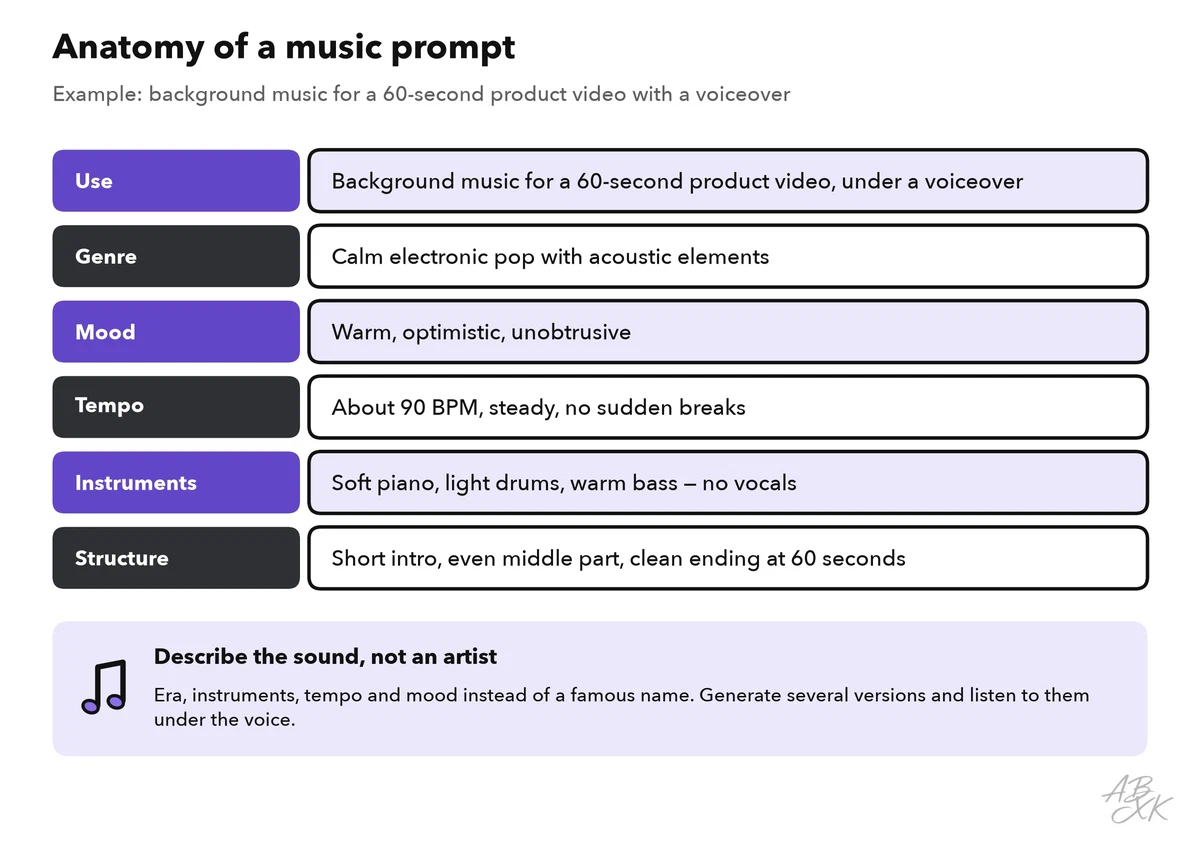
Four habits improve the results:
- Describe the sound, not an artist. Name the era, instruments, tempo and mood instead of a famous musician. Imitating a known artist raises legal and ethical questions.
- Give the structure. “Short intro, even middle, clean ending” leaves room for the voice. Some song tools accept your own lyrics with section labels such as [Verse] and [Chorus]. These labels are hints, and the model does not always follow them.
- Generate several versions, and judge them under the voice. A track that sounds great alone can be too busy under speech.
- Check the start and the end. Generated tracks can stop abruptly or fade out at an odd moment. Trim and fade them in your editor.
Our comparison lists 12 text-to-music tools, and our ABXK Ranking of text-to-music generators shows which of them lead right now.



Short descriptions from our tool comparison, based on the vendors' information — not tested by ABXK.
Mix voice and music so every word is clear
In the mix, the voice leads and the music supports it. Four techniques do most of the work:
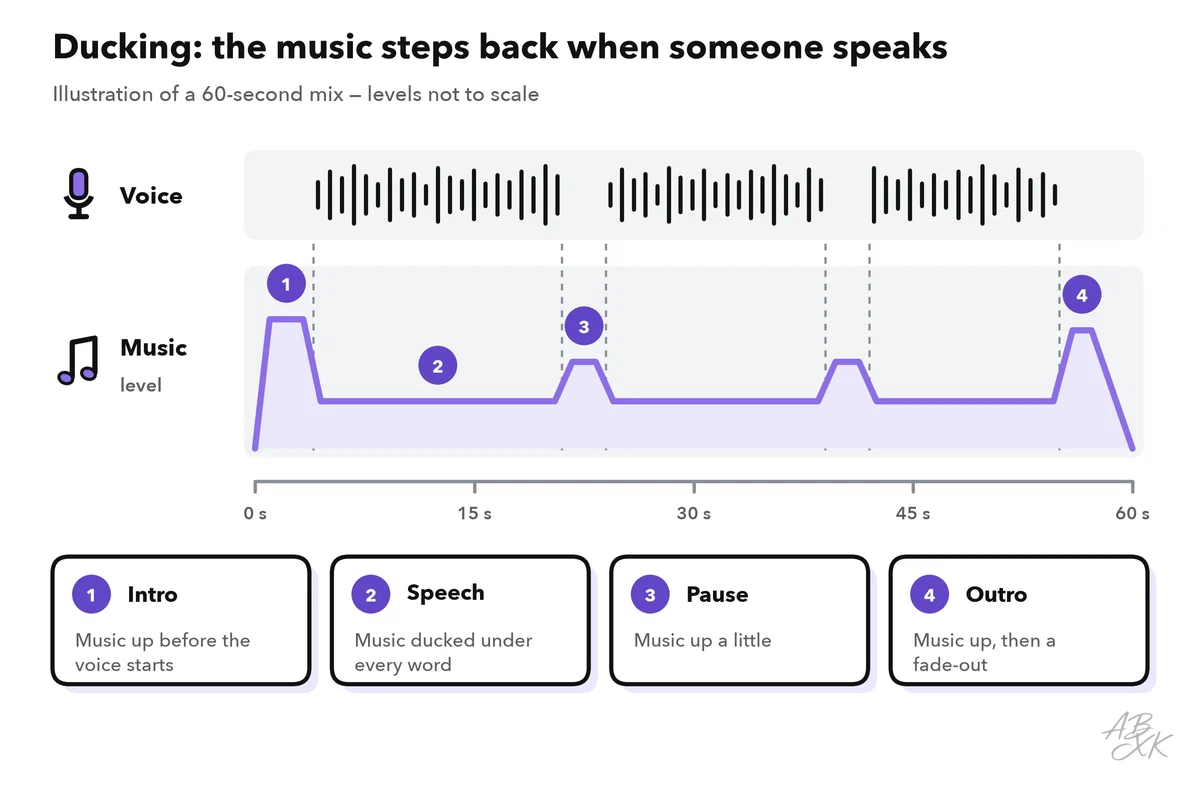
- Ducking. Lower the music while someone speaks, and raise it a little in longer pauses. Some editors do this automatically, often under the name auto-ducking. The music should step back smoothly, not jump.
- Room for the voice. Avoid music with vocals or a busy melody under speech. If a track still covers the voice, try a calmer version.
- Intro and outro. Start the music a moment before the voice, and end it with a fade, not a hard stop.
- Loudness. Platforms adjust playback to a target loudness. It is measured in LUFS (loudness units relative to full scale), a measure of how loud audio sounds to people. Spotify uses −14 LUFS as its reference level for music (Source: Spotify for Artists, “Loudness normalization”, support.spotify.com). For podcasts, Apple recommends about −16 LKFS, the same measure under another name (Source: Apple Podcasts for Creators, “Audio requirements”, podcasters.apple.com).
Then listen on the devices your audience uses: a phone speaker, earbuds and a laptop. A mix that works on studio headphones can bury the voice on a phone.
Rights, licenses and labels
Before you publish AI audio, clear three things: the tool’s terms, the people and material in it, and the copyright.
Terms differ by tool and often by plan, for example on commercial use. Read them before you publish, and save a dated copy. Royalty-free means you pay no fee per use or per play, but the license still decides where you may use a track. And as part 3 of this level showed, in the US, prompts alone do not make you the author of generated output (Source: U.S. Copyright Office, Copyright and Artificial Intelligence, Part 2: Copyrightability, 2025, copyright.gov). A track made from a prompt alone may be yours to use but not yours to protect.
| Question | Why it matters | Where you find the answer |
|---|---|---|
| Does my plan allow commercial use? | Rights often depend on the plan | The tool’s terms and plan page |
| Does the license cover my channel? | Paid ads, broadcast or resale may need more | The license terms |
| Is a real person’s voice in it? | A clone needs that person’s written consent | Your consent record |
| Did I upload someone else’s material? | A reference song or recording needs your rights to it | Your own records |
| Can I prove all of this later? | Platforms and clients may ask | A record with tool, plan, date, prompt and file |
Keep a record of tool, plan, date and prompt with every file. The Level 4 part on the multimodal content pipeline shows a complete asset record.
Labels. Listeners should not mistake a synthetic voice for a real person. YouTube asks creators to disclose realistic altered or synthetic content. One of its examples is a synthetically generated voice of a person narrating a video (Source: YouTube, “How we’re helping creators disclose altered or synthetic content”, 2024, blog.youtube). In the EU, the AI Act’s transparency duties for deepfakes also cover audio (Article 50). Put the label in the description or the show notes, or say it at the start. For example: “Narration: AI-generated voice. Music: AI-generated.” For a clone, add the consent: “Voice: AI clone of Maria Lopez’s voice, used with her consent.”
Release check for AI audio
Run this check before every release. It catches the errors that are hardest to fix once the audio is out.
| Check | Question |
|---|---|
| Script | Are all names, numbers and dates spoken correctly? |
| Voice | Does the stress fall on the right words, and is the pace easy to follow? |
| Consent | For a clone: is the written consent on file, and does it cover this use? |
| Music | Does the track fit under the voice, and does its license cover this channel? |
| Mix | Is every word clear on a phone speaker, with the music under the voice? |
| Loudness | Does the whole file meet the target of your main channel? |
| Label | Is the AI voice or music labeled where the platform or the law requires it? |
| Record | Are the tool, plan, date, prompt and settings saved with the file? |