

Ask three people what “AI development” means, and you may hear three different answers. A programmer thinks of an assistant that suggests code in the editor. A product manager thinks of a chatbot that answers customer questions. A researcher thinks of training a model on huge amounts of data. All three are right, but they describe different work, with different skills, tools and costs.
This is part 1 of Level 0 in our AI Development learning path. You need no programming knowledge. You will learn the three ways to do AI development and which roles work on each. You will also see how this path is built, so you can decide where to start.
Three meanings of “AI development”
The confusion clears up with one question: where does the AI do its work? It can help you while you build software. It can be a part of the product you build. Or it can be the thing you build.
At the center of all three is a model: the trained core of an AI system. It has learned patterns from large amounts of data and turns an input, such as a question, into an output, such as an answer. Most of this path is about large language models (LLMs): models trained on text that can also write code.
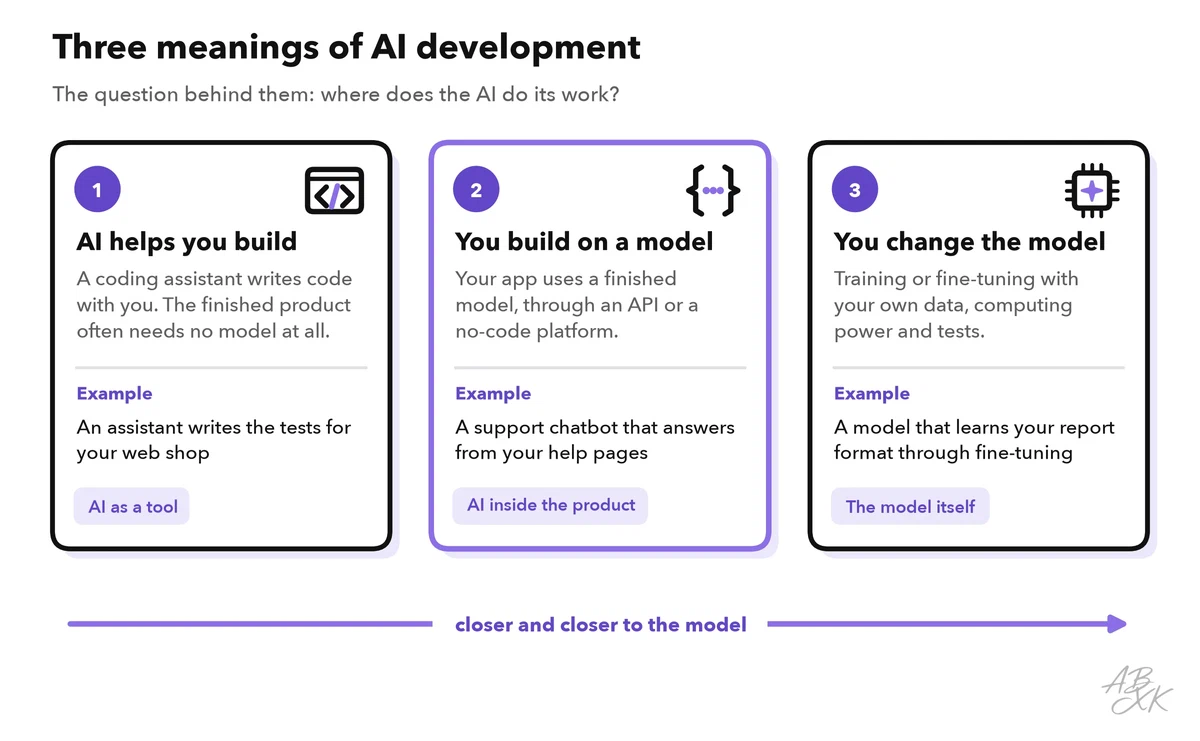
- Way 1: using AI to build software. An assistant helps you write code. The finished product may contain no AI at all.
- Way 2: building with AI. Your product uses a finished model while people work with it, for example to answer their questions.
- Way 3: building the AI itself. You train a model or adapt an existing one with your own data.
Way 1: AI helps you write software
An AI coding assistant works inside your code editor or next to it. You will meet it in three main forms:
- Autocomplete suggests the next lines while you type.
- Chat explains code, finds errors and writes small functions on request.
- Agents take on a whole task, change several files, run tests and show you the result.
Some products go one step further. App builders such as Emergent create a web or mobile app from a description in plain language, according to the vendor. This style of work is often called vibe coding: you describe what you want, the AI writes the code, and you test and correct it.
The result is ordinary software. It runs without a model. But the responsibility stays with you: assistants can use outdated libraries, call functions that do not exist or introduce security flaws. Someone has to read, test and understand the code before it goes live. Part 5 of this level explains what AI coding assistants do and where they fail.
Way 2: You build a product on top of a model
This is what most people mean when they talk about building AI apps, and it is the focus of this learning path. You do not train anything. You take a finished model and connect it to your own product.
Your product talks to the model through an API (application programming interface): a fixed way for two programs to exchange data over the internet. Your app sends a request with instructions and the user’s question. The provider’s server sends back the model’s answer. Most providers bill this usage per token. A token is a small piece of text, such as a short word or part of a word. Part 3 of this level explains APIs, tokens and context windows.
You can build such a product with code or without it:
- With code, a developer calls the model’s API from their own software. The app runs on a server or on a hosting platform such as Netlify.
- Without code, you use a no-code platform: a tool where you build by clicking, filling in forms and writing instructions. According to the vendors, MindStudio lets you build your own AI agents without code. Devs.ai lets teams build and run AI apps and agents on their own data.
Way 3: You train or adapt the model itself
Here the model itself is your work, at two very different scales:
- Training from scratch means creating a new model from huge amounts of data. Many specialized chips run for weeks or months to do it. The large models behind today’s AI assistants come from a relatively small number of companies and research labs.
- Fine-tuning means you continue training an existing model with your own examples. It then learns a format, a style or a narrow task. This needs far less data and computing power than training from scratch.
To fine-tune a model yourself, you need its weights. The weights are the numbers a model learned during training. A model with open weights can be downloaded. You can run and adapt it on your own hardware or on rented GPUs, for example from a GPU cloud such as Runpod. GPUs are graphics processors, the chips most AI models run on. Check the license first: open weights do not always allow every use. Models with closed weights stay with their provider, and some providers offer fine-tuning of selected models as a service. Our LLM database lists 343 models, and 172 of them have open weights.
Still, fine-tuning is rarely the first step. Many problems that seem to need it are solved faster with better instructions. Another option is to look up the right passages in your documents and give them to the model with each question. This method is called retrieval-augmented generation (RAG). For facts that change often, such as product details, it is easier to keep documents up to date than to fine-tune again. Our Level 3 guide Fine-Tuning vs. RAG vs. Prompting helps you decide.
Roles: who does what
Different roles work on the three ways. Two questions place each of them: do you write code, and do you change the model?
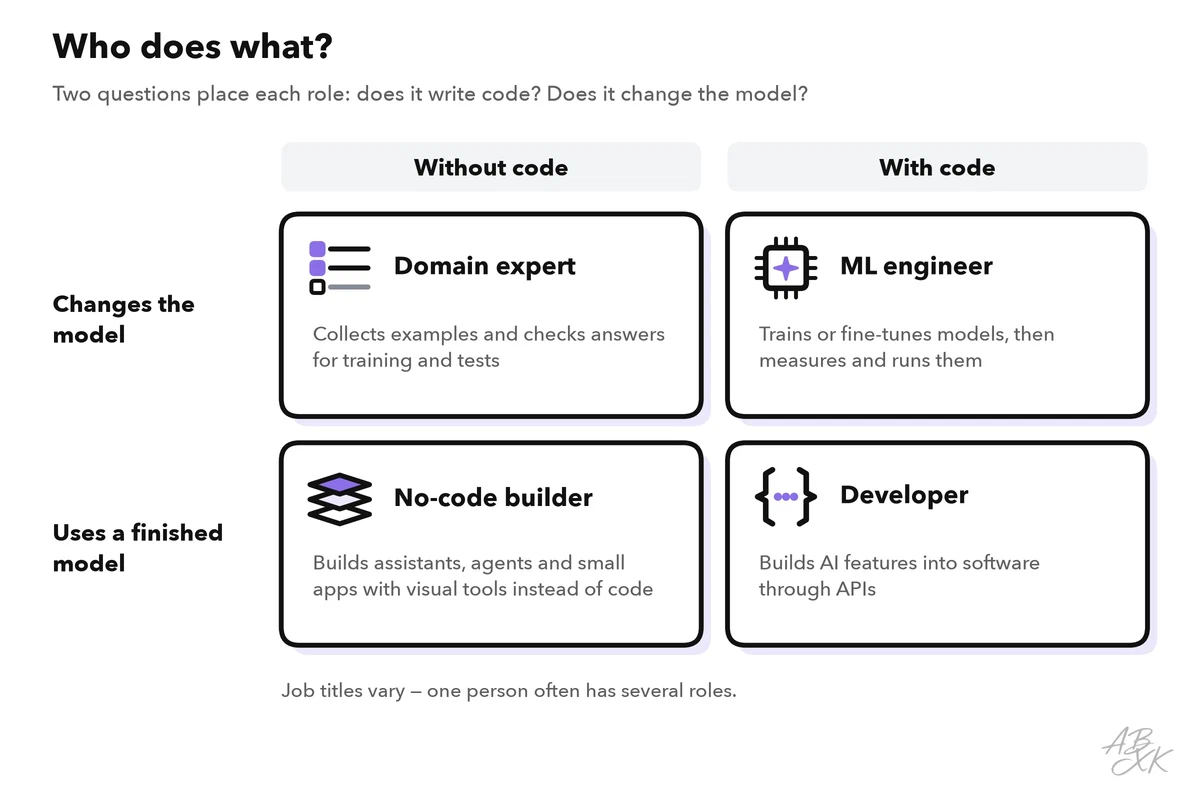
The table shows what each role builds and which skills come first:
| Role | What they build | First skills to learn | Typical tools |
|---|---|---|---|
| No-code builder | Assistants, agents and simple apps | Describe a task precisely, write instructions, test with real examples | No-code platforms, app builders |
| Developer (sometimes called AI engineer) | AI features inside software, connected through APIs | One programming language, HTTP and JSON, keeping API keys secret, testing | Code editor with an AI assistant, model APIs, hosting |
| ML engineer (machine learning) | Trained and fine-tuned models, data pipelines, model serving | Python, statistics, data preparation, evaluation | GPU cloud, training frameworks |
| Domain expert | Example data, test cases and quality rules | Describe good results, collect examples, judge answers | Spreadsheets, test sets |
Job titles differ from company to company, and in small teams one person often has several roles. A marketing manager may build a no-code assistant one week and collect test questions for the developers the next. What matters is the skill a task needs, not the title. Within Way 2, you can build with no code, with low code (visual tools plus a little code) or with full code. Part 4 of this level compares no-code, low-code and code.
What this learning path covers
The path has five levels with five parts each.
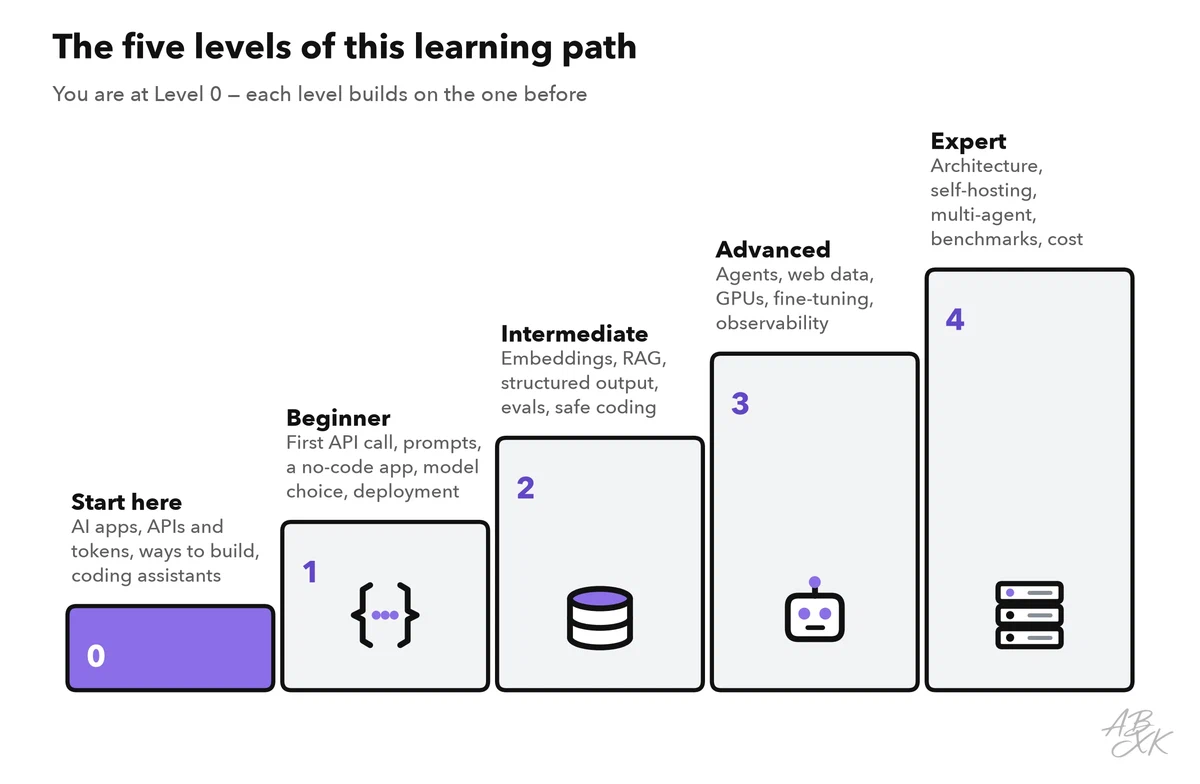
Most parts follow Way 2: products built on top of finished models. Way 1 comes up in the parts on coding assistants (Level 0) and on a safe AI-assisted coding workflow (Level 2). Way 3 comes up in Level 3, with fine-tuning and the GPU infrastructure it needs. Level 4 then shows how to run open-weight models on your own hardware.
Our tool comparison for AI Development lists 13 tools for building, hosting and automating. Five of them fit the three ways well. Emergent fits Way 1. MindStudio and Devs.ai fit Way 2 without code. Netlify hosts web apps, and Runpod rents out GPUs for Way 3.





Short descriptions from our tool comparison, based on the vendors' information — not tested by ABXK.
Find your starting point
Your first project tells you where to start. Two questions point you to a way. Before Way 3, one more test can save you a lot of work.
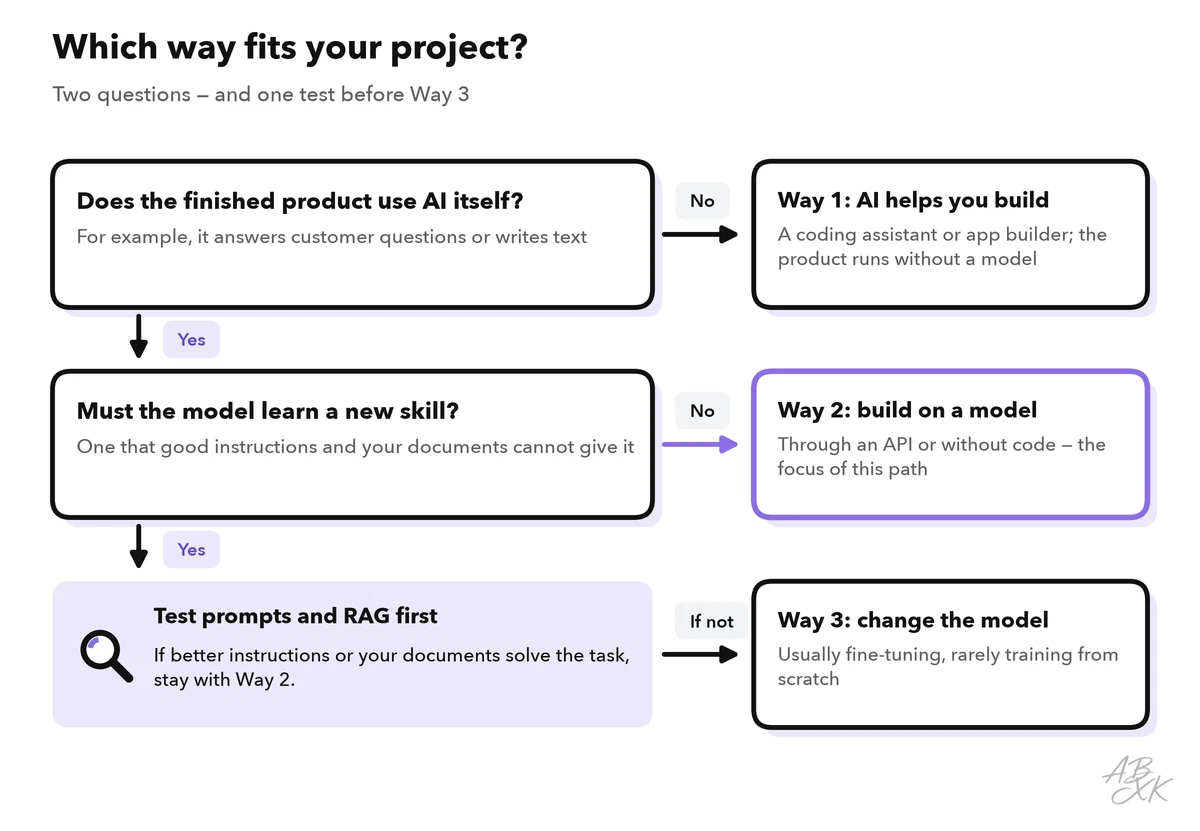
| Your goal | Your way | Start with |
|---|---|---|
| Write and understand code faster | Way 1 | Level 0, part 5: AI coding assistants |
| Build an internal assistant without code | Way 2, no code | Level 1, part 3: a simple AI app without code |
| Add an AI feature to your own software | Way 2, with code | Level 1, part 1: your first LLM API call |
| Teach a model a house style that prompts alone cannot hold | Way 3 | Level 3, part 4: fine-tuning, RAG or prompting |