

An AI coding assistant can write a working function in seconds. It explains confusing error messages, suggests tests and renames a variable across a whole project. The same assistant can also call a function that does not exist, pick a library version that is years old or leave a door open for attackers. And it does all of this in code that looks clean and confident.
This is part 5 of Level 0 in our AI Development learning path. You will learn the three main forms of coding assistants, the tasks where they save real time, the mistakes they typically make and why the review always stays with you. You do not need to program: a short code example shows the typical mistakes, and the text explains them in plain words.
Three forms: from autocomplete to agent
An AI coding assistant is a tool that uses a large language model (LLM) to suggest, explain or change program code. The model has learned from huge amounts of public code and text. It predicts which code most likely fits your request. It does not know whether that code is correct. Part 1 of this level introduced the three forms. Here is what each one does in practice:
- Autocomplete. While you type in your code editor, the assistant suggests the next line or a whole block in light gray text. You accept it with one key or simply keep typing.
- Chat. You ask questions in a chat window next to your code or in the browser: “What does this function do?” or “Write a function that checks an email address.” You copy the answer into your project yourself.
- Agents. You describe a task, for example “add a search field to the product page”. The agent plans the steps, reads and edits several files, runs commands and tests, and shows you the result as a diff: a list of every line it added, changed or deleted. Some agents work in your editor or terminal. Others work in the cloud and deliver a pull request, a proposed change that a person reviews before it becomes part of the project.
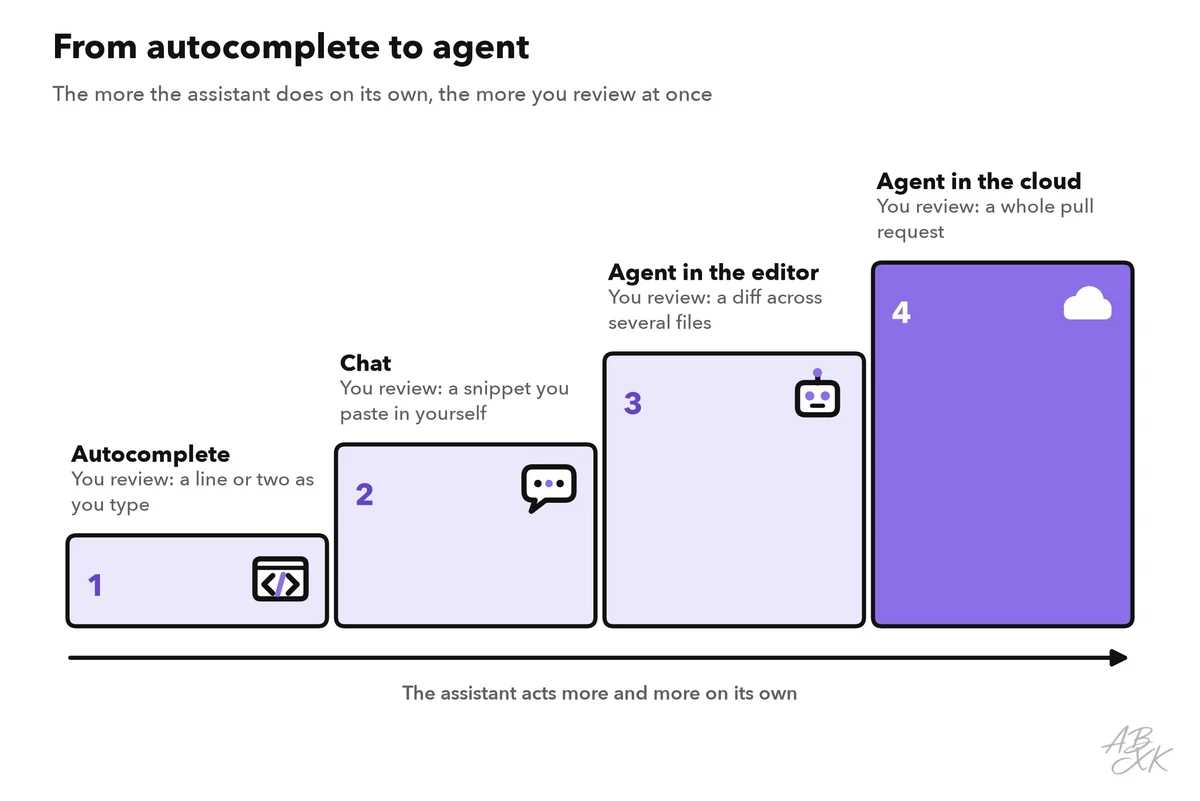
Many products offer several of these forms, and the borders blur. The key difference is how much the assistant does before you look at the result: with autocomplete, you check a line or two; with an agent, changes in many files at once.
Where assistants save real time
Assistants work best on tasks with a clear pattern, where you can quickly see whether the result is right. Two terms come up often. Boilerplate is standard code that looks almost the same in every project, such as the settings for a web form. A unit test is a small program that checks one function automatically, for example whether a price calculation still returns the right total.
| Task | How the assistant helps | What you still check |
|---|---|---|
| Boilerplate | Writes settings files, forms and routine database queries | That it follows your project’s style and rules |
| Tests | Suggests unit tests and unusual cases for existing functions | That each test checks the right thing, not just that it passes |
| Explanations | Explains unfamiliar code and error messages line by line | Important claims against the official documentation |
| Small changes | Renames, splits or converts code; writes comments and documentation | The diff, line by line |
| Prototypes | Builds a first working version of an idea in minutes | Everything, before the prototype turns into a product |
Explanations are useful even if you never write code yourself. Before you change or run a program, ask the assistant what it does, line by line. It is a fast way to learn a new programming language or to find your way around an unfamiliar project.
Prototypes are where vibe coding shines: you describe an idea, the AI writes the code, and you test and correct it. Our VibeCoding article shows how we use this approach for experiments, and for which kinds of code we do not use it.
Typical mistakes and why they happen
An assistant does not look anything up while it writes, unless the tool gives it a web search or the documentation. It produces code that looks right, based on patterns it has learned. Most of the time, that works. But some mistakes come up again and again. The example below shows three kinds of them in ten lines of code.
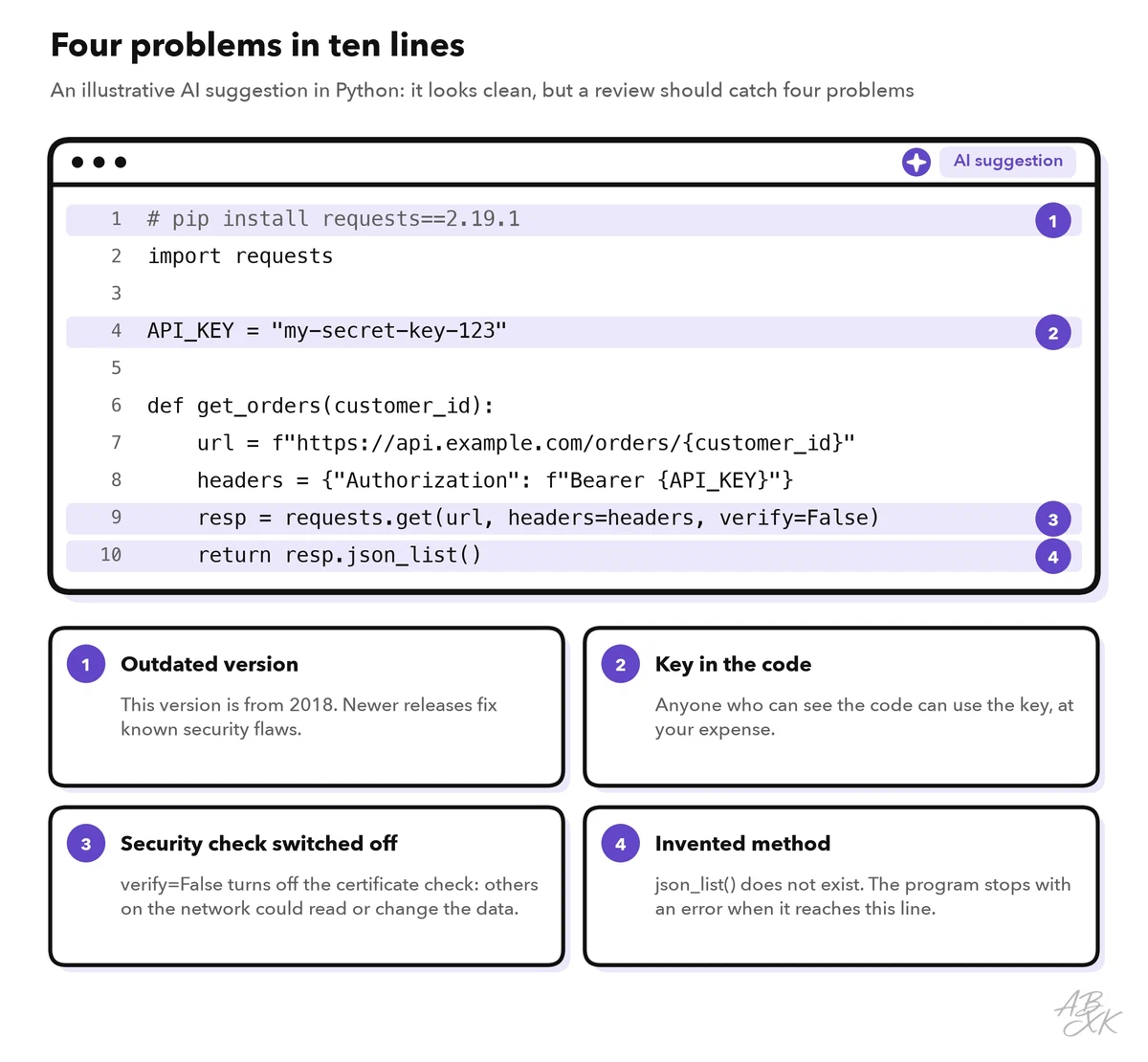
- Invented functions and packages. The model writes a name that sounds right but does not exist, like
json_list()in the example. This is a hallucination, the code version of an invented quote. It can also happen with whole packages: the assistant suggests installing a library that was never published. Security researchers warn that attackers can publish harmful code under such invented names (Source: Spracklen et al., “We Have a Package for You!”, USENIX Security 2025, usenix.org). - Outdated libraries. A model learns from code up to a cutoff date, and much of that code is older. So it may pin an old version of a library or use a function that was removed long ago. The version in the example dates from 2018, and newer releases fix known security flaws.
- Security bugs. Public code contains insecure patterns, and models repeat them. Typical examples are an API key (a secret code that gives access to a paid service) written into the code, a security check switched off, or user input passed on without checks. A Stanford study found that people with an AI assistant wrote less secure code than people without one, and were more likely to believe their code was secure (Source: Perry et al., “Do Users Write More Insecure Code with AI Assistants?”, ACM CCS 2023, arxiv.org).
- Plausible but wrong logic. The code runs, but it does the wrong thing: it forgets an edge case, rounds a price the wrong way or fails on an empty list. Tests that the same assistant wrote may share the same misunderstanding.
- Missing context. The assistant sees only what the tool gives it: often the open file, sometimes more of the project. It does not know your team’s rules, why old code looks the way it does or what your customer really asked for.
Agents add risks of their own, because they act instead of only suggesting. An agent may change files you did not mention, or make failing tests pass by changing the tests instead of the code. It can also be misled by instructions hidden in the content it reads, such as a web page or a code comment. This is called prompt injection. Give agents only the access they need, and let them ask before they run commands. Our AI Security section explains these risks in more depth.
How good are coding assistants? A look at the data
Researchers compare models with benchmarks: fixed sets of test tasks with a clear score. For coding, one of the best known is SWE-bench Verified. It uses real problems from open-source Python projects, whose code anyone can read, and the model has to change the code until the project’s own tests pass. These are the leaders in our LLM data:
| # | Model | Released | Result |
|---|---|---|---|
| 1 | Claude Opus 4.7 (max) Anthropic | Apr 16, 2026 | 83.5% |
| 2 | GPT-5.5 (xhigh) OpenAI | Apr 23, 2026 | 80.6% |
| 3 | Gemini 3.5 Flash Google DeepMind | May 19, 2026 | 79.3% |
| 4 | Claude Opus 4.6 (no thinking) Anthropic | Feb 5, 2026 | 78.7% |
| 5 | GLM-5.2 Z.ai (Zhipu AI) | Jun 16, 2026 | 78.7% |




500 real issues from open-source Python projects, checked by humans. The model has to change the code so that the project's tests pass. Data: Epoch AI, retrieved on October 17, 2026, licensed CC BY 4.0. All models: LLM database.
Two notes help you read the table. First, these are Epoch AI’s own runs with one fixed setup; vendors often report higher numbers with their own tooling. Second, not every new model has been tested on every benchmark yet, so some of the newest models in our LLM database may be missing here.
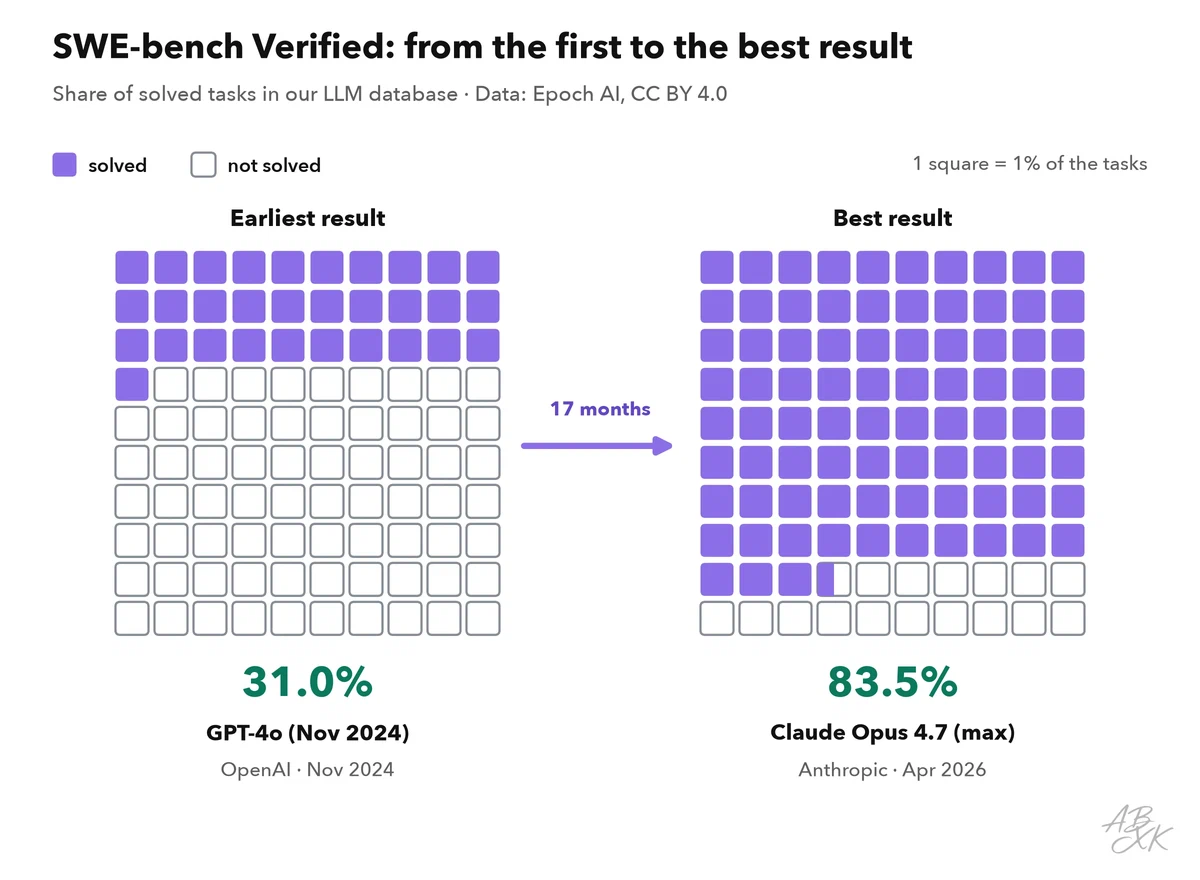
The figure puts the scores in perspective. Coding models have improved fast. But the benchmark consists of small, well-described fixes that people screened in advance. Your own project is messier: other languages, unwritten rules, unclear requirements. A high score tells you that a model is worth trying, not that its code is right. Level 4 explains how coding benchmarks work and where they can mislead, for example through flawed tests.
You are the reviewer
Whoever accepts the code is responsible for it, not the assistant. Treat AI code like code from a new colleague who is fast and well read but sometimes wrong without noticing. How closely you check depends on two questions: what breaks if the code is wrong, and how well do you understand it?
The more you trust the tool, the harder this gets. In a 2025 survey of 319 knowledge workers by Microsoft Research and Carnegie Mellon University, people with more confidence in generative AI reported less critical thinking, while people with more confidence in their own skills reported more (Source: Lee et al., CHI 2025). For code, this means: the moment an assistant starts to feel reliable is the moment to keep reading.
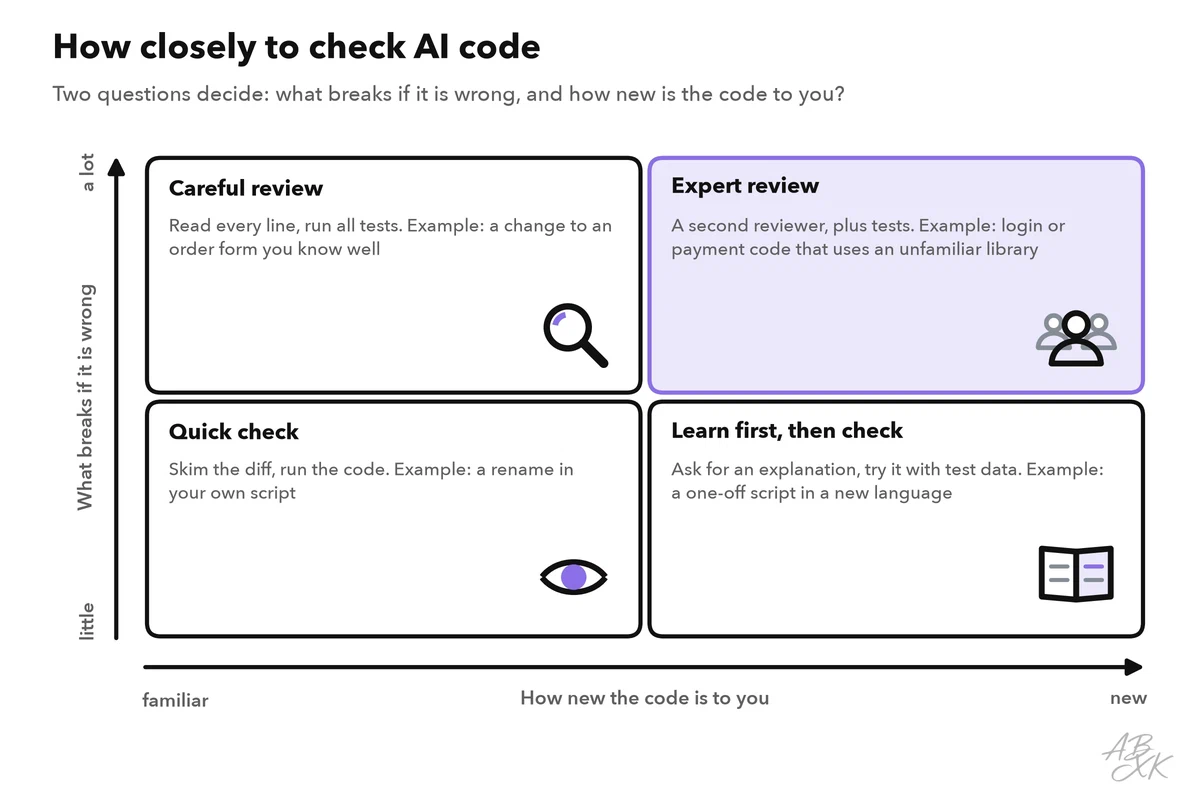
Five habits cover most situations:
- Work in small steps. Ask for one function or one change at a time. A small diff is easy to read; a huge one tempts you to skim.
- Ask before you accept. Let the assistant explain its code and list its assumptions. If the explanation does not match the code, something is wrong.
- Run it and test it. Run the code and the tests, and read the tests, too.
- Check every new package. Does it exist, is it the one you meant, and is the version current?
- Get a second reviewer for code that handles logins, payments or personal data.
Tools can take over part of the checking. According to the vendor, TestDriver.ai writes and runs tests for pull requests and reports errors before a change is merged. App builders sit at the other end. According to the vendors, Emergent builds web and mobile apps from a plain-language description, and Devs.ai lets teams build apps and agents on their own data. The less code you write yourself, the more your checks matter. We have not tested these tools.



Short descriptions from our tool comparison, based on the vendors' information — not tested by ABXK.
Level 2 turns these habits into a complete coding workflow with checkpoints.
Checklist: before you accept AI-written code
Go through these questions whenever an assistant hands you code, whether it is one line or a whole pull request:
| Question | Why it matters |
|---|---|
| Can I explain what each line does? | Code you do not understand, you cannot fix or maintain |
| Does it run, and do the tests pass? Have I read the tests? | Passing tests only help if they check the right thing |
| Do all functions and packages exist, in a current version? | Invented and outdated code is a common mistake |
| Is a password, key or other secret in the code? | Anyone who can see the code can use it |
| Is a security check switched off, or is user input used unchecked? | Such gaps work fine until someone attacks them |
| Did the change touch anything I did not ask for? | Agents sometimes edit other files, settings or tests |