

Many AI apps need fresh data from the web: product prices, job ads, public tenders, documentation, news. A model alone cannot deliver it, because its knowledge stops at its training date. So your app has to collect the data — and how you collect it decides how reliable, legal and maintainable the result is.
This is part 2 of Level 3 (Advanced). You will learn the order of options (official API, licensed data, scraping), how a scraper works and which rules apply: robots.txt, terms of service, copyright and the GDPR. You will also see how to crawl politely, when proxies are legitimate and how to notice when a source changes. This is practical guidance, not legal advice; for real projects, involve your legal team.
Official APIs first
Before you write a single line of scraping code, look for an official way in. An API (application programming interface) gives you structured data, documented fields, stated rate limits and clear terms. Many sites also offer data exports, RSS feeds, sitemaps or open-data portals. Data providers sell licensed datasets with clear usage rights.
Web scraping means that a program loads the same pages a browser shows and extracts the information from the HTML. It works when there is no other way, but it is fragile: when the site changes its layout, the scraper breaks. Legally, it is also the least clear option.
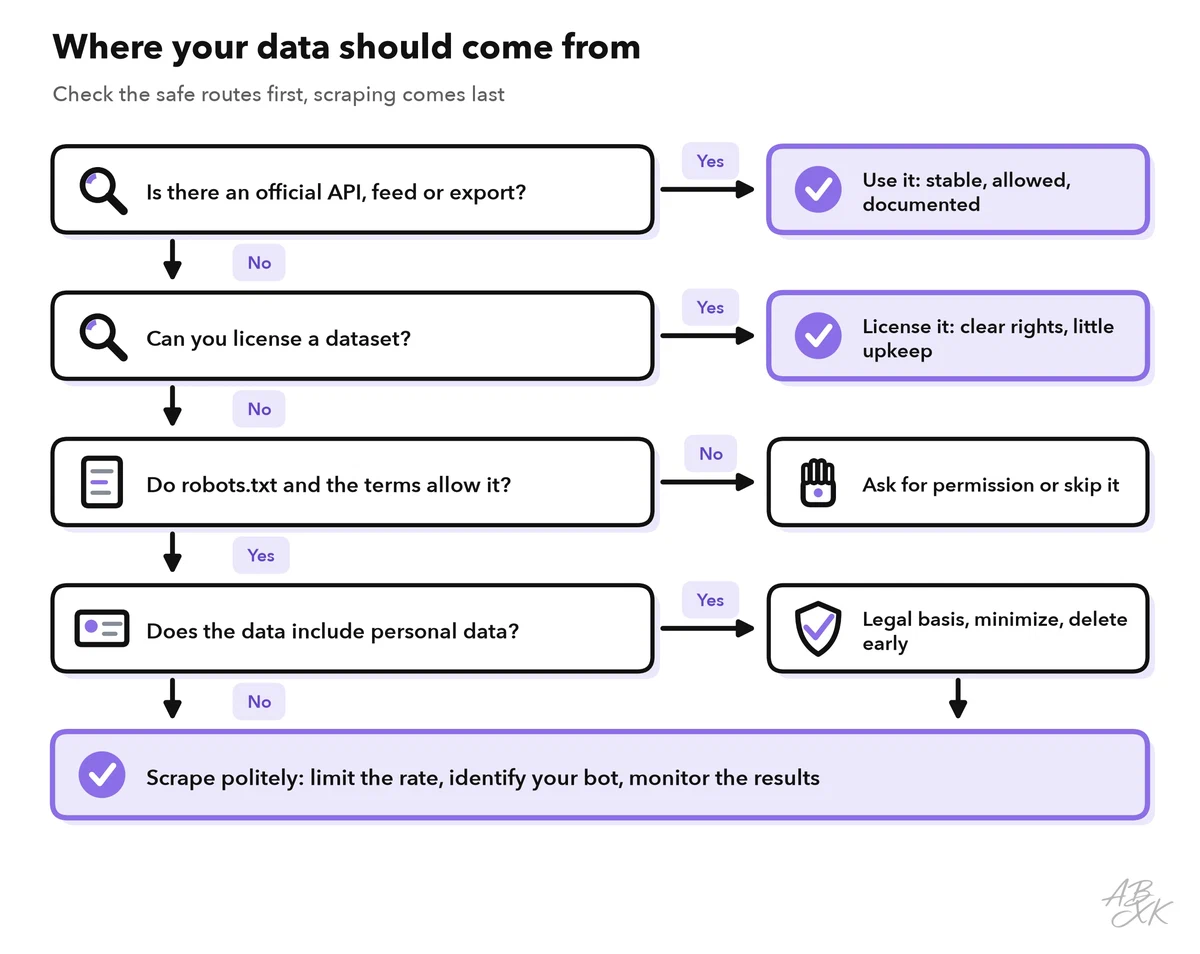
The table compares the three routes:
| Official API | Licensed dataset | Scraping | |
|---|---|---|---|
| Reliability | High, versioned | High, delivered in batches | Low, breaks with layout changes |
| Legal clarity | Clear terms | Clear license | Depends on terms, copyright and personal data |
| Freshness | Live | As delivered | As often as you crawl |
| Your effort | Low | Low | High: build, monitor, repair |
How a scraper works
A scraper runs the same steps every time:
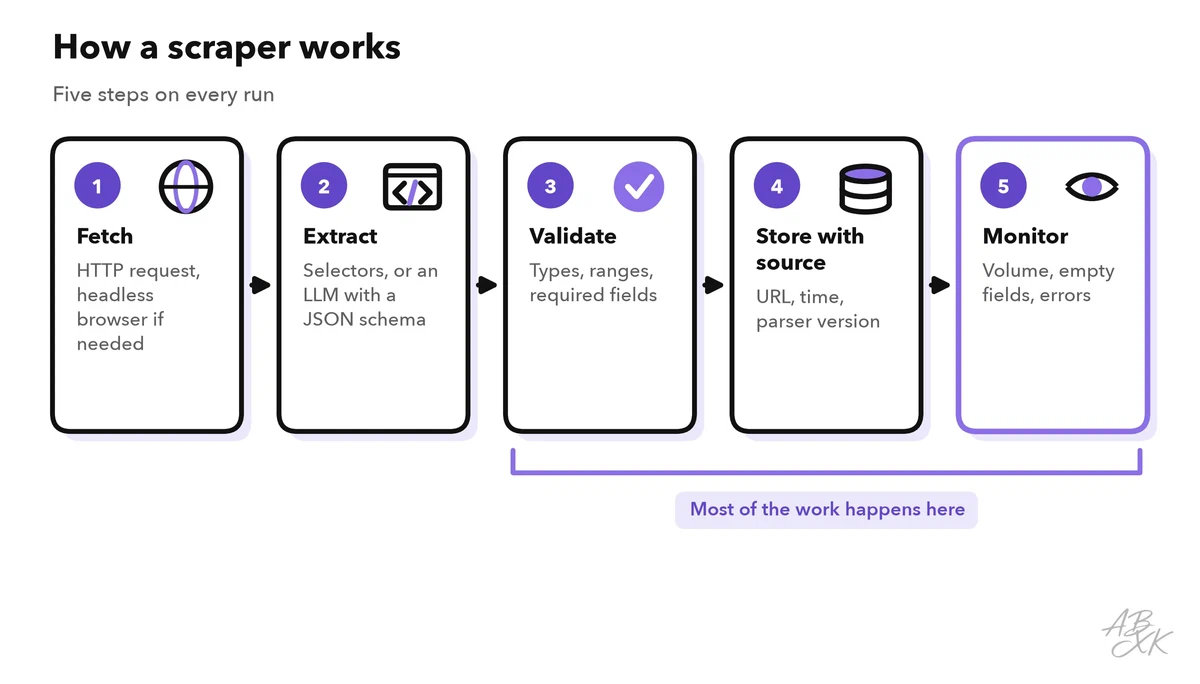
- Fetch. Your code requests the page over HTTP. Pages that load their content with JavaScript need a headless browser — a browser without a window that your code controls.
- Extract. Selectors (CSS or XPath expressions) point to the fields you need: title, price, date.
- Validate. Check types, ranges and required fields. A price of zero or an empty title is a bug, not data.
- Store with the source. Save the URL, the time of collection and the parser version with every record. This provenance tells you later where a fact came from — essential when an AI app cites it.
- Monitor. Watch for errors, empty fields and sudden drops in volume.
LLMs help in step 2. When page layouts vary, a model can turn messy HTML into fields that match a JSON schema — the technique from structured output and function calling in Level 2. Check the output: a model may fill a missing field with a plausible invention. Allow null for missing values and validate every record. In an agent, the whole pipeline can become a single tool, as described in part 1 of this level.
If you do not want to build the pipeline yourself, no-code tools exist. According to the vendor, Browse AI extracts data from websites, monitors pages for changes and can turn a website into an API:
The rules: robots.txt, terms, copyright and personal data
Four sets of rules decide whether you may collect and use web data. Check them before you build, not after.
robots.txt is a text file at the root of a website, for example example.com/robots.txt. It tells crawlers which paths they may visit. The format is a standard: the Robots Exclusion Protocol (RFC 9309, IETF, 2022). The standard itself says that these rules are not a form of access authorization, so a site still has to protect private content in other ways. Respecting robots.txt is the minimum of good behavior, and many site owners now use it to keep AI crawlers out.
Terms of service can forbid automated access or the reuse of content. Content behind a login carries a special risk: when you create an account, you usually accept the terms.
Copyright and database rights protect texts, images and collections of data, even when they are public. Facts themselves are often free, but the way they are written and compiled may not be. In the EU, text and data mining is allowed in many cases. However, rightsholders can opt out, for online content for example in machine-readable form (Directive (EU) 2019/790, Article 4).
Personal data stays personal data under the GDPR (General Data Protection Regulation), even when it is publicly visible. You need a legal basis and a clear purpose. You collect only what you need and delete it on time, and people keep their rights, for example the right to have their data deleted.
| Check | Question to ask | If the answer is a problem |
|---|---|---|
| API | Is there an official API, feed or export? | Use it instead of scraping |
| robots.txt | Does it disallow the paths you need? | Do not crawl them; ask the owner |
| Terms | Do the terms forbid automated access or reuse? | Ask for permission or license the data |
| Login | Is the content behind a login? | Do not scrape it without permission |
| Copyright | Do you copy texts or images, not just facts? | Store facts and links; respect opt-outs |
| Personal data | Do records contain names, emails or profiles? | Legal basis, minimize, delete early — or leave them out |
| Load | Could your crawler slow the site down? | Lower the rate, crawl off-peak |
Polite crawling: rate limits and load
A crawler that sends hundreds of requests per second can slow down a small website for everyone. Polite crawling protects the site and keeps your crawler from being blocked.
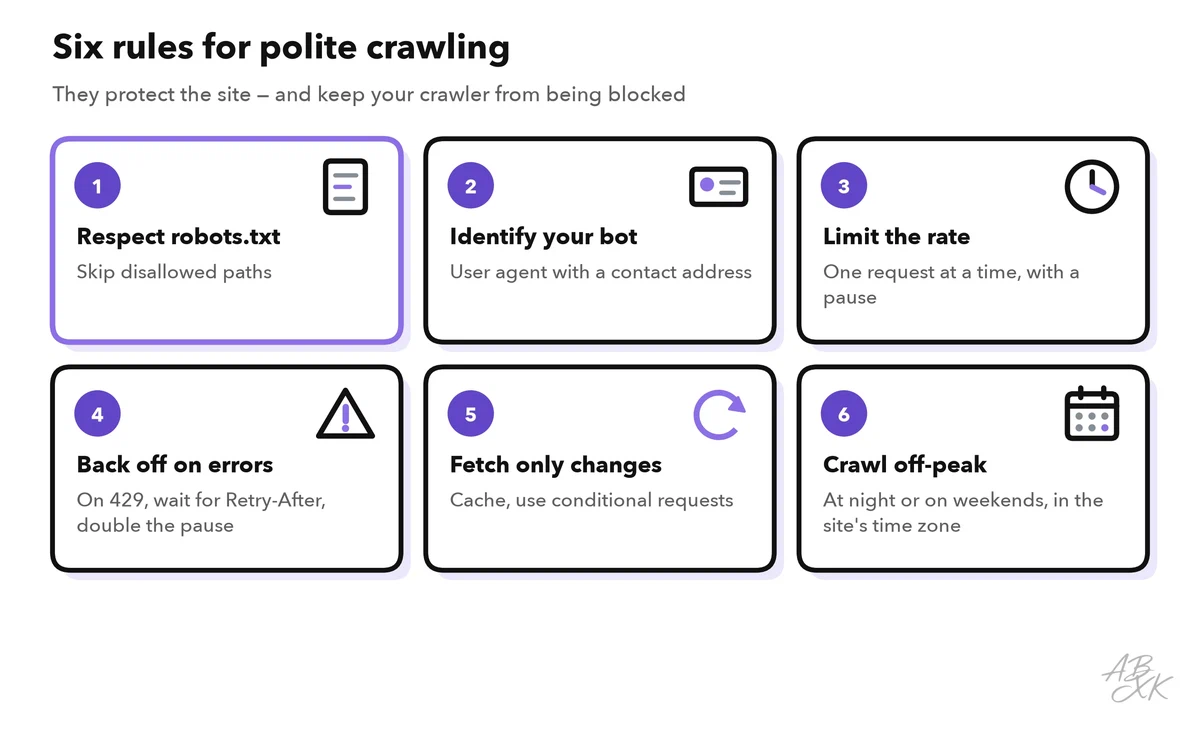
- Identify your bot. Send a clear user agent with a contact address, so the site owner can reach you instead of blocking you.
- Limit the rate. One request at a time per website, with a pause in between, is a safe start. Respect any limits the site states.
- Back off on errors. The HTTP status 429 means “Too Many Requests”. If the response includes a
Retry-Afterheader, wait at least that long. On repeated errors, double the waiting time. - Cache and fetch only changes. Conditional requests (
If-Modified-Since, ETags) let the server answer “not modified” without sending the page again.
Proxies: what they are and when they are legitimate
A proxy is a server that forwards your requests. The website sees the proxy’s IP address instead of yours. Data center proxies run in hosting centers. Residential proxies route traffic through the internet connections of private households, often through apps or software on those people’s devices. When you choose a provider, ask how it gets its IP addresses and whether the device owners agreed.
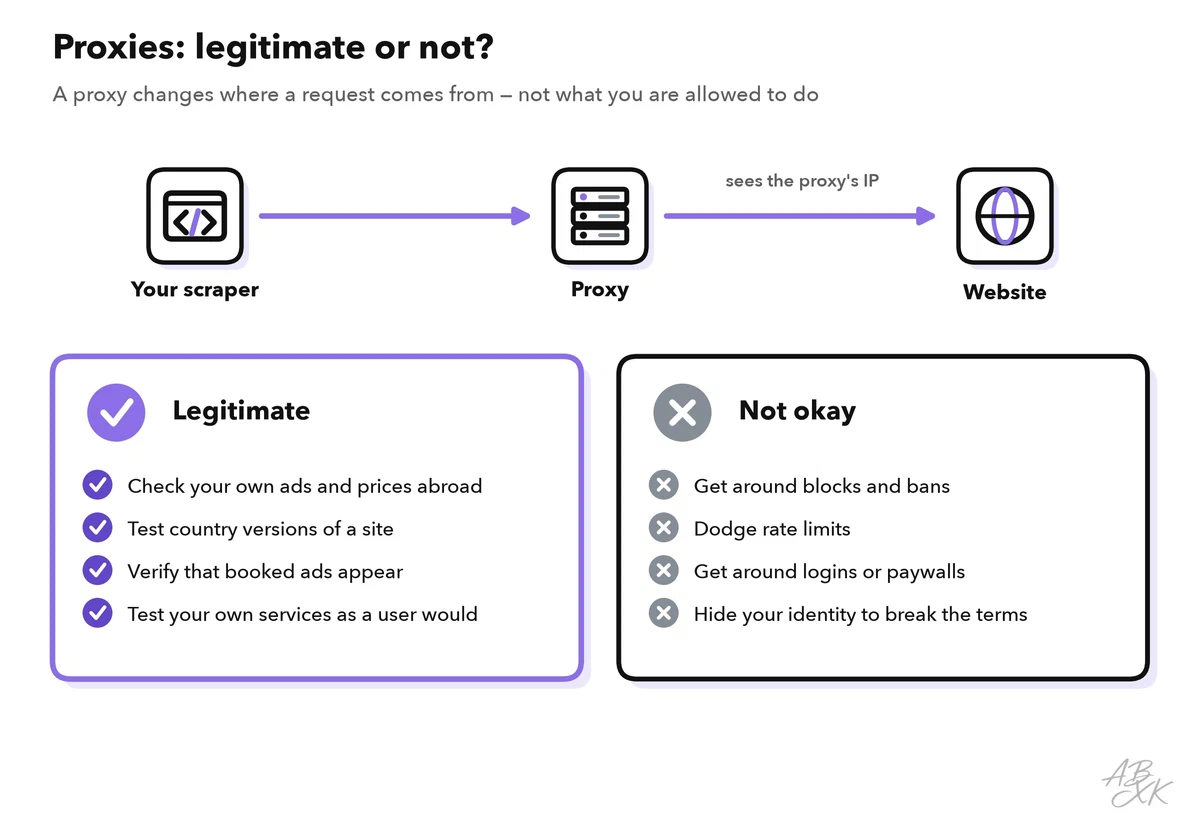
Proxies have legitimate uses. For example, you can check how your own ads, prices or search results look in another country. You can also test localized versions of a site or verify that ads appear where they were booked. Proxies are not a way around rules, though. If you use them to dodge a block, a rate limit, a login or a ban, you turn data collection into a legal problem.
ThorData in our comparison is a proxy network for collecting publicly available web data. As our tool note says, check the legal side of what you plan to collect before you start. Pinecone sits at the other end of the pipeline: a vector database that stores the collected texts for search and retrieval.



Short descriptions from our tool comparison, based on the vendors' information — not tested by ABXK.
Data quality and monitoring for changes
Scrapers rarely crash. They fail quietly: the site renames a CSS class, and from that day on your price field is empty. An AI app built on this data then gives confident answers from stale or broken records.
Set up checks that run with every crawl:
- Volume: alert when the number of records drops sharply compared with the last run.
- Completeness: alert when the share of empty fields rises.
- Plausibility: prices, dates and counts stay within expected ranges.
- Freshness: track the date of the newest record per source.
- Duplicates: catch the same item under two URLs, or the same text twice.
Before data goes into a search index, also remove page clutter such as menus, cookie banners and footers, so that search finds the real content. Retrieval-augmented generation step by step in Level 2 shows how the cleaned text becomes searchable for a model.
Worked example: a price tracker for 200 product pages
A purchasing team wants an AI assistant that answers questions such as “Which supplier lowered the price of item X this month?”. Here is how the steps above play out:
- API check: two of the five suppliers offer a product feed. The team uses those feeds and looks at scraping only for the other three shops.
- Rules check: robots.txt allows the product pages of all three shops, and the pages contain no personal data. The terms of one shop forbid automated access, so the team asks that shop for a feed and scrapes only the other two.
- Crawl plan: once per night, one request every few seconds per shop, with a user agent that names the team and a contact address.
- Extraction: selectors for name, price and availability; an LLM fallback with a JSON schema for pages with an unusual layout;
nullfor missing values. - Validation and storage: prices must be positive and within a plausible range; every record keeps its URL, time and parser version.
- Monitoring: alerts on volume drops and empty fields, plus a weekly spot check of ten random records against the live pages.
- Answering: the assistant answers only from stored records and names the date of each price it quotes.
The numbers in this example are illustrations. Adapt the crawl rate to the size of each site. If a site owner contacts you, answer quickly and adjust. A feed agreed by email can replace a scraper for good.