

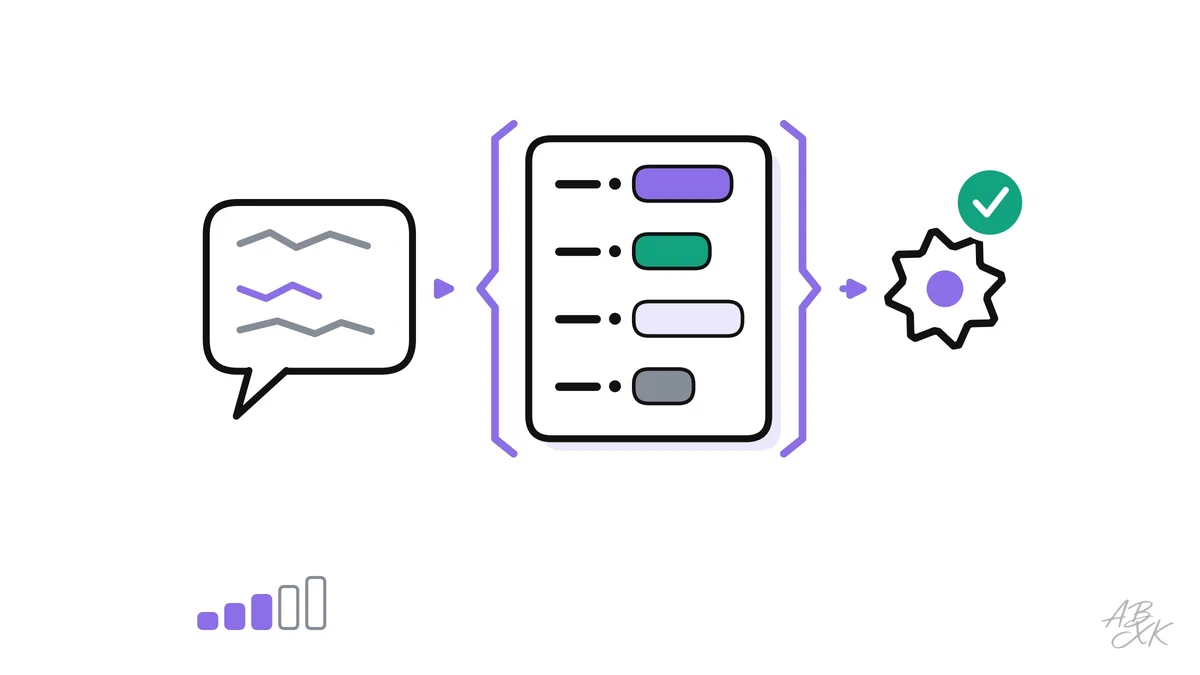
A chat answer is written for people. Your code needs something else: fields it can read, values it can check and actions it can run. Structured output and function calling are the two techniques that turn a language model from a text generator into a reliable part of your software.
This is part 3 of Level 2. You will learn how to get valid JSON with a schema, how to validate and retry, how the function-calling loop works, how to write tool descriptions a model understands and which safety checks belong around every call. It builds on prompt design for developers from Level 1.
Why free text breaks your code
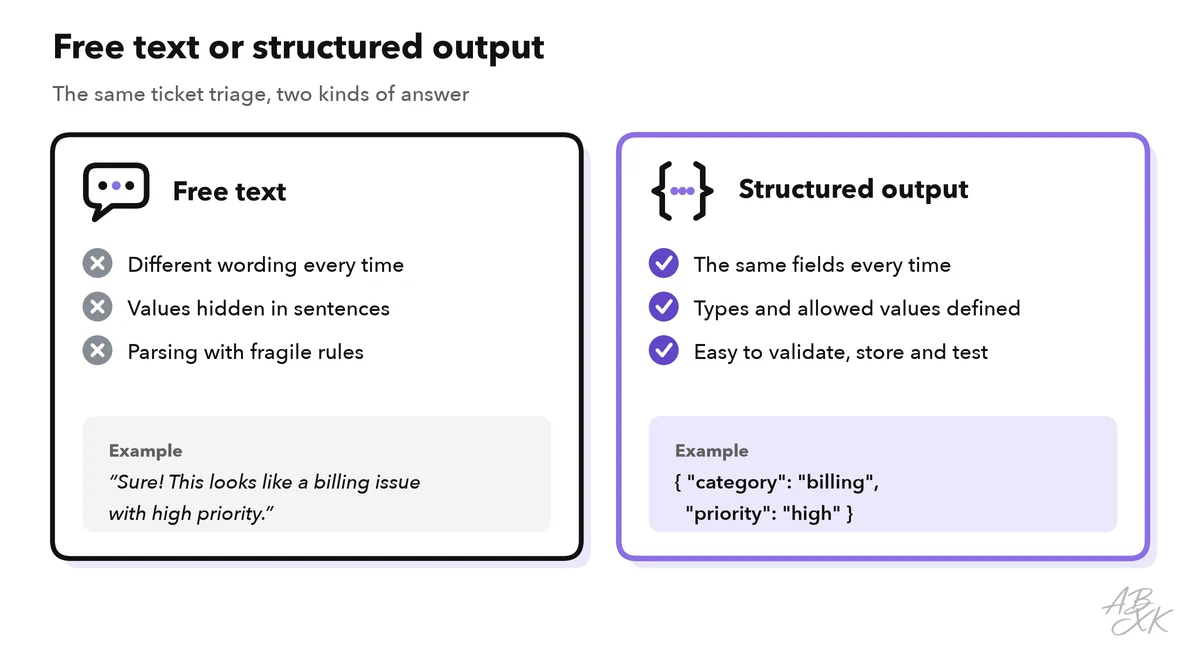
Imagine a support tool that sorts incoming tickets. You ask the model for a category and a priority. On Monday, it answers “Sure! This looks like a billing issue with high priority.” On Tuesday, it writes “Category: Billing (urgent)”. Your code has to guess where the values are, and sooner or later the guess fails.
Structured output fixes this. The model answers in a fixed format, usually JSON, and a JSON Schema describes that format. JSON Schema is a standard way to define which fields exist, which types they have and which values are allowed (json-schema.org).
Define the shape with a JSON Schema
Here is a schema for the ticket example:
{
  "type": "object",
  "properties": {
    "category":    { "type": "string", "enum": ["billing", "shipping", "technical", "other"] },
    "priority":    { "type": "string", "enum": ["low", "normal", "high"] },
    "summary":     { "type": "string", "description": "One sentence, at most 25 words" },
    "needs_human": { "type": "boolean" }
  },
  "required": ["category", "priority", "summary", "needs_human"],
  "additionalProperties": false
}
Four details do most of the work:
enumlimits a field to fixed values. Your code never sees “Billing (urgent)” again.requiredmakes sure that no field is missing.additionalProperties: falseforbids extra fields that your code does not expect.descriptiontells the model what a field means. The model reads it like a part of the prompt.
Always give the model a way out, such as the category other. Without it, the model has to force every ticket into a category, even when none fits.
There are three ways to make the model follow the schema. First, you describe the format in the prompt and add an example. This works most of the time, but not always. Second, many APIs offer a JSON mode that guarantees syntactically valid JSON, but not your fields. Third, some APIs and open-source serving tools enforce the full schema while the model generates its answer. This is often called constrained decoding or simply structured outputs. Use the strictest option your provider supports.
Validate, retry, fall back
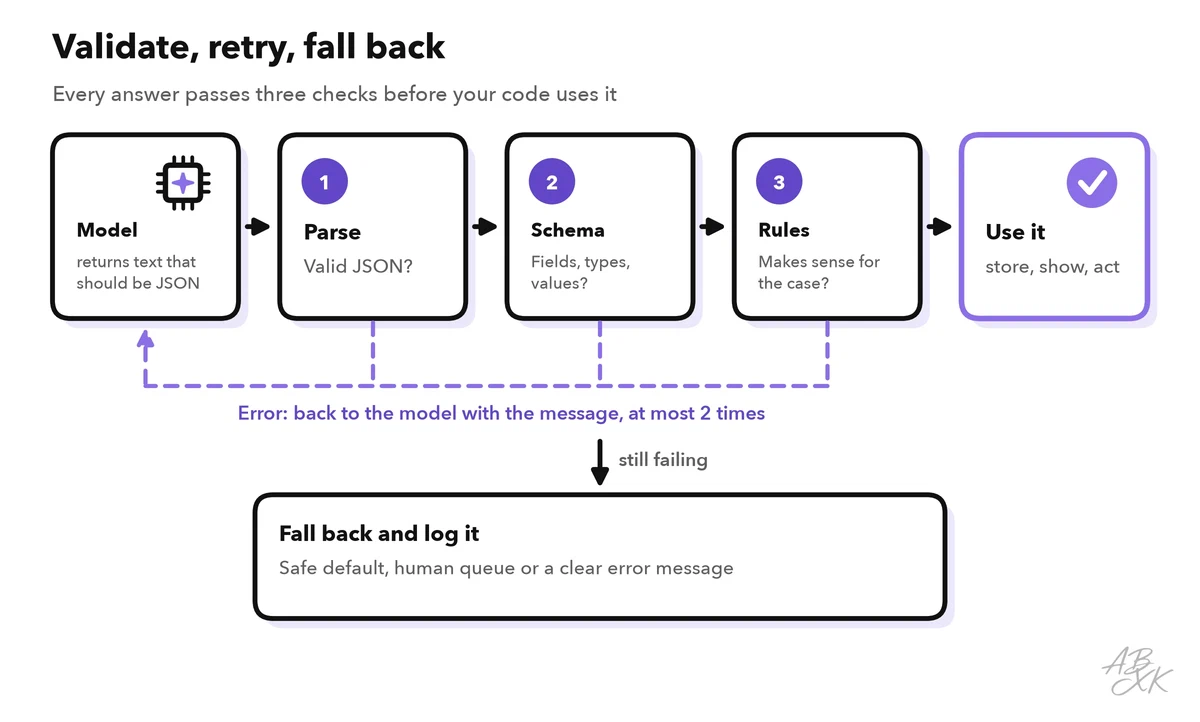
Even an answer that matches the schema can be wrong. The model can pick shipping for a billing problem or write a summary with 80 words. So your code checks every answer in three layers before it uses it:
- Parse: is it valid JSON?
- Schema: are all fields there, with the right types and allowed values?
- Business rules: does it make sense for your case? For example, a refund must not be higher than the order total.
If a check fails, send the error message back to the model and ask again. Limit this to one or two retries. If it still fails, use a fallback: a safe default, a human queue or a clear error message. Log every failure. A rising failure rate is an early warning that a prompt or model change broke something.
In Python, the loop can look like this. call_model(), check_business_rules() and send_to_human_queue() stand for your own code. validate() comes from the jsonschema package:
import json
from jsonschema import validate, ValidationError

def triage(ticket, messages):
    for attempt in range(3):                      # first try + 2 retries
        raw = call_model(messages, schema=TICKET_SCHEMA)
        try:
            data = json.loads(raw)                # 1. parse
            validate(data, TICKET_SCHEMA)         # 2. schema
            check_business_rules(data)            # 3. your rules, raise ValueError
            return data
        except (ValueError, ValidationError) as err:
            messages += [
                {"role": "assistant", "content": raw},
                {"role": "user", "content": f"Invalid output: {err}. Reply with corrected JSON only."},
            ]
    return send_to_human_queue(ticket)            # fallback
Checks like these only tell you whether the format is right. How often the content is right is a different question. You answer it with a test set, as shown in part 4: Test AI features with evals.
How function calling works
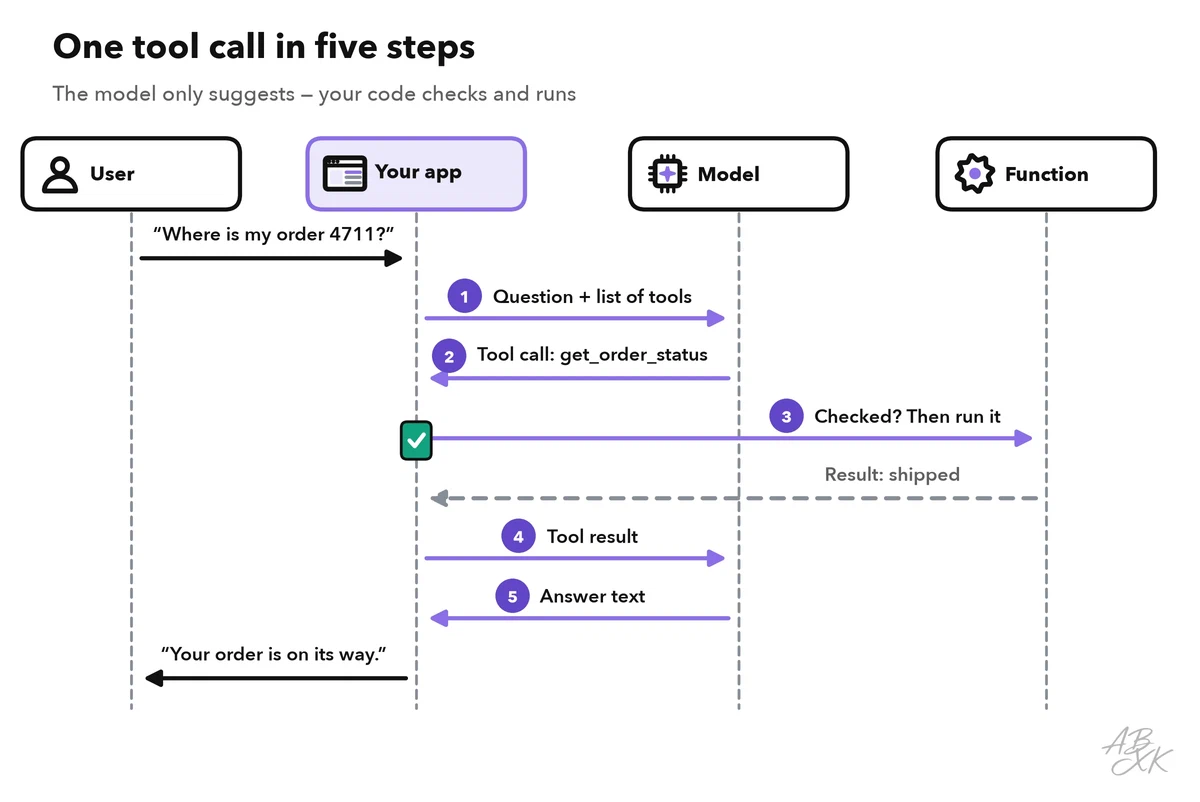
With function calling, also called tool calling or tool use, you describe functions to the model: their names, what they do and which parameters they take. When a question needs one of them, the model does not answer in text. Instead, it returns a request such as “call get_order_status with order_id 4711”. The model never runs anything itself. Your code decides whether to run the function, runs it and sends the result back. Then the model writes the answer.
A tool definition looks similar in most APIs. Again, a JSON Schema describes the parameters:
{
  "name": "get_order_status",
  "description": "Look up the shipping status of one order. Use it when the customer gives an order number. Do not use it for refunds.",
  "parameters": {
    "type": "object",
    "properties": {
      "order_id": { "type": "string", "description": "Order number with 4 to 10 digits, e.g. \"4711\"" }
    },
    "required": ["order_id"]
  }
}
Some questions need several calls in a row: look up the order, check the stock, draft a reply. Then the app runs this cycle in a loop. That loop is the core of an AI agent, which Level 3 covers in Build AI agents: tools, loops and memory.
You do not have to code the loop yourself. No-code platforms for agents and automations connect models to actions for you. According to the vendors, you build an agent or describe a workflow in plain language instead of writing code:



Short descriptions from our tool comparison, based on the vendors' information — not tested by ABXK.
The safety rules in the last section apply in the same way, no matter who writes the loop.
Write tool descriptions the model understands
The model chooses a tool only from its name, its description and its parameters. It cannot read your code. So each description is a small prompt, and it deserves the same care:
| Element | Weak | Better |
|---|---|---|
| Name | tool1, query | get_order_status: a verb plus an object |
| Description | “Gets orders” | Says what it does, when to use it and when not |
| Parameters | id without an explanation | order_id with its format and an example |
| Allowed values | Free text | enum with the valid options |
| Result | A full database row | Only the fields the model needs, in short form |
| Errors | A stack trace | A clear message: “Order not found. Ask the customer to check the number.” |
Keep the number of tools small and their jobs distinct. Two tools with similar descriptions, such as find_order and search_orders, confuse the model. If you connect many tools across several apps, open standards help: the Model Context Protocol (MCP), introduced by Anthropic in 2024, describes tools in one common format that many AI applications understand.
Never execute without checks
A tool call from the model is a suggestion, not a command. Treat it like user input. The arguments can simply be wrong, and attackers can try to steer them through prompt injection: instructions hidden in a user message or in a retrieved document. Our AI Security section explains this attack and its defenses. For your code, five layers of protection follow:
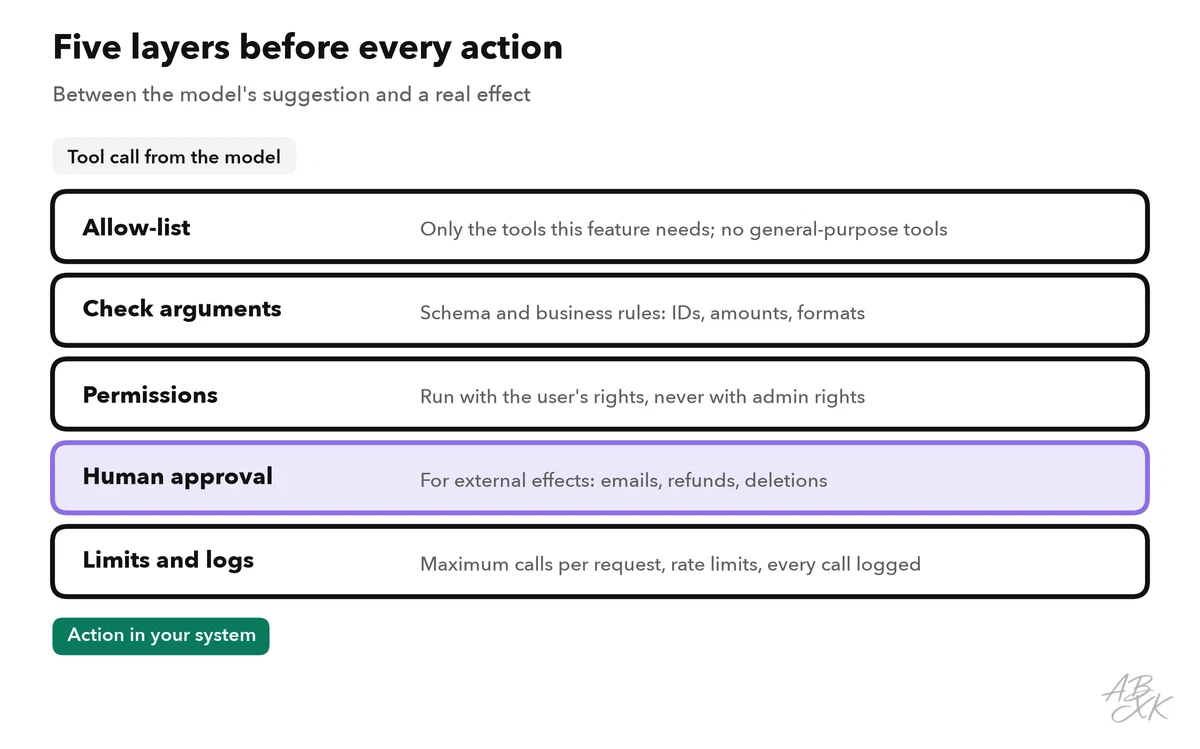
How much control you need depends on what a tool can do. Use this table as a starting point for your own rules:
| Type of action | Example | Rule |
|---|---|---|
| Read the user’s own data | Look up an order status | Run automatically after validation |
| Read sensitive data | Show a customer’s address | Check the user’s permissions first |
| Write, easy to undo | Add a tag, create a draft reply | Run automatically, log it, allow undo |
| Write with an external effect | Send an email, issue a refund | A person approves before it runs |
| Irreversible or high impact | Delete data, make a payment | Separate approval and strict limits — or do not offer it as a tool |