

Through an API, you rent a model’s answers. When you self-host, you run the model on hardware you control. Open-weight models make this possible: their trained parameters — the weights — are published, so anyone can download and run them. With the weights, you also take over every job the API provider did for you: GPUs, scaling, updates, security and safety filters.
This is part 2 of Level 4 (Expert) in our AI Development path. You will learn when self-hosting pays off, how to read open-weight licenses, which software turns weights into an endpoint, how to size GPU memory, and how far open models trail closed ones in our data. It continues GPU infrastructure for AI from Level 3.
When self-hosting pays off
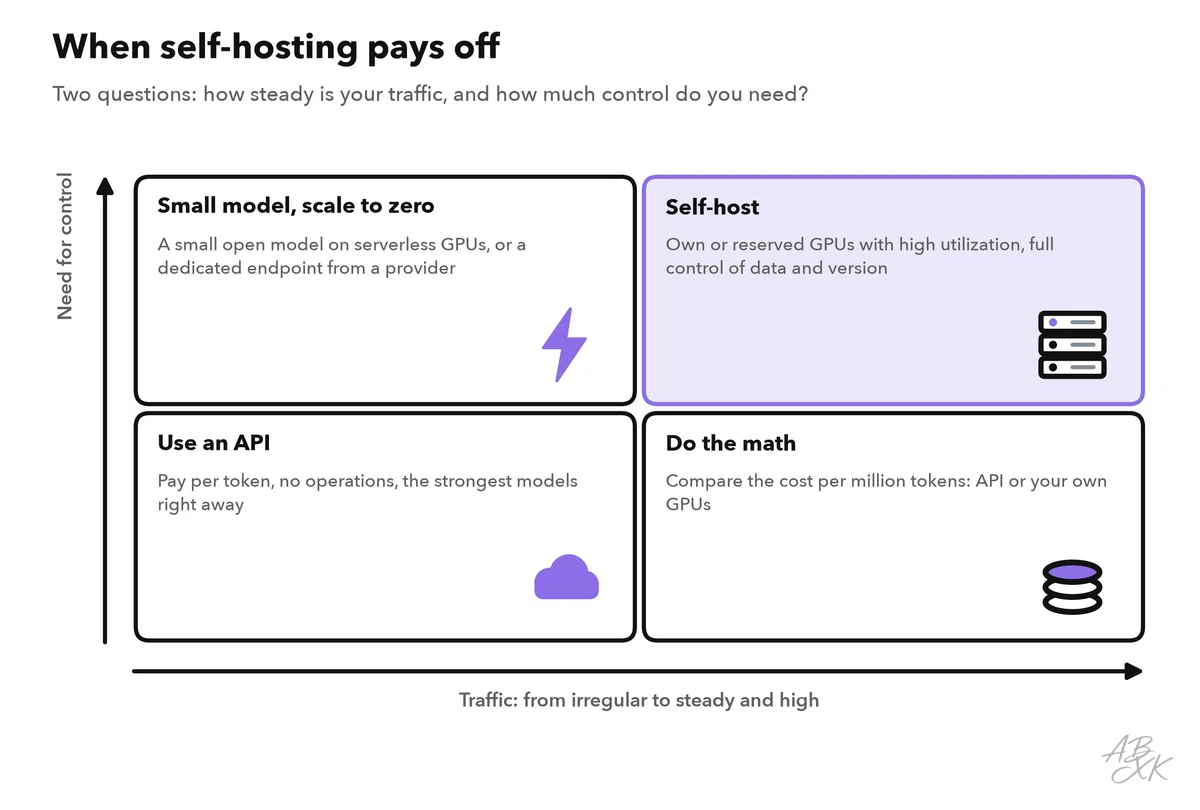
Teams self-host for five reasons:
- Data control. Prompts and documents never leave your network. This matters for health data, legal files and public-sector work.
- Version control. The model changes only when you change it. No provider can retire it or alter its behavior.
- Customization. You can fine-tune the weights or load small adapters per task. Level 3 compares fine-tuning, RAG and prompting.
- Cost at scale. With steady, high traffic, a busy GPU can produce tokens more cheaply than an API. With irregular traffic, idle GPUs make it more expensive.
- Location. The model runs where you need it: on your premises, at the edge or without an internet connection.
The price is operations. Someone must patch drivers, watch memory, handle traffic peaks and answer alerts at night. And the strongest models in our data have closed weights, so you may give up some capability in exchange for control.
Open weights are not always open source
“Open” describes the weights, not necessarily your rights. The Open Source Initiative published its Open Source AI Definition 1.0 in October 2024. It asks for more than the weights: also the code and detailed information about the training data. Many popular open-weight models do not meet this definition. For your project, the license counts most — and licenses differ widely:
- Standard open-source licenses such as Apache 2.0 or MIT allow commercial use with few conditions. Mistral 7B, for example, was released under Apache 2.0, and DeepSeek-R1 under the MIT license.
- Custom model licenses add conditions. Meta’s Llama 2 license, for example, required companies with more than 700 million monthly active users to request a separate license from Meta (Source: Meta, Llama 2 Community License, 2023). Many custom licenses also include an acceptable use policy.
- Research or non-commercial licenses forbid commercial use altogether.
Before a model goes into production, answer these questions together with your legal team:
| Question | Why it matters |
|---|---|
| Is commercial use allowed? | Some weights are for research only |
| Are there thresholds for users or revenue? | Growth can require a new license |
| Is there an acceptable use policy? | It forbids certain uses and can change |
| Are there rules for attribution or names? | Your product may need a notice or a naming rule |
| May you share fine-tuned versions? | Derivatives can fall under the same license |
| May outputs train other models? | Important if you plan distillation |
Check the license of every version: terms can change from one model generation to the next.
Serving software: from weights to an endpoint
Weights are just large files. To serve them, you need a stack of software between the GPU and your apps:
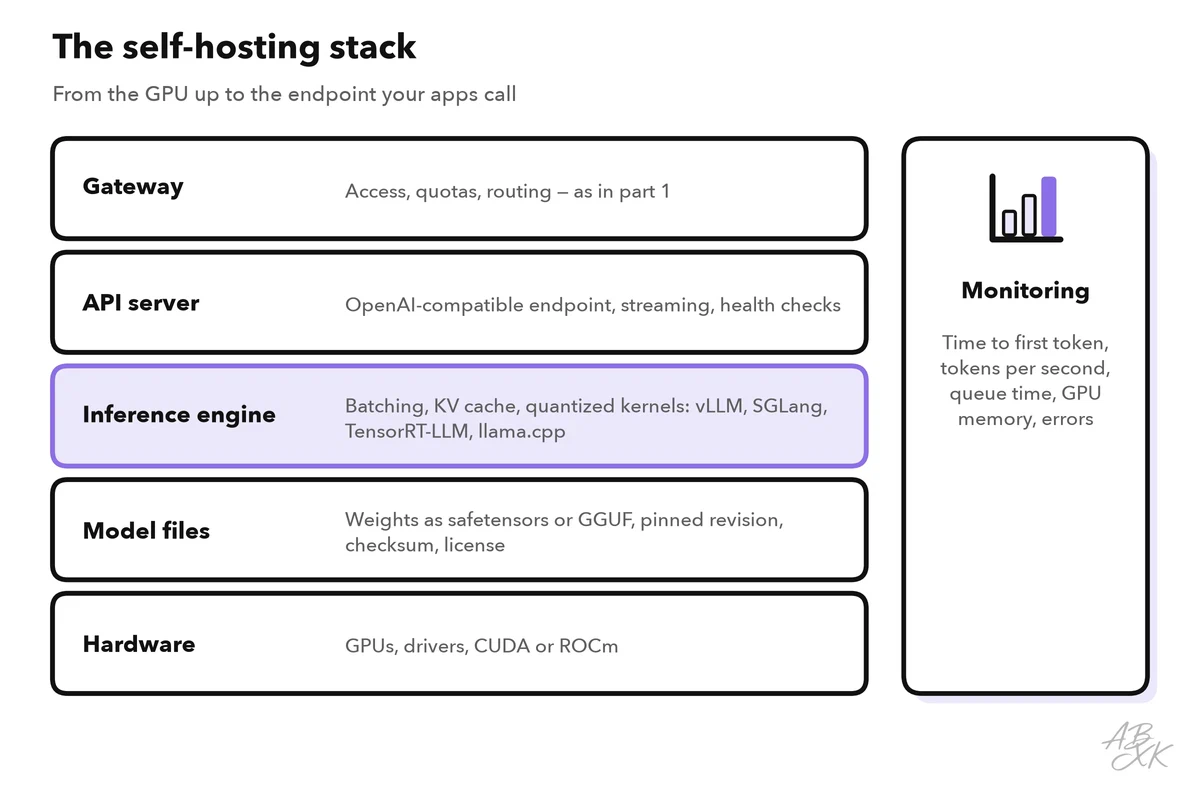
The inference engine is the core. Well-known open-source options are vLLM, SGLang and NVIDIA TensorRT-LLM for GPU servers, and llama.cpp or Ollama for laptops and small servers. Several of them offer an OpenAI-compatible API, so the gateway from part 1 can route to your own model like to any provider. Good engines rely on a few techniques; the first two came up briefly in Level 3:
- Continuous batching: new requests join the running batch at every generation step instead of waiting until the whole batch is finished. The idea comes from the Orca paper (Yu et al., OSDI 2022).
- Paged KV cache: the engine manages the memory for the KV cache in small pages, like virtual memory in an operating system. This reduces waste and fits more parallel requests on one GPU (Kwon et al., “PagedAttention”, SOSP 2023, the paper behind vLLM).
- Prefix caching: requests that start with the same system prompt reuse the work already done for it.
- Tensor parallelism: one model is split across several GPUs when it does not fit on one.
- Speculative decoding: a small draft model proposes several tokens, and the large model checks them in one step (Leviathan et al., ICML 2023).
Treat model files like code from outside. Prefer the safetensors format: it stores only tensors and a small header and cannot run code when it is loaded, unlike older Python pickle files. Pin the exact revision and verify checksums before you deploy.
Sizing GPU memory: weights plus KV cache
Level 3 gave you the rule of thumb for the weights: parameters × bytes per parameter. In production, the KV cache decides how many users one GPU can serve. The engine keeps one for every running request, and it grows with each token:
KV cache per token = 2 × layers × KV heads × head size × bytes per value
Take an example model with 8 billion parameters, 32 layers and 8 key-value heads of size 128, in 16-bit precision: 2 × 32 × 8 × 128 × 2 bytes ≈ 0.13 MB per token. One request with 8,192 tokens of context needs about 1.1 GB. Thirty-two such requests at the same time need about 34 GB — roughly twice as much as the weights.
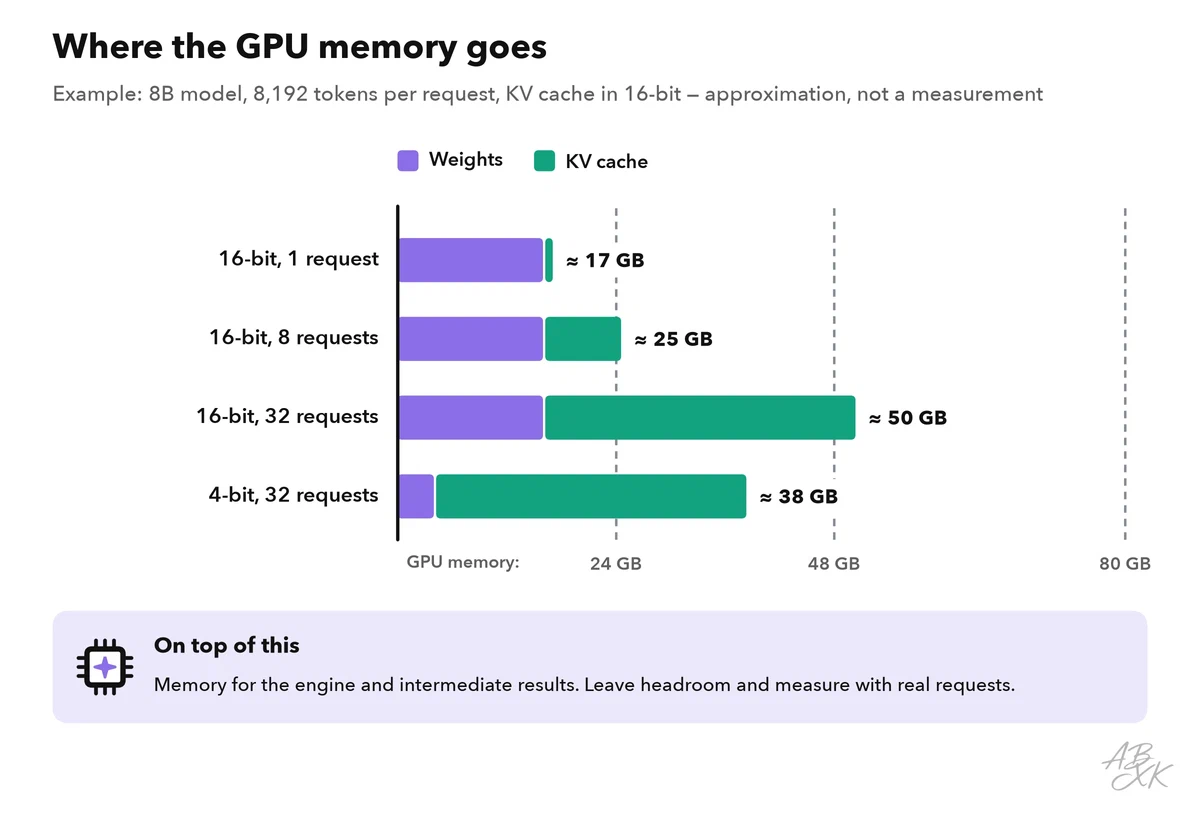
Three levers reduce memory:
- Quantization stores weights with fewer bits. Common methods are GPTQ (Frantar et al., 2022) and AWQ (Lin et al., 2023), as well as the GGUF format of llama.cpp. Some engines can also keep the KV cache in 8-bit. Always test the quality on your own eval set.
- Grouped-query attention (Ainslie et al., 2023) lets several attention heads share key-value heads, which shrinks the cache. It is part of the model architecture, so check the model card.
- Shorter contexts help directly: a limit on the conversation length is also a memory limit.
Mixture-of-experts (MoE) models need extra care. DeepSeek-V3, for example, has 671 billion parameters in total, but only 37 billion are active for each token (Source: DeepSeek-V3 Technical Report, 2024). Memory must hold all of them, while the compute per token is closer to that of a much smaller model.
Then measure: time to first token, tokens per second per GPU, and how many parallel requests run before your latency targets break. A load test with real prompts answers these questions better than any formula.
The quality gap: what our data shows
Our LLM database lists 172 models with open weights and 160 with closed weights. The chart compares the best overall index (ECI) that each group had reached at each point in time:
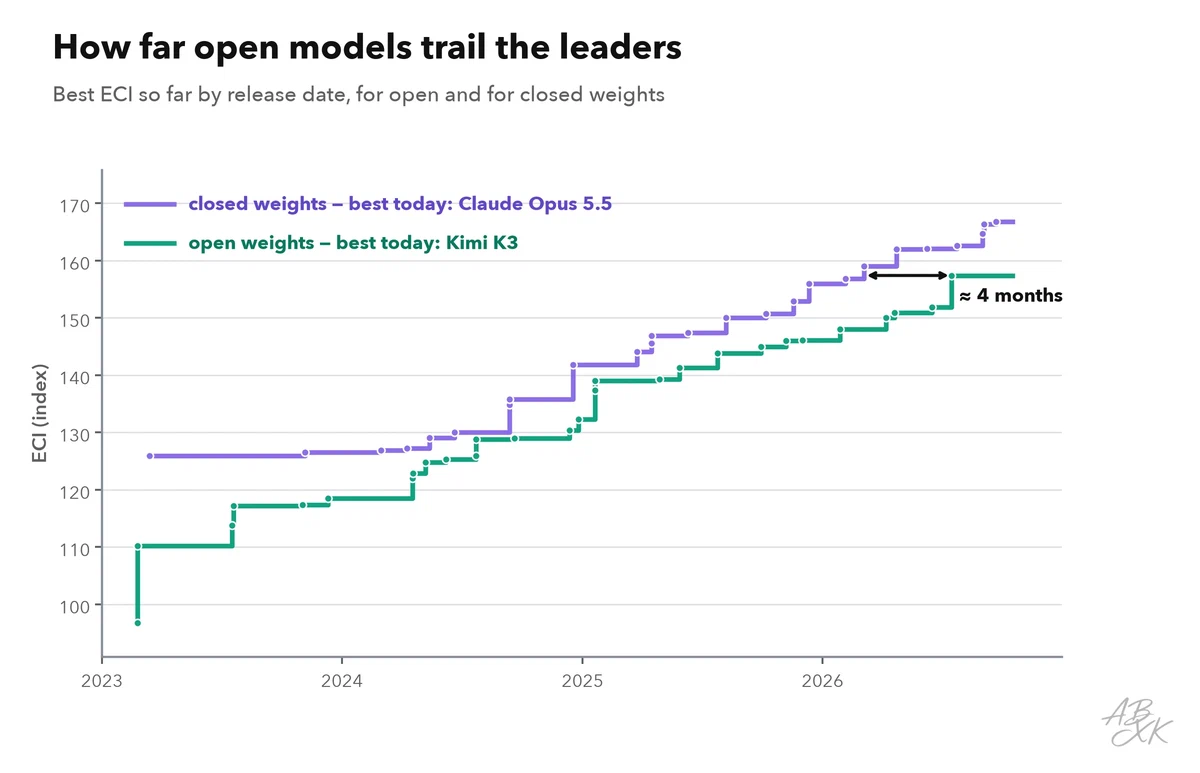
Both lines rise, and the open line follows the closed one. The arrow shows how many months earlier a closed model first reached the level of today’s best open model; measured at other points in time, this distance has varied. These are some of the strongest open-weight models in our data:
| Model | Released | Weights | ECI | Rank |
|---|---|---|---|---|
| Kimi K3 Moonshot | Jul 16, 2026 | open | 157.4 | 17 |
| DeepSeek V4.1 Flash DeepSeek | Sep 9, 2026 | open | 155.6 | 31 |
| DeepSeek V4 Pro 0813 DeepSeek | Aug 13, 2026 | open | 155.3 | 32 |
| GLM-5.3-Flash Z.ai (Zhipu AI) | Aug 20, 2026 | open | 153.2 | 45 |
| Qwen 3.8 27B Alibaba | Aug 14, 2026 | open | 151.6 | 52 |




ECI = Epoch Capabilities Index, one overall score across many benchmarks; rank among all models with an ECI. Data: Epoch AI, retrieved on October 17, 2026, licensed CC BY 4.0. All models: LLM database.
Read the index with two caveats. The ECI measures broad capability across many benchmarks; for a narrow task, such as classification or extraction from your own documents, a smaller open model can be fully sufficient. And the largest open models need servers with several GPUs, so check the size before you plan hardware. All models and filters are in our LLM database.
Operating checklist
Running a model is a service, not a download. Plan these points before the first user arrives:
| Area | What to set up |
|---|---|
| Access | No direct access to the inference server; all traffic through the gateway; no outbound internet |
| Versions | A pinned model revision; new versions only after your evals pass |
| Scaling | Autoscaling on queue length; spare capacity, because loading a large model takes minutes |
| Monitoring | Time to first token, tokens per second, queue time, GPU memory, out-of-memory errors |
| Safety | Your own input and output filters — there is no provider safety layer |
| Fallback | A hosted API model for overflow when your GPUs are full |
| Cost | Cost per million tokens = GPU cost per hour ÷ millions of tokens per hour, at real utilization |
Compare the cost line every month with the same work through an API; part 5 of this level shows more ways to optimize cost and latency. Infrastructure for this setup is part of our comparison. According to the vendors, Runpod is a GPU cloud for training and running models, billed by usage. Plesk is a control panel for the servers that run the app around the model. Pinecone is a vector database for when your model answers from your documents:



Short descriptions from our tool comparison, based on the vendors' information — not tested by ABXK.
Start small: one model, one task, one GPU, with an API as the fallback. Move more traffic to your own hardware only when your evals and the monthly cost comparison both say yes.