

A language model only knows what was in its training data. It does not know your price list, your internal wiki or the policy change from last week. Retrieval-augmented generation (RAG) closes this gap. Before the model answers, your app looks up the most relevant passages in your own documents and adds them to the prompt. The model then answers from these passages and names its sources.
This is part 2 of Level 2. It builds on embeddings and vector databases from part 1. You will walk through the full pipeline step by step, learn where it typically breaks and how to test it — and when you do not need RAG at all.
Why a model needs your documents
Three limits make retrieval necessary:
- Cut-off date. A model learns from data up to a certain date. It does not know anything newer unless you provide it.
- No private knowledge. Your contracts, tickets and product specs were never part of its training data.
- Confident guessing. When a model does not know a fact, it may invent a plausible answer. This is called a hallucination.
The last point is measurable. The SimpleQA Verified benchmark asks short factual questions with exactly one correct answer, and the models answer without tools or web search. Even the best models in our LLM database do not answer all of them correctly:
| # | Model | Released | Result |
|---|---|---|---|
| 1 | Gemini 4 Argon (high) Google DeepMind | Sep 30, 2026 | 76.0% |
| 2 | GPT-6 Astra (max) OpenAI | Sep 3, 2026 | 75.6% |
| 3 | GPT-6.1 Sol (max) OpenAI | Sep 29, 2026 | 73.9% |
| 4 | Gemini 3.1 Pro Preview Google DeepMind | Feb 19, 2026 | 73.5% |
| 5 | Claude Opus 5.5 (max) Anthropic | Sep 22, 2026 | 72.2% |



Short factual questions with exactly one correct answer, answered without tools. It shows how much a model really knows and how often it invents an answer instead of admitting that it does not know. Data: Epoch AI, retrieved on October 17, 2026, licensed CC BY 4.0. All models: LLM database.
RAG does not make a model perfect. But it gives the model the facts it needs, and it lets users check each answer against its source. The method was described in 2020 by researchers at Facebook AI Research (Source: Lewis et al., “Retrieval-Augmented Generation for Knowledge-Intensive NLP Tasks”, NeurIPS 2020, arxiv.org). Today it is one of the most common patterns for assistants that answer questions about company documents.
The pipeline at a glance
A RAG system works in two phases. Indexing runs in the background whenever documents change: you load the documents, split them into chunks, embed the chunks and store them. Answering runs for every question: you retrieve candidate chunks, rerank them and let the model write an answer with citations.
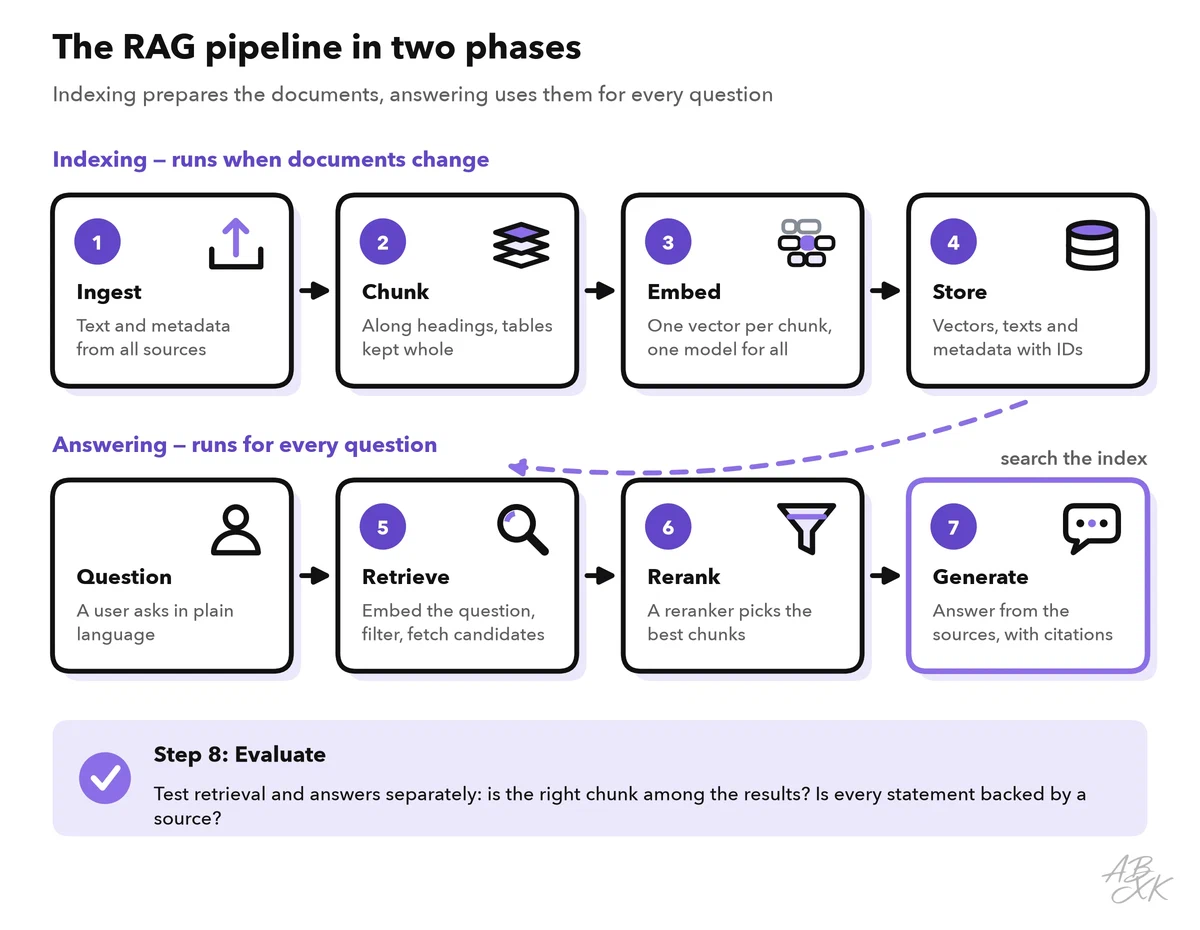
The next two sections go through the seven steps one by one. Each step has one job and its own typical mistakes. Evaluation, the eighth step, gets a section of its own.
Indexing: ingest, chunk, embed, store
1. Ingest. Collect the documents from their sources: PDFs, wiki pages, help center articles, tickets. Extract clean text and remove headers, footers and page numbers that repeat on every page. Keep the metadata: title, link or file path, date, owner and access rights. Skip duplicates and outdated versions. If two versions of a policy are in the index, the model may quote the wrong one.
2. Chunk. Split each document into chunks along its structure: headings, paragraphs, list items. Keep tables in one piece and convert them to a simple format such as Markdown, because PDF extraction often turns table rows into a jumble of numbers. Add the document title and the heading to each chunk. Part 1 explains how to choose the chunk size.
3. Embed. Turn every chunk into a vector with an embedding model. Use the same model for the chunks and for the questions, and store the model name with the index. Embedding thousands of chunks is a batch job: you run it once, and after that only for new or changed documents.
4. Store. Write the vectors, chunk texts and metadata into your vector store, with a stable ID for every chunk. When a document changes, replace its chunks. When it is deleted, delete them too.
Three tools from our comparison fit these steps: a managed vector database for storage and search and a platform for AI apps on your own data. The third is a no-code scraper that, according to the vendor, monitors web pages for changes. It helps when your sources are public pages that must stay fresh in the index.



Short descriptions from our tool comparison, based on the vendors' information — not tested by ABXK.
Answering: retrieve, rerank, generate
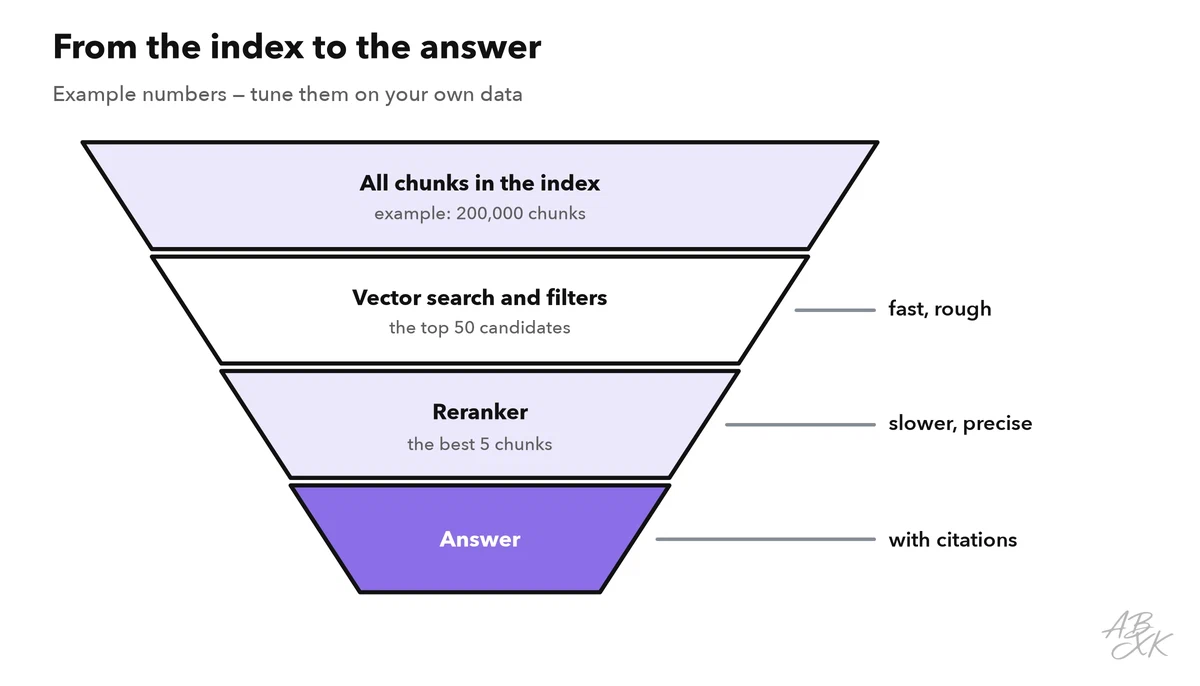
5. Retrieve. Embed the question with the same model and search the index for the nearest chunks. Fetch more candidates than you need, for example 20 to 50. Apply metadata filters before or during the search: language, product, date and, above all, the access rights of the user. Two techniques often help:
- Hybrid search combines vector search with keyword search, so exact terms like product codes are found.
- Query rewriting turns a follow-up question into a complete one. In a chat, “And in Germany?” means nothing on its own. A short model call can rewrite it into “What is the return period for orders in Germany?” before you search.
6. Rerank. Vector search is fast but rough. A reranker is a second model that reads the question and each candidate chunk together and scores how well they match. This is more precise but slower, so you only rerank the candidates from step 5. Keep the best few — for example three to eight chunks — for the prompt.
7. Generate with citations. Now you build the prompt. It contains clear rules, the selected chunks with their IDs and the user’s question:
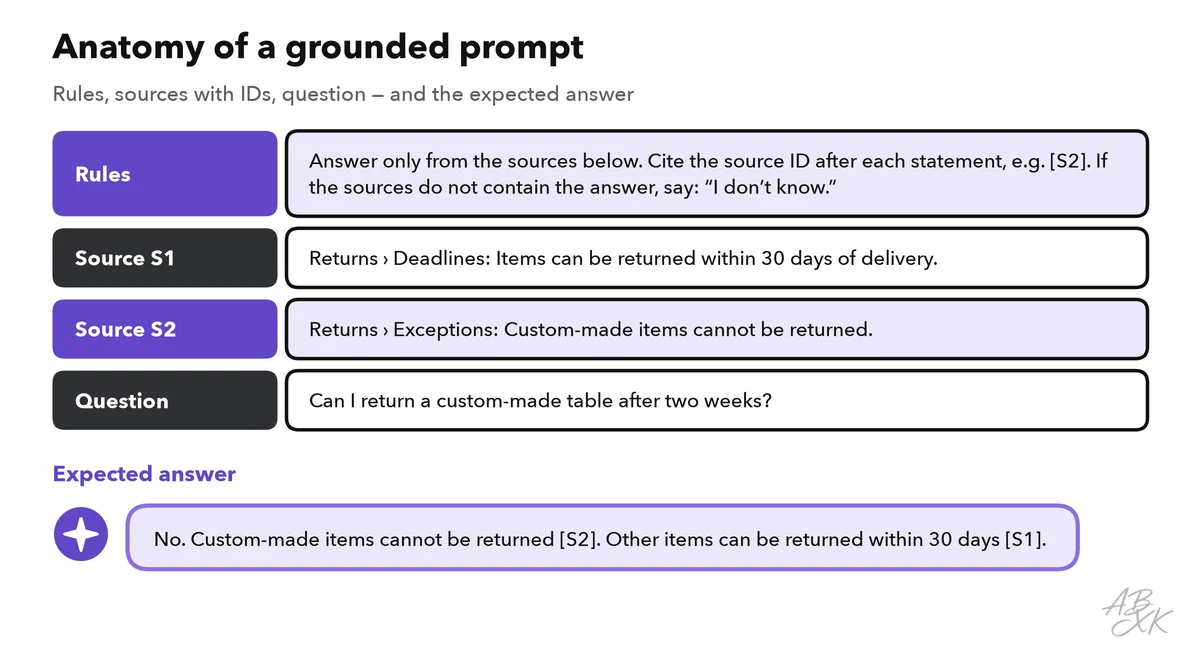
Three details make the difference:
- Allow “I don’t know”. Tell the model to say so when the sources do not contain the answer. Without this rule, it fills the gaps from its general knowledge.
- Check the citations in code. Every ID the model cites must belong to a chunk you actually sent. Show the cited passages in your interface, so users can verify the answer.
- Put the best chunks first and keep the prompt focused. Language models tend to use information at the beginning and at the end of a long input better than information in the middle (Source: Liu et al., “Lost in the Middle: How Language Models Use Long Contexts”, 2023, arxiv.org).
Evaluate retrieval and answers separately
When a RAG answer is wrong, you need to know which step failed. So measure the two halves separately:
- Retrieval: for each test question, you know which chunk holds the answer. Is that chunk among the top results? The share of questions where it is, is called hit rate or recall@k.
- Answer: is every statement supported by the cited chunks? This is called faithfulness or groundedness. Is the answer correct and complete? And does the model say “I don’t know” when the documents do not contain the answer?
If retrieval fails, fix the chunks, the filters or the search. If retrieval works but the answers are wrong, fix the prompt or try another model. Part 4 of this level shows how to build such test sets and run them automatically: Test AI features with evals.
Common failures and their fixes
Most RAG failures start before the model writes a single word. The figure shows six typical ones and the step where each begins:
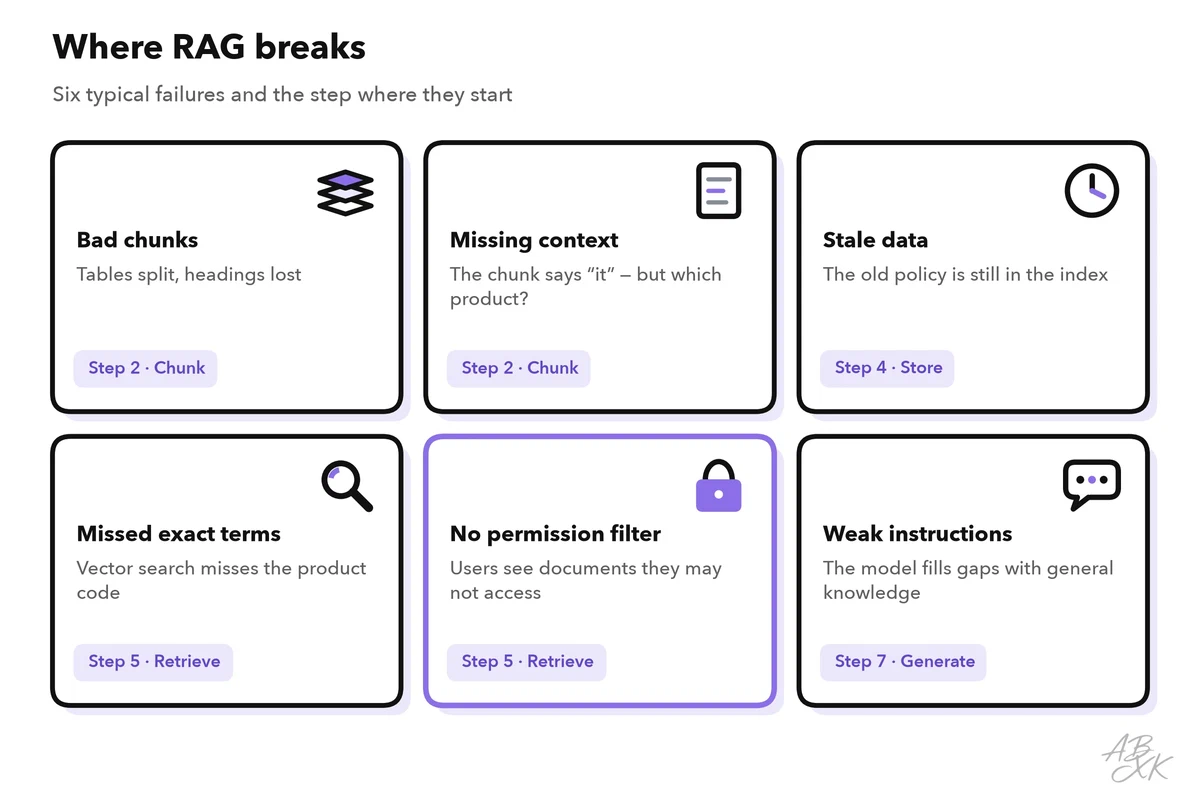
The table turns them into a troubleshooting guide:
| Symptom | Likely cause | Fix |
|---|---|---|
| The answer misses facts that are in the documents | The right chunk was not retrieved | Hybrid search, query rewriting, better chunks |
| The answer mixes up products or versions | Chunks lack context such as the title or product name | Add title and heading to every chunk; filter by product |
| The answer is outdated | The index was not updated; old versions are still stored | Re-index on every change; delete old versions; show dates |
| Numbers from tables are wrong | Tables were split or flattened during extraction | Keep tables whole; convert them to Markdown; test with number questions |
| The model answers from general knowledge | Weak instructions, or nothing relevant was retrieved | Require answers from the sources only; set a minimum relevance score |
| Users see content they may not access | No permission filter at retrieval | Filter by the user’s rights before the model sees any text |
When you do not need RAG
RAG adds moving parts: an index to keep fresh, a search to tune, citations to check. Before you build it, check whether a simpler approach does the job:
| Situation | Better approach |
|---|---|
| All the knowledge fits into the prompt, for example a ten-page manual that rarely changes | Put the whole text into the prompt; it fits easily into the context window of current models |
| You need a certain style, tone or output format, not new knowledge | Prompting with examples, or fine-tuning for large volumes — compare them in the decision guide in Level 3 |
| The answer lives in a database, such as an order status or stock levels | Let the model call a function that runs the query: see structured output and function calling |
| Questions about general knowledge | The model alone, or a model with web search |
| Answers must be complete and exact, for example in legal reviews | RAG only as a helper, with a human review of every answer |