

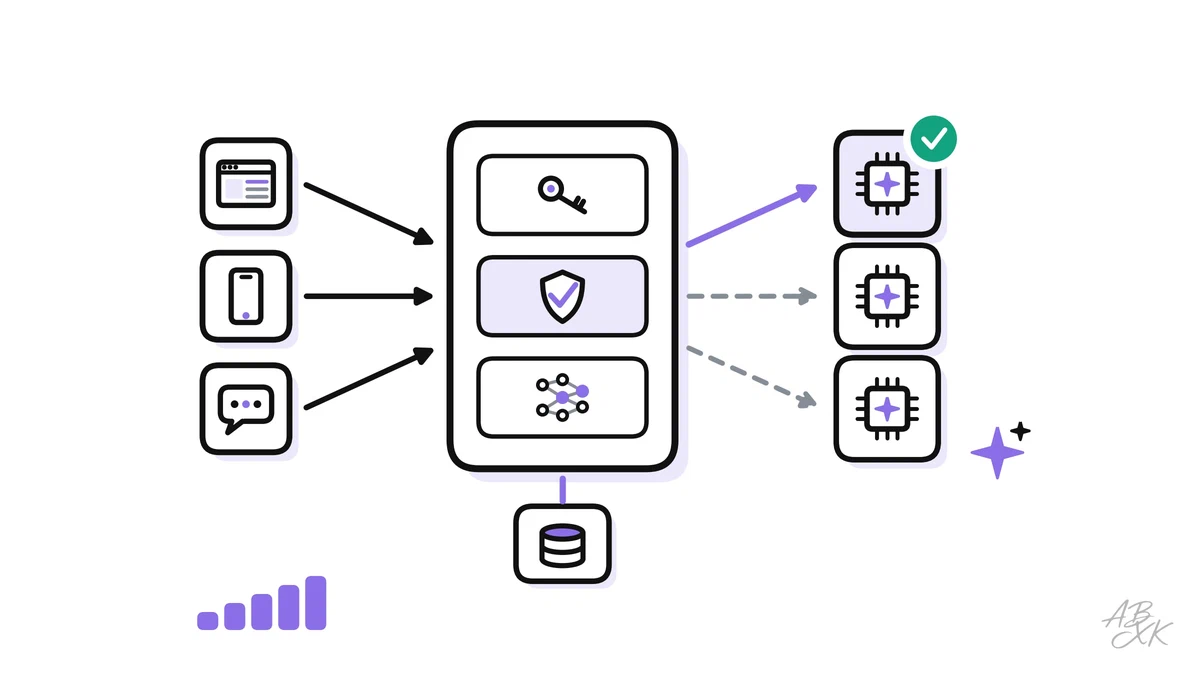
A prototype calls one model with one API key, and it works. A production system serves thousands of users, depends on providers that sometimes slow down or fail, and has to stay within a budget. What makes the difference is not a better prompt but the architecture around the model: one controlled entry point, caches, fallbacks, guardrails and targets you can measure.
This is part 1 of Level 4 (Expert) in our AI Development path. You will see a reference architecture, learn what each component does and what it costs, and finish with a checklist for the go-live. It builds on observability for LLM apps from Level 3: you can only run what you can see.
A reference architecture for LLM apps
Most production LLM systems end up with a similar shape. Apps do not call model providers directly. Every request goes through an LLM gateway (also called an AI gateway or model proxy): a service that sits between your apps and all models. It checks who is calling, applies limits, looks up caches, picks a model, checks the answer and writes the log.
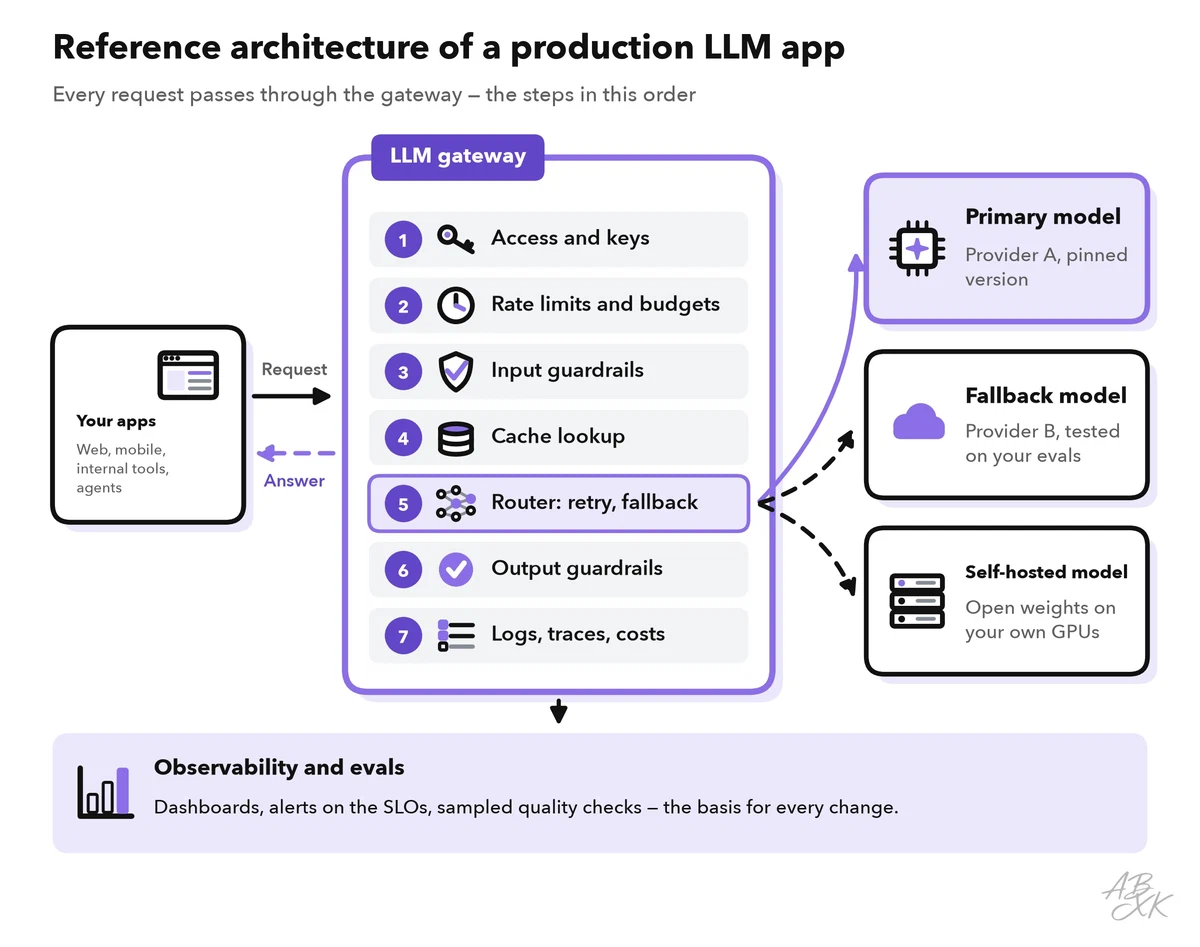
Each component prevents a specific kind of failure, and each one comes with a number you should watch:
| Component | Job | Prevents | Metric to watch |
|---|---|---|---|
| Access and keys | Internal keys for apps; provider keys stay in the gateway | Leaked keys, unknown usage | Requests per app and user |
| Rate limits and budgets | Quotas per user, team and provider | Runaway costs, blocked accounts | Rejected requests, spend per day |
| Cache | Reuses answers or processed prompts | Paying twice for the same work | Hit rate, false hits |
| Router and fallbacks | Picks the model, retries, switches provider | Outages, hanging requests | Errors and fallback share per provider |
| Guardrails | Check input, output and tool calls | Data leaks, broken formats | Block rate, schema errors |
| Logs and evals | Traces, costs, sampled quality checks | Silent loss of quality | Quality score, cost per task |
None of these parts needs a special platform. The gateway is a small, stateless service on your normal hosting. Run at least two instances so that it does not become a single point of failure. A semantic cache needs a vector store, and a self-hosted fallback model needs GPUs. In our comparison, according to the vendors, Netlify hosts web apps, Pinecone is a vector database for search and retrieval, and Runpod rents GPU compute billed by usage:



Short descriptions from our tool comparison, based on the vendors' information — not tested by ABXK.
The gateway: one door to every model
Without a gateway, every team copies provider keys into its code and writes its own retry logic. Nobody knows the total cost, and a new provider means changing every app. A gateway solves this in one place:
- One interface. Apps send one request format, and the gateway translates it for each provider. Many gateways and model servers accept the OpenAI chat format, so a new model becomes a configuration change.
- Keys and access. Apps get internal keys with their own permissions. Provider keys never leave the gateway and come from the environment or a secret manager.
- Routing rules. Rules pick the model by task, customer or region — for example, EU customer data goes only to EU endpoints.
- Metering. The gateway counts input and output tokens per app, team and feature. One large bill becomes costs you can assign.
- One log format. Every request gets a trace ID, the model version and the prompt version.
The price is one extra network hop. It usually adds milliseconds, while a model answer takes seconds, but measure it at the 95th percentile (p95: the value that 95 percent of requests stay below). Streaming must pass through the gateway without buffering, or users lose its main benefit.
Caching: exact, semantic and prompt caches
The cheapest model call is the one you do not make. Three kinds of caches work at different levels, and they carry different risks:
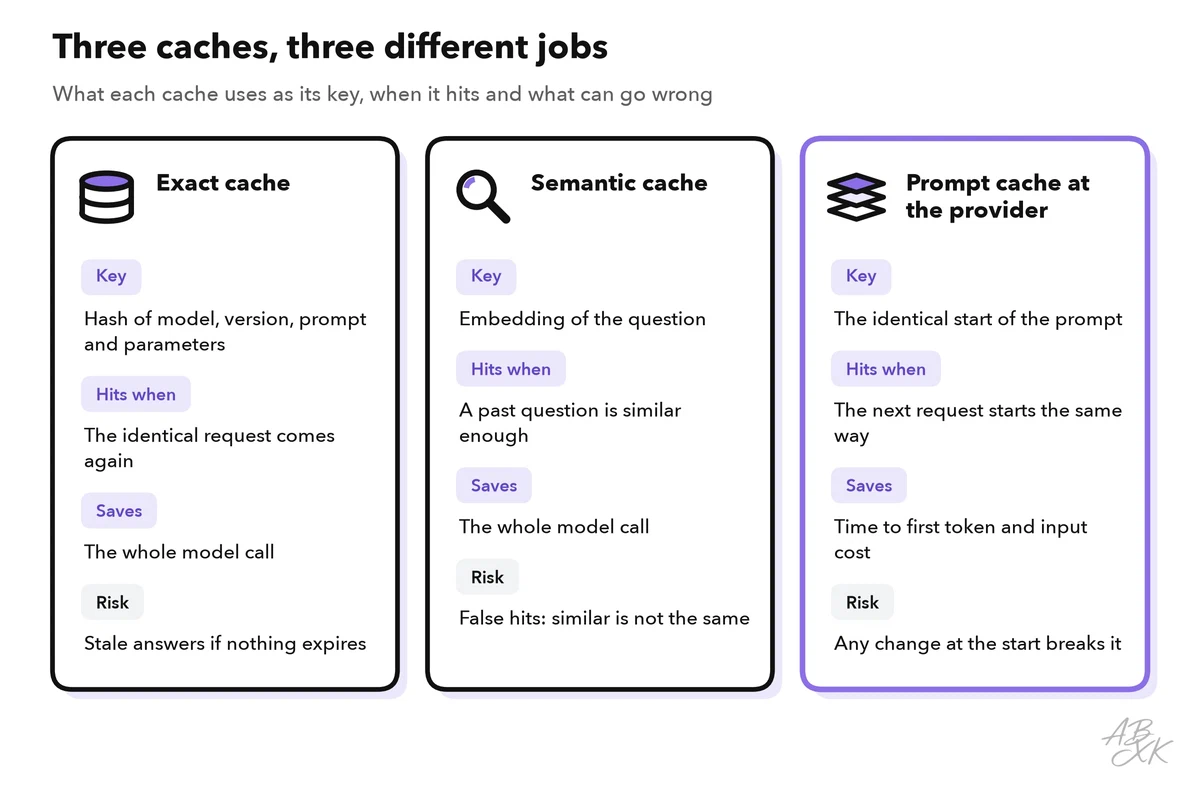
- An exact cache stores the full answer under a hash of model, model version, prompt and parameters. It hits only when the identical request comes back: a FAQ button, a classification job that runs again, a test suite. Give entries an expiry time and clear them when the underlying documents change.
- A semantic cache compares the meaning of a new question with past questions, using embeddings, and returns the stored answer above a similarity threshold. It hits more often — and it can be wrong. “How do I cancel my order?” and “How do I cancel my subscription?” are close in meaning but need different answers. Use it only for general answers, set a strict threshold and check a sample of hits by hand.
- Prompt caching happens at the provider. Several APIs keep the processed beginning of a prompt — the prefix — for a short time. If the next request starts with exactly the same prefix, that part is processed faster and billed at a lower rate. Put stable content first (system prompt, tool definitions, examples, long documents) and variable content last. A timestamp at the top of the prompt breaks the cache for every request.
Part 5 of this level shows how caching, batching and model routing work together to optimize cost and latency at scale.
Timeouts, retries and fallbacks
Model APIs fail in two ways: loudly, with an error code, and quietly, by hanging. Plan for both with one deadline per request — the longest time a user should wait — and share it across all attempts:
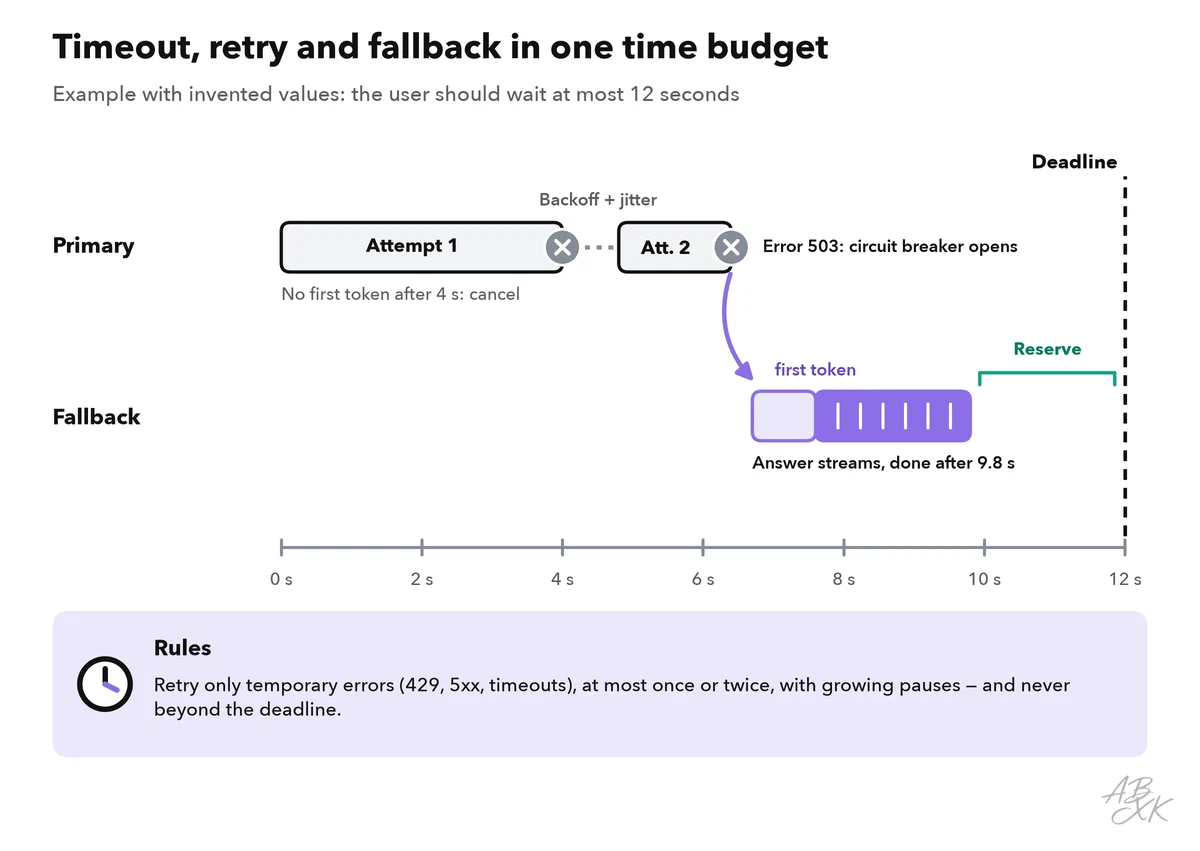
- Timeouts. With streaming, the most useful signal is the time to first token (TTFT). If no token arrives within a few seconds, the request is probably stuck, and there is still time to switch models.
- Retries. Retry only temporary errors: HTTP 429 (too many requests), 500, 502, 503, 504, timeouts and network errors. Never retry a 400 error unchanged. Wait longer after each attempt and add a random part, called jitter, so that thousands of clients do not retry at the same moment (Source: AWS Architecture Blog, “Exponential Backoff and Jitter”, 2015). If the provider sends a
Retry-Afterheader, respect it. - Retry budgets. During an outage, retries multiply the load on a system that already struggles. Google’s SRE book allows at most three attempts per request, and retries only while they stay below 10 percent of a client’s requests (Source: Google, “Site Reliability Engineering”, chapter “Handling Overload”, 2016, sre.google).
- Circuit breaker. After repeated failures, the gateway stops sending traffic to a provider for a cooling-off period, then lets a few test requests through. Michael Nygard’s book “Release It!” (2007) made the pattern widely known.
A fallback model takes over when the primary model fails. Choose one from another provider — an outage rarely hits two providers at once — with similar capability. Our LLM database helps you find candidates. As an illustration, not a recommendation, here is a chain of two strong models from different providers, a lighter model tier for a reduced mode and an open-weight model that you could host yourself:
| Model | Released | Weights | ECI | Rank |
|---|---|---|---|---|
| Claude Sonnet 5.5 Anthropic | Sep 28, 2026 | closed | 164.4 | 6 |
| GPT-6 Sol OpenAI | Sep 22, 2026 | closed | 162.6 | 8 |
| Gemini 3.8 Flash Google DeepMind | Sep 2, 2026 | closed | 157.2 | 19 |
| DeepSeek V4.1 Flash DeepSeek | Sep 9, 2026 | open | 155.6 | 31 |




ECI = Epoch Capabilities Index, one overall score across many benchmarks; rank among all models with an ECI. Data: Epoch AI, retrieved on October 17, 2026, licensed CC BY 4.0. All models: LLM database.
A fallback only helps if it works with your prompts. Run your eval set on every fallback before you depend on it, validate structured output again and keep a separate prompt version per model where needed. A model that you host yourself can serve as a last line of defense; part 2 of this level explains how to self-host open-weight models. When everything fails, degrade gracefully: show a cached answer, offer a simpler function or say honestly that the feature is not available right now.
Rate limits, streaming and guardrails
Rate limits work in two directions. Providers limit you, usually in requests and tokens per minute, and answer with HTTP 429 when you exceed them. You should also limit your own users. A common method is the token bucket: each user has a bucket that refills at a fixed rate, and every request takes something out of it. An empty bucket means a 429 answer with a Retry-After header. Add daily token budgets per user and a hard maximum for output tokens. The OWASP Top 10 for LLM Applications (2025) lists this risk as “unbounded consumption”: runaway usage that drives up costs or overloads the service.
Streaming sends the answer token by token, usually as server-sent events. Users see the first words after a moment instead of waiting for the full text. Streaming does not reduce cost, and it complicates two things. First, output checks must work on partial text: check in chunks, or hold back the first sentence until a fast check has passed. Second, a fallback is easy only before the first token — after that, the user has already seen part of the answer. Stop the generation when the user leaves the page; otherwise you pay for tokens nobody reads.
Guardrails are checks around the model. Input checks limit the length, remove personal data where possible and screen for prompt injection, which the OWASP list ranks first. Output checks validate the schema, block policy violations and look for leaked data. Tool calls get permission checks in your code. Our AI Security section explains the attacks behind these rules.
Versions, releases and SLOs
A model behind an alias such as “latest” can change without notice, and so can your results. Pin dated model versions where the provider offers them, keep prompts and configuration in Git, and write all three into every trace. Then treat a model or prompt change like a code release:
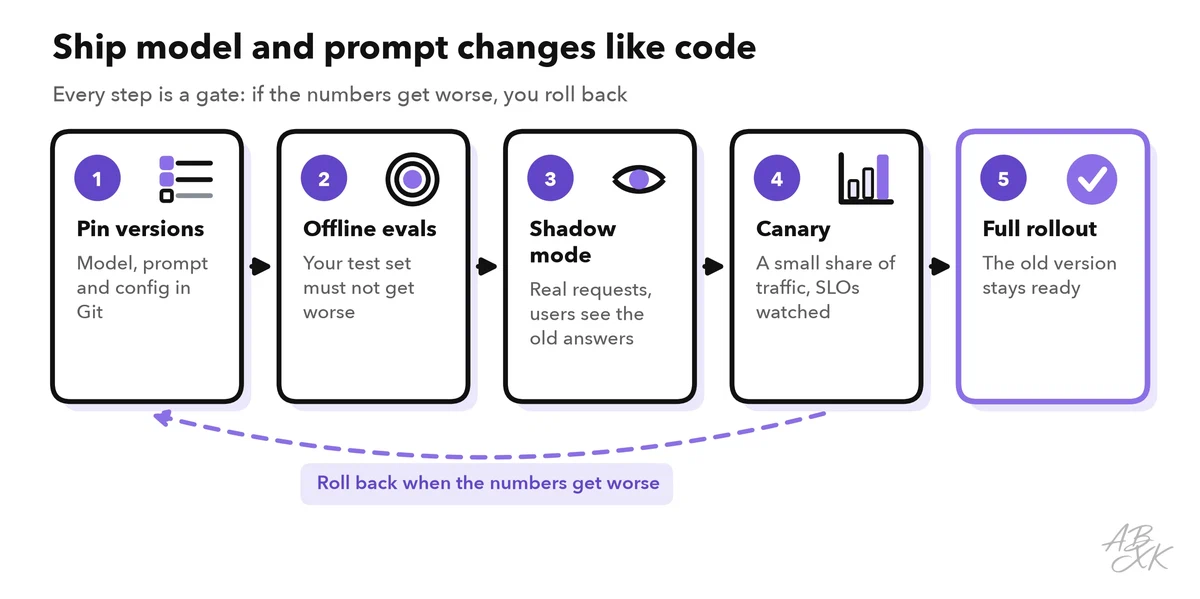
Your evals become the first gate: a change ships only if your test set does not get worse. Level 2 shows how to test AI features with evals. In shadow mode, the new version answers real requests, but users still see the old answers. A canary release then sends a small share of traffic to the new version while you watch your targets.
Those targets come from site reliability engineering. A service level indicator (SLI) is what you measure, a service level objective (SLO) is the target, and the error budget is the amount of failure the target still allows (Source: Google, “Site Reliability Engineering”, 2016, sre.google). LLM apps need targets for quality and cost in addition to the classic ones. The values below are examples; set your own from baseline measurements:
| SLI | Example SLO | A breach often points to |
|---|---|---|
| Requests with a valid answer | 99.5% over 30 days | Provider outages, broken fallbacks |
| Time to first token, p95 | under 2 seconds | Overload, slow model, long prompts |
| End-to-end time, p95 | under 10 seconds | Retries, too many tool steps |
| Sampled answers rated acceptable | at least 90% per week | Model change, stale documents, drift |
| Cost per successful task | within budget | Longer prompts, more retries, wrong routing |
Measure quality continuously. Sample a small share of real traffic for review by an LLM judge or a person, track user feedback, and set an alert when the error budget burns faster than planned.
Checklist before the go-live
Use this list in your launch review. Every “no” is a risk that someone should accept consciously:
- Provider keys live only in the gateway, and every app has its own internal key.
- Quotas per user and team exist, and budget alerts reach a person.
- Every request has a deadline, a TTFT timeout and at most one or two retries with backoff and jitter.
- The fallback model has passed the same eval set as the primary model, and a circuit breaker is configured.
- Cache keys include model version, prompt version and user scope, and every entry expires.
- Input and output guardrails run, and structured output is validated.
- Model and prompt versions are pinned and appear in every trace.
- SLOs have alerts, and the person on call knows how to roll back.
- A load test with realistic prompts, including long contexts, has run above the expected peak.
- You switched off the primary provider in a test environment and watched the fallback take over.
Teams often skip the last test. Repeat it after every larger change: a fallback that has never run usually fails on the day you need it.