

Say you want an assistant that answers your colleagues’ questions about travel expenses. You could put it together on a platform by clicking, without a single line of code. You could use the same kind of platform and add a few lines of code where it falls short. Or a developer could write it as ordinary software. All three can lead to a working assistant. They differ in how fast you start, how much you decide yourself and how hard it is to change course later.
This is part 4 of Level 0 in our AI Development learning path. Part 1 described three ways to do AI development. Here we look closer at the most common one: building a product on top of a finished model. You will learn what no-code, low-code and code mean and how they compare on five criteria. You will also see what to build with each and when it is time to switch.
Three approaches, one example
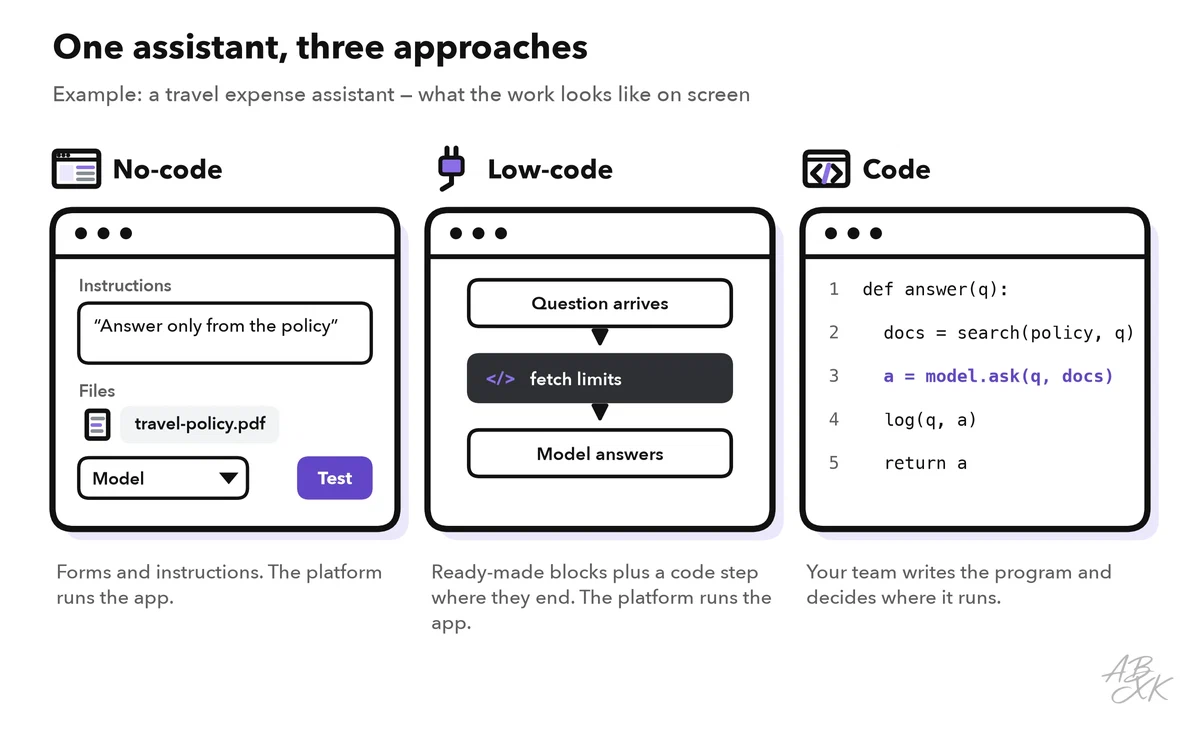
Let’s stay with the travel assistant. It should answer questions such as “Can I take a taxi to the airport?” from your company’s travel policy. Here is what building it looks like in each approach.
No-code means you build in a visual editor: you click, fill in forms and write instructions in plain language. You never touch program code. For the assistant, you upload the travel policy and write an instruction such as “Answer only from the policy.” Then you pick a model from a list and test the result in a preview. The platform runs the app for you.
Low-code also starts in a visual editor. Where the ready-made building blocks end, you add small pieces of code. Your assistant could, for example, use a short script to fetch the current expense limits from your finance system. In most cases, the platform still runs the app.
With code, a developer writes the assistant as normal software, for example in Python or JavaScript. The program sends each question to the model, together with the matching parts of the policy. It does this through the model’s API, the interface that lets programs talk to it. The developer decides where the app runs, which model it uses and what it records.
Working this way is often called vibe coding. Our article VibeCoding: How We Deploy Experiments Faster shows where it helps us and where we stop.
Five criteria for choosing
No approach is the best in general. The right one depends on what you build, who builds it and how long it has to last. Five criteria make the choice clearer:
- Speed: how quickly you have a first working version.
- Control: how much you decide yourself, from the interface to the model and where your data goes.
- Cost of change: how much effort a change takes later, such as a new data source or a different model.
- Scaling: what happens when ten or a hundred times more people use the app.
- Lock-in: how hard it is to leave a platform. Experts speak of vendor lock-in when leaving would cost so much that you stay.
The table shows typical tendencies. Individual platforms differ.
| Criterion | No-code | Low-code | Code |
|---|---|---|---|
| Speed | Fastest start, nothing to set up | Fast; code steps add some time | Slowest start: setup, hosting, tests |
| Control | Only what the platform offers | More: code fills the gaps | Full: you decide every detail |
| Cost of change | Low within the platform’s limits, high beyond them | Medium; code steps need someone who can code | Each change needs a developer, but nothing blocks you |
| Scaling | The platform’s limits and pricing set the frame | Like no-code, plus your own services | You plan it yourself: servers, model choice, cost control |
| Lock-in | High: the app only exists on the platform | Medium to high | Low for your code; changing the model provider still takes work |
Speed and control pull in opposite directions. The figure places the three approaches on both axes.
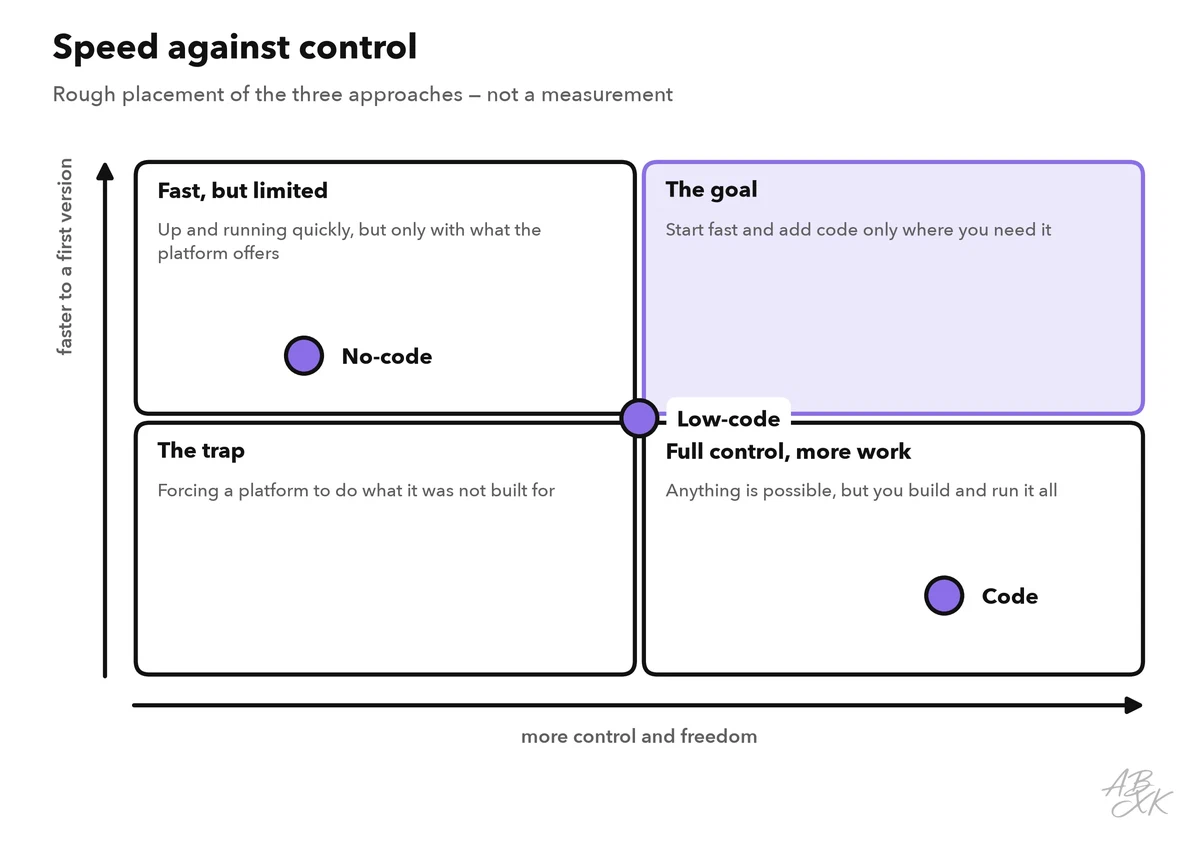
One corner deserves a warning: slow and limited at the same time. You end up there when you force a platform to do something it was not built for. Each workaround makes the app harder to understand, and every change takes longer than it would in code.
Who provides which part of the app
Part 2 of this level explains the seven parts an AI app is made of. The three approaches differ in who provides each of them.
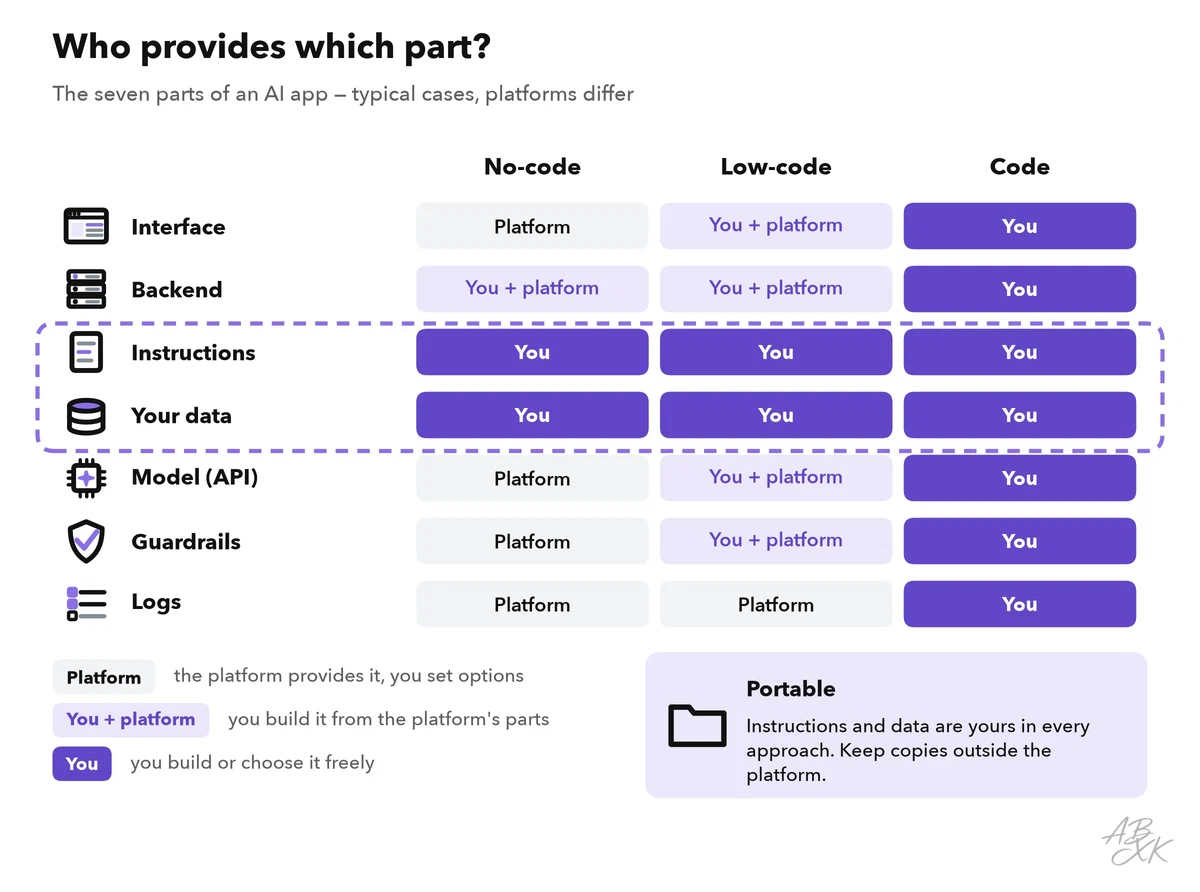
Two rows look the same in every approach: you write the instructions, and you bring the data, such as the travel policy. Together with your test questions, they hold most of what you learned about the task. You can take them with you. The interface and the steps in the backend are different: on a platform, they exist only in its format. They are what you rebuild when you leave.
What to build with each approach
Most projects fit one approach better than the others. These examples show typical starting points:
| Project | Start with | Why |
|---|---|---|
| Assistant that answers staff questions from a handbook | No-code | Chat over your documents is a common feature of no-code platforms |
| Helper that drafts product texts from a short form | No-code | Simple input, simple output, a small team |
| Sorting incoming emails and creating tickets | Low-code or an automation platform | Needs connections to your email and ticket systems |
| Support bot that checks the order status in your shop | Low-code | A short code step that asks your shop system fills the gap |
| AI search inside your own app or website | Code | Must fit your product and stay fast for many users |
| Feature with strict data rules, for example data that must stay on your servers | Code | You control hosting, logs and the choice of model |
Our tool comparison lists 5 tools for app building and testing and 3 for agents and automation. Five of them show the range. According to the vendors, MindStudio is a no-code platform for building your own AI agents. Turbotic builds automations from a description in natural language. Emergent and Devs.ai are AI app builders. Dry Ground AI is part consultancy, part product: here you work with a team instead of building alone. We have not tested these tools.





Short descriptions from our tool comparison, based on the vendors' information — not tested by ABXK.
Hiring a team is a fourth route when a project needs code but nobody on your side writes it. Ask the same questions as for the other approaches, and one more: who owns and changes the app once the project ends?
When to switch
Many projects move through the approaches as they grow. A no-code prototype shows whether people use the idea at all. A pilot connects it to your systems. An app for many users with strict rules often ends up as code.
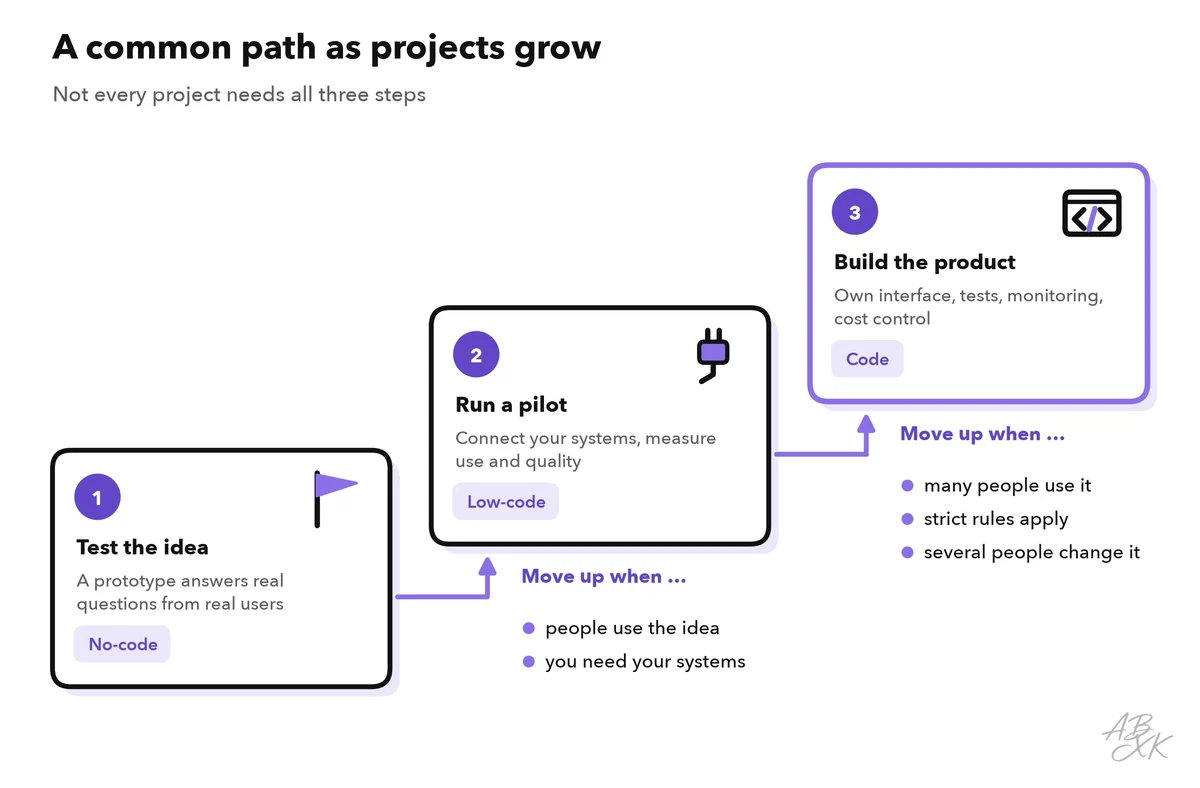
These signals tell you that it is time to move toward code:
- The platform cannot do what you need. A data source, a model or a part of the interface is missing, and the workarounds pile up.
- Costs grow faster than the value. Platforms bill in different ways, for example per user or per run. Check what happens to the bill when use doubles.
- Data rules get stricter. Your security team may need data to stay in one region, or it may need detailed logs and access rights.
- Several people change the app. You need a history of every change, reviews and automatic tests before a change goes live. Code tools are built for this.
- The app becomes critical. If an outage stops work for many people, you need monitoring and a plan B.
Switching works in the other direction too. If a developer spends hours on small wording changes that a colleague could make, the instructions may be better off in a no-code tool. And many internal helpers never need to leave the platform at all.
Level 1 shows both ends in practice: build a simple AI app without code and make your first LLM API call.
Common mistakes when choosing
- Choosing by habit. Developers tend to write code for everything. Business teams tend to push a platform too far. Start from the task and the five criteria instead.
- Building the full product first. A rough prototype with real users answers the most important question early: does anyone need this?
- Forgetting running costs. Model providers usually bill per token, a small piece of text, and platforms add their own fees. Estimate the costs for ten times today’s use before a wide rollout.
- Treating generated code as finished. Code from an AI app builder still needs someone who reads it, tests it and checks it for security gaps.
- Leaving a prototype without an owner. Once a helper becomes important, someone must keep its documents current and react when it fails.