

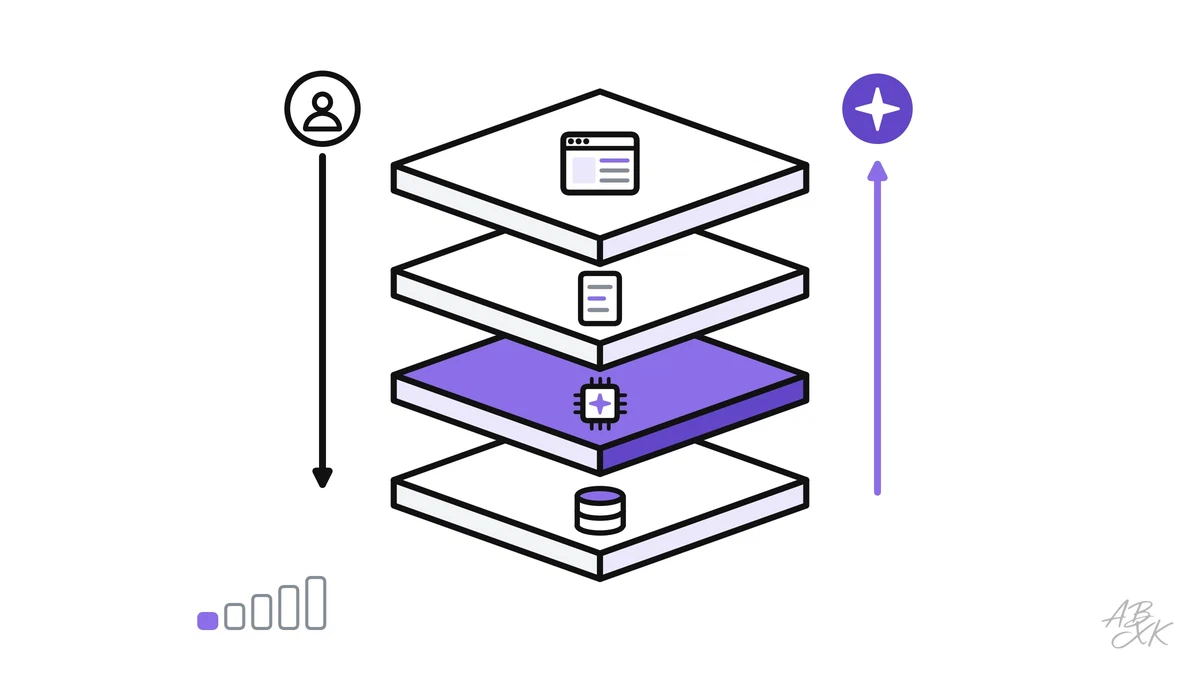
You ask an online shop’s support chat a question and get a helpful answer. It feels like one smart program is talking to you. In fact, seven parts work together, and only one of them is the AI model. The rest is ordinary software that decides what the model sees and what happens with its answer.
This is part 2 of Level 0 in our AI Development learning path. Part 1 described an online shop that builds a support assistant on top of a finished model. Now you look inside such an app: you learn its seven parts and follow one customer question through all of them. You do not need to know how to code.
The seven parts of an AI app
Almost every AI app is built from the same seven parts, whether it is a support bot, a writing helper or an email sorter. The names come from software development, but the ideas are simple.
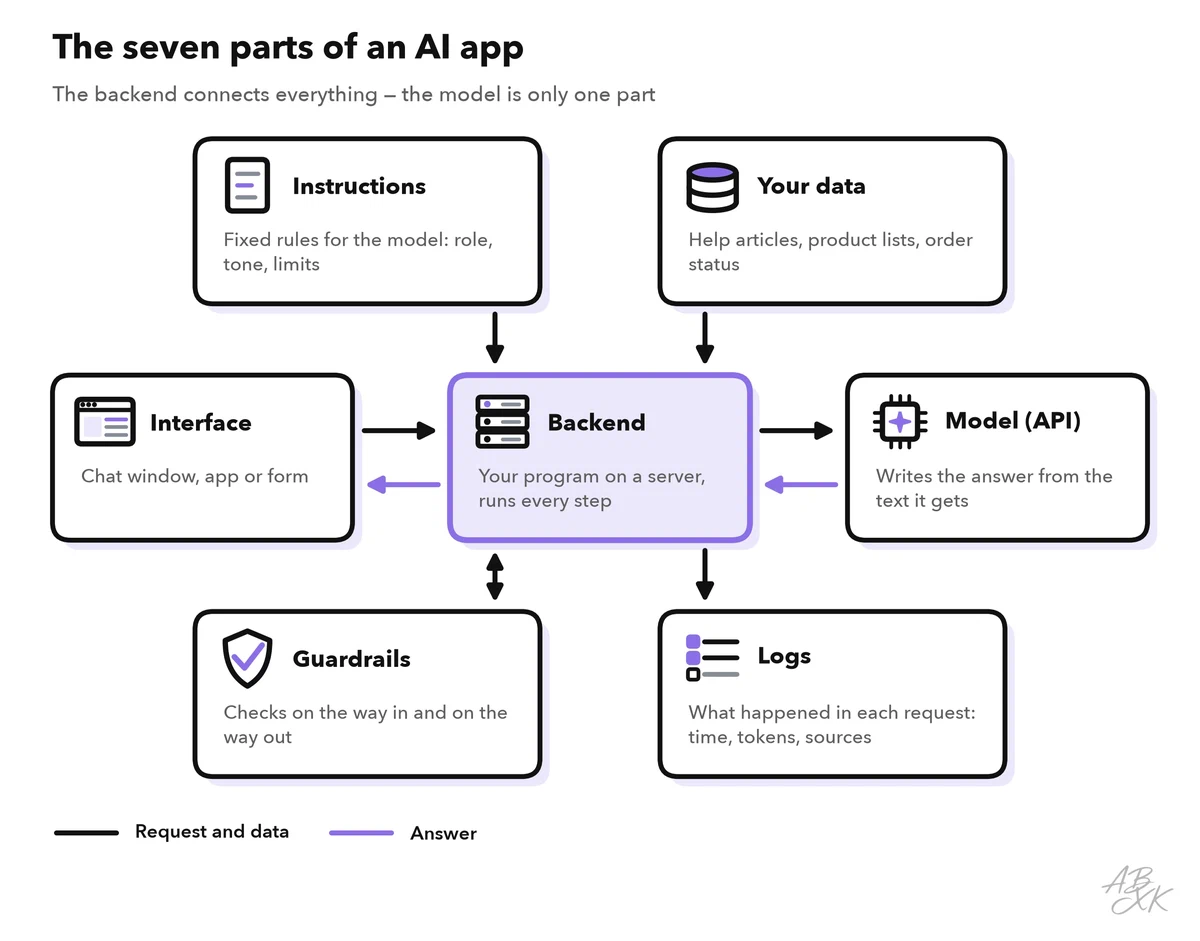
The interface (also called UI, for user interface) is what people see and use: a chat window, a form or a button in an app. The backend is your program on a server. It receives each request, collects what the model needs and decides what happens with the answer. Users never see the backend, which is why secrets such as the API key belong there. An API (application programming interface) is the door through which one program talks to another. Your backend sends text to the provider’s API and gets text back.
| Part | What it does | In a support bot |
|---|---|---|
| Interface | Takes the user’s input and shows the result | Chat window on the shop’s website |
| Backend | Runs every step between user and model | A small program on the shop’s server |
| Instructions | Fixed rules for the model: role, tone, limits | “Answer only from our help articles” |
| Model via API | Writes the answer from the text it receives | A language model from a provider |
| Your data | Facts the model cannot know | Help articles, return policy, order status |
| Guardrails | Check input and output against rules | Remove card numbers, stop false promises |
| Logs | Record what happened in each request | Question, sources used, tokens, response time |
You do not have to build every part yourself. Hosting platforms serve the interface, vector databases store your data so it can be searched by meaning, and GPU clouds run models on rented hardware. No-code platforms combine several parts in one place. Here are four examples from our tool comparison for AI Development, each described by its vendor:




Short descriptions from our tool comparison, based on the vendors' information — not tested by ABXK.
The model is only one part
Beginners often think the model is the app. In practice, the model does one narrow job: it reads the text it receives and writes an answer. Everything around it is the job of your app.
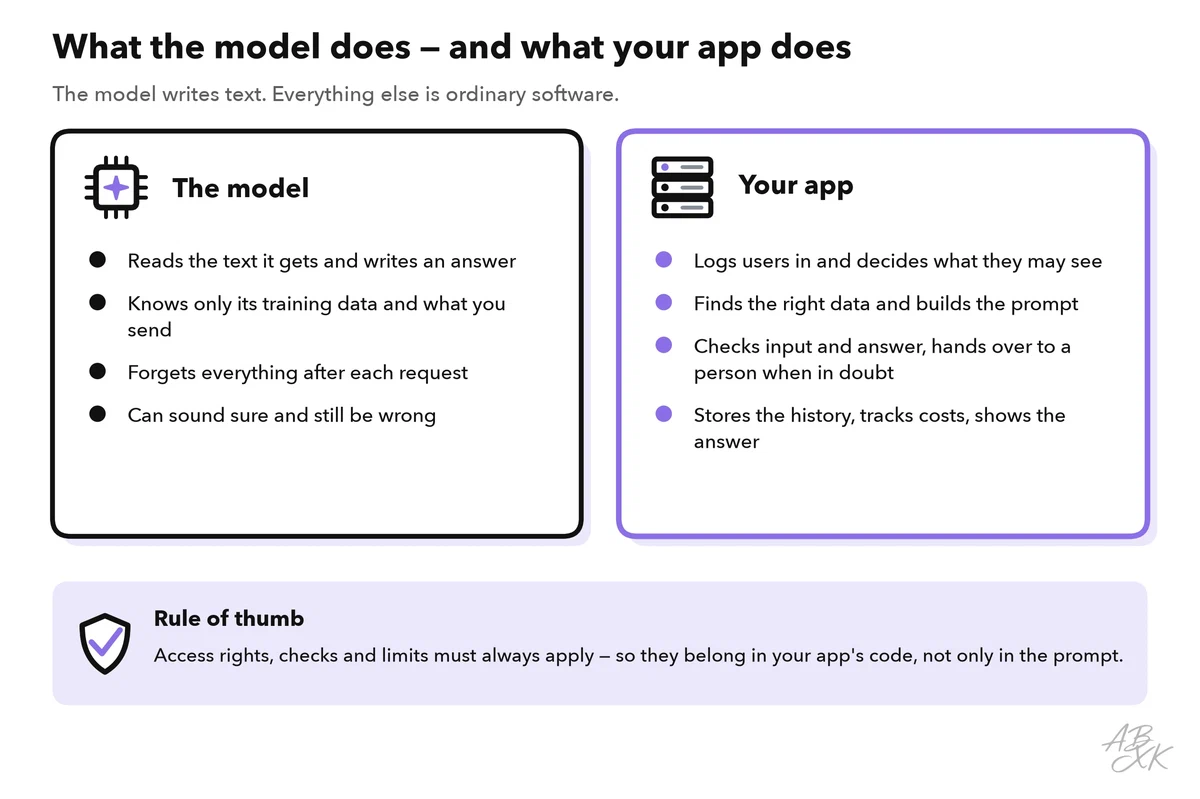
Two facts explain why the other parts are needed:
- The model forgets. With a typical chat API, the model does not remember earlier calls. Your backend sends the instructions, the relevant data and the recent conversation again with every request.
- The model guesses when it does not know. If the return policy is not in the text it receives, the model may invent a plausible one. This is called a hallucination. Your data and your checks are the defense against it.
The model itself is a replaceable part. Your backend names the model in each API call, so you can switch to another one without rebuilding the rest of the app. You still need to test again, because each model answers a little differently. Our LLM database lists 343 models with release dates and test results. Of these, 172 have open weights. Their model files are published, so you can also run them on your own or rented hardware. Here are a few current models from different providers:
| Model | Released | Weights | ECI | Rank |
|---|---|---|---|---|
| Claude Sonnet 5.5 Anthropic | Sep 28, 2026 | closed | 164.4 | 6 |
| GPT-6 Luna OpenAI | Sep 22, 2026 | closed | 156.3 | 28 |
| Gemini 3.8 Flash Google DeepMind | Sep 2, 2026 | closed | 157.2 | 19 |
| Kimi K3 Moonshot | Jul 16, 2026 | open | 157.4 | 17 |




ECI = Epoch Capabilities Index, one overall score across many benchmarks; rank among all models with an ECI. Data: Epoch AI, retrieved on October 17, 2026, licensed CC BY 4.0. All models: LLM database.
One question, start to finish
Let’s follow one request through the support bot of an online shop for outdoor gear. A customer types: “Can I still return my hiking boots? I got them three weeks ago.” This is what happens next:
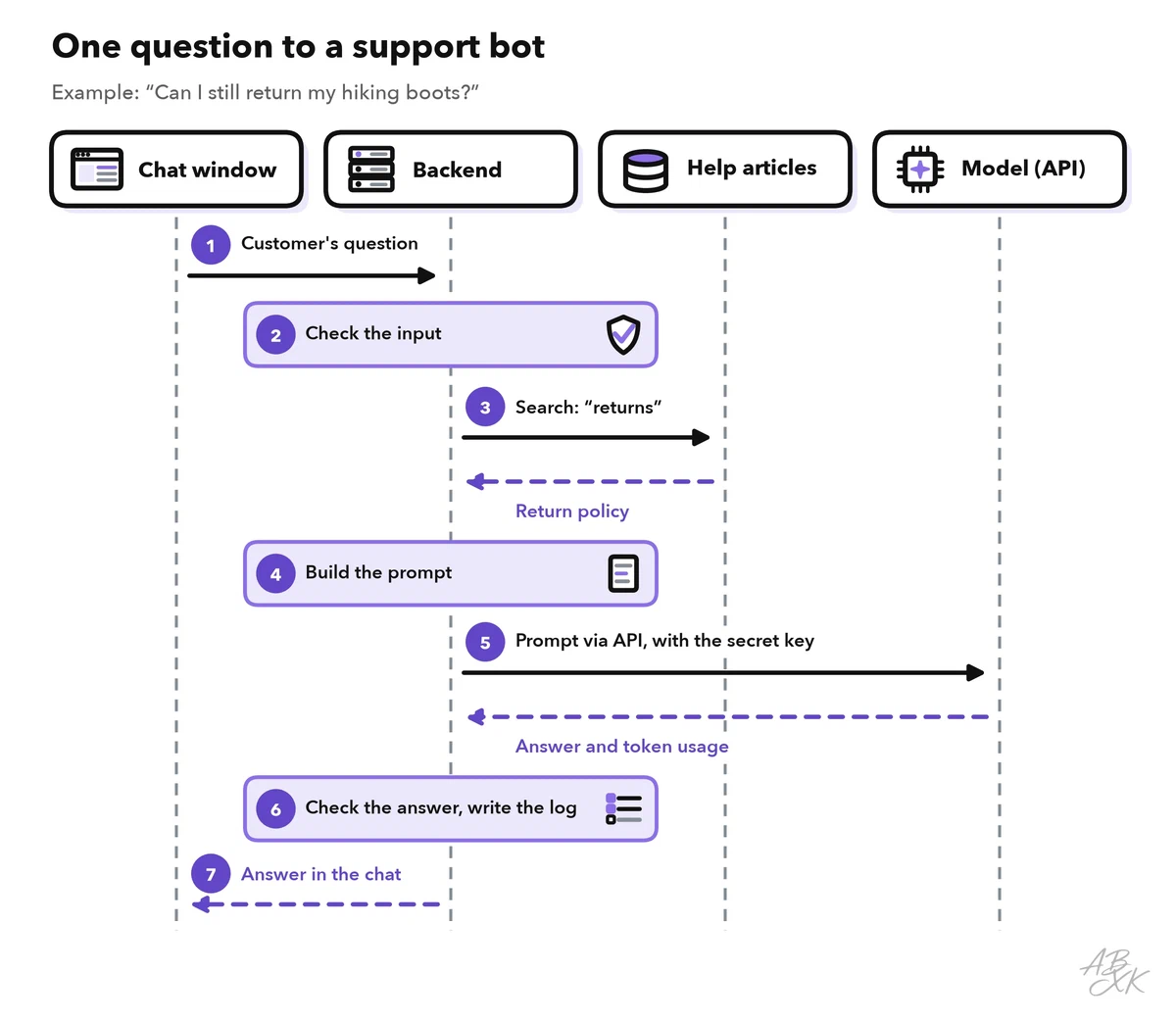
- The interface sends the question. The chat window passes the text to the backend, together with an ID for this conversation.
- The backend checks the input. A first guardrail blocks empty or very long messages. It also removes data that does not belong in a prompt, such as a credit card number.
- The backend searches your data. It looks for “returns” in the shop’s help articles and gets back the passage with the return policy.
- The backend builds the prompt. It puts together the instructions, the passage, the recent chat and the new question.
- The backend calls the model. It sends the prompt and the secret API key to the provider’s API. The model writes the answer and returns it with the number of tokens used. Tokens are the small pieces of text that models read and write, and providers bill per token.
- The backend checks the answer and writes the log. Does the answer stick to the policy? Does it promise something the shop does not offer? If the check fails, the backend sends a safe standard reply or hands the chat to a person.
- The interface shows the answer. The customer reads that unworn items can be returned within 30 days of delivery, so there is still time.
The round trip usually takes a few seconds, and the model’s writing is typically the slowest part. That is why many chat windows show the answer word by word as it is written, which is called streaming.
Looking up the right passage first and then letting the model answer from it has a name: retrieval-augmented generation (RAG). Level 2 explains RAG step by step.
What the model actually receives
The customer typed one sentence. The model receives much more: everything the backend put together in step 4.
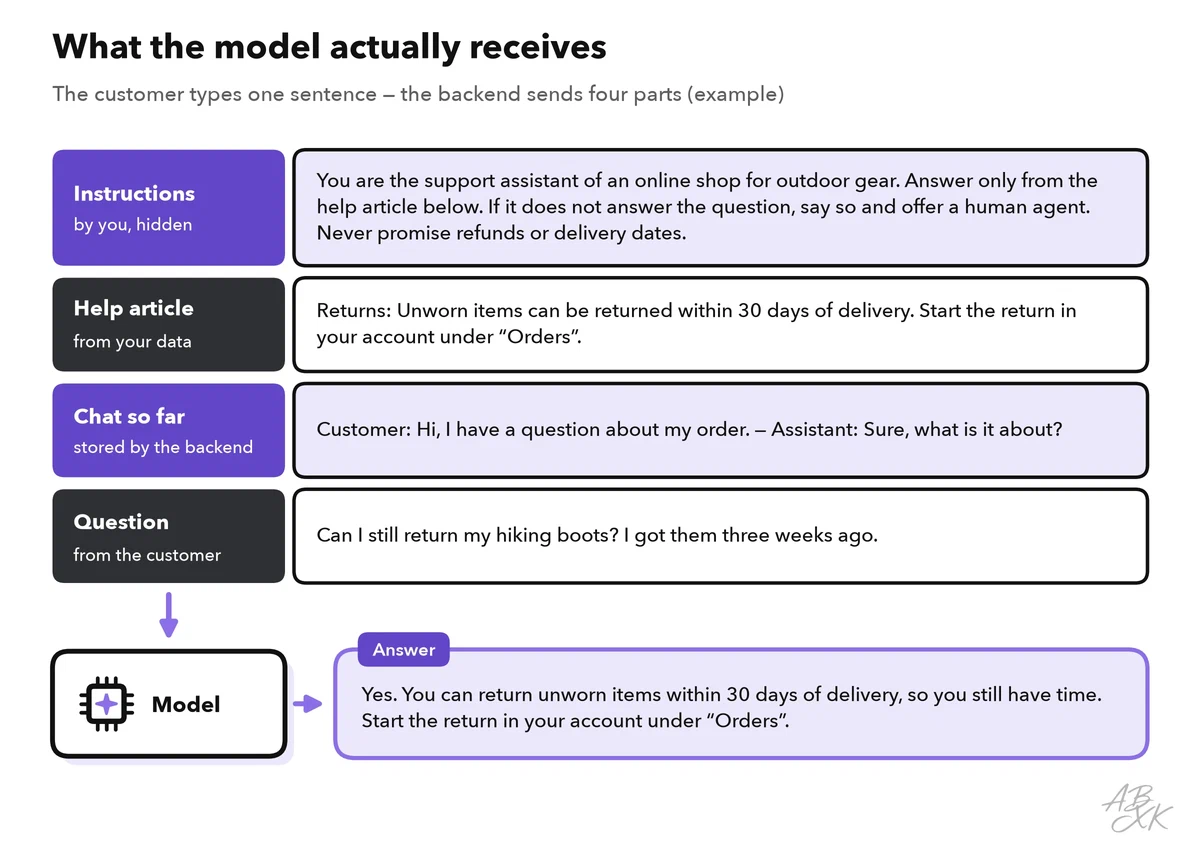
Three things are worth noticing:
- The customer never sees the instructions or the help article. They are part of your app. The instructions are often called the system prompt.
- The facts come from your data, not from the model’s memory. When the shop changes its return policy, it only updates the help article. The bot answers correctly from then on, with no new training.
- Every part costs tokens. Each model also has a limit on how much text it can handle in one request, the context window. A good backend sends what the question needs, not everything it has. Part 3 of this level explains APIs, tokens and context windows.
Guardrails and logs: the parts beginners forget
A demo works without guardrails and logs. A real app with real customers does not.
Guardrails are checks and limits around the model. They work in three places:
- Before the model: limit the length, block abuse and remove personal data that the model does not need.
- Around your data: give the model only what the current user is allowed to see. If a support bot could read all orders, a clever question might reveal one customer’s address to another. The backend, not the model, decides which order data goes into the prompt, and only after the customer has logged in.
- After the model: check the answer before anyone sees it, for example for promises the shop does not make or links that do not exist. When in doubt, hand over to a person.
Some users will also try to talk the bot out of its rules, for example with a message that tells it to ignore its instructions. This is called prompt injection. Instructions alone do not stop it reliably, so the protection must come from the app itself: limited data, limited actions and checks in code. Our AI Security section covers the defenses in more depth.
Logs record what happened in each request: time, model, tokens, response time, sources used and user ratings. With logs, you can find out why the bot gave a wrong answer, what a conversation costs and whether a new prompt made things better or worse. Logs often contain personal data, so store only what you need, limit who can read them and delete them after a fixed period.
Exercise: take apart an AI app you already use
Pick an AI feature you use: a support chat, the AI button in your email program or a writing assistant. Try to answer these questions for it. You will not find every answer, and that is part of the lesson: most parts of an AI app are hidden in the backend.
| Question | The part it reveals |
|---|---|
| Where do I type, and where does the answer appear? | Interface |
| Does it stay on topic or refuse some requests? | Instructions and guardrails |
| Does it know things a general chatbot would not, such as my orders or company documents? | Your data |
| Does it name the model or the provider? | Model via API |
| Can I rate answers or see my earlier chats? | Logs and stored history |