

Most AI apps never touch a GPU. They call a model through an API, and the provider runs the hardware. That changes when you fine-tune a model, run an open-weight model yourself or process millions of documents in one batch. Then you rent compute — and the bill depends on decisions you make before the first job starts.
This is part 3 of Level 3 (Advanced). You will learn when you really need GPUs, how to estimate GPU memory from model size, which way of renting fits which workload, and how to keep utilization high and costs under control. We explain the cost logic, not prices.
When you need GPUs — and when you don’t
A GPU (graphics processing unit) has thousands of small cores and very fast memory. That makes it good at the matrix math inside neural networks. The memory on the card is called VRAM, and it decides which models you can run.
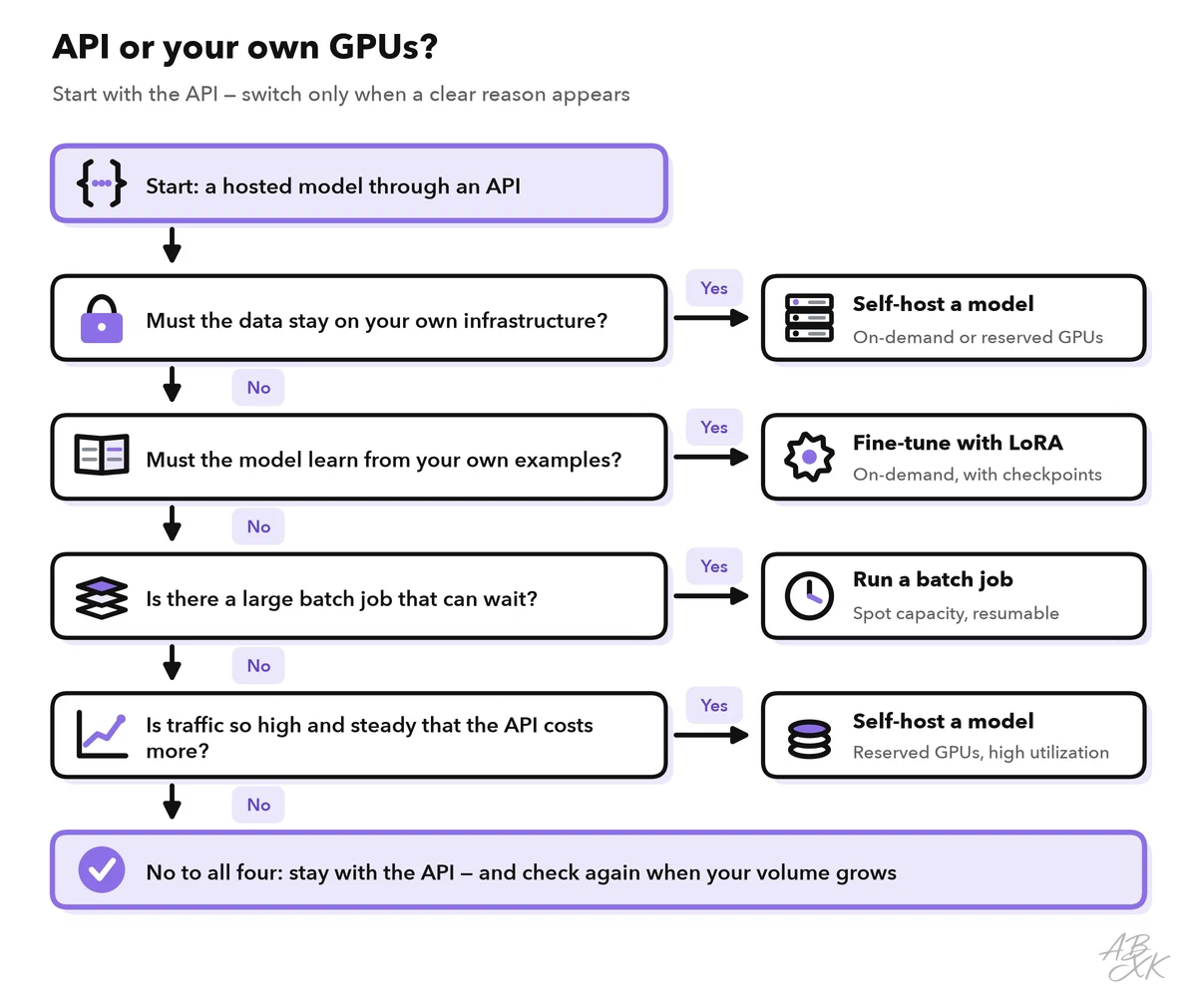
You need your own GPUs, rented or bought, in four situations:
- Fine-tuning: you train an open-weight model on your own examples. Some providers also fine-tune selected closed models for you as a service; then the GPUs are their job. Part 4 of this level helps you decide between fine-tuning, RAG and prompting.
- Self-hosting: data must not leave your infrastructure, or you need full control over the model version.
- Batch jobs: you create embeddings for a large archive or classify millions of records, and the steady workload keeps the GPU busy.
- Training from scratch: rare outside research labs and large companies.
You do not need GPUs when you build a prototype, when traffic is low or irregular, or when the best model for your task is only available through an API. A hosted API turns a fixed cost into a cost per request, and someone else handles updates, scaling and failures. With your own GPUs, that work moves to your team: drivers and security updates, monitoring, spare capacity for peaks and a plan for the day a machine fails.
Open-weight models are the usual candidates for self-hosting. Our LLM database lists 172 models with open weights, with their release dates and test results. Open weights do not always mean free use: some licenses restrict commercial use or set other conditions, so read the license before you build on a model.
GPU memory: a rule of thumb
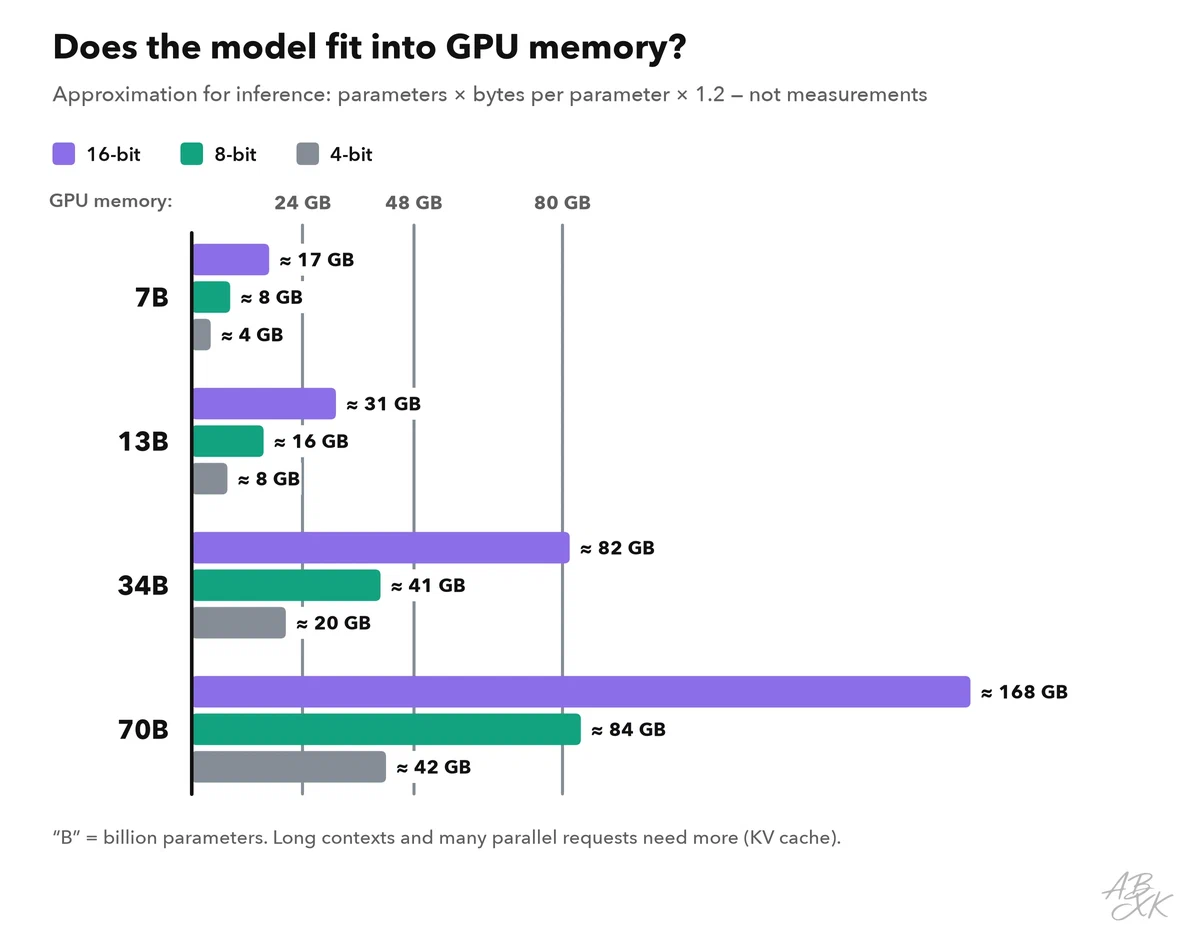
The first question is whether the model fits into GPU memory. For the model weights, a simple formula gives a good estimate:
memory for weights (GB) ≈ parameters (billions) × bytes per parameter
Each parameter takes 2 bytes in 16-bit precision (FP16 or BF16), 1 byte in 8-bit and about half a byte in 4-bit. Storing weights with fewer bits is called quantization. It saves memory and often speeds up inference, but it can cost some quality, so test it on your own task.
Inference needs more than the weights. The KV cache stores intermediate results for the text the model has already processed, so it does not have to compute them again for every new token. It grows with the context length and with the number of requests that run in parallel. For a quick check, EleutherAI suggests planning about 1.2 times the memory of the weights for inference (Source: EleutherAI, “Transformer Math 101”, 2023, blog.eleuther.ai). That works for short prompts and a few parallel requests. Long contexts and many parallel users can need much more.
| Model size | 16-bit | 8-bit | 4-bit | Full fine-tuning (~16 bytes per parameter) |
|---|---|---|---|---|
| 7B | ~14 GB | ~7 GB | ~3.5 GB | ~112 GB |
| 13B | ~26 GB | ~13 GB | ~6.5 GB | ~208 GB |
| 34B | ~68 GB | ~34 GB | ~17 GB | ~544 GB |
| 70B | ~140 GB | ~70 GB | ~35 GB | ~1,120 GB |
The table shows rough approximations for the weights only; “B” stands for billion parameters. Many common GPUs have 24, 48 or 80 GB of memory, and the newest data center models have more. The chart adds the 20 percent for inference and shows which combinations fit:
Training needs far more. Full fine-tuning with the common Adam optimizer in mixed precision needs about 16 bytes per parameter for weights, gradients and optimizer states (Source: Rajbhandari et al., “ZeRO”, Microsoft, 2020). On top of that come the activations, the intermediate results of each training step. That is why most teams use LoRA (Low-Rank Adaptation): the base model stays frozen, and only small adapter matrices are trained (Source: Hu et al., “LoRA”, Microsoft, 2021). QLoRA goes one step further and loads the base model in 4-bit. Its authors fine-tuned a 65-billion-parameter model on a single 48 GB GPU (Source: Dettmers et al., “QLoRA”, 2023).
Four ways to rent GPUs
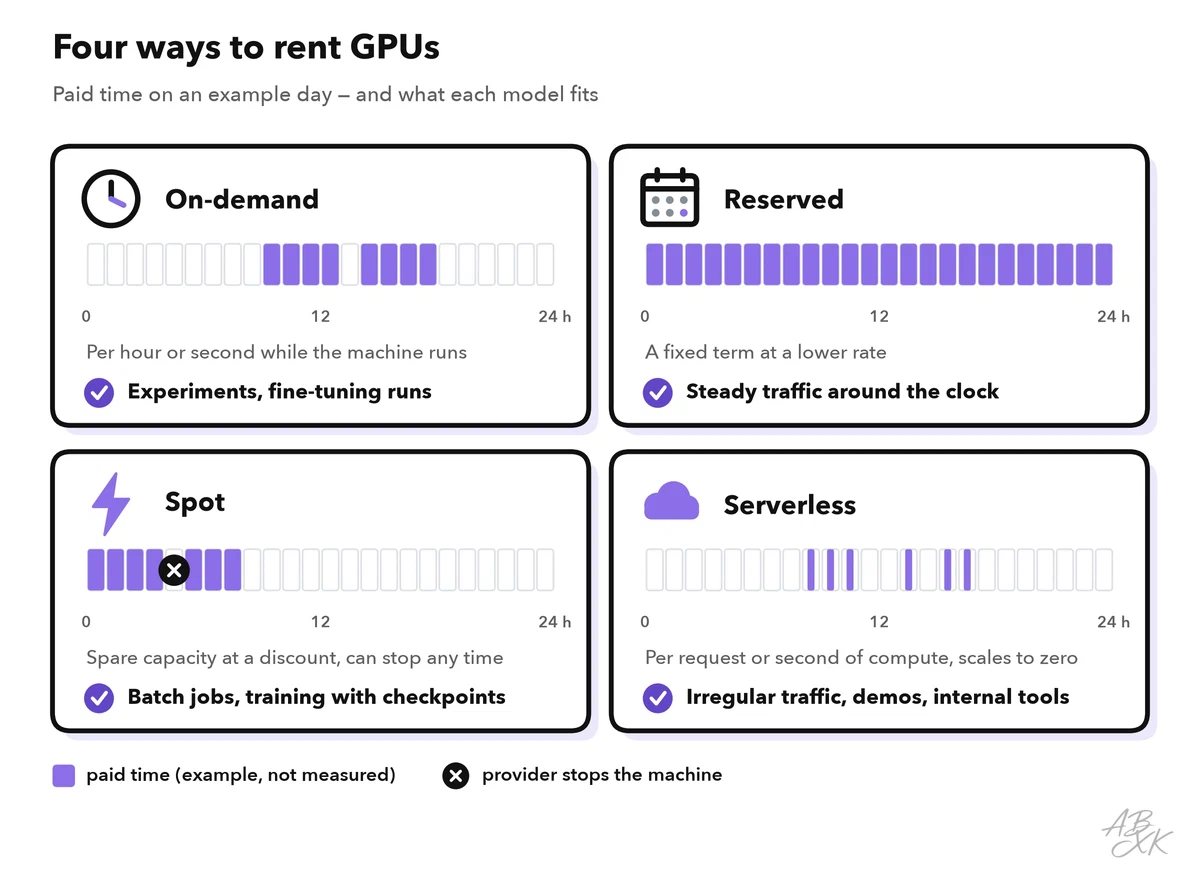
GPU clouds offer different billing models. The right one depends on how predictable your workload is.
| Billing model | How you pay | Best for | Watch out for |
|---|---|---|---|
| On-demand | Per hour or second while the machine runs | Experiments, fine-tuning runs, irregular jobs | You also pay while the GPU is idle |
| Reserved | A commitment for a period, at a lower rate | Steady traffic around the clock | Paying for capacity you do not use |
| Spot / interruptible | Spare capacity at a discount | Batch jobs and training with checkpoints | The provider can stop the machine at any time |
| Serverless | Per request or second of execution; scales to zero | Irregular traffic, demos, internal tools | Cold starts: loading a large model takes time |
A checkpoint saves the state of a training run at regular intervals, so an interrupted job can continue instead of starting over. Without checkpoints, spot capacity is a gamble.
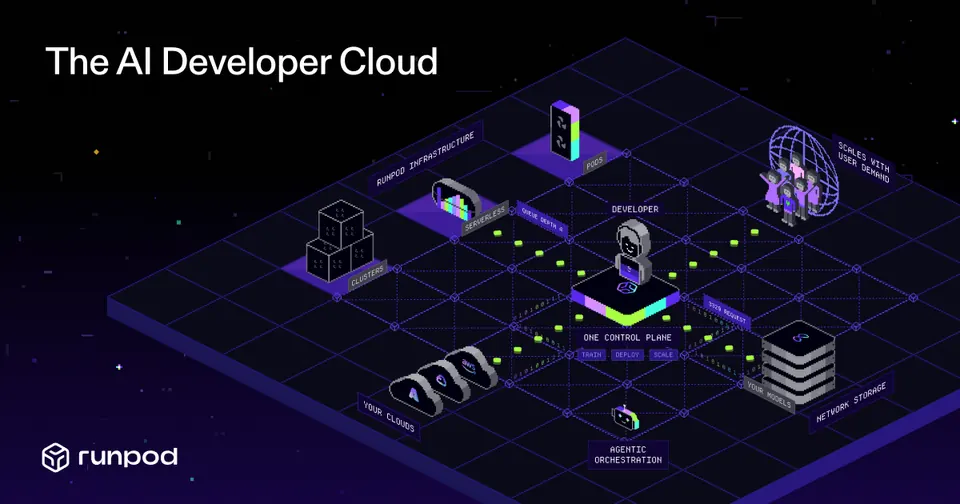
Runpod in our comparison of infrastructure tools is a GPU cloud of this kind. According to the vendor, it offers on-demand GPUs and serverless compute billed by usage:
Utilization: the number that decides your costs
Utilization is the share of paid GPU time that does useful work. On an hourly bill, an idle GPU costs the same as a busy one. Picture an internal assistant that runs on an always-on GPU but gets requests only during office hours: most of the paid hours are idle.
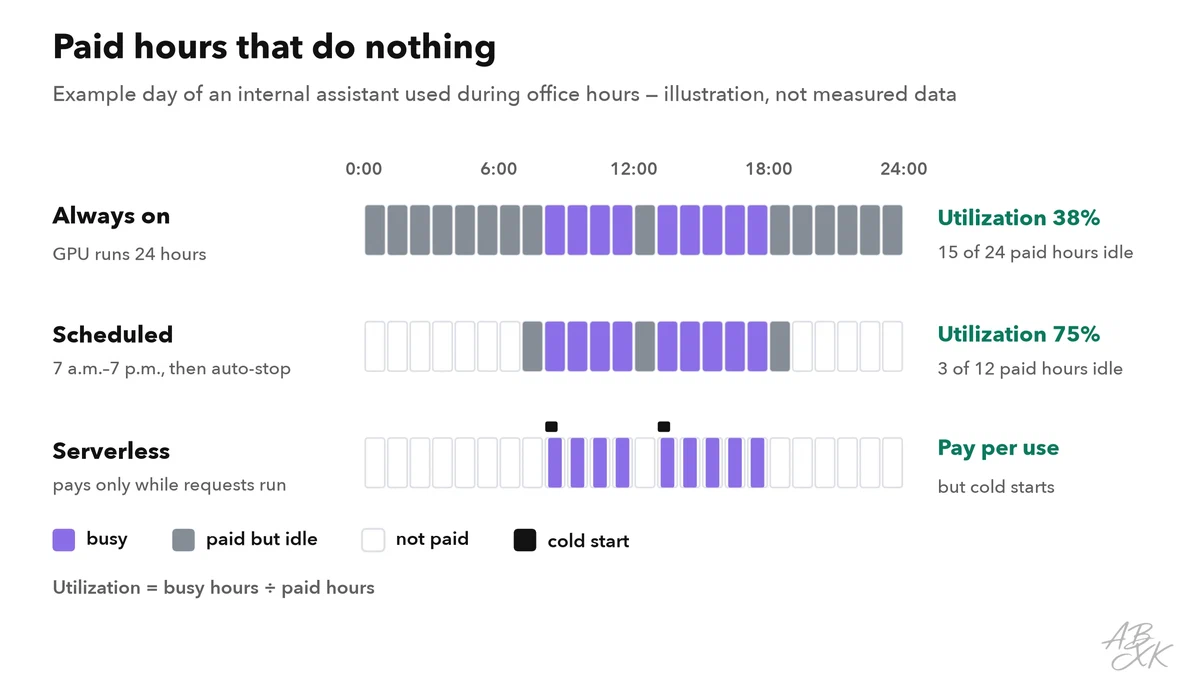
Three levers raise utilization:
- Batching: the GPU processes several requests at once. Throughput rises, and each single request waits slightly longer. Open-source inference servers such as vLLM add new requests to a running batch continuously. They also store the KV cache in small blocks, so more requests fit into the same memory (Source: Kwon et al., “PagedAttention”, SOSP 2023).
- Right-sizing: a 7B model in 4-bit does not need the largest GPU. Choose the smallest card that fits the model with headroom.
- Scheduling: run batch jobs at night on the same GPUs, and stop machines outside working hours.
Measure what you get for the money: GPU utilization and memory use (for example with the nvidia-smi tool), tokens per second, requests per hour and queue time. The key business number is the cost per request or per successful task: the hourly cost divided by the requests the GPU served in that hour. Compare it every month with the cost of the same work through an API. Our article on how we reduce AI development costs shows more levers.
Worked example: a nightly batch job on a rented GPU
A support team tags every new ticket by topic and urgency. Today, the app sends each ticket to a hosted API. The volume has grown to tens of thousands of tickets per night, the task is narrow, and nobody needs the result within seconds. That makes it a good candidate for a rented GPU. The team checks it in six steps:
- Baseline: measure the accuracy on 300 tickets that people labeled by hand, and the cost per 1,000 tickets with the current API.
- Candidate model: an open-weight model with about 8 billion parameters, tested with the same prompt. If the prompt alone is not accurate enough, fine-tuning with LoRA comes next; part 4 of this level compares the options.
- Memory: 8 billion × 1 byte in 8-bit ≈ 8 GB, plus about 20 percent ≈ 10 GB. A 24 GB GPU leaves room for batching.
- Billing model: the job runs once per night and can resume from the last finished ticket. Spot capacity or on-demand with auto-stop both fit; an always-on GPU does not.
- Measure: tickets per hour on the GPU. Cost per 1,000 tickets = hourly cost ÷ tickets per hour × 1,000.
- Decide: switch only if the accuracy on the 300 test tickets is at least as good as before and the cost per 1,000 tickets is clearly lower — including the hours your team spends on running the setup.
The numbers in this example are illustrations; your own measurements decide. Keep the API as a fallback for the first weeks, so a failed night does not leave tickets untagged.
Cost control checklist
Before you rent your first GPU, set up these controls:
- Budget and alerts per project, with a hard limit where the provider supports one.
- Auto-stop for idle machines and development environments.
- Labels on every resource, so you can see which project caused which cost.
- Storage cleanup: volumes and snapshots keep billing when the GPU is off.
- Checkpoints for every training run that takes longer than an hour.
- Quantization tests before you choose a larger GPU.
- Separation: keep the website and the database on normal hosting and put only the model on GPUs.
- A monthly comparison of the cost per task against a hosted API.
Point 7 is easy to overlook. The web app around a model — frontend, user accounts, database — runs fine on ordinary hosting, for example on a server managed with a control panel such as Plesk or on a platform such as Netlify. Only the inference service needs the GPU, and the self-hosting guide in Level 4 shows how to run it in production.



Short descriptions from our tool comparison, based on the vendors' information — not tested by ABXK.