

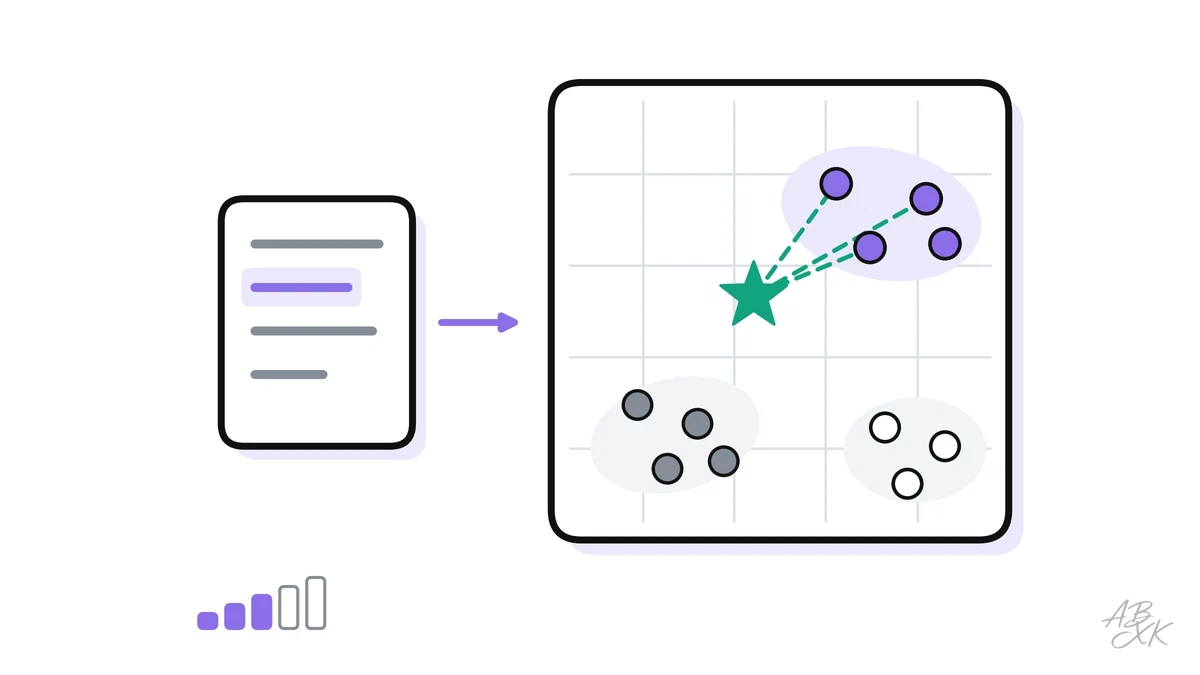
A customer types “Can I get my money back?” into your help center. The answer sits in an article called “Refund policy”, but the keyword search finds nothing, because the two texts share no words. Embeddings solve this problem. They turn text into numbers that capture its meaning, so software can find texts that mean the same thing even when the words differ.
This is part 1 of Level 2 (Intermediate) in our AI Development learning path. You will learn what an embedding is, how similarity search works, what a vector database adds and which settings matter in practice. Part 2 uses all of this to build a RAG pipeline step by step.
Embeddings turn meaning into coordinates
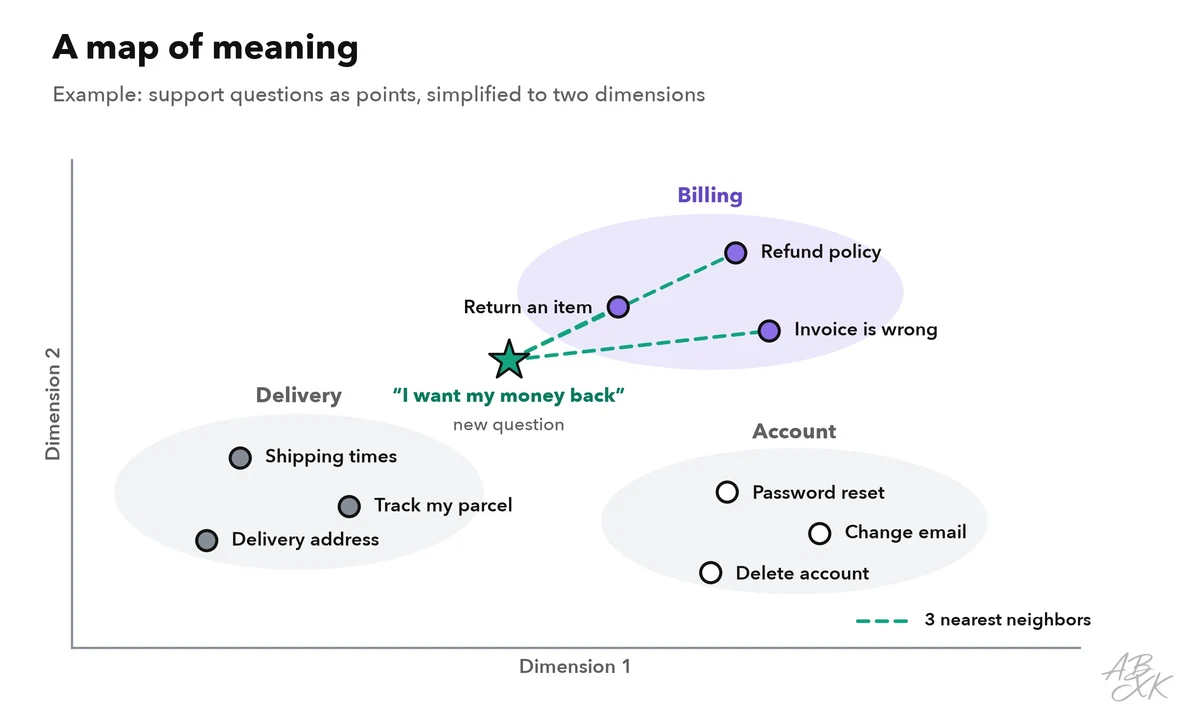
An embedding is a list of numbers, also called a vector, that an embedding model computes for a piece of text. Typical embedding models return several hundred to a few thousand numbers per text. You can read them as coordinates: every text becomes a point in a space with that many dimensions. Texts with a similar meaning end up close together. Unrelated texts end up far apart.
Nobody can picture hundreds of dimensions, so the figure squeezes the idea into two. Each dot is a short support question. The model was never told which topic a question belongs to. The groups appear because similar questions get similar numbers.
Three properties matter in practice:
- One model per index. Vectors from different embedding models live in different spaces. You must embed your documents and your search queries with the same model. When you switch models, you embed everything again.
- Meaning beats wording. “Money back” and “refund” land close together. With a multilingual embedding model, the German “Rückerstattung” lands there too.
- Similar is not the same as true. “The fee is refundable” and “The fee is not refundable” talk about the same thing, so their vectors can be very close. Embeddings find related text. They do not check facts.
How similarity search works
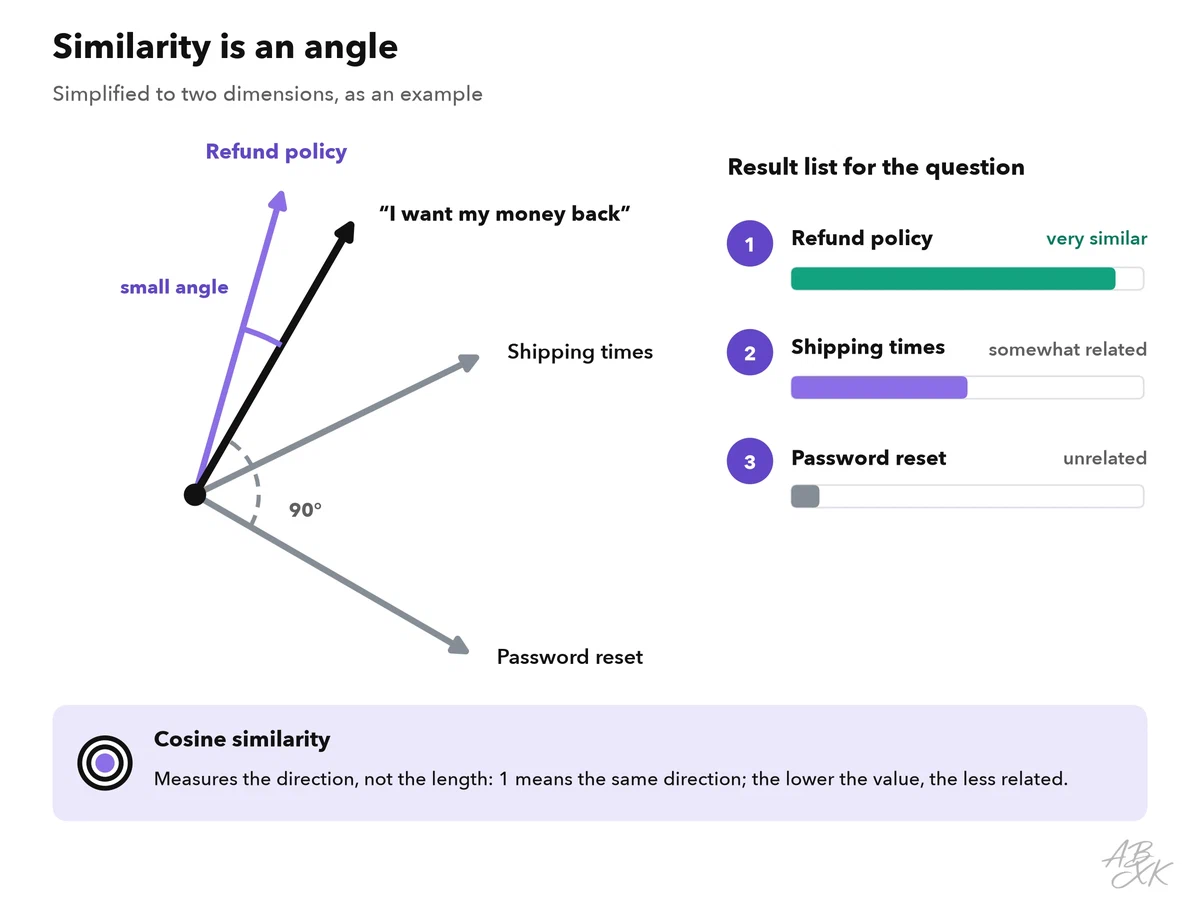
To search, you embed the question with the same model and compare its vector with the stored vectors. The closest ones are the best matches. Developers call this a nearest neighbor search. The number of results you ask for is called top-k, for example the top 5.
“Close” is usually measured with cosine similarity. It compares the direction of two vectors — in other words, the angle between them. A value of 1 means the same direction. The lower the value, the less related the texts. Some models are built for other measures, such as the dot product or the Euclidean distance. Use the measure that your model’s documentation recommends.
Two practical rules follow from this:
- Scores are relative. A score such as 0.8 means different things for different models. Never copy a threshold from a blog post. Find yours by testing real questions.
- Exact terms need help. Product codes, names and error numbers such as “E-4012” easily get blurred in a vector. Many systems therefore combine vector search with classic keyword search. This is called hybrid search.
Here is the whole idea in a few lines of Python. embed() stands for any embedding API or local model:
import numpy as np

def cosine(a, b):
    return np.dot(a, b) / (np.linalg.norm(a) * np.linalg.norm(b))

docs = ["Refunds are possible within 30 days.",
        "Shipping takes 2 to 4 business days.",
        "Reset your password under Settings."]
doc_vectors = [embed(d) for d in docs]        # once, when you build the index

question = embed("Can I get my money back?")  # same model for the question!
scores = [cosine(question, v) for v in doc_vectors]
best = scores.index(max(scores))
print(docs[best])  # -> "Refunds are possible within 30 days."
What a vector database adds
With a few thousand texts, your program can simply compare the question with every vector. With millions of vectors and many users, that gets too slow. A vector database stores the vectors and builds an index for approximate nearest neighbor search (ANN). The index finds almost the best matches, much faster than a full comparison. The price is a small loss of recall: now and then, a good match is missed. Common index types are graph-based (HNSW) or cluster-based (IVF). Most databases let you tune the balance between speed and recall.
A vector database stores more than numbers. Each record usually has four parts:
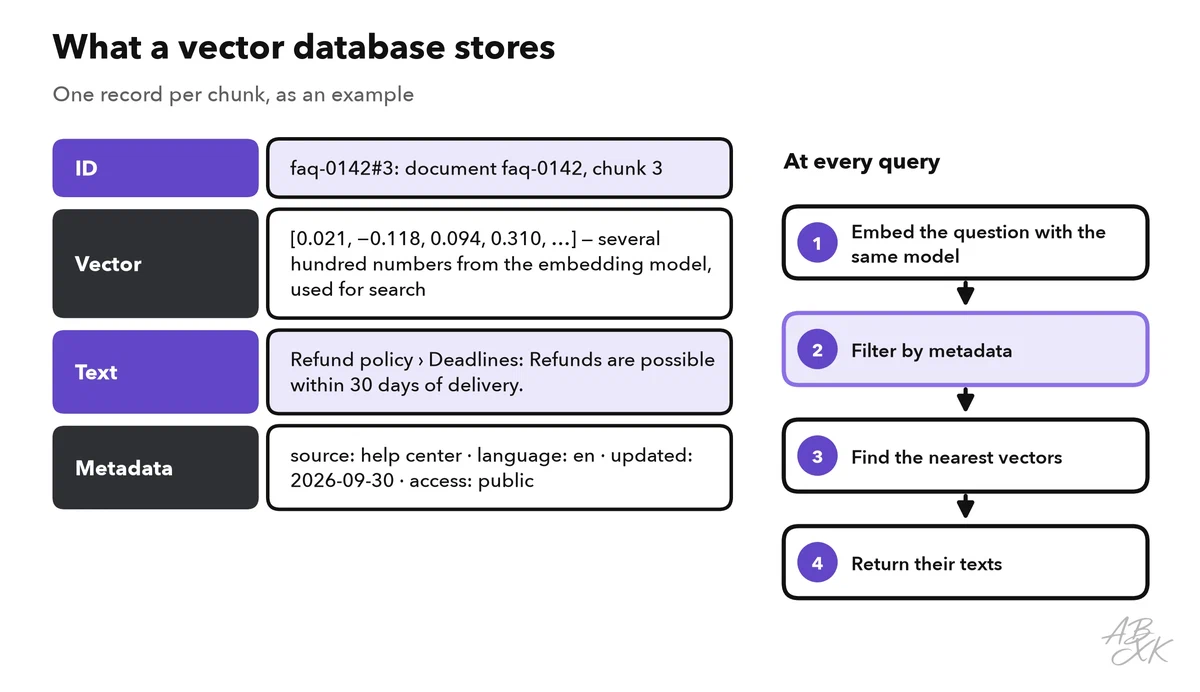
The metadata makes a vector database useful in a real product. With metadata filters, you can search only German texts, only documents updated this year, or only documents the current user is allowed to see. The last filter matters most. If search ignores permissions, an AI feature can show confidential content to the wrong person.
You do not always need a separate database. This table helps you choose:
| Situation | Good option | Why |
|---|---|---|
| Prototype or small data set (thousands of chunks) | Search in memory inside your app | No extra service to run |
| Your data already lives in PostgreSQL | A vector extension such as pgvector | One database, vectors next to your other data |
| Millions of vectors, many queries, little time for operations | A managed vector database such as Pinecone | The provider runs the index and the scaling |
| You do not want to build the pipeline yourself | A platform for AI apps on your own data, such as Devs.ai | Apps and agents on your data, according to the vendor |
Pinecone is listed in our tool comparison for AI Development as a managed vector database:
Some teams run an open-source embedding model themselves, for example to keep full control over the model and its version. Small embedding models run on an ordinary CPU. For large batch jobs, GPU clouds such as Runpod rent compute by usage, according to the vendor.
Chunk size: how much text goes into one vector
Long documents are split into chunks, and each chunk gets its own vector. One vector for a 40-page manual would blur all its topics into a single point. Also, the model that later writes an answer needs short, relevant passages, not whole files.
The size of a chunk is a trade-off:
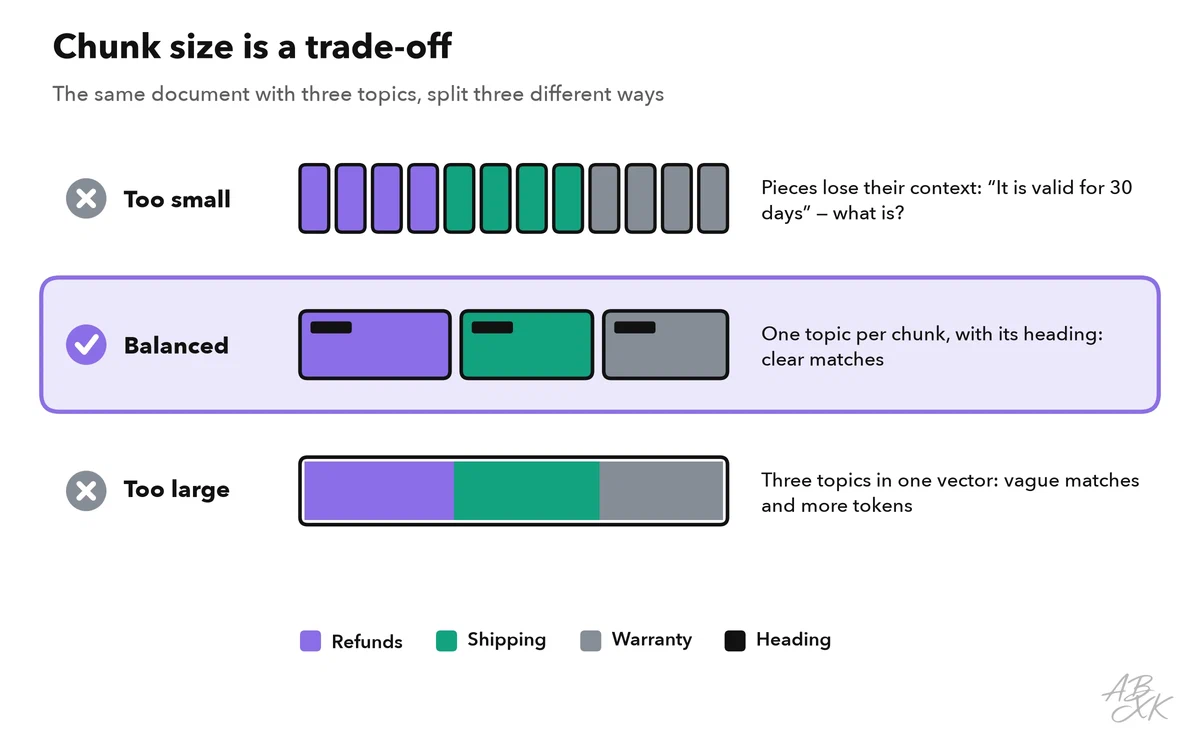
- Too small: a chunk like “It is valid for 30 days” has lost its context. What is valid?
- Too large: a chunk that covers refunds, shipping and warranty gets a vague vector. It matches many questions a little and none of them well. It also costs more tokens when you send it to a model later.
A practical starting point: split along the structure of the document (headings, paragraphs, list items), aim for a few hundred tokens per chunk, and let neighboring chunks overlap by a sentence or two. Add the document title and the heading to each chunk. Then “It is valid for 30 days” becomes “Refund policy › Deadlines: It is valid for 30 days”. Test with real questions and adjust. If tokens are new to you, read APIs, tokens and context windows from Level 0 first.
Where embeddings help beyond chatbots
Embeddings are best known as a part of RAG, where they find the passages a chatbot needs. But they solve many other problems without generating any text:
| Use case | How embeddings help | Example |
|---|---|---|
| Semantic search | Finds matches by meaning, not by keyword | Help center, intranet, product search |
| Duplicate detection | Very close vectors mean nearly identical content | Merge tickets that describe the same bug |
| Recommendations | Shows items close to what someone just read | “Similar articles” under a blog post |
| Clustering | Groups thousands of texts into themes | Sort customer feedback into topics |
| Classification | Compares a new text with labeled examples | Route a ticket to billing or support |
| Outlier detection | Texts far away from every group stand out | Spot unusual requests in a queue |
Mistakes that cost you later
Most problems with embeddings do not show up in a demo. They appear weeks later, when data changes or the index grows. These six are the most common:
| Mistake | What happens | Better |
|---|---|---|
| Switching the embedding model without a new index | Questions and documents live in different spaces; results look random | Store the model name with the index; embed everything again after a switch |
| Relying on vectors alone | Product codes, names and error numbers get lost | Add keyword search (hybrid search) |
| Storing vectors without metadata | No filters for language, date or permissions | Save source, date, language and access group with every chunk |
| Copying a similarity threshold | Too many or too few results | Choose thresholds by testing your own questions |
| Forgetting updates and deletions | Old or deleted content still shows up | Update or delete vectors whenever the source changes |
| Treating vectors as harmless numbers | Sensitive text can partly be recovered | Protect vectors like the original text |
The last point surprises many developers. In one study, researchers reconstructed most short test texts exactly from their embeddings (Source: Morris et al., “Text Embeddings Reveal (Almost) As Much As Text”, EMNLP 2023, arxiv.org). So if a text is confidential, its vector is confidential too. Store both only in services that your company has approved for that kind of data.