

In your first API call, the request named a placeholder model. In a real app, this one field is among your most important decisions. It sets the quality of the answers, how long users wait and what each request costs. There are many candidates: our LLM database alone lists 343 models.
This is part 4 of Level 1 in our AI Development learning path. You will learn which criteria matter and how they pull against each other. You will also see what open and closed weights mean for your app and how to test a shortlist on your own data. It helps to know the basics of tokens and context windows from Level 0.
Start with your task, not with a ranking
Rankings show which model is strongest on average across many tests. Your app needs something else: a model that does your task well enough, fast enough and at a cost you can carry, under your data rules. That is often not the model at the top of a ranking.
So write down two things before you look at any model:
- The task in one sentence, for example “Answer customer questions from our help articles in English and German.”
- The hard requirements: things a model must meet, or it is out. Must the data stay in the EU or on your own servers? Which languages? How long are the inputs? Will users upload images or PDF files? How quickly must the answer start?
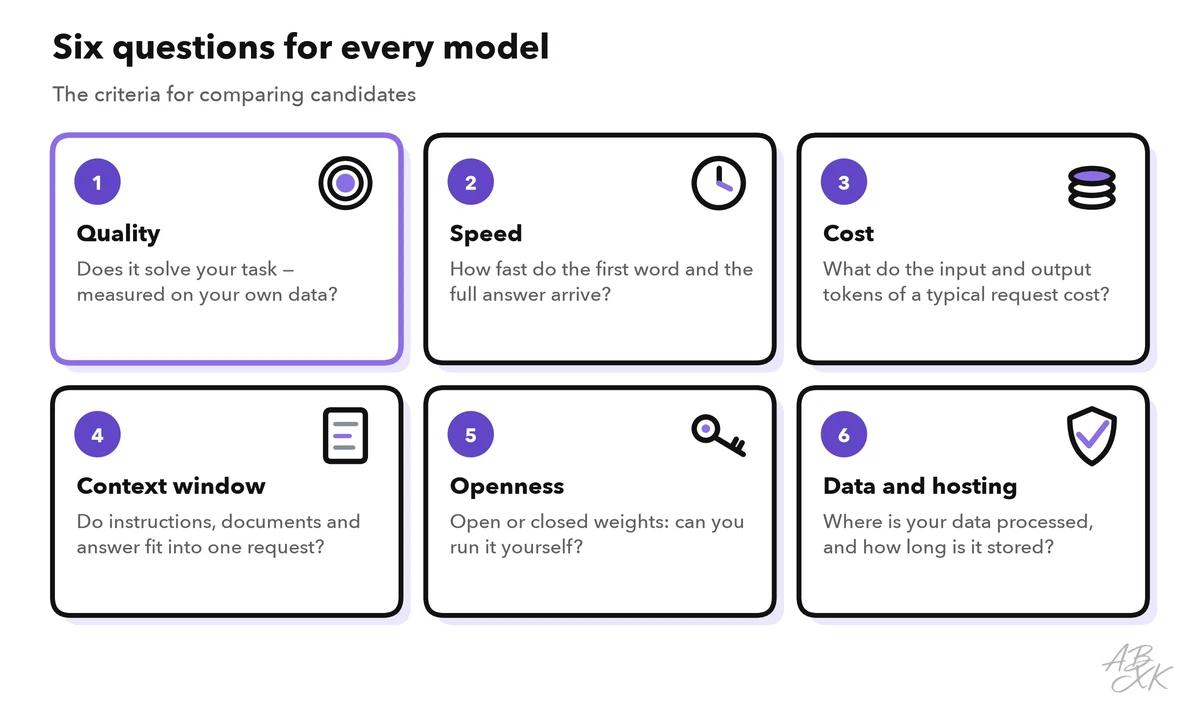
With these notes, you can ask the same six questions of every candidate:
Quality, speed and cost pull against each other
Quality means how well a model solves your task. General benchmarks give a first idea. A useful overview is the Epoch Capabilities Index (ECI), which combines the results of many benchmarks into one number per model. These are the current leaders in our data:
| # | Model | Released | Result |
|---|---|---|---|
| 1 | Claude Opus 5.5 Anthropic | Sep 22, 2026 | 166.8 |
| 2 | GPT-6 Astra OpenAI | Sep 3, 2026 | 166.4 |
| 3 | GPT-6.1 Sol OpenAI | Sep 29, 2026 | 166.3 |
| 4 | Claude Fable 5.1 Anthropic | Sep 1, 2026 | 164.7 |
| 5 | Gemini 4 Argon Google DeepMind | Sep 30, 2026 | 164.6 |
| 6 | Claude Sonnet 5.5 Anthropic | Sep 28, 2026 | 164.4 |
| 7 | Claude Opus 5 Anthropic | Jul 24, 2026 | 162.6 |
| 8 | GPT-6 Sol OpenAI | Sep 22, 2026 | 162.6 |



Combines the results of more than 50 benchmarks into one number per model, so that models can be compared even if they were never tested on the same benchmarks. It is an index, not a percentage: Epoch AI scales it so that Claude 3.5 Sonnet stands at 130 and GPT-5 at 150. Data: Epoch AI, retrieved on October 17, 2026, licensed CC BY 4.0. All models: LLM database.
A high rank tells you that a model is strong in general. It does not tell you how well it handles your support tickets, your product data or your language. Only a test with your own inputs can show that — the last section explains how.
Speed, also called latency, has two parts. The time to first token is how long it takes until the answer starts. The output speed is how many tokens per second the model writes after that. Large models and reasoning models, which work through a problem step by step before they answer, are often slower. With streaming, users see the answer while it is written, so the wait feels shorter.
Cost depends on the tokens of each request. APIs bill input and output tokens separately, with different prices for each model. A larger model usually costs more per token, and reasoning adds output tokens that you also pay for. Compare the cost of a typical request with your own token counts, not only the price list.
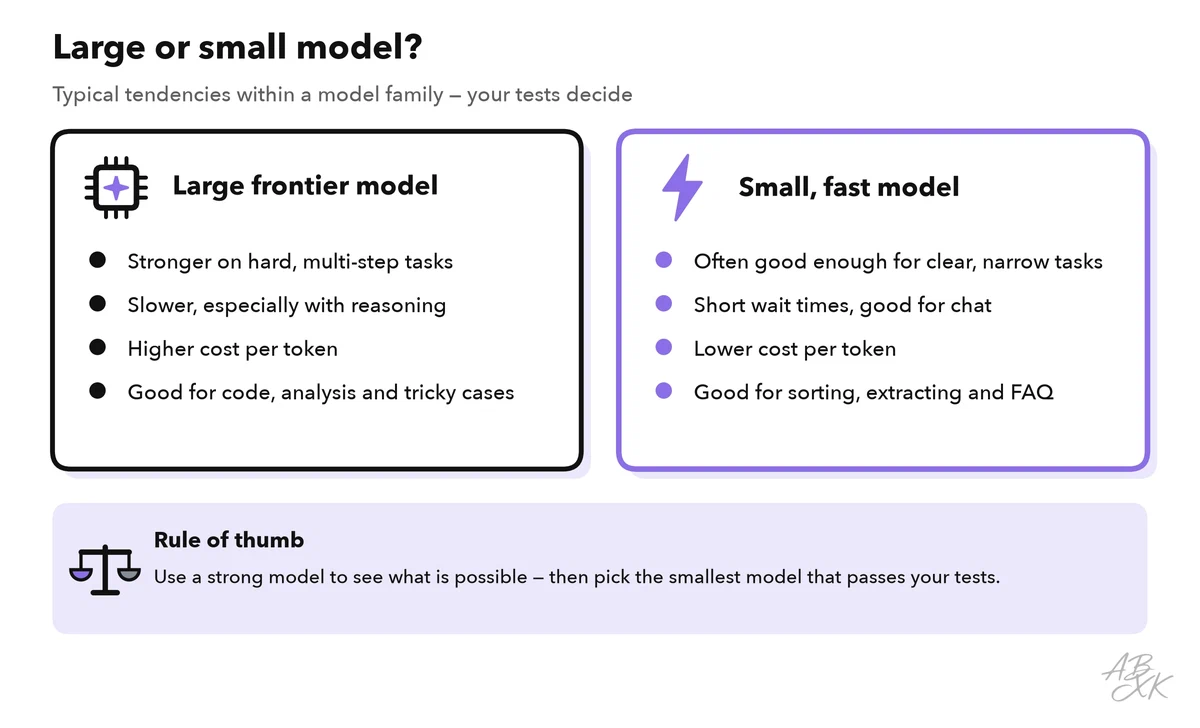
Within a model family, these three criteria usually move together: the larger model is stronger, slower and more expensive.
The context window is the fourth criterion: it has to hold your instructions, documents, chat history and the answer. A larger window is not automatically better, because every token you send costs money and time.
Open or closed weights
The weights are the numbers a model learned during training. With open weights, the model files are published. You can run the model on your own hardware or on rented GPUs, and many hosting services also offer such models through an API. With closed weights, you can only use the model through the provider’s API or app. In our database, 172 models have open weights and 160 are closed.
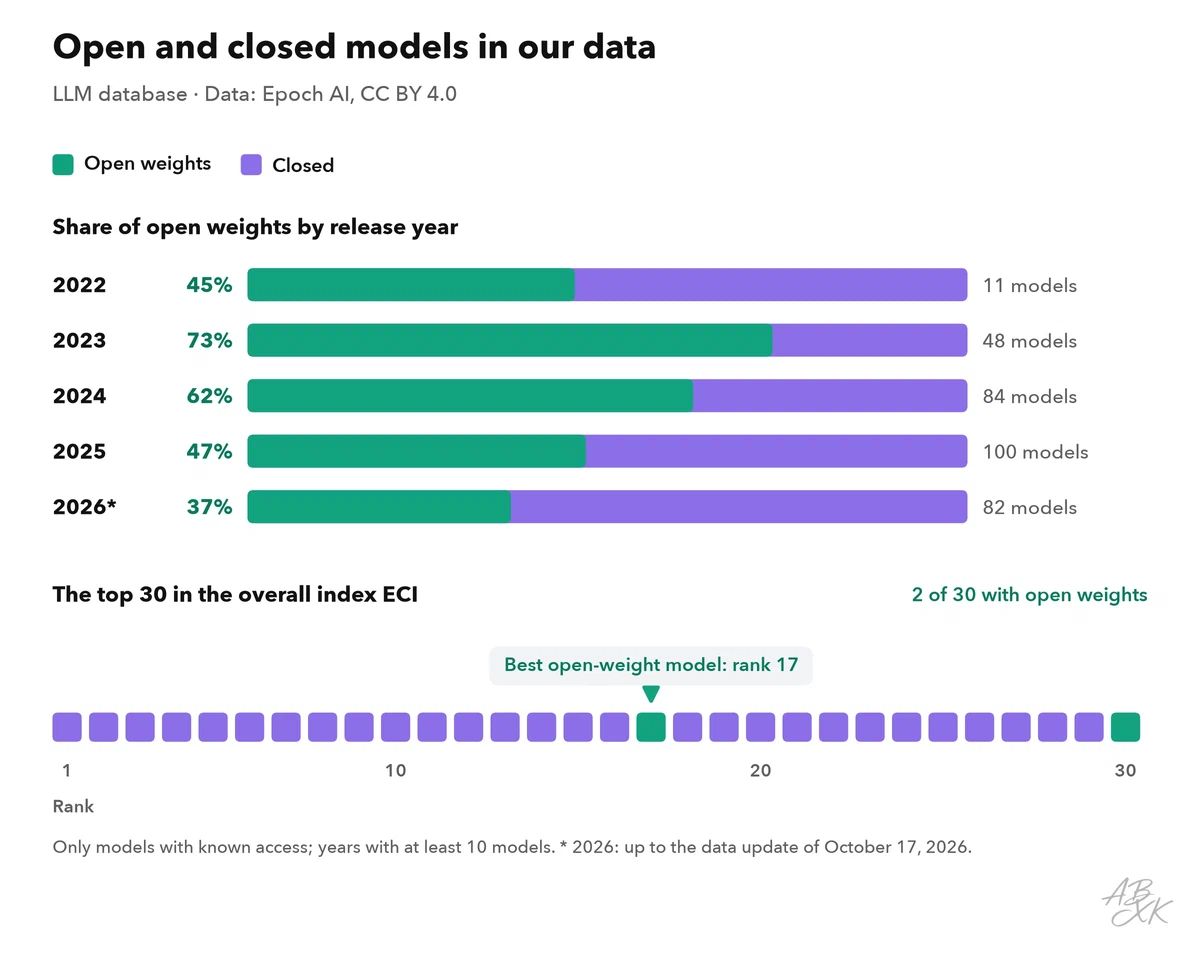
The figure shows two views of the same data: what share of the new models in our database came with open weights each year, and where open-weight models stand in the overall ranking. Our database lists models with published test results, so it shows these models, not every model on the market. Here are a few strong open-weight models from our data:
| Model | Released | Weights | ECI | Rank |
|---|---|---|---|---|
| Kimi K3 Moonshot | Jul 16, 2026 | open | 157.4 | 17 |
| DeepSeek V4.1 Flash DeepSeek | Sep 9, 2026 | open | 155.6 | 31 |
| DeepSeek V4 Pro 0813 DeepSeek | Aug 13, 2026 | open | 155.3 | 32 |
| GLM-5.3-Flash Z.ai (Zhipu AI) | Aug 20, 2026 | open | 153.2 | 45 |
| Qwen 3.8 27B Alibaba | Aug 14, 2026 | open | 151.6 | 52 |




ECI = Epoch Capabilities Index, one overall score across many benchmarks; rank among all models with an ECI. Data: Epoch AI, retrieved on October 17, 2026, licensed CC BY 4.0. All models: LLM database.
A number such as 27B in a model name usually gives the number of parameters, here 27 billion. As a rough guide, more parameters need more GPU memory and more computing power.
The choice between the two groups is about control and effort:
| Open weights | Closed weights | |
|---|---|---|
| Where it runs | Where you decide: your servers, a GPU cloud, a hosting service | At the provider |
| Your data | Can stay in your own environment | Goes to the provider, under its terms |
| Versions | You keep the files as long as you like | The provider updates and retires versions |
| Adapting | Fine-tuning is possible on your own hardware | Only where the provider offers it |
| Effort | You run, scale and secure the setup — or pay a host | Little: an API key is enough |
| License | Varies; some licenses restrict certain uses | Set by the provider’s terms of service |
“Open weights” does not always mean “open source”. Some licenses limit commercial use, set conditions for very large services or require you to name the model. Read the license before you build on a model. If you want to run an open-weight model yourself, a GPU cloud such as Runpod rents the hardware, billed by usage according to the vendor. Level 3 explains when renting GPUs makes sense.
Questions to ask before you commit
Benchmarks do not answer the questions about data and operations. Find the answers in the provider’s documentation, terms and data processing agreement:
| Question | Why it matters |
|---|---|
| Are your API inputs used to train models? | Inputs may contain customer data or trade secrets |
| Where is data processed and stored? | Some data rules require a region, such as the EU |
| How long are inputs and outputs kept? | Shorter storage means less risk |
| Is there a data processing agreement? | Under the GDPR, a provider that processes personal data on your behalf needs one (Article 28) |
| Can you use a fixed model version, and when will it be retired? | A silent change or a retirement can break your app |
| Does the model support what your app needs? | For example JSON output, tool calling, images or your languages |
Test your shortlist on your own data
Now narrow the field. Drop every model that fails a hard requirement, and pick two to four candidates of different sizes — ideally from at least two providers. Then test them all with the same prompt.
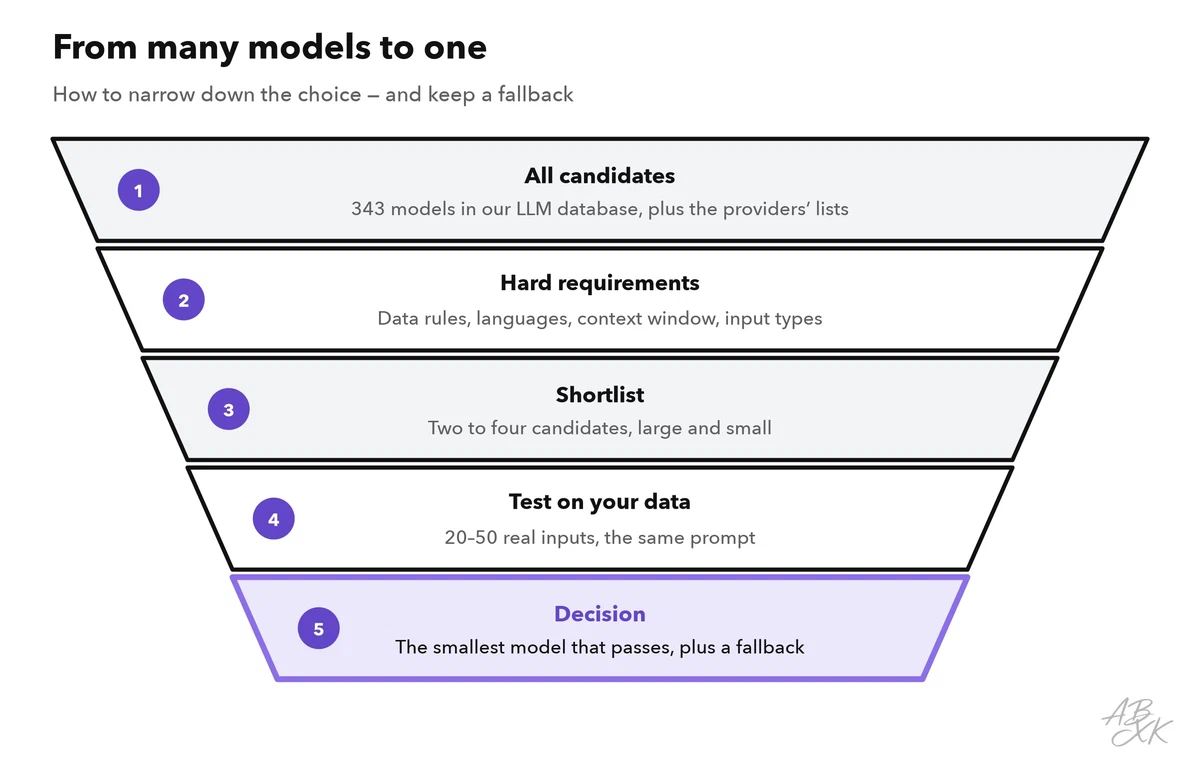
- Collect 20 to 50 real inputs with the result you expect for each. Include easy, typical and tricky cases. If you versioned your prompts as shown in part 2, you already have such a test set.
- Run every candidate with the same prompt and settings, and record the answer, the time and the tokens of each request.
- Score the answers. Mark each one as correct or not, or use a simple scale. Level 2 turns this into automated evals.
- Calculate the cost per 1,000 requests from the token counts and the provider’s current prices.
- Decide. Choose the smallest or cheapest model that meets your quality bar. Keep the runner-up as a fallback, ideally from another provider, for outages.
A short script does steps 2 and 4 for you. It uses the request from part 1 and writes one row per answer into a CSV file that you can open in a spreadsheet:
import csv
import os
import time

import requests

URL = "https://api.example.com/v1/chat"                  # your provider's endpoint
HEADERS = {"Authorization": f"Bearer {os.environ['LLM_API_KEY']}"}
CANDIDATES = ["model-large", "model-medium", "model-small"]  # model IDs from the docs
SYSTEM = open("prompts/faq_v3.txt").read()               # the same prompt for every model

with open("tests.csv", newline="") as f:                 # columns: question, expected
    tests = list(csv.DictReader(f))

with open("results.csv", "w", newline="") as f:
    out = csv.writer(f)
    out.writerow(["model", "question", "expected", "answer", "seconds", "tokens_in", "tokens_out"])
    for model in CANDIDATES:
        for t in tests:
            start = time.perf_counter()
            r = requests.post(URL, headers=HEADERS, timeout=60, json={
                "model": model,
                "messages": [{"role": "system", "content": SYSTEM},
                             {"role": "user", "content": t["question"]}],
                "max_tokens": 400,
            })
            r.raise_for_status()
            data = r.json()                              # layout as in part 1; it varies by provider
            out.writerow([model, t["question"], t["expected"], data["output"][0]["text"],
                          round(time.perf_counter() - start, 2),
                          data["usage"]["input_tokens"], data["usage"]["output_tokens"]])
Run each test more than once if answers vary, and look at the slowest answers, not only at the average. A model that is fast most of the time but sometimes takes much longer can still frustrate your users.
Which model for which app: a decision table
Your test results decide, but this table gives you a sensible starting point for the shortlist:
| Your app | Start with | Watch out for |
|---|---|---|
| Answers from your documents (FAQ, support) | A small or mid-size model with enough context for your passages | Many wrong answers come from the search, not the model — check the passages first |
| Sorting, tagging, extracting data as JSON | A small, fast model | Edge cases; check the JSON in code |
| Drafts and summaries that people edit | A mid-size model | Tone and length; a person still reviews |
| Coding help, complex analysis, multi-step agents | A model near the top of the overall ranking | Time and cost per task |
| Live chat or voice with short replies | A fast model, with streaming | Time to first token |
| Data that must stay on your servers | An open-weight model on your own or rented hardware | License terms; the effort of running GPUs |
| Long contracts or manuals | A model with a large context window — or a search over your documents instead | Cost per request; details lost in long inputs |
Check your choice again from time to time. New models appear often, and providers retire older versions. Because your test set and script already exist, checking a new candidate takes an hour, not a project.