

A chatbot answers a question. An AI agent works toward a goal. It decides the next step, uses tools such as a search or a database and reads the result. Then it continues until the job is done — or until a rule stops it. That small difference changes how you build, test and control the system.
This is part 1 of Level 3 (Advanced) in our AI Development path. You will build the agent loop step by step, choose tools and memory, set stop rules and approvals, and see how far today’s models get on long tasks. It builds on structured output and function calling from Level 2.
The agent loop: plan, act, observe
An agent is a program in which a large language model (LLM) chooses the next action in a loop. Your code gives the model a goal and a list of tools. The model answers either with a tool call or with a final result. Your code runs the tool, adds the result to the conversation and asks the model again.
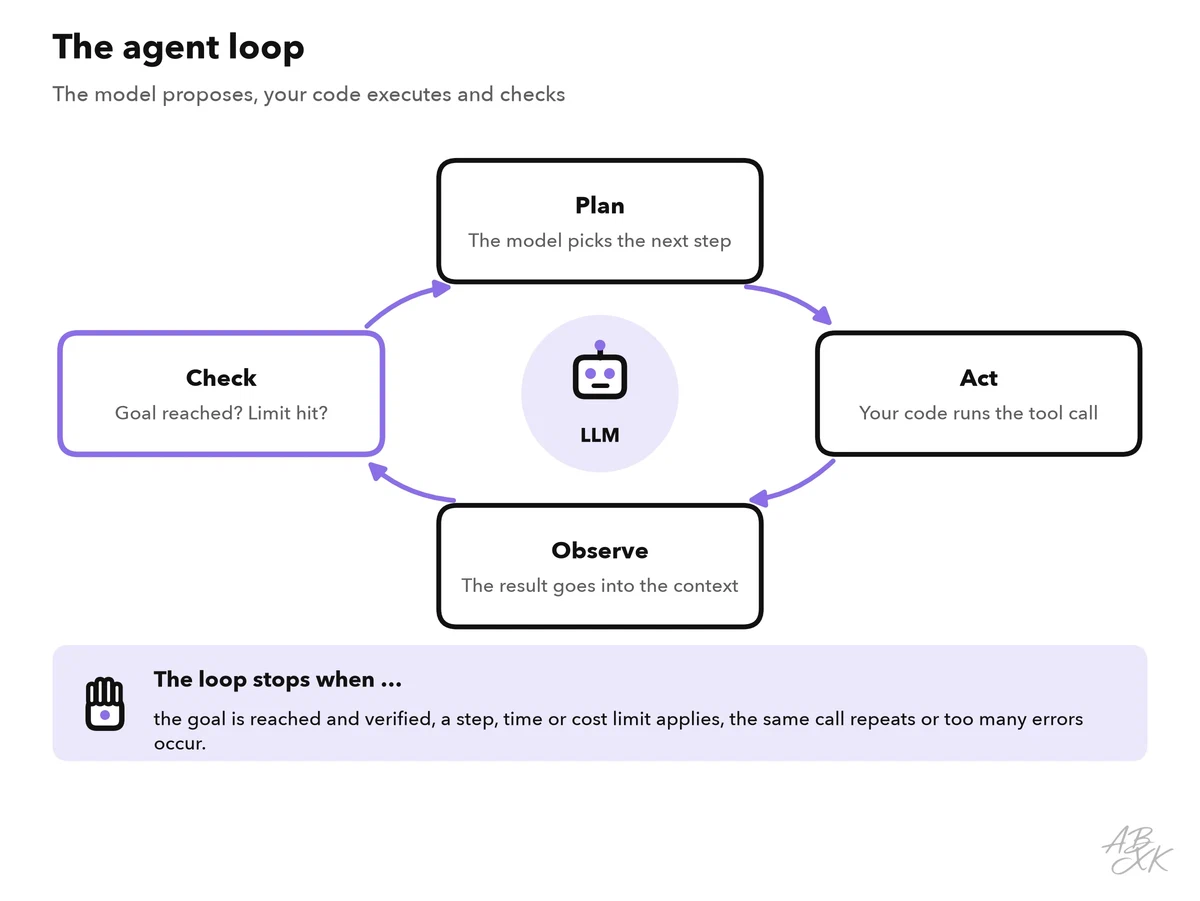
This pattern became known as ReAct (reasoning plus acting), after a 2022 paper by Yao and colleagues. In practice, the loop looks like this:
messages = [system_prompt, user_goal]
for step in range(MAX_STEPS):               # hard limit
    reply = model(messages, tools=TOOLS)
    if reply.tool_call is None:              # the model says it is done
        return verify(reply.text)            # your check, not the model's word
    call = reply.tool_call
    if needs_approval(call) and not human_approves(call):
        messages.append(tool_result(call, "Rejected by the user."))
        continue
    result = run_tool(call)                  # your code acts, not the model
    messages.append(tool_result(call, result))
raise StepLimitReached()
Two details matter more than they seem. First, the model never executes anything itself: it only proposes a call, and your code decides whether to run it. Second, every line of the loop is a control point — for limits, approvals, logging and checks.
Not every task needs an agent. If you know the steps in advance — fetch an invoice, extract the fields, save them — a fixed workflow is cheaper, faster and easier to test. Use an agent when the path depends on what the system finds along the way, for example when it researches a customer problem across several sources.
Tools: what the agent is allowed to do
A tool is a function you offer to the model: a name, a description and a parameter schema. The model picks a tool and fills in the arguments; your code validates them and runs the function. Good tools follow a few rules:
- Few and clear. Five well-named tools work better than thirty that overlap. The description says when to use the tool and when not to.
- Strict parameters. Use fixed value lists and required fields, and reject invalid calls with a readable error, such as “No order with ID 4711”. The model can recover from a clear error message.
- Short results. Return the fields the model needs, not a whole web page. Long tool results fill the context and push out the goal.
- Safe to repeat. A write tool should not create a second ticket when the model calls it twice. An idempotency key — a unique ID per action — prevents duplicates.
- Least privilege. Give the agent read-only access where possible and its own narrowly scoped API keys, never an admin account.
Part 3 of Level 2 sorted single tool calls by their effect. In an agent, the model chains such calls without a person in between, so the risk grows with what each tool can change:
| Tool type | Example | Main risk | Control |
|---|---|---|---|
| Read | Search help articles, query the CRM | Private data enters the context; hidden instructions in content | Filter results by the user’s permissions; treat content as data |
| Write | Create a ticket, update a record | Wrong or duplicate changes | Validation, idempotency keys, change log |
| Send | Email a customer, start a payment | External effect, hard to undo | Human approval, rate limits |
| Execute | Run code or shell commands | Almost anything | Sandbox without network access, time limits |
You do not have to write the loop yourself. No-code platforms in our comparison let you set instructions, tools and triggers in an interface. According to the vendors, MindStudio and Turbotic build agents and automations without code. Devs.ai is aimed at teams that build agents on company data, and Browse AI can serve as a data source that reads websites:




Short descriptions from our tool comparison, based on the vendors' information — not tested by ABXK.
Memory: what the agent keeps between steps
The model itself remembers nothing between two calls. Everything it knows about the task must be in the context you send — so “memory” is something your code builds. Four kinds are useful:
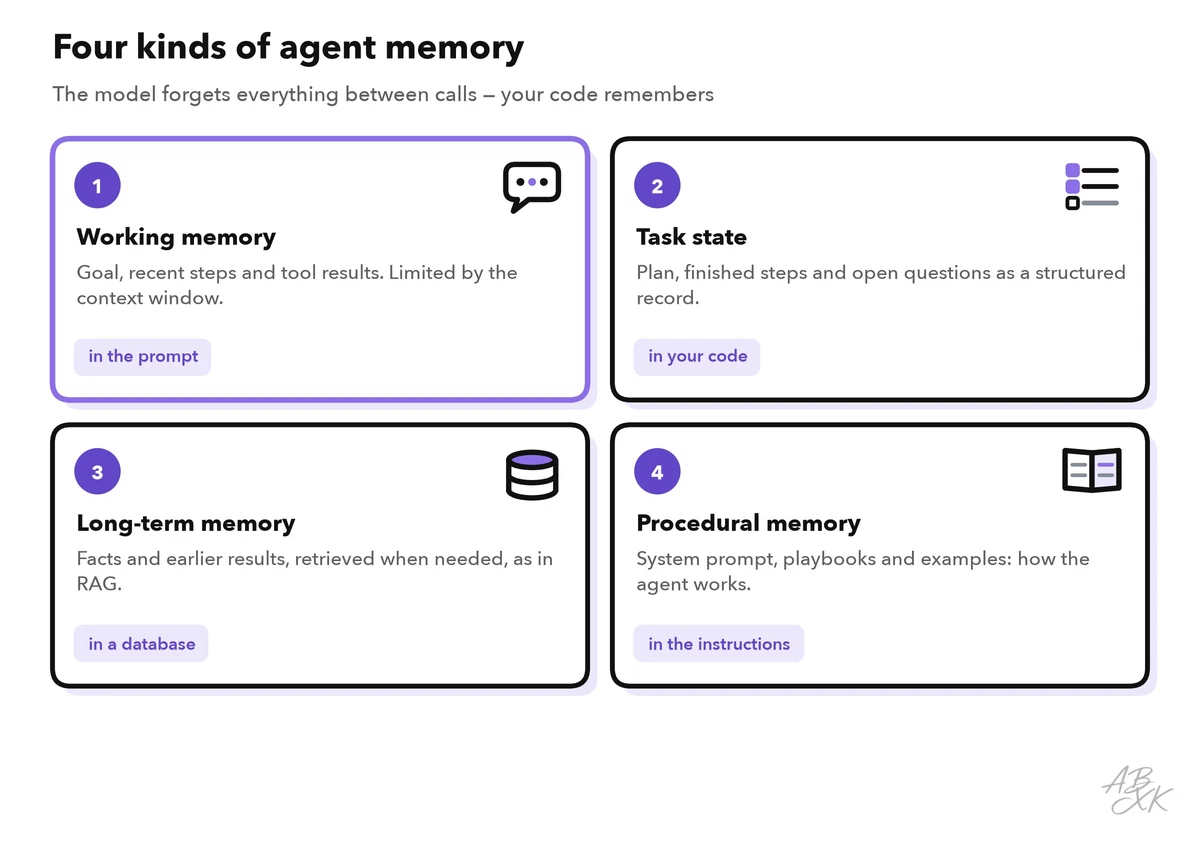
- Working memory is the current context: goal, recent steps and tool results. It grows with every step until the context window is full.
- Task state is a structured record your code keeps outside the model: the plan, finished steps, open questions. You insert a compact version into each prompt.
- Long-term memory stores facts and results in a database or vector store and retrieves them when they are relevant — the same idea as retrieval in RAG.
- Procedural memory is the know-how: system prompt, playbooks and examples that tell the agent how to work.
When the context fills up, summarize older steps and keep only references (for example, document IDs) instead of full texts. Give stored memories an expiry date, and do not keep personal data longer than you need it. Treat memory like any other input: a wrong or manipulated note can mislead every later run.
Stop rules and human approval
An agent without stop rules can run in circles and waste tokens. Set several limits, because each one catches a different problem:
- a maximum number of steps per task,
- a token or cost budget per task,
- a time limit,
- loop detection: the same tool call with the same arguments twice in a row,
- an error limit: several failed tool calls in a row,
- a real success check — tests pass, the form validates — instead of the model’s own “done”.
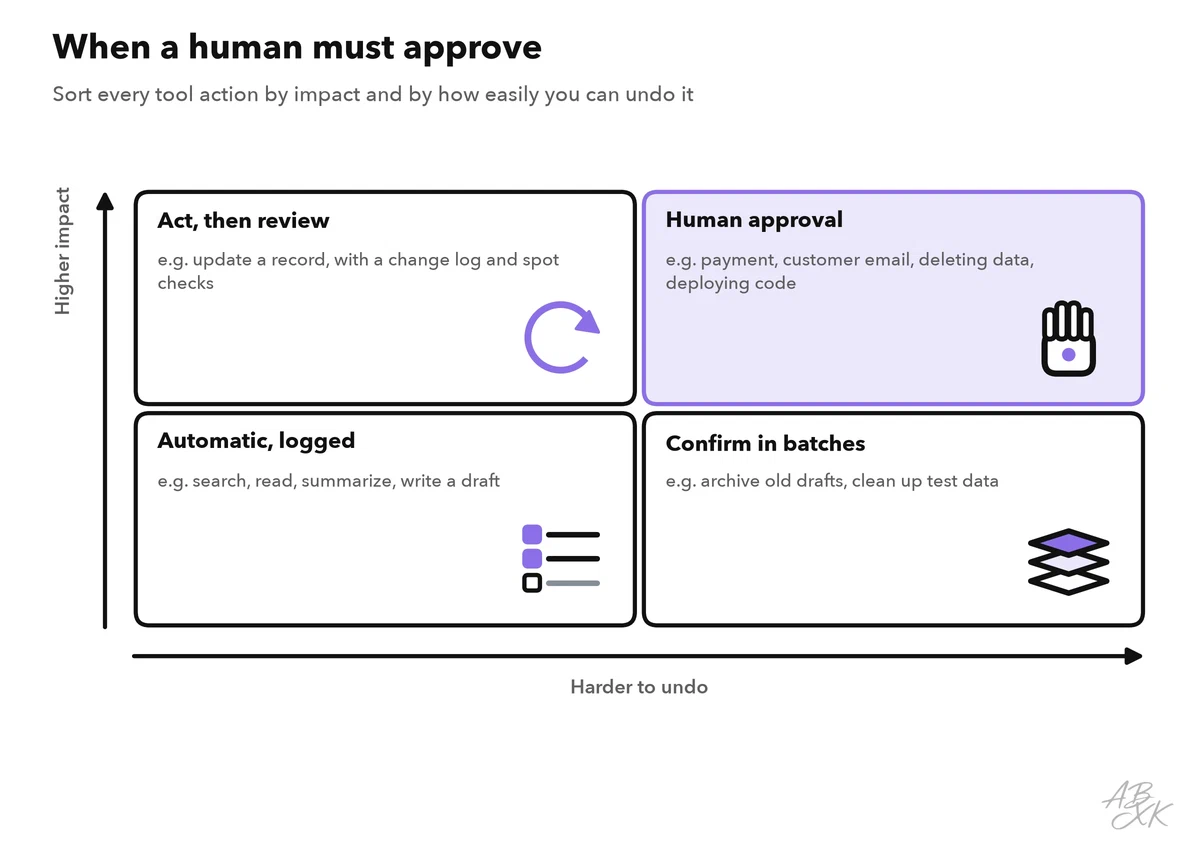
Approval is the second safety net. Not every action needs a human, but some always do. A simple rule sorts actions by their impact and by how easily you can undo them:
Typical failure modes and how to spot them
Agents fail in ways you can recognize. Your logs should make each of them visible:
- Loops. The agent repeats a search with tiny changes. Sign: many similar tool calls. Fix: loop detection and a step limit.
- Wrong tool or wrong arguments. Sign: validation errors, empty results. Fix: clearer tool descriptions and examples.
- Invented results. The model claims it sent an email that was never sent. Fix: report only what real tool results confirm.
- Goal drift. The agent solves a side problem instead of the task. Fix: repeat the goal in the task state and review the plan after each step.
- Lost context. In long runs, the original goal falls out of the context. Fix: summarize older steps and keep the goal at the top.
To find these problems, record every step as a trace: tool, arguments, result, tokens and time. Part 5 of this level shows how to set up observability for LLM apps.
How long tasks can agents handle today?
A useful measure of autonomy is the time horizon from the research organization METR. It is the length of tasks that a model completes successfully about half of the time, measured by how long a skilled human needs for them. The tasks are multi-step software and reasoning tasks. These are the current leaders in our LLM data:
| # | Model | Released | Result |
|---|---|---|---|
| 1 | Claude Mythos Preview (Early) Anthropic | Apr 7, 2026 | 17 h 25 min |
| 2 | Claude Opus 4.6 (unknown thinking) Anthropic | Feb 5, 2026 | 11 h 59 min |
| 3 | Gemini 3.1 Pro Preview Google DeepMind | Feb 19, 2026 | 6 h 24 min |
| 4 | GPT-5.2 (high) OpenAI | Dec 11, 2025 | 5 h 52 min |
| 5 | GPT-5.3 Codex OpenAI | Feb 5, 2026 | 5 h 50 min |



The length of the tasks a model completes correctly about half of the time, measured by how long a human expert needs for them. The number is a duration, not a score: a longer horizon means the model can work on its own for longer. Data: Epoch AI, retrieved on October 17, 2026, licensed CC BY 4.0. All models: LLM database.
The chart shows how the record has grown since the first measured models. The vertical axis is logarithmic: each step up multiplies the task length.
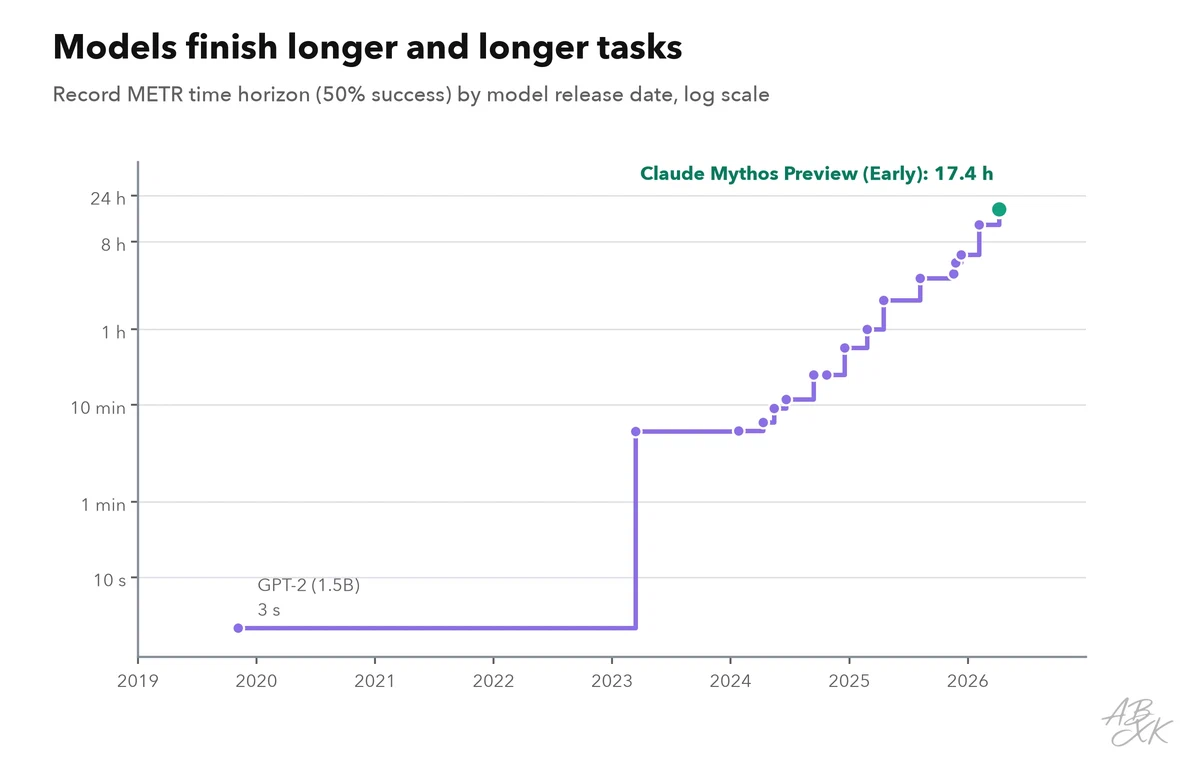
In its original 2025 study, METR reported that this horizon had doubled roughly every seven months over the previous six years (Source: METR, “Measuring AI Ability to Complete Long Tasks”, 2025, metr.org). Read the number with care. Fifty percent success means that half of such tasks still fail. For work that must succeed reliably, give agents much shorter tasks, or add checks and approvals. Also, the tasks come from software and reasoning work — your domain may be easier or harder. All models with their release dates are in our LLM database.
Worked example: a support triage agent
Here is how the pieces fit together in a small, realistic agent. Its goal: answer a customer question about an order, or hand it over to a person.
- Tools:
find_order(read),search_help_center(read),draft_reply(writes a draft, sends nothing),escalate_to_human(creates a ticket for the team). - Memory: working memory holds the conversation; the task state stores the order ID and the help articles already read.
- Stop rules: at most eight steps, a token budget per ticket, stop after two failed tool calls in a row.
- Approvals: the agent never sends anything itself. At first, a person approves every draft; later, only refunds and complaints.
- Success check: the draft must cite a help article and name the correct order status.
- Test before launch: run the agent on 30 past tickets and measure the success rate, steps per ticket, cost per successful ticket and how often it handed over.
Start with the strictest setup and loosen it step by step — only where your measurements show that the agent works reliably. If one agent is not enough for a task, Level 4 shows patterns for multi-agent systems.