

Most AI apps do not run a language model themselves. They send text to a model at a provider and get text back. Three ideas shape this exchange: the API that carries each request, the tokens in which the model counts every piece of text, and the context window that limits how much text fits into one request. Together, they decide what your app can do, how quickly it answers and what it costs.
This is part 3 of Level 0 in our AI Development learning path. You need no programming knowledge. You will learn what an API and an API key are, how text turns into tokens, what fits into a context window, why providers limit your requests and why you pay per token. Part 2 showed the parts of an AI app. This part looks closely at the line between your app and the model.
What an API is
Part 1 described an API (application programming interface) as a fixed way for two programs to exchange data. For a language model, the API is a web address at the provider, called an endpoint. Your app sends a request to it: which model should answer, your instructions and the user’s text. The provider runs the model and sends back a response: the answer, plus facts about the request, such as the number of tokens it used.
You may know the same models from chat apps. The API is a second way in, built for programs instead of people:
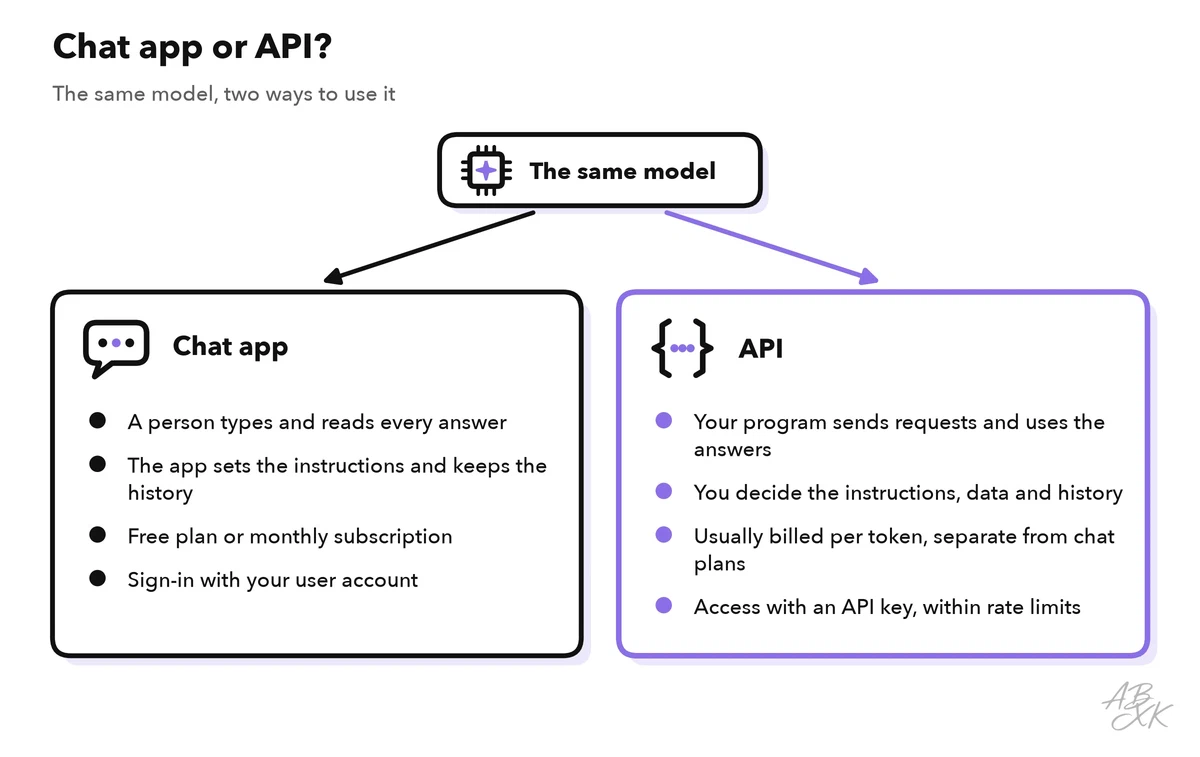
One difference matters from the start. As part 2 showed, with a typical chat API the model does not remember your earlier requests. A chat app keeps the history for you. With the API, your app has to send everything the model needs in every request: the instructions, the relevant data and the earlier messages.
Not every model can be downloaded. Of the 343 models in our LLM database, 160 are closed: you can use them only through an API or an app. 172 have open weights. You can run them yourself if the license allows your use, and many hosting services offer them through an API as well. A few current models from both groups:
| Model | Released | Weights | ECI | Rank |
|---|---|---|---|---|
| Claude Opus 5.5 Anthropic | Sep 22, 2026 | closed | 166.8 | 1 |
| GPT-6.1 Sol OpenAI | Sep 29, 2026 | closed | 166.3 | 3 |
| Gemini 3.8 Flash Google DeepMind | Sep 2, 2026 | closed | 157.2 | 19 |
| Grok 4.6 xAI | Aug 12, 2026 | closed | 156.3 | 27 |
| Kimi K3 Moonshot | Jul 16, 2026 | open | 157.4 | 17 |
| DeepSeek V4.1 Flash DeepSeek | Sep 9, 2026 | open | 155.6 | 31 |






ECI = Epoch Capabilities Index, one overall score across many benchmarks; rank among all models with an ECI. Data: Epoch AI, retrieved on October 17, 2026, licensed CC BY 4.0. All models: LLM database.
If you build without code, platforms such as MindStudio send these API requests for you. The same rules about tokens and limits still apply in the background.
API keys: keep the secret on the server
An API key is a long, secret string of characters that identifies your account. You create it in the provider’s console, the web dashboard of your account. The provider checks the key with every request. Each request made with your key counts toward your limits and lands on your bill, no matter who sent it. Treat a key like a password.
The key belongs in the backend, the part of your app that runs on a server. The browser or the mobile app talks to your backend, and only the backend talks to the model provider. On the server, the key lives in an environment variable: a setting outside your code that your program reads when it runs. Hosting platforms such as Netlify offer environment variables for server-side functions, so the key never appears in your code.
| Do | Don’t |
|---|---|
| Keep the key in an environment variable or a secret manager (a vault for keys and passwords) on the server | Write the key into your code or into a file stored with your code |
| Call the model from your backend | Call the model with your key from a web page or a mobile app, where anyone can read it |
| Create one key per app and per environment, such as test and live | Share one key across all projects and colleagues |
| Set a budget limit and usage alerts in the provider’s console, if it offers them | Notice unusual use only when the invoice arrives |
Tokens: how models count text
Language models do not read letters or whole words. They read tokens: pieces of text from a fixed vocabulary that holds tens of thousands of pieces or more. A small program called a tokenizer splits your text into these pieces and replaces each piece with its number in the vocabulary. The model calculates only with these numbers. Its answer also comes out as token numbers, which are turned back into text.
A common short word is usually one token, often together with the space in front of it. Rare or long words, numbers and code are split into several pieces:
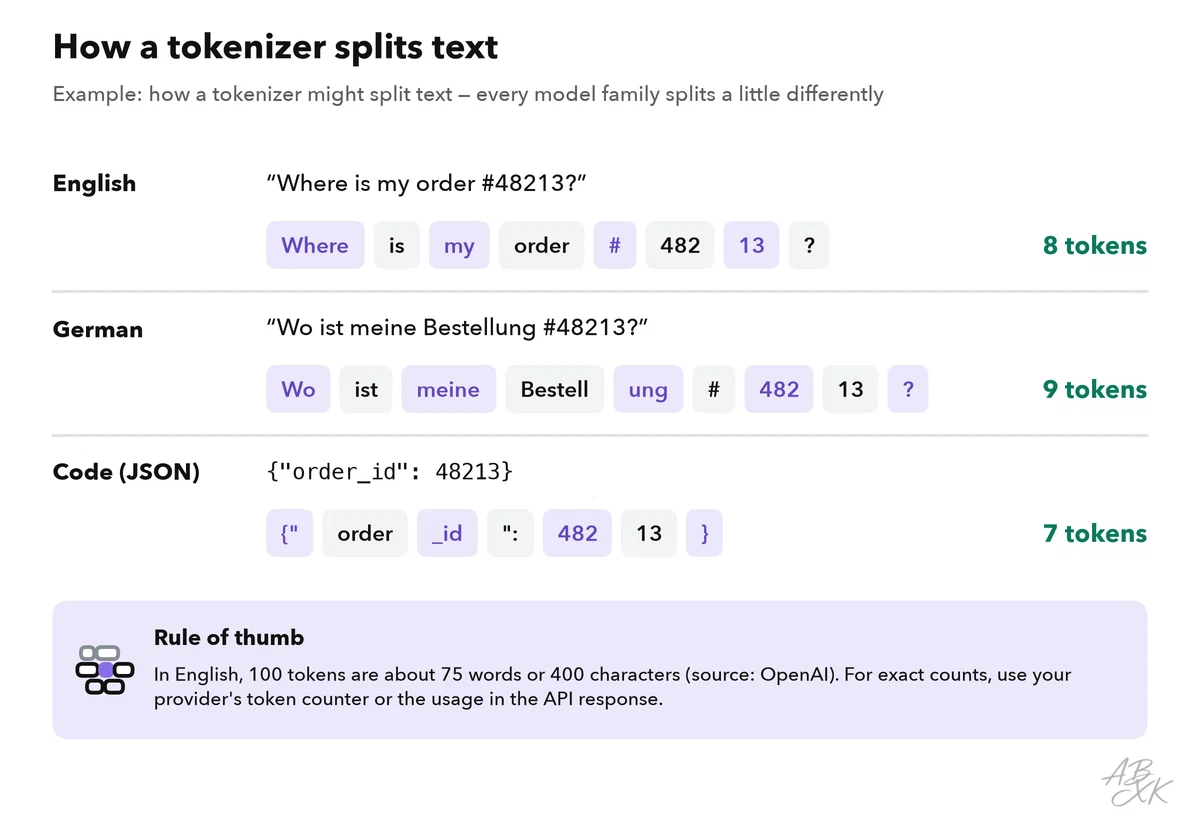
For estimates, a rule of thumb helps: in English, 100 tokens are about 75 words, and one token is about four characters (Source: OpenAI Help Center, help.openai.com). Other kinds of text usually need more tokens for the same content:
| Text | Effect on the token count |
|---|---|
| Everyday English | The baseline of the rule of thumb |
| German and many other languages | Often more tokens for the same message |
| Order numbers, amounts, dates | Split into several short pieces |
| Code and JSON | Brackets, quotes and spaces count, too |
| Images, audio, PDF files | Converted into tokens as well, often many per file |
Tokenizers differ between model families, so the same text can have a different token count with each one. For exact numbers, use the token counter your provider offers, or read the token usage in the API response.
Input tokens and output tokens
Every request has two sides, and the provider counts both:
- Input tokens are everything you send: instructions, earlier messages, documents such as a help article, and the new question.
- Output tokens are everything the model writes. The model produces them one at a time, so a long answer takes longer than a short one. A setting called max output tokens caps the length. If the model reaches the cap, the answer is cut off.
Many newer models also “think” before they answer. These reasoning tokens are often hidden from you, but with many providers they count as output tokens and appear on your bill.
Because a typical chat API does not remember earlier requests, the input grows during a conversation. Each new request carries the whole history again:
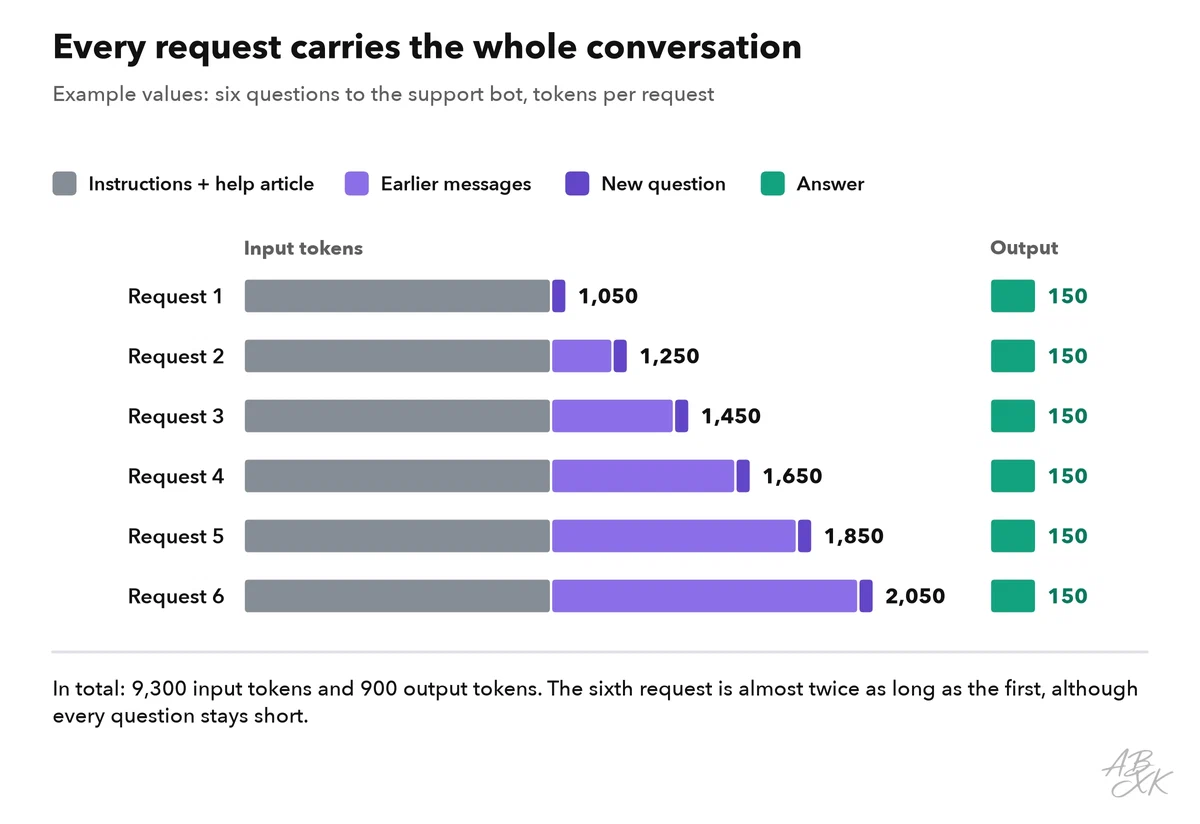
In this example, the sixth request carries almost twice as many input tokens as the first, although the customer’s questions stay short. Long chats get slower and more expensive with every turn. At some point, they no longer fit into the context window.
The context window: the limit of one request
The context window is the maximum number of tokens a model can handle in one request: input and output together. Think of it as a box of fixed size. Instructions, documents, chat history and the question go in first. The answer has to fit into the space that is left.
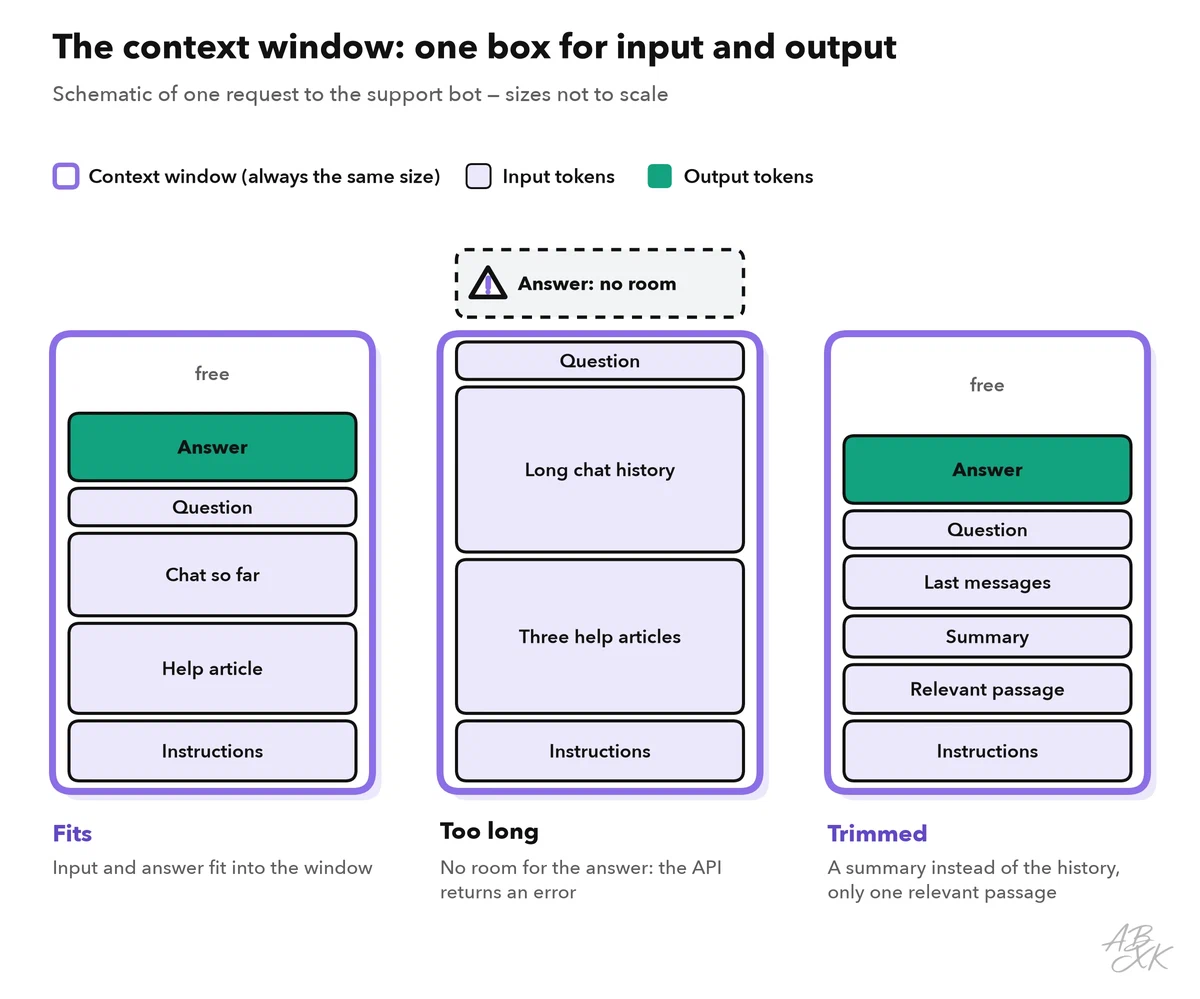
Each model has its own context window. The provider lists it on the model page, often together with a lower limit for the output alone. If the input and the space reserved for the answer do not fit, the API usually rejects the request with an error. Many chat apps handle this for you, for example by dropping or shortening old messages. In your own app, you decide what happens. Three common strategies:
- Keep only recent messages. Send the last few turns and drop the oldest ones.
- Summarize. Replace the older part of the chat with a short summary.
- Retrieve instead of copying. Keep your documents in a search index, for example a vector database such as Pinecone, and send only the passages that match the question. Level 2 explains this method, retrieval-augmented generation, step by step.
A bigger window is not automatically better. Every token you send costs money and time, and models do not use all parts of a long input equally well. One study found that models can miss information placed in the middle of a long input (Source: Liu et al., “Lost in the Middle: How Language Models Use Long Contexts”, 2023, arxiv.org). Send what the task needs, not everything you have.
Rate limits: how much you can send per minute
Providers protect their servers with rate limits: caps on how much one account may send in a given time. The most common are requests per minute (RPM) and tokens per minute (TPM). Some providers add daily limits or count input and output tokens separately. Whichever limit you reach first stops you.
| Limit | What it counts | When you hit it |
|---|---|---|
| Requests per minute (RPM) | Calls, no matter how long they are | Many short requests, such as sorting thousands of short emails |
| Tokens per minute (TPM) | Tokens of all calls together | A few long requests, such as summaries of long PDF files |
| Daily limits | Requests or tokens per day | Big batch jobs that run for hours |
If you go over a limit, the API answers with the HTTP status code 429 (“Too Many Requests”). Your app should then wait and try again, with a longer pause each time. Level 1 shows this pattern in your first LLM API call.
Limits differ from account to account. Many providers place accounts in tiers that rise with usage and payment history, and they show the current limits in the console. Many also send your remaining requests and tokens with every response, so your app can slow down before it hits a limit.
Why APIs bill per token: a worked example
Tokens measure the work a model does: it has to process every input token and generate every output token. That is why providers bill API use per token. Prices are usually stated per million tokens, with one price for input and one for output, and output tokens usually cost more. A chat subscription usually does not include API use. Some providers charge less for input that repeats in many requests (prompt caching) or for jobs that can wait (batch processing). If you run an open-weight model yourself, for example on a GPU cloud such as Runpod, you pay for GPU time instead of tokens. Level 3 explains when renting GPUs makes sense.
Before you estimate the costs of a project, look up these facts for your model:
| What to look up | Where you find it | What it tells you |
|---|---|---|
| Context window | The provider’s model page | How much input and output fit into one request |
| Max output tokens | Model page | The longest possible answer |
| Price per million input and output tokens | Pricing page | What one request costs |
| Rate limits of your tier | Console or limits page | How many requests and tokens per minute you can send |
| Token counter | Documentation or console | How your own texts translate into tokens |
Now the estimate. Here is the support bot from part 2, with example values for one request:
| Part of the request | Tokens (example) |
|---|---|
| Instructions | 400 |
| Help article (about 450 English words) | 600 |
| Chat so far (average) | 300 |
| Customer question | 50 |
| Input per request | 1,350 |
| Output: the answer | 150 |
With 2,000 questions a day, the bot reads 2.7 million input tokens and writes 0.3 million output tokens per day. In a month of 30 days, that adds up to about 81 million input and 9 million output tokens. Multiply these numbers by your provider’s current prices per million tokens, and you have a first estimate.
The example also shows where the tokens go. The bot reads nine times as many tokens as it writes, and most of them are instructions and help text, sent again with every request. That is the first place to look when you want to save. Level 4 shows how to optimize cost and response time at scale.